
Desertcart purchases this item on your behalf and handles shipping, customs, and support to Senegal.
๐ Hold a thousand stories in your handโread smarter, faster, anywhere.
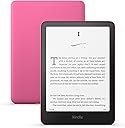
The newest Kindle Paperwhite features a 7-inch glare-free display with 300 ppi and 16-level grayscale, delivering 20% faster page turns. Its ultra-thin, lightweight design is waterproof (IPX8) and offers up to 12 weeks of battery life on a single USB-C charge. With 16GB storage, it holds thousands of books and supports Bluetooth for text-to-speech. Perfect for professionals seeking a premium, distraction-free reading experience anytime, anywhere.
| Display | Amazon's 7โ Paperwhite display technology with built-in light, 300 ppi, optimized font technology, 16-level gray scale. |
| Size | 5โ x 7โ x 0.3โ (127.6 x 176.7 x 7.8 mm) |
| Weight | 7.4 oz (211g). Actual size and weight may vary by configuration and manufacturing process. |
| System Requirements | None; fully wireless and doesn't require a computer to download content. |
| On-Device Storage | 16 GB; holds thousands of books. |
| Cloud Storage | Free cloud storage for all Amazon content. |
| Battery Life | A single charge lasts up to twelve (12) weeks, based on a half hour of reading per day with wireless off and the light setting at 13. Battery life may vary depending on use. Audible audiobook streaming over Bluetooth will reduce battery life. |
| Charge Time | Fully charges in less than 2.5 hours with a 9W USB power adapter. |
| Wi-Fi Connectivity | Supports 2.4 GHz and 5.0 GHz networks with support for WEP, WPA, WPA2, WPA3, and OWE security using password authentication or Wi-Fi Protected Setup (WPS). Does not support connecting to ad-hoc (or peer-to-peer) wifi networks. |
| Accessibility Features | VoiceView screen reader, available over Bluetooth audio, provides spoken feedback allowing you to navigate your device and read books with text-to-speech (available in English only). Kindle Paperwhite also includes Dark Mode and the ability to adjust font size, font face, line spacing and margins. Learn more about Accessibility for Kindle. |
| Content Formats Supported | Kindle Format 8 (AZW3), Kindle (AZW), TXT, PDF, unprotected MOBI, PRC natively; PDF, DOCX, DOC, HTML, EPUB, TXT, RTF, JPEG, GIF, PNG, BMP through conversion; Audible audio format (AAX). Learn more about supported file types for personal documents. |
| Documentation | Learn more about Kindle devices with our Quick Start Guide and Kindle User Guide. |
| Warranty and Service | 1-year limited warranty and service included. Optional 1-year, 2-year or 3-year. Extended Warranty available for U.S customers sold separately. Use of Kindle is subject to the terms found here. |
| Included in the Box | Kindle Paperwhite, USB-C charging cable and Quick Start Guide. |
| Waterproofing | Waterproof (IPX8), tested to withstand immersion in 2 meters of fresh water for 60 minutes. Learn more about the waterproof Kindle Paperwhite. |
| Available Colors | Black, Raspberry, and Jade |
| Generation | Kindle Paperwhite (12th Generation) - 2024 release. |
| Software Security Updates | Learn more about these software security updates. If you already own a Kindle, visit Manage Your Content and Devices for information specific to your device. |
I**1
The Perfect E-Reader
I love this Kindle Paperwhite. Even though the display is black and white, the contrast and clarity are perfect for reading. The glare-free 7-inch screen is easy on the eyes and provides a comfortable experience in different lighting conditions. The Wi-Fi works well, the Bluetooth connection is reliable, and the battery lasts a long time. It is fast, lightweight, and easy to carry anywhere. Overall, it does everything I need it to do and provides an excellent reading experience. It is the perfect e-reader for me.
A**Y
Favorite Kindle!
I've had a Kindle Fire for years now and kept buying a new version when the old ones would give out. They seemed to not hold up super well (the Fire) but they are the cheapest Kindle option. Finally decided, since I wasn't really using the tablet feature of the Fire, to go with a Paperwhite instead and the difference has been very noticeable. The Paperwhite is definitely the better quality Kindle - more durable, not nearly as heavy as the Fire, which makes it much easier to carry around or hold for long periods of time. I got a Pop Socket for the back of mine and it's even easier to hold, especially when you've got an infant contact napping on you and only have one hand to use. The readability is great - it doesn't glitch out (so far) like the Fire often does. The backlight is great - I read with it in bed quite often and have no issues seeing the screen. The size is perfect - closer to a traditional paperback and very lightweight. The only issues with functionality would be that it does not support any apps, like Libby, but it's easy enough to download books from Libby using my phone, so that's not a big deal. Overall, I'm very happy with the Paperweight and wish I would have skipped the Fire altogether. For the price, I think the Paperwhite is probably the best option for what it does. The battery life is amazing on the Paperwhite - I usually only have to charge it once every 3-4 weeks with casual reading. The Color Soft option would also be nice, but I don't think it's necessarily worth the price increase, unless having color options is extremely important to you. Overall, a great option for someone just looking for a nice e-reader.
A**N
Perfection!
Iโm a big reader (a PHYsical BOOK reader) and my husband bought my the Kindle Paperwhite as a gift. I am totally blown away surprised at how much I love this thing! I never thought I would enjoy an e-reader as much as this! The battery life is superb! I can read for hours a day and only charge up once a week. I also like reading outside and I am astounded at the screen in full sun. No glare, no eye squinting, itโs perfect. I did get the black and white version and while it may be nice to have a full color version of the book cover, itโs really not necessary unless youโre purchasing for graphic novels or kids books. Itโs lightweight, easy to hold and fits in my hand nicely. The operations is great, but be aware this is not a regular tablet, no internet surfing. The home screen is the Kindle Library and I highly recommend having the Unlimited Subscription to go along with it
E**R
Hold A Thousand Books in Your Hand
Imagine holding a thousand books in your hand. Imagine wearing your jammies while getting that next book in your series, and starting into it a minute later. Imagine reading at night in bed without needing a lamp because your book is backlit (and the light doesnโt hurt your eyes). Imagine having your kindle read to you (even if you donโt have audiobooks) with text to speech while you drive or fold laundry. The 12th edition of the Kindle Paperwhite is a fabulous device and well-worth considering if you read a lot. Itโs not too big, not heavy, waterproof, and easy to carry in your purse or backpack. Note that if you get a cover with it (highly recommended), when you open the cover the Kindle turns on automatically to the last page you were reading. With the cover open it feels like youโre holding a thin book -- or fold back the cover if you prefer. The Kindle E-reader is not a computer. Itโs not a tablet or a phone. It is a gizmo that acts like a book with a black-and-white flat e-ink screen showing typed sentences and paragraphs. You turn pages one at a time, just like a book. There is no movement on the page and no distraction or advertisement*. It is just text, plus any images that the author has included to illustrate his book. *NOTE: The advertisements on the Kindle are on the main page not the individual book pages and just show books you might like. They are unobtrusive. The backlighting, unlike a computer, tablet, or phone, is gentle because the Kindleโs light is directed onto the screen, not into your eyes. You can change lighting level and add warmth (yellow lighting), decide on dark screen or light screen, and change the size of the print to make your reading experience โjust the way you like it.โ Itโs super-simple to access your own ebooks or to find new ones either on your computer or directly on the Kindle. They load in less than a minute onto the Kindle, ready for reading. Keep in mind if you are a reader that ebooks tend to be half or less the price of the same books in print. You can even find FREE ebooks and audiobooks on Amazon and/or use the Libby app (libbyapp.com) to borrow LOCAL LIBRARY books. You may want to consider subscribing to Kindle Unlimited for $12/month so you can download an even wider selection of free ebooks, audiobooks, and magazines from Amazon to keep as long as you want. Can you tell I love my Kindle? I am wowed by having so many books so easily accessible โ not like the time I took that 5-hour flight with one crummy poorly written book and nothing else to do. This 12th generation Kindle is fantastic. The battery lasts a long time. The screen is plenty sensitive for page turns and navigation. I go through one or two books a week easy with this little device. Ebooks have revolutionized the publishing industry, and if you are a reader, the Kindle may be exactly what youโre looking for. If you read many ebooks on your phone or a tablet, consider being kind to your eyes with a Kindle. If you are resisting because you arenโt sure youโll like ebooks as well as print books, I say what the heck, the Kindle may be worth a try. Itโs like driving a racing car rather than a horse and buggy. You might decide you love it. * NOTE: To enable TTS (text to speech) so that your kindle can read to you without audiobooks, turn on your wireless headphones or speaker. Then on your Kindle, tap the top of the screen, then hit the three dots on the right. Go to Settings. Hit Wi-Fi and Bluetooth, then Bluetooth Devices. Select your device so your Kindle will recognize it. Next, close the window and go back to Settings. Hit Accessibility, then turn on Voiceview screen reader. The Kindle should start talking to you. If itโs glitchy, just turn off your bluetooth device then turn it on again. Remember that you have to give double taps not single taps on the Kindle to navigate actions. If you want to change the volume or reading speed (I like 1.25x) just double tap on Voiceview screen to show and customize your settings.
T**T
Worth the money.
I couldn't be happier with my new Kindle! The display is crisp and easy on the eyes, the battery life is outstanding, and it's incredibly fast and responsive. I love having an entire library with me wherever I go, and reading for long periods is much more comfortable than on a tablet. The only surprise was the sizeโit was smaller than I expected. However, after using it for a while, I came to appreciate how lightweight and portable it is. It slips easily into a bag or even a large pocket, making it perfect for travel or reading on the go. Overall, this has exceeded my expectations, and I would highly recommend it to anyone who enjoys reading. It's a fantastic device that makes it easy to read more often.
A**R
Amazing!!!
Oh my goodness, these Kindles are life changing. They are waterproof for relaxing in the tub or on the beach. I love that you can adjust the font to whatever size you need and change the background to black for a no-glare experience. I have never been able to read digital books but reading from this Kindle is different. There is no glare and so it doesn't feel like I'm reading from a screen. I can take my whole library with me wherever I want. I am also a seminary student and I can search my library using terms I'm writing papers about and it will bring up all of the books that cover that topic along with page numbers I can click on for easy access to quotes. I also have Kindle unlimited and it will show me all the books I can access for free on the topic and the page numbers I can click on in those books to find information with just one click! I can also listen to any book I want through the assisted reading feature or download audio books to listen to from the Kindle. I rarely have to charge it as each charge lasts weeks. And, I can add up to 8,000 books! I can highlight and take notes in any book. And, if I don't know a word's meaning, I can just rest my finger on it and it will give me the definition! Just an amazing experience I would recommend for any student, Bible studier, or book lover! As a bonus, I speak Spanish and love learning new languages. When I download a book in another language, it has a built-in English-Spanish dictionary so I can lay my finger over a word I don't know and it will give me the dictionary translation of it! Jus amazing!!
J**S
Perfect little carry-along...
I'm a relatively new e-ink convert, having bought a tricked-out Kindle Scribe exactly two years ago (when the device was brand new). Long story short? I loved that device... Literally, to death... After dropping it on terrazzo floors in SEVERAL airports world-wide, not to mention the myriad spills at home on more forgiving carpet. In fact, I loved it so much that when the 11th gen Scribe went on fire-sale a few weeks ago, I bought the cheapest version to replace my original (recently non-functional) unit, simply swapping my old premium pen for the basic one. Clearly, I loved the device enough to buy it again... I adore the ability to mark up .pdf's, the note-taking capabilities and that even with this extra functionality, it's still a very limited device that allows me to focus on reading first. What I don't love, and never have? The weight. It's heavy to the point that I never used it if I couldn't prop it on something. Which led to it being dropped. A lot. Which led to the original unit failing. Not that it wasn't pretty sturdy... I mean, it survived repeated collisions with very unforgiving surfaces. It even weathered some relatively large liquid spills on and near it despite not being water resistant. Now? I just use the Scribe when I need to mark up .pdf's (like, when I'm gaming... I can keep my character sheets on the Kindle), or need something that can display larger printed materials... Like RPG basic books or comics. Hence, the new Kindle Paperwhite gen 12... My new device isn't appreciably different than my Scribe except in a couple very important ways. The reviews don't lie... The screen contrast is higher, and in good light without backlighting, looks whiter. The device is much smaller, and seems a touch slimmer. It's also, very importantly, less than half as heavy, which means it's comfortable to hold in one hand while reading without tiring. I don't need to set it down on things, or prop it up, which reduces the threat of drops. When I'm out in public, I do have a cover for the device, and because it's so light, you can hold it open like a paperback, and it won't overbalance and fall out of your hand. The screen, given that it's half the size of the Scribe, seems to refresh much faster. It also seems to load the store faster, and settings menu navigation is measurably faster, as well. This is not surprising. The device is newer, and has less functionality. The one thing that I have detracted a star for is the battery life. I don't use the pen on the Scribe unless I'm actually writing, as it drains battery quickly. When you're turning pages with the touch-screen, however, you get exceptional battery life out of the Scribe. Not so terribly much on the Paperwhite. Granted, I'm not the average reader. 30 minutes a day is amateurish. When I use the backlight all day, I'm running down the battery at least 10% on the Paperwhite, if not more. Not a deal-breaker, by any means, but gone are the days of not bringing a charging cord for a two week vacation as I did with the Scribe. I hear a lot of people make noise about the format... AKA, the Paperwhite doesn't have the extended lip on the side like the Oasis to make it easier to hold, and that it doesn't have buttons. Well, I understand that personal preference is personal preference, but... Who the heck wants another point of mechanical failure on a device that goes through a lot of punishment in public? I don't want my precious page-turn button breaking. Ever. And, let's face it... That's why everything is touch-screen these days. Yes, you might have to clean the screen more often, or bother to wash your hands before using your precious device (which you really SHOULD be doing, anyway), but these aren't exactly deal-breakers. Another thing that's come up even in professional reviews is people "accidentally" activating the bottom button. The question I have is, HOW?!? You need to alter your grip for leverage to depress it, the device is so light. The only other thing I've mused on is that the Paperwhite is just a plain plastic thing. It doesn't have the flashy aluminum back-side of the Oasis or even the Scribe... It doesn't look as luxe in the hand. And honestly? After the durability and weight issues I've mentioned above, I just plain don't care. If I'm in public, my device is in a case, anyway. I'm not an Apple person. While I experience SOME e-vanity, I don't think of my Kindle as a fashion accessory. Rather the opposite, as some people judge one harshly for going with an Amazon device in the first place. I'm here to read, and you probably are too if you're bothering to read this review. All in all, it took less than a week for the Paperwhite to become my favored reading device for its' portability, its' weight and its' utility. I love the tiny thing! I look forward to years of care-free, comfortable reading without worrying so much about dropping my favorite note-taking device and general scratch-pad, the Scribe.
J**H
Love my kindle!
Best purchase I ever made. My kindle is now a little over a year, I was not sure I'd like it, but it has been an excellent purchase. I can read outside, even at the beach. Adjusting the warmth & brightness at night helps avoid eye strain, & the light doesn't bother the hubby. The screen is durable, still looks brand new after a year. I was hesitant to subscribe to kindle unlimited-I'm rather frugal, but it has been an excellent choice as well. I have plenty of options. $12 a month is substantially less than I used to spend on books and I don't have to wait for my next read, downloading is very fast. You can borrow/read library books with the Libby app. Battery life is excellent, no durability issues, love that it's waterproof. I was slow to purchase, but glad I did. It's rare to see quality electronics, storage size is not an issue. I don't see a need to upgrade anytime soon.
Trustpilot
3 weeks ago
1 month ago