
Desertcart purchases this item on your behalf and handles shipping, customs, and support to Senegal.
🚀 Elevate your desk game with the ultimate 14-in-1 USB-C hub — because multitasking just got a major upgrade!
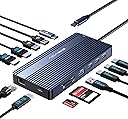
The ACASIS 14-in-1 USB-C Docking Station is a compact, high-performance hub designed for Windows laptops with Thunderbolt 3 or USB-C ports. It supports dual 4K@60Hz HDMI monitors plus a third via USB-C video, offers ultra-fast 10Gbps data transfer across multiple USB 3.1 ports, includes a Gigabit Ethernet port for stable networking, and delivers up to 100W power delivery charging. Ideal for professionals seeking a versatile, all-in-one docking solution to expand connectivity and productivity.
| ASIN | B0DGKJXPM9 |
| Best Sellers Rank | #36,713 in Computers & Accessories ( See Top 100 in Computers & Accessories ) #1,344 in Laptop Docking Stations |
| Brand | ACASIS |
| Color | Grey |
| Compatible Devices | Dell |
| Customer Reviews | 3.7 out of 5 stars 74 Reviews |
| Hardware Interface | HDMI |
| Item Dimensions L x W x H | 1.2"L x 3.2"W x 0.7"H |
| Item Weight | 0.1 kg |
| Manufacturer | ACASIS |
| Model Number | DS0203 |
| Number of Items | 1 |
| Number of Ports | 14 |
| Product Dimensions | 1.2"L x 3.2"W x 0.7"H |
| Total Number of HDMI Ports | 2 |
| Total USB Ports | 7 |
| Total Usb Ports | 7 |
| Warranty Description | 1 Year Manufacturer |
| Wattage | 100 watts |
M**N
docking station is good
I like this one because his has so many different type of ports. If you do photography i even has a slot for your chip. Affordable too
F**S
Working good
This is exactly what I was looking for, all the ports I want and in a great logical layout. The cable is 10" long, a reasonable length. I have had consistent good connections through most ports. I have been unable to connect an external monitor through the USB-C Video/data port. I will get a brief image on the display, then it stops. I am assuming this is an issue with the graphics capabilities on my notebook, or driver issues. I CAN run that monitor, and another simultaneously through the 2 HDMI ports. I can extend the display to the 2 external and the notebook display with no problems. With all this running, the aluminum case gets barely warm. My 1st unit appeared to be a returned unit, and had some intermittent issues. The seller reached out to me and got me a replacement that worked good.
D**Y
Wanted to like it - 75% of the units I bought failed - customer service didn't respond at all!
Bought 2, one for work and one for home, to make transporting by laptop back and forth a one-plug process. One worked great right out of the box. On the second one, the RJ45 Ethernet port started disconnecting and connecting regularly the 2nd time I used it. Returned that one and took a chance on a replacement. It's only been 48 hours, but it's working just like the first good working one. At home, I have two external monitors hooked up, and at work just one external monitor. When home, I leave my laptop on but although the external mouse connected to the device will wake up the laptop from deep sleep (not hibernate) in the morning, the monitor ports on the device do not not wake up. I have to unpug the UBSC cable from laptop to and plug it back in, to wake up the monitors. I went into Device Manager and told USB 3.0 Root Hub the device is connected to not allow the computer to sleep that Hub, and the monitors woke up this morning. Gonna try it again tonight, but if it doesn't work, I will edit my review. Edit 1/10/25: Another one's RJ45 Ethernet just gave up the ghost. While it might seem like it's a problem on my end, I've tried these hubs in multiple geographical locations, on different networks with different network switches using different cablemns, and the problem is the same. The RJ45 innards start not being able to connect after a few uses. I'm returning yet another one, and this time looking for another brand. Edit 1/16/25: Tried a different USB dock, and that one's speaker port didn't work with some apps. Took a chance and ordered a second replacement of this dock, and this time, I uninstalled and reinstalled network adapter driver. It's been 3 days without issue now. It's odd that when plugged into the first one of these that I bought for work there's been no issue with the rj45 port, but with the 2nd and 3rd there might have been ome sort of conflict with the network driver. Makes me wonder if I had un-installed and reinstalled the driver if that would have resolved the issue with those other units I sent back as defective. Perhaps seller should have a note in listing to uninstall and reinstall network adapter driver if necessary. I'm changing the title to this review to help others avoid a potential unnecessary headache. Edit 2/3/2025: 4th unit's ethernet has started acting up in the same way as the 2nd and 3rd units. I plugged in a completely different USBC to ethernet dongle and do not have any network interruptions. It's possible that these units might just inherently have bad ethernet ports. I have reached out to the company directly, and will see if they even respond. I will update yet AGAIN if anything changes. For now, I'm dropping it to two stars because everything else works. Edit 2/8/2025: Reached out to company with a adirect email from their website, and via the support link on Amazon. They did not respond at all. Returning the 4th one, and ordered the ANYOYO version of this dock instead. The ANYOYO branded dock appears to be EXACTLY the same as the Acasis one, so it might have the exact same issue down the road, but I'm praying they have better quality control and this one doesn't crap out, just like my first Acasis model has not, so far (knock wood). But, at this point, I would not even CONSIDER buying anything Acasis anymore. If they had at least responded to my multiple communications for support, I might not feel this way. But, lack of response on their part makes me think they know they are selling "seconds" (products that don't pass QA). Changing rating to one star.
K**N
Works as advertised.
V**O
Not enough power!
This product is pretty much unique. Basically the only brand providing a hub with type-c video (alt) output and multiple ports. All the other brands I was able to find that has type-c video, only has 1 HDMI outputs, half the usb ports and no sdcard reader or ethernet. If I would modify something, I would probably change 1 HDMI for a DP port so it could work in more scenarios with devices that don't has HDMI input. Also, DP to HDMI adapters are pretty cheap while HDMI to DP adapters not. And maybe, add 8k support (HDMI 2.1) if they find a way to do it without doubling the price. The only problem I found was that the hub itself consume too much power, so you can't connect other power hungry devices without connecting the PD power source. I didn't had this problem with my old "solution" to my charge my rog ally+portable monitor. I'm able to power up my portable monitor though the VITURE adapter without connecting a power source. Was not able to find info about the USB power output of each port, but I have connection issues when it's not connected to the PD charger. Overall, I'm happy with the purchase since the product is basically the only option if I want to connect my external monitor, power up my rog ally and have extra ports, but there is room for improvement. ____________________ Update: After reading some of the reviews about "only a single screen working in mirror", I tested it and was able to setup it properly in windows and linux (I don't have a mac). It's not that hard to properly setup it to have a quad monitor setup (laptop main screen, 2 HDMI and 1 type-c). Now, It setup itself as "mirror" by default for some reason, but If you setup it as extended mode in windows/linux config, it works properly and in windows, It will remember your last config if you connect the same monitor again. I guess a lot of people are not tech savvy enough. Maybe the manufacturer should change the default behavior so it "extend" by default. Furthermore, as much as I know, macs have this problem with all type-c video alt hubs that are not thunderbolt. Not sure why they sell them as "mac compatible". Finally, while testing the multiscreen capabilities, I discovered the the hub don't like to be disconnected all at once when it's fully loaded. For some reason, I got a blue when I disconnect all 3 extra monitors at once. Not sure why... I tried to check the windows event log, but I got multiple different errors, so I'm not sure which one was the one that triggered the blue screen. If I disconnect the hub first or I disconnect the monitors 1 by 1 and let it auto setup between each disconnection, I don't have this problem. I'm reducing one extra star for this reason.
J**F
Does NOT need external power (was told it did)
On an M4 Mac Mini. Bus power alone is sufficient. That wasn't clear when I bought this, and Amazon's artificial intelligence "Rufus" said external power was needed using that 100W PD port. It's not, unless you're charging a laptop I suppose. Some ports and hubs I use have power adaptors, this one doesn't. I can't run both the USB-C video data port AND hdmi ports. I was hoping I could get two displays on this one dock. The dual HDMI ports mirror each other, think of it as an HDMI splitter. Also, in my case, to get video, this dock had to be plugged into Thunderbolt. Got no video when only using the USB-C port, but everything else still worked. Odd because this is not a Thunderbolt device. I've been running this for almost a year now. Build quality seems excellent. The only issue I've had it occasional dropped USB connections - a Samsumg T7 SSD will disconnect, or suddenly a USB iLok is unrecognized. HDMI and audio stay connected, no drops. I don't regard this as "mission critical" reliable, but for day to day operation it's pretty handy.
E**3
Realmente fantastico
Tal vez no sea el mas "moderno" esteticamente, pero funciona perfecto y entrega las velocidades que anuncia
M**L
This is garbage
Operated for three months and promptly failed. Reached out to their support and they told me to "try another cable" which is hilariously the only thing I CAN'T do as it's built into the device. I have tried a number of things and it won't work any longer. It's a piece of junk, their support is a joke, and there is little recourse but to buy something else since I am outside the warranty window.
M**Ş
çok iyi bir ürün
süper bir ürün beklediğimden kat kat fazlasını karşıladı thunderbolt olmazsa olmazınız değilse fazlasıyla tatmin edici lenovo thinpad ile uyumu tam
V**T
Kaliteli
Çok kullanışlı
I**N
Güzel Ürün
Güzel ürün ısınma problemi yok. Tavsiye ederim.
Trustpilot
1 week ago
1 month ago