


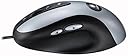

Logitech MX500 Optical Mouse
Product ID: 66301801
Details
- BrandLogitech
- ColorSliver and
- Connectivity TechnologyPS/2 USB
- Movement Detection TechnologyOptical
- Number of Buttons3
🎯High precision tracking
🔄Effortless navigation
🖱️No mouse pad needed
🚀 Elevate Your Workspace with the MX500!
The Logitech MX500 Optical Mouse features advanced optical tracking technology for superior accuracy on various surfaces, eliminating the need for a mouse pad. With convenient thumb buttons for easy navigation and a Cruise Control scrolling system, it enhances productivity for both PC and Mac users.
| ASIN | B00006HZ0K |
| Additional Features | Ergonomic Design |
| Antenna Location | Office, General Computing |
| Battery Average Life | 12 months |
| Best Sellers Rank | #9,501 in Computer Mice |
| Brand | Logitech |
| Button Quantity | 3 |
| Color | Sliver and Black |
| Compatible Devices | Personal Computer |
| Connectivity Technology | PS/2, USB |
| Customer Reviews | 4.1 out of 5 stars 112 Reviews |
| Enclosure Material | Plastic |
| Finish | Glossy or Matte |
| Global Trade Identification Number | 00097855015143 |
| Hand Orientation | Ambidextrous |
| Hardware Platform | PC |
| Included Components | USB Cable |
| Item Weight | 13.6 ounces |
| Manufacturer | Logitech |
| Mfr Part Number | 930763-0403 |
| Model Name | MX500 |
| Model Number | 930763-0403 |
| Movement Detection | Optical |
| Movement Detection Technology | Optical |
| Number of Buttons | 3 |
| Operating System | Windows 95 |
| Power Source | Battery Powered |
| Range | 10.0 meters |
| Special Feature | Ergonomic Design |
| Style Name | Modern |
| UPC | 097855015143 |
J**K
As perfect as a mouse get! Bravo!
Being really sensitive to the ugliness of any kind of computer cables, I bought the MX700 wireless mouse from Logitech mostly based on its cordless design and its many buttons. As much as i really wanted to like this mouse (I really do hate cables) I ended up being frustrated once too many with the iffyness of the wireless signal connection. I simply could not find any practical spot on my desk that wasn't far enough from any EM influence. Moreover, if the base was more than 10 or 12" away from the mouse the connection became erratic. When it worked it was beautiful. When it didn't I wanted to throw it out the window! In the end I decided to send it back, and ordered, reluctantly, its corded brethen the MX500. Boy what a difference a simple cord make! I have been using this mouse for about 3 weeks now and i still get impressed and elated by the feeling of extreme precision and "confident authority" this mouse gives me whenever I use it. Indeed, I have even grown to LOVE its cable! This is how good this mouse is. The buttons are where I expect to find them with just the right amount of resistance to them. The mouse feels just right in the palm of my hand. Its weight is an improvement over the slightly too heavy MX700. Its mouse software is simple, effective and extremely flexible. The optical design virtually never needs cleaning. The only "negative" I might point to, and a very subjective one at that, is that the MX700 silver accent was a perfect match for my Dual G5. The MX500 silver is more smokey grey than silver (Yes, we Mac users, really are that picky with the esthetics of our tools ; ) All in all, I cannot recommend this mouse enough. It is quite simply the very best mouse I have ever used, and certainly the only mouse I have ever felt that passionate about.
"**"
Best Mouse Ever
Before I got the Logitech MX500, I was stuck with the cheap mouse that came with my new computer. This mouse was small and very uncomfortable. I decided that I should get a new mouse. I did MANY comparisons for about a month and narrowed it down to 4 mice. The 4 mice were the Logitech MX500, Logitech Cordless Mouseman Optical, Microsoft Intellimouse Explorer, and the Microsoft Intellimouse Optical. I read many reviews about how the Intellimouse Explorer sometimes "froze" and being the hardcore gamer that I am, I couldn't have the mouse freezing. So this narrowed it down to 3 mice. The Intellimouse Optical was a great mouse that I had tested at many people's houses but I didn't really like how it felt in my hand. Finally I decided on the MX500 since I didn't really need a cordless mouse and the MX had more features. The MX has been reliable for the whole month I've been using it. Setup was a breeze and I get updates all the time. The buttons are all conviniently placed and the mouse feels great in my hand. The rubber grip kind of gets my hand a little sweaty but it's ok. The extra customizable buttons are really useful. I have the Back and Forward buttons set to well, Back and Forward. Clicking on the wheel closes my windows which is really handy. The program switcher is kind of strange and I don't really use it that much. The other two buttons I've set to minimize and maxamize. There isn't really anything I can set the application switcher to so I might just unassign it. Pros: -Very Ergonomic -Many Buttons -Scroll Wheel Feels Nice -Nice Look Cons: -Makes Hands Sweaty -Skips On My White Desk (using mousepad now) -Scroll Wheel Kind Of Hard To Press Down
S**E
This is the best mouse I've ever used in my life.
Take it from me, a computer programmer who has freelanced at dozens of offices for almost 15 years and has used probably hundreds of different mice: THE ONLY MOUSE I WILL EVER USE AGAIN IS THE LOGITECH MX500 OPTICAL MOUSE. This mouse is the most ergonomic, most comfortable, most accurate, most customizable, most sleek, most responsive, and most elegant mouse I have ever used in my life. I honestly could go on for days about how great this mouse is. Plus, if you're a Macintosh user, you can make this mouse even better by skipping the Logitech driver that comes with it and installing USB Overdrive instead ... USB overdrive gives you even MORE customization than Logitech's own driver. My favorite thing about this mouse is that it has 7 programmable buttons (that's right -- 7 buttons!!) that are so conveniently placed & so often used that you actually feel at a gigantic disadvantage when you're sitting at a computer that doesn't have an MX-500 optical mouse at it. I love programming the two thumb buttons on the lefthand side as "back" and "forward" buttons, for use on the Internet (and in other programs that have forward/back functionality). Take it from me -- you will NOT be disappointed with this wonderful mouse. This mouse is a steal [...] I would pay several hundred dollars for the time-saving convenience and ergonomic delights that this mouse offers me.
N**W
I wouldn't rush out to buy this one . . .
I know that this mouse is kinda old and outdated but it's hard to find a good wired mouse these days. I read all about Logitech and the MX series mice and had a good feeling going into this. Physical Stuff: I got the mouse and was very excited. It has a somewhat unusual feel to the mouse itself. You can feel the mouse very slightly 'stick' to your hand when you touch it. The finish isn't extremely smooth. But other than that, it fits good in the hand. The button placement isn't bad, considering how many buttons you have. The wheel button presses fairly hard, almost too hard and the wheel scrolls with a 'cheap' feel. I won't expect this one to last all that long. Overall, I was fairly pleased with the mouse, until I tried . . . Software: The Logitech MouseWare software is TERRIBLE. They claim that it allows for button customization, which it does, but for 1 program. There is no 'Program Specific' customization. If you run CAD applications or Firefox, or any program that deviates from Windows defaults, you are basically SOL. I've done reading and Logitech has an 'Advanced Settings Program' which is more of a joke than MouseWare. It basically gives you 10 check marks which do no good. There are 3rd party software that I think will do the job like LogiGame, but that's another RAM hogging program to run. Overall: If you want to do REAL computing, programming, CAD, graphic editing, look at other mice. I can't say for 'games' because I don't play computer games. I came from a Microsoft Intellimouse Explorer 3.0 and would go back in a heartbeat if I could. I was suckered in by Logitech's reputation here, don't do the same.
B**T
Solid mouse
With the 9.75 driver, wheel and thumb button problems have been fixed. No more disabling EM_EXEC or checking "Use MS Office Compatible Scroll Only" and "Scoll in Active Window Only" to get the mouse wheel to work in games. In fact, those two options don't even appear in the mouseware. Thumb buttons do not need to be bound to other keys to work in games. With default settings, CS will detect the wheel as mouse 3, the backwards thumb button as mouse 4, and the forward thumb button as mouse 5. Even though there are 8 buttons, you can only get 5 to work in games. On the other hand, it's a blessing that the quick switch button doesn't work in games or else you might accidentally press it and cause your game to crash. The MX 500 also feels pretty solid compared to the MS Explorer 3.0. The mouse feet seem more durable than that of the Dual Optical (I have a Dual Optical with 3/5 feet missing). The two thumb buttons are well positioned. The right side of my thumb sits right on top of them just right so that I won't accidentally press them when I don't want to but are well within reach when I want to use them. The red light is also kinda nifty. It stays on the whole time and doesn't go into a low power mode when it is not being used (like earlier logitech mice) so it's easier to blind people with it :)
R**.
Mouse prevents display power saving mode.
Beware if you are buying this mouse for a computer in your bedroom, or any other location where it may be annoying to have your monitor unexpectedly turn on. This mouse either prevents your monitor from entering power saving mode (i.e. automatically turning off) or brings it out of power saving mode without cause.
S**R
Benefits outweigh the flaws
I've been using the MX500 for a couple of weeks now as my primary mouse at home, and I'm overall happy with it. I chose the wired MX500 over the wireless MX700 because I didn't want yet another thing (rechargeable base station) taking up an outlet on an already overtaxed powerstrip. Plus, I like the ability to just yank the USB cable and pop it over to another computer. Pros --------------- *** Great ergonomic design *** I was a little hesitant of the deep side groove for your thumb, but it acts as a wonderful little shelf. The rubberized paint keeps the thumb from slipping. *** Precision *** No problem at all; works as advertised. It would be hard to go back to the old rollerball mice. *** Buttons *** Yes, there are a lot of buttons. And yes, I find that I click all of them, even the seldom-used Forward button. The two side buttons (Back and Forward) are well positioned for thumb operation, and they offer a nice tactile feel. I found that I would sometimes accidentally hit the Back button on my MS Intellimouse; this seldom if ever happens with this mouse. The all-in-one piece for the Left and Right Click also works great. I have larger hands and I like how these two buttons extend longer to accommodate my fingers. The Auto Scroll Up and Down buttons have also become mainstays in my mousing habits. There are really only two problems with them (one software, one design) listed below. Though less useful, I do find myself using the Application Switcher Button periodically. But the old Alt+Tab habit is hard to break. ;-) The Scroll Wheel/Button has a decent feel to the spin and click. But unlike the Intellimouse, it is not grooved. It's smooth like an old tire inner tube. *** Software *** Incorporates into the Mouse Control Panel. The device comes with a logical scheme right out of the box, but you can customize any of the buttons to your whim. *** Aesthetics *** I know color doesn't do anything to enhance usage, but I like how the black and silver matches my laptop. Cons --------------- *** Buttons *** The oft used Auto Scroll Down button is located between the Scroll Wheel and the Application Switcher. I too often find myself clicking on the Application Switcher when I meant to scroll down. A possible workaround is to disable the Application Switcher or assign Auto Scroll Down to it. But I haven't done that yet since I want to see if the Application Switcher gains more value over time. This is the only real hardware problem with the mouse. They could further improve on the design by giving the smooth surfaced Scroll Wheel the grooved texture found in Intellimouse. *** Software *** The software isn't as intuitive or universal as the MS Intellimouse. For example, I'm not sure if you can customize mouse behavior per application. I use Mozilla for some of my internet browsing, and I liked how I could Middle Click (the Scroll Wheel) and have it open a new tab. However, I only get the Software Auto Scroll with this function. And the Auto Scroll - either the buttons or the mouse-movement variety - is not as smooth as the MS software. It seems to jerk line-by-line instead of scrolling smooth. This is not horrible, but it does take some getting used to. *** Price *** This mouse is a tad pricier than comparable offerings. But it is also brand new and will certainly drop down in price. Conclusion --------------- I use the MX500 at home and an MS Intellimouse Explorer at work, and I can honestly say that I would rather have the MX500 also at work. Minor flaws aside, I find myself looking for those few extra buttons at work. And the overall ergonomic shape of the MX500 wins hands down, something that truly surprised me. Logitech did some serious human factors work when sculpting. The MX500 was a good purchase!
C**S
Excellent mouse
Great mouse... highly recommended. Pros: 1. Feels very comfortable in the hand. 2. Spot-on optical accuracy and tracking 3. Lightweight and glides effortlessly on most surfaces 4. Extra buttons (except task switcher button) 5. Price. At ($$$) after rebate on Amazon.com this is a great value! Cons (minor): 1. task switcher button is basically useless due to its awkward location. This is not really a con though, just dont use it. 2. for some reason, when browsing I have click the 'back' button twice on pages that have an input field active by default. This is rather annoying and does not happen with my MS intellimouse explorer. 3. would like it if the cord were less rigid so that it would not apply a force on the mouse. Again, great mouse. I just got this at work and have the most recent version of the corded MS intellimouse explorer at home. Though I love the intellimouse explorer too, but this one is better. It appears to track better, and it is a bit more comfortable (the MS mouse is just a bit too narrow which ends up being tiring to the thumb), you get the extra buttons. Also, it is cheaper than the MS (plus you don't have to support the MS juggernaut). Buy this mouse and you'll be very happy.
Trustpilot
2 months ago
4 days ago