Buy anything from 5,000+ international stores. One checkout price. No surprise fees. Join 2M+ shoppers on Desertcart.
Desertcart purchases this item on your behalf and handles shipping, customs, and support to Senegal.
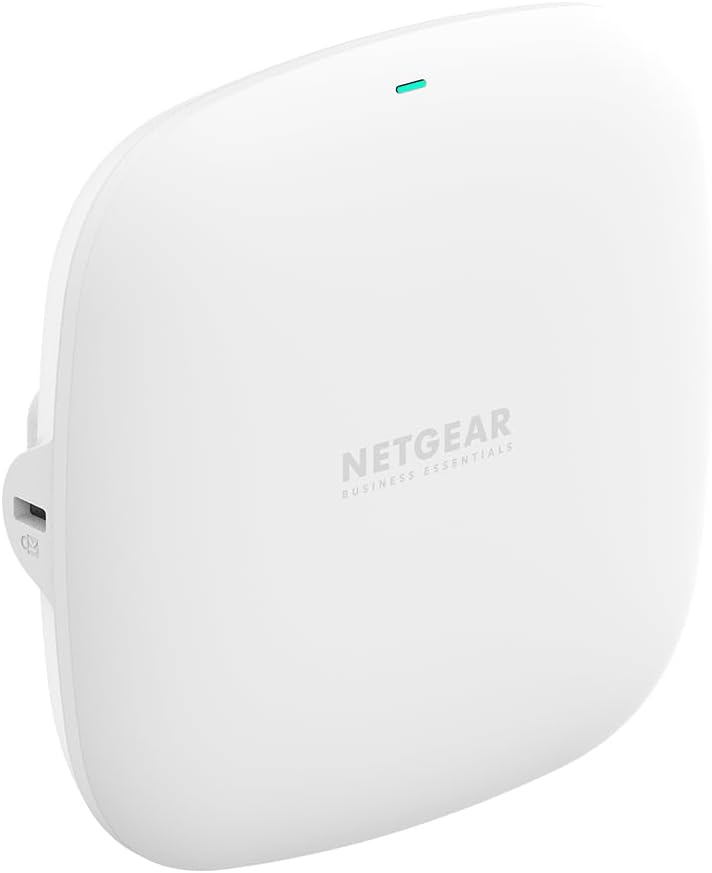
🚀 Elevate Your WiFi Game with Next-Gen Speed & Security
The NETGEAR WAX210 Wireless Access Point delivers ultra-fast AX1800 dual-band WiFi 6 connectivity, supporting up to 128 devices with enterprise-grade WPA3 security. Designed for easy PoE deployment and flexible ceiling or wall mounting, it enables creation of up to 4 distinct wireless networks without the need for cloud management or subscriptions—ideal for professional environments demanding reliable, secure, and scalable wireless coverage.


| Brand | NETGEAR |
| Compatible devices | Gaming Console, Laptop, Personal Computer, Smartphone, Tablet |
| Frequency band class | Dual-Band |
| Model name | WAX210-100EUS |
| Special feature | Access Point Mode |
| Wireless communication standard | 802.11ax |
D**N
A good access point
Setup was super easy. I had it up and running pretty quickly without having to mess around with a bunch of complicated settings. It was basically plug it in, go through the setup, and done. The range has been great too. I’m getting solid coverage throughout my garden and haven’t had any connection issues so far. Speeds are consistent and everything just works. No complaints it does exactly what I needed it to do. Definitely recommend it if you’re looking for a reliable access point. Price was good.
C**N
Great once set up
I bought this to create a WiFi network in a garden building. It was very difficult to set up on line and I almost gave up and returned it. I had to create a user registration with Netgear to even log a technical query but that was easy, and to their credit the Netgear technical team were chasing me down to resolve the set up, a call was booked and the tech guy stayed on the phone with me until everything was set up and working. I have been using the WAP now for over a year and had absolutely no problems.
N**S
Good signal is only around it.
Tried to replace old WiFi Access point inspired by reviews... . Have smart home light bulbs, sockets e.t.c. This had weaker signal, devices kept vanished.. . Already after minutes of use, smart devices gone offline, later came back. No ideas is it unstable or just damaged. But WiFi signal also was weaker as my old access point. At the end, had to return it as absolutely useless device. Looks, need direct visual for it. And calls "business" AP... .
E**Y
Don't attempt setup through WIFI
After a lot of messing around I got this AP working and it seemed a pretty decent product. DO NOT attempt to set up via Wifi. The netgear info is out of date and the KB it directs you to is also fairly hopeless. I eventually found some info from trawling the web which turned out to be OK. Connect the AP to your router via the wired connection, this is a requirement in any case, and access your router hub to find the IP address of the Netgear AP. If its a BT hub login to your BT Hub as admin and scroll through the devices connected until you see the AP. Make a note of the ip address it is using. Return to your browser and type the ip address in at the top, not the search box. You will then be directed to a warning page which allows you to ignore and access the AP set up page. If you are attempting a setup via Wifi, a warning page appears but there is no option to ignore and proceed. No amount of fiddling seemed to allow it to proceed. I can't say this is across all platforms and browsers but the first time you reach this problem should be the first time you use the ip address route via the wired connection. Some other users advise of creating exceptions in the privacy rules of the browser but I couldn't reproduce the same menus as they had found. Otherwise it seems to work well after this initial hiccup.
R**C
Access points
A+++. Easy setup in a few minutes..
D**N
Simples
Took minutes to setup, UI easy to access and use.
J**S
Terrible product
Terrible product. Doesn’t come with a power cable , have tried 3 different power cables (including the official netgear power cable) and still not working Definitely avoid
S**E
Poor Range
Easy to set up. Dreadful range in domestic location. This is Wi Fi 6 and compared to a Draytek Wi Fi 5 in the same location the Draytek out performed. Also Wi Fi 6 kept dropping out when 5 metres and one wall away from WAP on a 1GB ethernet cabled connection, using a 900MB fibre connection to the router.
B**Z
Cumple con su función. Sin cable de alimentación
El producto en si cumple las expectativas y está muy bien. Quizás la configuración de primera vez no sea muy intuitiva, porque al principio no sé mostraba la wifi temporal que aparece y tuve que descolgarlo para hacerlo a través del QR que aparece detrás. Una vez que se configura, los dispositivos se conectan al AP sin problema y con mucha mejor calidad que antes, que no me llegaba bien la señal. La única pega es que no viene con cargador por si no tienes switch PoE, estaría bien que se incluyese.
V**O
Très bon point d’accès Wi-Fi 6, stable et performant
Très bon point d’accès Wi-Fi 6, offrant une connexion stable et des performances constantes, même avec plusieurs appareils connectés. L’installation est relativement simple pour ce type de matériel et les options de configuration permettent une utilisation aussi bien en environnement domestique avancé que professionnel. Le PoE est un vrai plus, facilitant l’intégration sans multiplier les câbles. La qualité de fabrication est au rendez-vous et l’ensemble fonctionne de manière fiable au quotidien. Un point d’accès efficace et sérieux, adapté à ceux qui recherchent une solution Wi-Fi moderne et performante.
I**E
Goed design
Niet makkelijk te configureren, poe is makkelijk in gebruik, mooi design
G**I
Ottimo
Ne ho cambiati 2 (di marche diverse) prima di passare a questo. Netgear è sempre una garanzia
M**Z
immer wieder
Erfüllt alle bisherigen Voraussetzungen und funktioniert einwandfrei. Auch die Montage ist einfach und leicht.
Trustpilot
2 months ago
2 months ago