We remain fully operational. Our teams are working around the clock to ensure your deliveries continue safely.

DOWNLOAD THE APP


Copyright © 2025 Desertcart Holdings Limited
DOWNLOAD THE APP




Buy anything from 5,000+ international stores. One checkout price. No surprise fees. Join 2M+ shoppers on Desertcart.
Desertcart purchases this item on your behalf and handles shipping, customs, and support to Senegal.
🚀 Own Your Digital Universe with Speed, Space & Security!
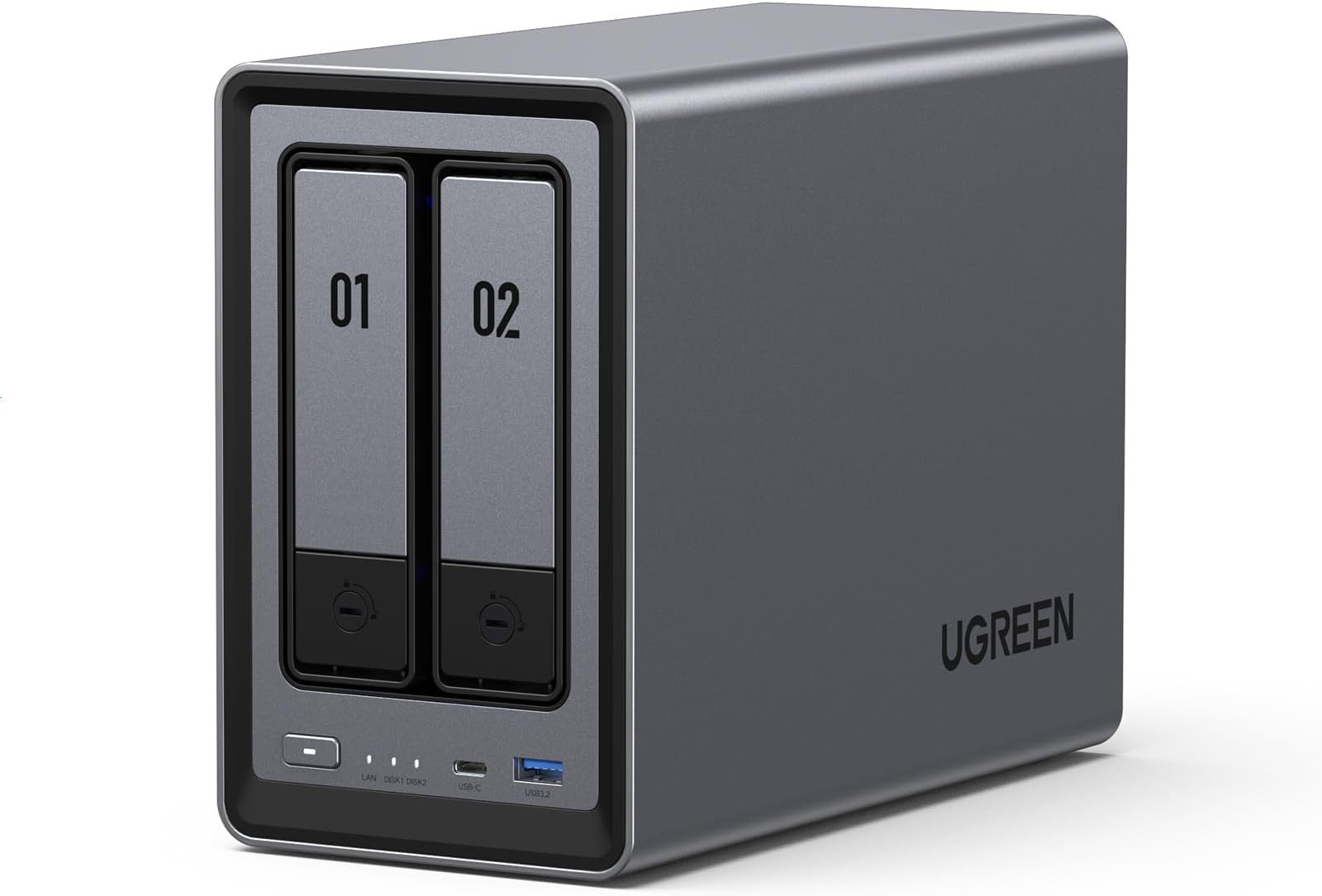
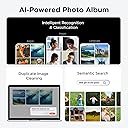
The UGREEN NAS DXP2800 is a premium 2-bay desktop network storage system designed for content creators and enthusiasts. Powered by an Intel N100 quad-core CPU and 8GB DDR5 RAM, it supports up to 80TB of storage with dual M.2 NVMe slots for SSD acceleration. Featuring 2.5GbE networking and 4K HDMI output, it offers ultra-fast file transfers and media streaming. Its robust aluminum build, AI-driven photo management, and user-friendly software make it an ideal all-in-one private cloud and media server solution.


| ASIN | B0D22HBFK1 |
| Additional Features | Dust Resistant |
| Best Sellers Rank | #1 in Network Attached Storage (NAS) Enclosures |
| Brand | UGREEN |
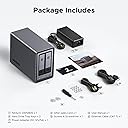
| Built-In Media | Power Adapter, Quick Start Guide, Screwdriver Kit, USB Cable |
| Color | Grey |
| Compatible Devices | Desktop, Laptop, Smartphone, Tablet, Television |
| Connectivity Technology | SATA |
| Customer Reviews | 4.5 4.5 out of 5 stars (948) |
| Data Transfer Rate | 334 Megabits Per Second |
| Digital Storage Capacity | 80 TB |
| Enclosure Material | Metal |
| Form Factor | 3.5-inch/2.5-inch (HDD), M.2 (SSD) |
| Global Trade Identification Number | 06941876239641 |
| Hard-Drive Size | 64 TB |
| Hardware Connectivity | Ethernet, SATA 6.0 Gb/s, USB |
| Installation Type | Internal Hard Drive |
| Item Weight | 2.58 Kilograms |
| Manufacturer | UGREEN |
| Model Name | DXP2800 2-Bay |
| Model Number | DXP2800,2-Bay (Diskless) |
| Number of Items | 1 |
| Read Speed | 312 Megabits Per Second |
| Specific Uses For Product | Business, Multimedia, Personal, Gaming |
| Warranty Description | 2-year Warranty |
D**C
Simple, Fast, Performant, Great Software. Buy now, don't look back.
This is the easiest, best 4 bay NAS money can buy. You will be up and running in _no_ time. Snapping in four drives of whatever size you choose takes moments. I unwrapped four Toshiba N300 Pro 18TB drives and snapped them into the chassis in about 4 minutes. Connected the NAS to my 2.5GB ports on my lan and had everything up and running and updated with the latest software in under 30 mins. Time to get going is important, but what's more important is how does it run over time? I am 9 weeks into owning the thing and I can tell you this: The software is easy. The system is complete... it's robust... it has features I'll never use--and that's cool if you're looking for a gimungous media server or whatever... I needed it for digital camera RAW storage in a RAID5 scenario. I couldn't say more good things about the product. Managing permissions for users on your LAN is easy, managing storage and basic drive management, etc. is easy. Updating the software routinely as patches and security updates are released is easy. Once upon a time Apple owned "easy" and now iOS has 1138 settings in the general tab and nobody can make it do anything--but this NAS is _easy_. And good. High performance reads and writes near theoretical limits... I literally can not say enough good things about it. Buy it and don't look back. Great value, great performance.
R**.
WOW!
This company has a great product. It is full of free included apps for all kinds of desires. I could not be more happy with the Amazon recommendation. Mine is handling my small business as well as allowing personal and family desires, linked to LAN or remote. I am no expert but was very capable to set it up and get running in very reasonable time. Now having it for months, not one bug, a few updates and expanded the apps offered. Exactly what I needed. I have had 2 NAS in the past years and then paid monthly for online cloud storage backl ups. Price kept climbing. I only wish I went back to a NAS again as the capabilities are far above the old day NAS systems.
A**H
Ugreen NASync DXP2800: The Best Value for a Home Media Server
The DXP2800 is a powerhouse for families moving their data off expensive cloud subscriptions like I have done. For anyone running Plex for home media server and Immich to replace google photos, this 2-bay unit delivers incredible performance at a stellar price. Key Highlights: Plex & Immich Heaven: The Intel N100 CPU handles 4K transcoding and Immich’s AI-heavy tasks effortlessly. It’s perfect for creating your own private, fast, and secure media cloud. Massive & Fast Storage: Supports two large SATA drives (up to 30TB each) and includes two M.2 NVMe slots. Put your app metadata and database on the SSDs for instant responsiveness. Premium Build: The aluminum chassis feels solid and durable, far superior to competitors' plastic designs. Easy Setup: UGOS Pro software is user-friendly and makes setup a breeze, even if you’re new to NAS systems. Docker support expands functionality hugely. The Caveat (The Noise): The only real drawback for large media libraries (like my 16TB drives) is the chassis can amplify HDD vibrations during heavy writing. Quick Fix: Placing the unit on a silicone mat or adding some felt pads inside the bays silences this minor quirk immediately. Verdict: This NAS is an absolute winner. It has the hardware to crush any home media task and is easily the best self-hosting solution I've used. A must-buy if you want to take ownership of your digital life!
A**S
Excelent device, I'm very happy!
I'm new to NAS devices. I always dreamed of having my own home server to store old family photos from digital cameras and access them from anywhere without having to pay for a lifetime cloud service. The same goes for my music—dozens of CD albums from years ago that I can still listen to anywhere. It's like my own personal Spotify. This little NAS solves all my problems. I used it for a month and a half with hard drives from old PCs in RAID 1 while I waited for an 8TB Seagate Red (for NAS) drive, which I've now installed. Now I can add my entire anime and movie collection. Honestly, I couldn't be more thrilled. The UGOS operating system comes with some native applications; the best is the Theater app for watching movies and TV shows. It's like streaming! The photo app is good (it has face recognition) and the music app is so-so (it could be improved). Anyway, if you don't like any of the native apps, you can install other application options via Docker. I haven't done it yet because I think it's best to use NVMe SSDs for Docker, and I haven't installed one yet. To access the NAS from your phone, the Android app isn't available on the Play Store in my country, Venezuela (I don't know why), but you can download the APK from their website, and it updates automatically without problems. There's also an APK available for Android TV, although currently it only works for streaming. This NAS has more features that I haven't explored yet, or haven't tested much. I find its HDMI port rather useless and don't use it; it doesn't display an interface, it's just a streaming output that you have to control with your phone. I haven't used other more technical file-sharing functions much, but they are included, such as DLNA for multimedia, SFTP, SMB, and others. User management is very intuitive; you can create user accounts for each family member, whether they live with you or not. User security includes 2FA with Microsoft Authenticator, which is optional but recommended. It supports RAID 1 technology, which slightly improves speed. Physically, it's small. I've included a couple of US coins in the photo for size comparison. It's slightly heavy due to its aluminum casing. The trays are plastic and easy to handle. I like the elegant design. In short, I'm very happy!
M**L
I’ve been following the UGREEN NASync series since its Kickstarter days, and as soon as it hit Amazon Canada, I didn't hesitate. After nearly a year of daily use, I can confidently say this is one of the best tech investments I’ve ever made. The "Apple Tax" Solution: The real value of this NAS became clear when I bought my new MacBook. As many know, upgrading internal storage on a Mac is incredibly expensive. By using the DXP2800 as my personal cloud, I was able to buy the base model laptop and store all my heavy files, photos, and media on the NAS. I can access everything from anywhere in the world, saving me hundreds of dollars in hardware upgrades. Performance & Reliability: Even with the stock 8GB DDR5 RAM (I haven't felt the need to upgrade yet), the Intel N100 CPU handles everything smoothly. I primarily use it for: Automatic Photo Backups: It syncs my phone photos instantly, allowing me to keep my phone storage free. Media Streaming: It serves as a flawless movie hub for my home. Fast Connectivity: The 2.5GbE port is a must-have. A great pro-tip: if you need even more speed, you can use one of the USB ports for an extra ethernet adapter! Software & Build: UGREEN has been very consistent with software updates. The app is intuitive and improves every month. The build quality is premium and feels like it was designed to last. It’s quiet, efficient, and fits perfectly on my desk. Pros: Significant long-term savings on phone/laptop storage. Easy M.2 NVMe and RAM upgrade paths. Solid 2.5GbE performance out of the box. Consistent software improvements. Cons: As a "light to moderate" user, I haven't found any real flaws. It does exactly what it promises. Final Verdict: If you want to own your data and stop paying for monthly cloud subscriptions or overpriced hardware storage upgrades, this is the way to go. Highly recommended for families and small teams!
S**.
Top tier nas. Works great so far
A**A
Excelente marca muy intuitiva para los que no sabemos mucho de servidores y lo que me gustó que es muy potente con la configuración de memorias que trae por defecto solo hay que buscar un buen disco duro que sea rápido
M**S
Es un NAS increíble y las capacidades que tiene da mucho margen para sus usos Solo me gustaría que en la galería de fotos se pudieran etiquetar las fotos para poder organizar mas facialmente las fotos
T**N
Great NAS! Got it on sale, and its been awesome and running straight for a month. Slotted in 3-12tb NAS drives and run them in RAID 5. Took 3 days to build the array, but its been running well. It only has a few Apps available at the store so far, including Docker and Jellyfin which work pretty well if you configure them right. Took me a few hours to learn how to do it and configure everything, but thats from 0 knowledge and it was pretty easy to pick up. I wouldn't really run VMs on it, just because the CPU is rather limited. Mostly set up as a photo back up(with the sync and backup App) and a media server(Jellyfin). I run the Jellyfin server on my Linux server though, since I find its easier to configure. You just have to permanently mount your network drives so you can access the NAS storage. It even has a built in remote access without configuring ports, so you can access and backup when your away from you local network Would definitely recommend to get this if you have no experience with NAS, since its very easy to pick up
Trustpilot
3 days ago
2 days ago