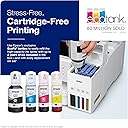
🖨️ EcoTank ET-3850: Print smarter, save bigger, and never run dry!
The Epson EcoTank ET-3850 is a wireless all-in-one printer designed for busy professionals seeking cost-effective, high-quality printing. Featuring a cartridge-free refillable ink system, fast 15.5 ppm print speed, a 250-sheet auto document feeder, and versatile scanning and copying functions, it streamlines office productivity while reducing ink expenses. Its compact design, color display, and broad device compatibility make it an essential upgrade for modern home offices.


| ASIN | B0B1M28FBM |
| Additional Printer Functions | All In One |
| B&W Pages per Minute | 15.5 ppm |
| Brand | Epson |
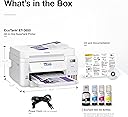
| Built-In Media | EcoTank ET-3850 all-in-one, power cord, 1 bottle of 502 Black (127 mL) and 1 bottle each of 502 Cyan, Magenta, Yellow (70 mL) |
| Color | White |
| Color Depth | 24 bpp |
| Color Pages per Minute | 8.5 ppm |
| Colour | White |
| Compatible Devices | Laptops |
| Connectivity technology | Ethernet |
| Control Method | Touch |
| Controller Type | iOS |
| Customer Reviews | 4.1 out of 5 stars 1,245 Reviews |
| Dual-sided printing | Yes |
| Duplex | Automatic |
| Hardware Interface | Ethernet, USB |
| Ink Color | Black, Cyan, Magenta, Yellow |
| Item Weight | 6.71 kg |
| Manufacturer | Epson |
| Maximum Copies Per Run | 250 |
| Maximum Copy Resolution Black and White | 600 x 1200 dpi |
| Maximum Copy Resolution Color | 600 x 1200 dpi |
| Maximum Copy Speed Black and White | 15.5 ppm |
| Maximum Media Size | A3 |
| Maximum Print Resolution Black and White | 600 dots_per_inch |
| Maximum Sheet Capacity | 250 |
| Maximum print Resolution Color | 600 x 1200 dpi |
| Model Name | ET-3850 Renewed |
| Model Number | C11CJ61201-N |
| Model Series | ET-3850 |
| Model name | ET-3850 Renewed |
| Number of Trays | 1 |
| Other Special Features of the Product | Refillable Ink Tank |
| Print media | Paper (plain) |
| Printer Connectivity Type | Ethernet |
| Printer Output Type | Color |
| Printer Type | Inkjet |
| Printing technology | Inkjet |
| Processor Count | 1 |
| Resolution | 600 x 1200 dpi |
| Scanner Type | Sheetfed |
| Special features | Refillable Ink Tank |
| Specific Uses For Product | General office and home office use, including document printing, photo printing, and scanning |
| Total Usb Ports | 1 |
| UPC | 010343967601 |
| Unit Count | 1 Count |
| Warranty Type | Limited Warranty |
| Wattage | 17.8 watts |
J**A
So far amazing printer
02/13/2024 This printer is amazing at printing both regular documents and pictures on plain paper. I am actually amazed at how sharp the colors are and how clear the text looks. This printer is great for the home or for printing small print jobs such as printing a packet with pictures for a classroom. As of now I am happy with the printer and will definitely update if there are any issues with the product. I haven't tried the scanner that is on top, but so far the rest of the printer seems to work well. The constant connection with the WiFi, the clear print, and the ease to print about 20 pages in color (double sided) in about 8 minutes was noteworthy. My old printer took longer and did not have the same print quality. 03/12/2024 Update: The printer still works very well. The ADf (Auto Document Feeder that is on top of the printer to scan documents) does not scan both sides automatically. You have to manually turn the pages to scan the other side. The ADF can be good if you are scanning multiple documents that are only one-sided. I have been able to get the documents to scan without jamming recently if I put the pages in the feeder carefully. The printer still works as expected as all my sheets are coming out crisp and clear. The print speed works for me as I do other things while the printer does it's job. However, this printer is not meant for those that have to print a lot of pages in a hurry. Instead, it works for the regular home use or for those that have the time to wait for the print outs. Since I am a classroom teacher and I print my things in advance, it is not a big deal to wait as there is always other things to do. Personally, compared to other inkjets I think this is the best option. If you need a fast printer then you need a Lazer printer. Hope this extra information helps. 12/26/2024 It is almost a year since I got this printer and I still have a lot of positive things to say about it. As I explained before, the prints were clear and vibrant. The original ink lasted until about a week ago as I just printed about 24 comic books with color. Before I printed the 24 books, I have used the printer to print out 600 hundred papers with color as well as other projects during the whole 10 months that the ink lasted. Throughout the year I just couldn't believe how I would print out hundreds of papers and it barely made a dent on the level of the ink tank. According to the printer, I made about 6, 632 copies both from the B/W and the Color ink tanks over the last ten months. The truth is, I still had about a 1/4 of ink in the ink tank, but I decided to refill it as I make copies often. As I mentioned earlier, if you need a really fast printer then this is not the printer to get, but if you pace yourself out well and let the printer run while you are getting other things done then it is all good. A couple of Cons that I noticed, but are not a big deal for me personally, are that the scanner on top can still jam at times. Another small annoying thing that happens is that the Epson software keeps notifying me that my ink is low when I literally just filled it up. However, the notification is not a big deal as it is easy to ignore and doe not effect the printers performance. Hope this helps.
T**N
Refurbished is the way to go!
I bought this model for several reasons. 1. To replace HP forever, I've been held hostage far too long. I've had nothing but problems with my 8710 and they didn't start until the day after HP said they no longer will offer support for that model. Convenient right? 2. To avoid HP demanding we use expensive ink and bricking our ability to use non OEM ink cartridges, making ink virtually unaffordable. This Epson did most all of the things our previous HP did. I didn't want to spend an arm and a leg so I bought the refurbished. I noticed right out of the box it was much lighter weight, smaller than our previous all-in-one. The print tray felt a little flimsy, and the top feeder was also light weight flimsy plastic feel. It is tall and looks well designed. Everything looked absolutely brand new and operated brand new. Ink was new, printer was taped like a new printer and packaging all new. If I didn't know it was a renewed, I'd think it was new. The one thing I will miss is a touch screen, but I'm getting used to the one on this Epson, but there is a learning curve and I'm not fully happy with the screen, oh well. You can do everything online as well if you want to change settings. This screen is not a deal breaker or a star changer. The setup includes a CD (I did not use this) or you can download straight from Epson (what I did.) There is also an install manual in the box which I appreciated. The online download got me the latest software and drivers. It took a little longer to set up the printer on all of my computers/devices than I had hoped but they all worked perfectly, even my phone. It connected to WiFi as expected. The longest part of the process of setting the alignment, but it was very easy. Five test pages to insure proper alignment. The alignment took about 10 minutes after about 5 minutes of the ink filling. Then we printed a test. Print quality is excellent. Sharp, vibrant and professional prints. I have it connected to a desktop, an Android tablet and phone and an HP laptop. I love the fact I can do remote printing, this will help in some instances. It didn't print as fast as my old printer but I didn't expect it would. It doesn't print slow though. Filling the ink tanks was simple and failproof. I'm so thankful to have this option now for ink. I'll not have to beg people not to print so much now! Oh the savings! It scanned from the printer to the computer and from the app on the computer requesting the scanner to scan. Top feed worked well for multiple pages and we also scanned on the flatbed which worked. It seems that the scanner software was much better than HP's. The automatic document feeder (ADF) is working as it should. I noticed you can configure the printer online too. I didn't bother with that option and won't unless there is some issue I can't figure out. The double side printing capability is handy. Inkjet Photo Paper both matte and glossy look great. Cardstock works just fine as well. It prints quiet, so in the other room, it is hard to detect if my print job is going through. I'm sure there may be a quiet mode but if there is, it doesn't need it. It has an email to print function which I didn't test yet, but I'm certain that works well too. I'm saying goodbye to my HP and I'm pleased with this purchase so far. If anything happens I'll update this review but for now, the little annoyances are little and the Ink Tank for me is the prize of all prizes!
D**O
Don't Buy Epson Certified Refurbished!!!!
Thought I could trust Amazon/Epson when I purchased this certified refurbished printer. At the same time I purchased an Epson Sublimation printer which has been great. Long and short, the standard printer is a piece of junk! Of course it worked fine during the 30 day return period but then it stopped doing what it was designed to do...PRINT. We will send a document to the printer and it prints fine. We then try to print a second or third document and it either doesn't print it, just sits there with the annoying circle arrow moving or prints a half page and then stops. Have to clear out the print queue or it will never print again. Not a Wi-Fi problem, the printer is direct connected via USB. Deleted the Epson software and re-downloaded, unplugged etc, restarted computer. Nothing helps. Called Epson Support and received no help whatsoever. I have a Best Buy Total Support membership so we took it in to see if they could help. They tried everything they could to no avail. Lesson learned, don't buy Epson Refurbished. I'm sure they cleaned the outside of the printer and ran a few prints...that's the refurb process. I doubt they check firmware or other potential electronic bugs. If you think I'm unhappy, you're correct. Older folks on fixed incomes don't need to get stuck with a lemon and then have to spend money for another printer that actually works
V**Y
An Enthusiastic First Look: The Epson EcoTank ET-3850
After hearing about the high cost of printer cartridges for years, I decided to make the switch to a cartridge-free model. My initial experience with the Epson EcoTank ET-3850 has been "so far, so good," and I'm genuinely impressed with its promises and performance right out of the box. The setup process was much more straightforward than I anticipated. The biggest step, and the one that felt the most different, was filling the ink tanks for the first time. The bottles are designed to be spill-free, and they have a unique key for each color, so there's no way to put the wrong color in the wrong tank. It's a surprisingly clean and simple process—just invert the bottle, and the ink flows into the tank until it's full. Once the tanks were filled, the printer guided me through the rest of the setup, from connecting to my home Wi-Fi to installing the software. The Epson Smart Panel app on my phone was particularly helpful, walking me through each step with clear instructions. Beyond the initial setup, the printer has already proven its worth. I love the fact that it comes with enough ink to last for a long time, which feels like a huge value. It has all the features I need for a home office, including the ability to print, scan, and copy. The automatic document feeder and the two-sided printing functionality are also fantastic, saving me a lot of time and paper. While I haven't put it through its paces yet with a huge volume of work, the test pages I've printed have been crisp and clear, and I'm looking forward to not worrying about running out of ink anytime soon. It feels like a solid investment that will pay off in the long run.
V**.
Great home office printer
I am a grad student, run a small nonprofit, and small business owner. I needed a printer that could fit all these needs. I did some research on good printers for the home office, and eventually I ended up at this one. I saw the refurbished model available and decided to go for it, since it seemed like the best printer deal I would find. The main reason I gave this 4 stars instead of 5 was how annoying the setup process was. Perhaps my printer was too far from the wireless router, but it would not connect wirelessly no matter what I tried. I couldn’t move either closer to the other, but I did have a super long Ethernet cable I was able to use and connect it. Once I did that, setup was a breeze. I had some trouble getting it to print on card stock, and I was worried it wouldn’t be able to handle it. Turns out, I had placed the card stock on top of the regular printer paper, and that prevented it from printing. It doesn’t say anywhere that this will happen, I found it in a review for a different EcoTank printer. Once I had just the card stock in, it printed beautifully. It does indeed print double sided. It does some printer sorcery and flips it around. It won’t be as fast as a giant office printer at double sided, but it’s not too shabby. I have some art that I print for my small business. I printed it on card stock first and thought it looked fine, but it was when I printed on glossy photo paper that it really showed the quality. It does have a white border, as this does not offer borderless printing, so it you are looking to print photos with no border, this won’t be it. However, if you don’t mind a border on photos and prints, this is excellent. It does not have a touch screen, but I don’t really care. It’s just a printer so for me it isn’t a big deal to have a touch screen. It also does not have fax, but as I haven’t sent a fax in like five to ten years, I’m not too concerned with this. There are ways to send faxes online these days, and it wasn’t worth the extra money to get the next model up that has fax ability. I haven’t used the copier portion of this yet, but I like that it closes up. This is really small and I like that. I was expecting it to be bigger. I have limited space for office supplies, so this fits perfectly in the space I have for it. I’ve only had it a few days, so if something goes terribly wrong, I’ll update. Otherwise, my only major problems with it have mostly been user error and not the products fault. The issue with the connection was annoying, but fortunately I had an easy fix. It is a little loud, but not ridiculously so. I’ve definitely heard louder printers. If you do a lot of printing, especially things in color, this is a great option for a home business.
Trustpilot
3 weeks ago
2 days ago