Buy anything from 5,000+ international stores. One checkout price. No surprise fees. Join 2M+ shoppers on Desertcart.
Desertcart purchases this item on your behalf and handles shipping, customs, and support to Senegal.
🎯 Master your workspace with precision and comfort—trackball freedom redefined!
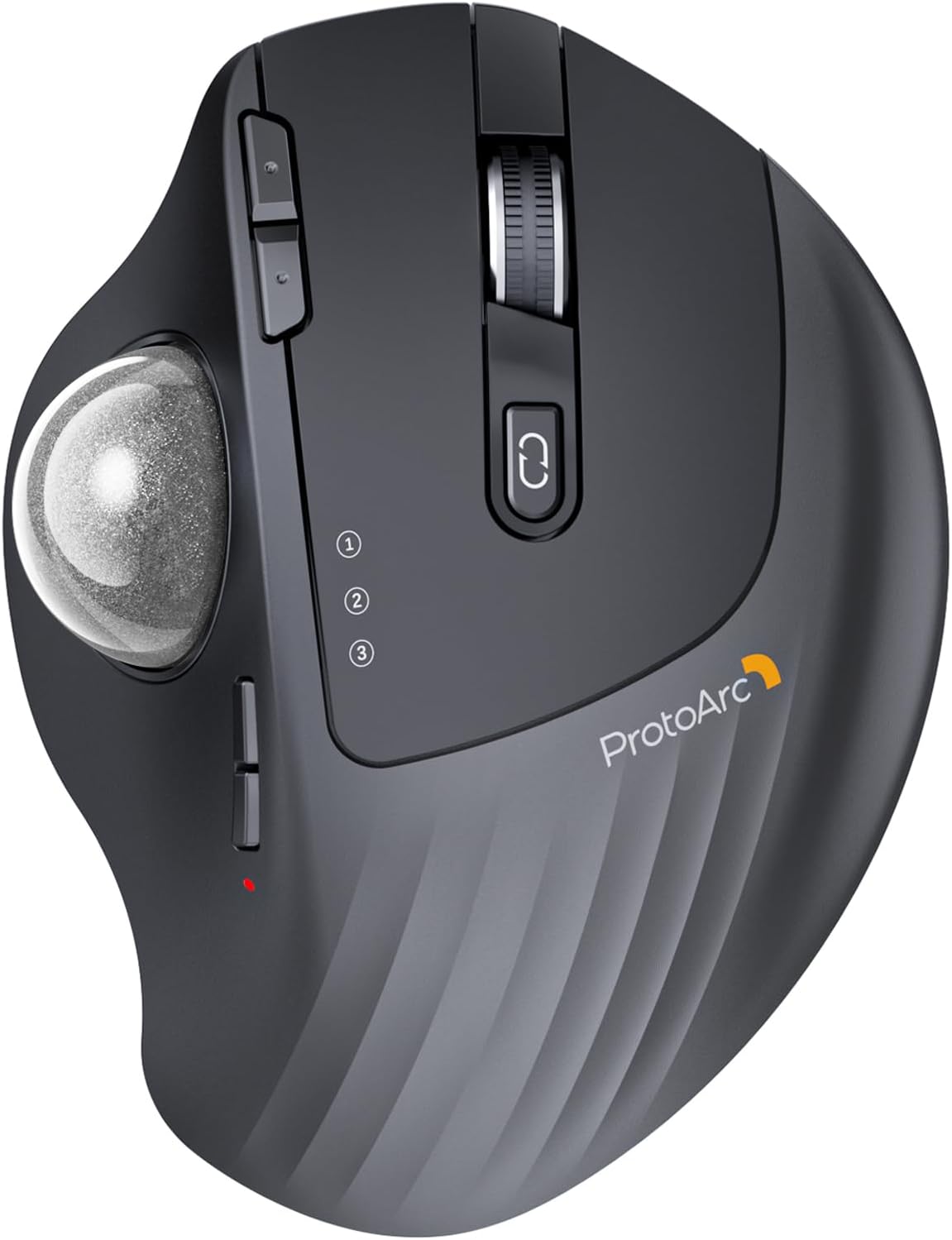
The ProtoArc Wireless Trackball Mouse EM01 NL combines ergonomic innovation with advanced connectivity, featuring an adjustable 0-20° angle, triple Bluetooth and 2.4G wireless device pairing, and a rechargeable battery lasting up to 3 months. Designed for professionals craving comfort and efficiency, it offers precise thumb-controlled navigation with up to 1600 DPI sensitivity and whisper-quiet clicks, making it ideal for multitasking across PC, Mac, and mobile devices in any environment.


| ASIN | B0CWTM9WSK |
| Additional Features | Adjustable Angle, Ergonomic Design, Quiet, Rechargeable, Wireless |
| Antenna Location | Business, Home, Office, Personal |
| Are Batteries Included | No |
| Are Batteries Required | Yes |
| Battery Average Life | 3 months |
| Best Sellers Rank | #101 in Computer Mice |
| Brand | ProtoArc |
| Built-In Media | A Type C Charging Cable, A USB Receiver, A User Manual, An Ergonomic Trackball Mouse |
| Button Quantity | 6 |
| Color | Silver Ball |
| Compatible Devices | Desktop Computer, Laptop, Personal Computer, Smartphone, Tablet |
| Connectivity Technology | 2.4G Wireless , Bluetooth |
| Customer Reviews | 4.3 out of 5 stars 3,209 Reviews |
| Enclosure Material | Plastic |
| Finish | Smooth |
| Hand Orientation | Right |
| Hardware Platform | Linux, Mac, PC |
| Item Weight | 310 Grams |
| Manufacturer | ProtoArc |
| Mfr Part Number | Protoarc B0CWTM9WSK |
| Model Name | EM01 NL |
| Model Number | EM01 NL |
| Mouse Maximum Sensitivity | 1600 Dots per Inch |
| Movement Detection | Trackball |
| Movement Detection Technology | Trackball |
| Number of Batteries | 1 Lithium Ion batteries required. |
| Number of Buttons | 6 |
| Operating System | Android, Mac OS, Windows |
| Power Source | Battery Powered |
| Range | 10.0 meters |
| Special Feature | Adjustable Angle, Ergonomic Design, Quiet, Rechargeable, Wireless |
| Style Name | Modern |
| Theme | Office |
| Unit Count | 1.0 Count |
| Warranty Description | 2 Year Warranty |
J**E
Effortless and Quality Mouse - A Definite Buy (Recommend Buying)
A definite buy if you are looking for a trackball mouse. Build quality is pretty good and it feels effortless to use the mouse. Trackball movements/motions are very very smooth. Very smooth scroll wheel. Left/Right click buttons require perfect amount of very light pressure to work, therefore the fingers wouldn't get tired after continuous use and same for the forward/back button. Click sounds while using the mouse are very subtle and just loud enough for you to hear the action. The DPI levels (the cursor speed) buttons have 5 levels that are perfectly spaced for varied needs. Size of the mouse and curves/arcs on the mouse are well designed and thought of for ergonomics and comfort and not to forget the 20 degree angle plate at the bottom of the mouse allows you to change the angle of the mouse, is a big plus. It can connect to 3 devices and I had no issues connecting it via Bluetooth. Only drawback is there is no storage for USB receiver/dongle on the mouse and it has to be stored separately, I would recommend ProtoArc to improve on this aspect. Another suggestion would be to provide the ability to customize the back/forward buttons to actions that user prefers. I also own a Logitech trackball mouse but after using ProtoArc's effortless mouse, I am NOT going back to Logitech.
A**R
Very Very Premium, Very Very Good
I have to say almost 6 days coming up on a year after buying this mouse, its perfect. Its funny cause when i bought this, i didn't really sift its specs thoroughly, didn't know physically moving the mouse didn't move the cursor, I just bought it because it looked good & it shipped fast. First off, the build quality is amazing, it feels and weighs very premium. love the fact that I can just recharge it with usb c. when I first got it, it took about 4 hours to get used to it because before it, the mouse i had was regular, so hand positioning was a bit awkward at first but after those hours i loved it. Never going back. Its very smooth and the scrolling is so good and easy to adjust. love that. One thing that's weird about it (or weird about me) is that u can use this while sitting in your chair (place it on the arms rest), standing up, on your lap, or laying down in your bed for tv (i use a projector). Its comfortable in every way. Although i said it took 4 hours to get used to, gaming took a bit longer, but over time it becomes way easier and honestly in my opinion, more convenient than a regular mouse. Reason why I say this is because for some people like me, our table may not have a lot of room to move the mouse, but with the rollerball, the ease of it is crazy. The battery lasts so long, I just charge it for the sake of seeing it charged, never for the sake of "its almost dead, or it died, lemme go charge it", if that makes sense. And the smooth connectivity is awesome, switches between devices like its nothing, the distance i can use it at is very good and I love the number-lights thing. Once you buy this mouse, you wont believe the quality you got for the price (compared to others). If the rollerball gets a bit slow or choppy, all I have to do is use my thumb and forcefully roll the ball until it feels smooth again, which i rarely have to do but its a quick fix, no extra steps. Overall, it feels awesome, performs awesome, and its aesthetic is awesome.
E**S
The Real Value Buy over the Logi MX ERGO+
Great value for the price, it definitely competes with the Logi(tec) MX EGRO Plus, it has all the same or simmilar features (from what I have used it for) - same buttons, sensitivity button, scroll buttons, wrist angle adjustment plate, usb C connector/charging port, thumb movement is good and feels similar, and it has one improvement: you can connect it to 3 different devices (vs 2 w the logi). Trackball Tangent: This is a great trackball mouse for those who know they like them, and for those looking to try one, this is a good buy, if you have never used one, you should expect to spend a couple hours getting used to it, and probably a month to get fully comfortable. Benefit: If you use a laptop or tv for your computer needs, a track ball is great because you dont need a sturdy table, you can hold it on the couch or even your leg, thus allowing for mouse, or keyboard & mouse in far more situations/locations. Note: I paid $38.69, and it looks to be even cheaper ($29) at the moment, and I thought I got a great deal. Note 2: If they are close in price when you are shopping, get the purple or yellow/gold ball version, those have proper amounts of flair (I messed up and got the grey version :( )
L**5
Comfortable Design with One Frustrating Drawback
I picked this up for a more ergonomic setup, and overall it’s been a solid mouse. The shape is comfortable for extended use, and the button layout feels natural without needing much adjustment. Tracking is smooth when everything is clean, and the connection has been consistent without dropouts. It’s responsive and works well for everyday tasks. My only real issue is the trackball itself. It’s very sensitive to even small amounts of dirt or debris, and when that happens, it can snag or feel inconsistent. That means you end up having to clean it more often than expected to keep it performing the way it should. Build quality feels decent, and everything else functions as expected. Overall, it’s a comfortable and functional mouse, but the sensitivity to debris can be a bit of a hassle over time.
P**S
Solid unit for the price
Been using this for about a year and I'm happy with it. Tracks accurately, and the tilt allows for a natural wrist position, which is critical for extended use. The ball is easy to remove for cleaning (small hole in the bottom allows you to "poke" the ball out of the top, and cleaning it is straightforward. As with all trackball mice, you will need to keep it clean to operate smoothly. My only gripe is that where the button is for the different connection modes allows for accidental activation, so the mouse might suddenly stop responding because you hit the connection button. Easy to fix.
H**R
Deducting 2 stars for button design
Owned this for 10 months now, so I figure a review is in order. I’ve found this to be a decent trackball mouse with the button “feel” and reliability as a significant detractor. Easily cleaned by popping the ball out from the bottom. Bluetooth easily connects to my Mac and PC, but used primarily on Mac, so that's what this review is based on. I have compared this track ball to my other mice, a Nulea M501 and Logitech 570, which are both in daily use, too. Like others, this trackball mouse can switch between 3 different devices (1 USB using the included dongle, and 2 Bluetooth (BT) devices). Low power use, and I only have to charge it monthly. Since Mac is great about displaying the charge level of attached BT accessories, it’s pretty easy to know when to plug it in, so I don’t need a charge light. Side-mounted DPI-adjust buttons are great for fine-detail cursor movement (such as in Figma or Illustrator), as you can adjust on the fly. The left and right mouse buttons are NOT as solid as my Logi or Nulea trackball mice, and I’m one of many who complain of this and find it unacceptable. Some shortcomings: - As others have mentioned, the left & right mouse click buttons have a super-mushy feel for such a “premium” product designed by Nguyen, who introduces himself via a paper insert in the high-quality packaging. If only they’d put as much time into engineering solid buttons as their packaging, I wouldn’t have taken TWO stars off. - Hit-or-miss on longevity based on other reviews Big Wins: - Clever design, appreciate the ergonomic adjustments - Different ball color options (I have the gray one) - Easily-switched between BT/USB dongle devices using top-located button - Affordable (when using the regularly-available coupon), and does what my 570 does at a fraction of the cost
C**E
Give it time and you’ll end up, loving it
Just getting started with CAD drawing and realized I needed a better mouse for my desktop. This one works great and is really comfortable with the two ergonomic positions that you can adjust it to. It does take some time to get used to this as most of us are not used to using our thumb as the primary movement of the pointer. This mouse stays in place and all the movement is done with just your thumb. Quality is really nice and connectivity on multiple devices was easy. The only thing I wish is that the Non-primary buttons were assignable like to a back or undo type of buttons. To my knowledge, they are not they are preset, but the functionality of the mouse is a great. Battery life is awesome. I’ve been using it for a couple of weeks already and have not had to charge, I actually forgot that I’m going to have to eventually. I have had to go back-and-forth a couple of times in my mouse settings to get the accuracy to where it is most comfortable for me but once I did, it’s working awesome.
M**L
Highly recommend for desk jobs & multi-screen users
I’m a bookkeeper and spend the entire day at my desk with multiple screens open at once. This mouse has been a game changer for comfort and productivity. The trackball design means I barely have to move my arm at all — my hand stays in one place, and I only reach out when I need to use the keyboard. The trackball did take a little getting used to, but honestly it only took about an hour before it felt completely natural. Once adjusted, it’s incredibly comfortable for long workdays and much easier on my arm and shoulder than a traditional mouse. If you work long hours at a computer, especially with multiple monitors, this mouse is absolutely worth it.
Z**6
bonne aide quotidienne
avec clavier virtuel car arthrite +++++ aux mains
T**A
Goodness
I like it very much , But peaple should know that it is not movable You will use the ball
M**O
Buona qualità costruttiva. Comodità suggeriva
Articolo di buona fattura. Purtroppo ho dovuto renderlo in quanto risulta piccolo per le dimensioni della mia mano. Le indicazioni fornite per la corretta misurazione della dimensione della mano sono abbastanza affidabili tuttavia bisogna sempre considerare il fattore comodità che è comunque personale.
N**N
Great trackball without LED lights
Nice stylish black trackball with (I choose) a red ball. Luckily no fancy LED lights, and connects to PC and MAC. Great!! What could be improved is a small storage area in the trackball for the dongle (wifi/bluetooth)
G**H
Best yet ...!
Best Logitech trackball yet. Easy to set-up & use on Win 10 & 11.
Trustpilot
2 weeks ago
1 month ago