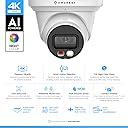
🔒 Elevate your security game with 4K AI clarity — don’t just watch, see everything.
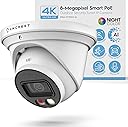
The Amcrest UltraHD 4K IP PoE AI Turret Camera delivers professional-grade 8MP video with a 129° wide-angle lens and advanced AI detection for humans, faces, and vehicles. Featuring full-color night vision up to 49 feet via dual LED illumination, it ensures vivid surveillance day and night. Designed for outdoor durability with IP67 weatherproof metal housing, it supports PoE for streamlined installation and offers versatile storage options including MicroSD, PC, NAS, and secure cloud backup. Compatible with Alexa and Amcrest’s app ecosystem, it’s a future-proof security upgrade for smart homes and businesses.


| ASIN | B0BMWFTFLS |
| Alert Type | Motion Only |
| Antenna Location | Outdoor Security |
| Batteries are Required | No |
| Brand | Amcrest |
| Colour | White |
| Compatible Devices | Smartphone |
| Compatible devices | Smartphone |
| Connectivity Protocol | Power Over Ethernet |
| Connectivity technology | Wired |
| Control Method | App |
| Controller Type | Amazon Alexa |
| Customer Reviews | 4.3 out of 5 stars 320 Reviews |
| Effective Still Resolution | 8 MP |
| Field Of View | 129 Degrees |
| Form Factor | Turret |
| Frame Rate | 15 fps |
| Global Trade Identification Number | 00850024042971 |
| Included Components | Quick Start Guide |
| Indoor Outdoor Usage | Outdoor |
| Indoor/Outdoor usage | Outdoor |
| Item Dimensions | 6 x 2 x 4 centimetres |
| Item Type Name | Security Camera |
| Item Weight | 726 g |
| Light Source | LED |
| Manufacturer | Amcrest |
| Material | Metal |
| Model Number | MONITORA11 |
| Mount Type | Wall Mount |
| Network Connectivity Technology | Wired |
| Night Vision | Night Color |
| Night Vision Range | 49 Feet |
| Number of Channels | 1 |
| Number of IR LEDs | 1 |
| Number of Items | 1 |
| Other Special Features of the Product | Image Sensor, Motion Sensor, Night Vision, Portable |
| Photo Sensor Technology | CMOS |
| Power source | Ethernet Cable / POE |
| Recommended uses for product | Outdoor Security |
| Room Type | Living Room |
| Special feature | Image Sensor, Motion Sensor, Night Vision, Portable |
| UPC | 850024042971 |
| Unit Count | 1.0 count |
| Usage | Inside, Outside |
| Video Capture Format | H.265/H.264 |
| Video Capture Resolution | 4k |
| Viewing Angle | 129 Degrees |
| Voltage | 12 Volts |
| Waterproof Rating | IP67 |
| Wattage | 7.2 watts |
| Wireless Technology Type | Power Over Ethernet |
J**N
Great camera with easy setup
I purchased two of these cameras so far, and have been extremely happy with the quality of the product as well as the video and images that they produce. The initial setup was fairly easy, with the most difficult part being to install the SD card into the camera. You have to physically disassemble the camera to install the SD card. It wasn't a difficult process for me; but for some, I could see that being a challenge. That being said, I feel this is a much better system for SD cards than other cameras that I looked at prior to buying these. All the other cameras made the SD card easy to get to and install; however, the downside of that is that it also would be easy for someone else will ill intentions to get access to and remove it as well. Once the SD card is installed, the remainder of the setup process goes very quickly. I recommend doing a "test setup" prior to actually mounting the cameras in their desired locations. I ran a short network cable from my switch to the camera, and it immediately booted up with no problems. The next step was to setup up the app, and associate your camera(s) with your account in the app. This is the only hiccup I had in the setup process.. You actually use the camera on your phone to scan a QR code on the camera to perform this process.. My confusion was that after reading the instructions, I thought the bar code on the exterior of the box is what needed to be scanned. There is actually a QR code on the cable attached to the camera that needs to be scanned in order to add the camera to the app.. After a few minutes to figure this out, the remainder was very easy to complete. The app asks a few other basic setup questions(name of camera, etc) and then you are fairly quickly viewing live video from the camera. While the app is rich in features and adjustments that can be made to the camera setting to finetune the image, I ultimately decided to go with the setup as it was out of the box. Somewhat because I was a little afraid that I would make it worse if I started messing with the settings, but, mainly because the picture and video quality are awesome as they were. In addition to the app, the cameras can also be viewed and adjusted on the computer. This process was also painless and straight forward. Installation in their final position was pretty simple. You just need to find a way to get an ethernet cable from the camera to your NVR and or POE network switch. It's really just that simple. I had a professional install mine just because I wanted the backyard camera mounted on my back fence, and I didn't want to dig the trench to bury the cable to that camera. After they were both installed and re-connected, I just fine-tuned the direction that the camera was pointed, and they were ready for use. One more thing to think about prior to purchasing this camera. Where will you store your video / pictures. I personally, for now, am using the SD card in the camera. I installed a 128gb(the biggest they say the camera will support), and have it recording 24/7 and it holds about 2.5 days worth of video. Eventually, I will probably go to only recording motion events, but want to keep an eye on it for the first 30 days and just make sure it's capturing all events prior to switching. I will say, so far, it has performed above expectations in that area as well. But, if you didn't want to use the on board SD card, you can also use a FTP service, a NAS, or any number of cloud based services to store your video. Amcrest also offers a cloud option, which I believe you get a free trial of. However, I knew that long term I did not want to pay for a service so I opted not to even take advantage of the free trial, so I can't speak to the functionality of that. Overall, I would highly recommend the product. It's simple to setup and use.
F**E
Great drop in replacement!
1. Setup - I already have an NVR setup and I have 2 2k POE cameras and one doorbell camera. I swapped the 2k (also amcrest) in the front of the house with the 4k. Switching it out was super simple. The way these mount is the same so it was straightforward and I didn’t have to use the installation drill guide or anything. The NVR recognized it right away and I was able to set it up without any issues. It was a frictionless swap between the two cameras. 2. Quality - The build quality is pretty much the same as the 2k cameras I have which is not a bad thing and I expect it to withstand the weather without any issues. The image quality is notably sharper. We have a streetlight in front of our house so the camera doesn’t switch to night mode most of the time which is fine. The light isn’t much use to me because of the mounting location. I have it mounted near the top of the A pillar in front of the house so it’s pretty high up and can see the entire cul de sac. Having it so far away meant that details were lost with the previous camera. Zooming in the image, the quality improvement is most noticeable and welcome. 3. Functionality - I have my cameras running 24/7 and recording all movement. I didn’t really test the AI motion capture features because I don’t really feel the need for them currently. It’s not very often that I actually look at the recorded footage and have to look for something, but when I do, the motion capture and person capture flags that I already have setup were enough. I keep the same settings as before. Conclusion After using it for a couple weeks, I didn’t have any connection issues come up. It integrated with my existing system perfectly and without issues. As someone with a NVM system already installed, I think this product is perfect for me as a drop-in replacement to upgrade image quality. The light is a nice feature but not something I use. The improved night vision is welcome but not super important for where I have it installed. Overall I feel good that the footage captured is of much higher quality so that in the event that I do need to scrub back and look for something, I know I’ll have superior details.
R**T
Overall a great camera
The good: - wide angle with a sharp picture. Nightvision is color and provides a very crisp image with minimal blur. - construction feels very sturdy and I like it's waterproof design. I used this camera to replace my 4MP amcrest turret camera (which that had the same design and it's been outside non-stop in use for the last 5 years.) - AI features are really nice and work surprisingly well, which reduces false alarms. - My NVR (PC running Blueiris) detected it immediately and connected. - Amcrest Surveillance Pro Desktop App works great (windows 10/11 app) - Happy that Amcrest is a well known brand and stand behind their products. I've had a few other cameras in the past by random chinese brands and they had all sorts of issues. I have had 0 issues with amcrest products the bad: - doesn't come with a starbit, I have to dig one out of my tool chest (not a big deal) - I've noticed that the android app won't continuously show the feed, after about 1 minute the transfer rate drops to 0 KB/S. I'm not sure if that's a limitation of my phone or what. I have a samsung galaxy s21. Overall I am really happy with this purchase, especially considering the cost vs 4k quality. The nightvision is very crisp on this camera. My wife says that she feels so much more comfortable being able to check on things outside when she hears a bump in the night. Recommend!!
J**S
Avoid at all cost
I would find a different camera brand. These are way to complicated to set up and lack of support is amazing. Some cameras require a chrome extension (which isn't supported by Chrome anymore). And most help-forums are outdated. unfortunately, I already purchased 6 of these....do yourself a favor and research another brand that is plug n play.
B**L
Good camera, nice 4K image.
The camera was installed using a high quality cable and a new poe injector. Camera fired up and image quality was pretty good, a little better than my Amcrest doorbell camera. Went thru a cold Buffalo winter with no problem. Now that spring is here, the camera only has a good image during the day but the night image is very dark and distorted. UPDATE 3/30/26 pressed the reset button and the night image is back to normal.
Trustpilot
3 weeks ago
1 week ago