Desertcart purchases this item on your behalf and handles shipping, customs, and support to Senegal.
❄️ Stay Cool, Stay Ahead — The Ultimate Gaming Chill Companion
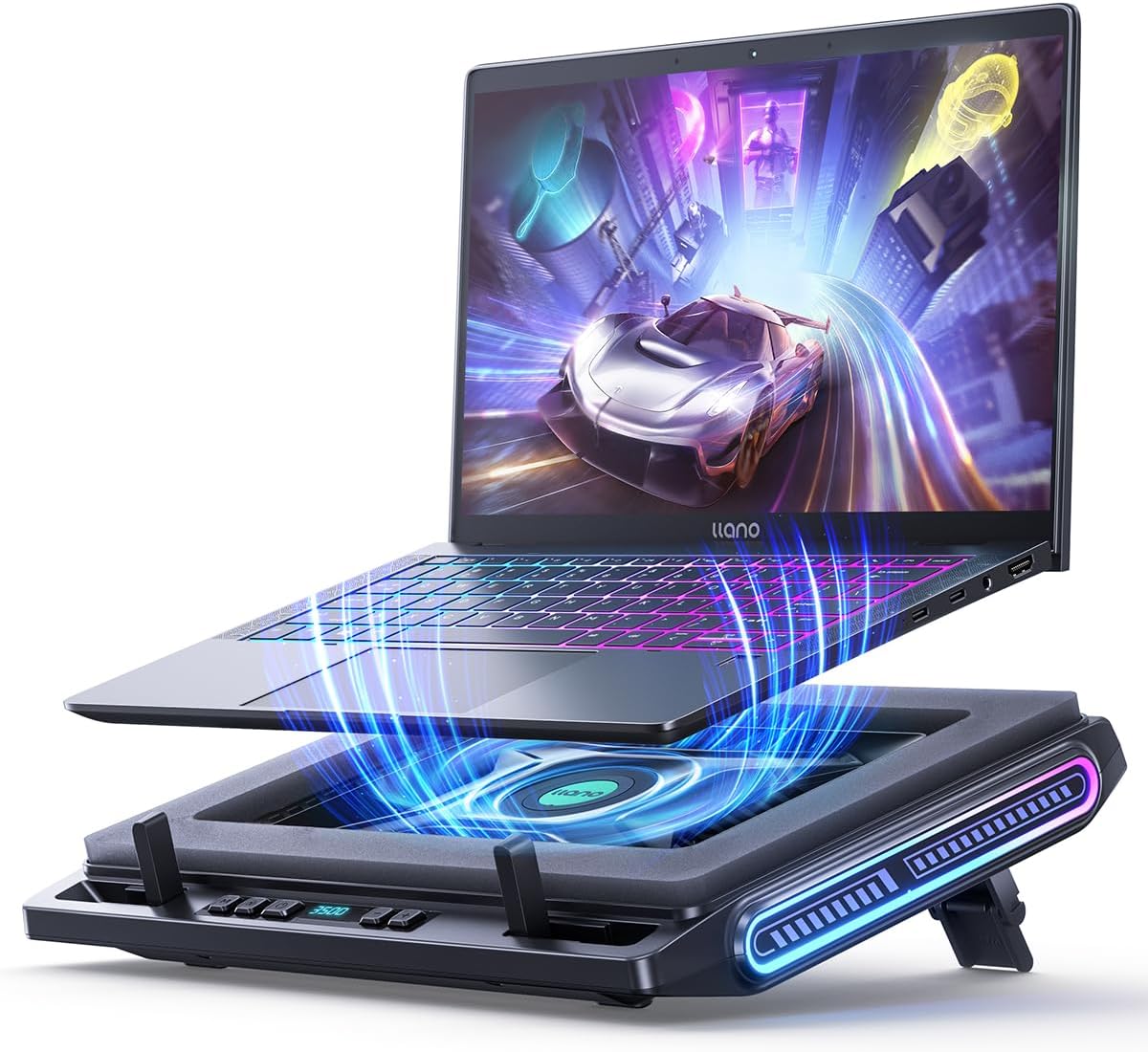
The llano V10 Gaming Laptop Cooling Pad features a high-efficiency 4.72-inch turbo fan powered by a pure copper motor delivering up to 3500 RPM, reducing laptop temperatures by up to 38°C. It supports laptops from 13 to 17.3 inches, includes 12 customizable RGB lighting modes with memory recall, and offers tactile physical controls for precise fan and lighting adjustments. Designed for comfort and durability, it has a 3-level ergonomic stand, anti-slip baffles, a removable dust filter, and dual USB ports for added connectivity, making it ideal for gamers and power users seeking reliable, stylish cooling performance.


| ASIN | B0D4DS24TG |
| Best Sellers Rank | #946 in Computers & Accessories ( See Top 100 in Computers & Accessories ) #27 in Laptop Cooling Pads |
| Brand | llano |
| Color | Black |
| Cooling Method | Air |
| Customer Reviews | 4.5 out of 5 stars 716 Reviews |
| Enclosure Material | 100% Copper Motor, Composite, Metal |
| Item Dimensions L x W x H | 14.8"L x 11.4"W x 2.5"H |
| Manufacturer | llano |
| Material | 100% Copper Motor, Composite, Metal |
| Model Number | V10 |
| Number of Fans | 1 |
| Product Dimensions | 14.8"L x 11.4"W x 2.5"H |
| UPC | 768771299152 |
| Unit Count | 1 Count |
| Warranty Description | One Year Warranty |
V**K
Strong cooling, good value, minor noise
Have been using it for a while. Cooling performance is really solid and does the job well. The fan speed is powerful and pushes a lot of airflow, which helps keep temps down during long use. For the price, it’s definitely worth it. The only downside is the noise level. Fan speed can be somewhat loud on higher settings, but if you put on headphones, you almost hear nothing. The RGB lighting is a nice extra and looks clean, not too distracting. Overall, a good balance of performance and value.
S**J
Hands down the most powerful cooler on the market today.
Most powerful cooler on the market today for smaller laptops. Any laptops without the numpad keyboard, 14" ballpark, this would be your most powerful option available on the market. Build quality is solid. materials are not flimsy, things function as they should, parts are clean and durable. RPM is adjustable by increments of 100. at 2600+ RPM, I could be running ultra graphics on some intensive games on my ROG Zeph G14 and it drops a solid 20 degrees. Laptop used to burn my fingers on touch - now it actually feels lukewarm at most. With great power comes some noise. I use a headset so never really notice it myself, but it does get fan-noisy above 2000. If all you are looking for is a mild cooler for a general purpose laptop, this is overkill. If you are gaming and you have a smaller set laptop, go with this one. The lights are a nice bonus. I personally don't care much for flashy looks, but if that's what you like, then this is gonna be your jam.
M**L
It’s working well!
I bought this for my g14 and I can view the temps drop in real time. It’s a great little fan! Really quiet and efficient too on the lower settings. Instructions were easy to understand too. Seems well built so far. My usb mouse dongle doesn’t fit in their usba but it’s not a big deal to me as I wasn’t expecting ports anyways. Great fan!
B**X
Best for 13" - 15" Laptops & Slightly Quieter Than V12
I have both the V12 and V10 for my ASUS ROG Zephyrus G16 Laptop. I've had the V12 for a month and decided to purchase the V10 to see the power of 3500 RPM & have available for family members to use. I can already tell the difference: I would argue that at max RPM, this one (V10) is slightly quieter. The temperature drops 20 degrees Fahrenheit quickly. But in terms of airflow, I'm seeing better results with the V12 for my 16" laptop, despite the max RPM reaching 2800 on that model. I think the major flaw with the V10 is that the formation of the holes built are in a rectangular formation (versus the V12 which has a circular set of holes around the fan in the gap), and the shape prevents some of the airflow from reaching the full bottom at all angles as intended (& preferred). Although this is advertised for sizes up to 17" laptops, I would recommend this cooler for anyone with a laptop that is smaller than 15", as I feel the size & shape is more accommodating. I can imagine at the time of release that it was considered the best of the best. I can at least hand this off for family members to use with full confidence that it does work really well. For me personally, I will be sticking to the V12, for size & the true 360 airflow needed for my 16" laptop.
Z**U
Effective Cooling Solution for Laptops with Bottom Vents
Before I get into my review, I want to mention that if your laptop doesn't have bottom vents, you might want to save your money and skip the Llano V10 Pro. The instructions suggest not using the foam in that case, but honestly, you won’t get much benefit without bottom vents. This fan won't magically cool through a sealed case. But if your laptop has bottom vents, read on... This cooling pad works. I was skeptical at first, but my laptop temperatures dropped by 10-20°C depending on the activity. And this is at less than half fan speed. The biggest reductions happen during high-heat activities like gaming, but even general use shows improvement. In terms of cooling, I give this an A++. It really does the job. My Llano V10 Pro used to get hot enough to make the keyboard uncomfortable to touch, but with this pad, that issue is gone. I've tried other cooling pads that either did nothing or made things worse. As for noise, if you crank it to full speed, it's loud. There's no sugarcoating it. However, I usually run it at about one-third speed, where you can hear it, but it's not obnoxious. It's more of a "what’s that faint sound?" level. If you need to run this at 100%, you likely need more than just a cooling pad. Even at full speed, though, using headphones can help. The only downside is an annoying whine at lower RPMs, and since it's controlled with a physical dial, finding the right setting can be a bit tricky. When it comes to lighting, I'm indifferent. I don’t care much for it. I did struggle to turn off the disco light show at first (no instructions provided), but eventually, I managed to find a single color I liked. Stability and build quality are impressive. My laptop is heavy, yet it doesn't budge on this pad. The pad itself is sturdy and doesn’t slide around, and the laptop stays put as well. Before buying, I saw a review saying it’s just a fan in a case with foam, and while that's true, it's a solid case with a great fan. The foam helps direct the airflow to the laptop instead of the desk. The USB hub is something I didn't bother with, so if that’s important to you, check other reviews. Ergonomically, it’s a bit unusual but not bad. The sturdy braces at the bottom keep your laptop in place but stick up even at the lowest setting, which can be slightly annoying depending on where you rest your hands. The pad allows for raising the back to different heights, though some of the increments seem impractical. Fortunately, the main height options are comfortable. My main complaint is the complete lack of documentation. There’s none. They do indicate which foam to use (which is important), but figuring out the lights is a guessing game. Good luck! One thing to watch out for: check where your laptop vents are. Mine are toward the center/back, so I had to adjust the braces to position the laptop correctly over the fan. There are three brace positions, so it should accommodate most layouts, but make sure to position the vents properly. If your laptop has temperature issues, I highly recommend the Llano V10 Pro. It works.
E**R
Everything it's hyped up to be. The best there is.
The PROS: Honestly, it works, wow I mean the numbers !! On idle, I used to be around 42-48 degrees with a regular 3 fan laptop cooler and while gaming a demanding AAA game like Control on the highest setting, I would get an average of 80-95 degrees on the CPU (i7 13th gen) and 70-75 on GPU (RTX 4070). Now while using this cooler, just on 1200-1500 speed (barely noticeable noise) It went down to 29-35 degrees on idle and playing the same game on the highest settings, my CPU stays at a cool 55-65-75 degrees and the GPU even less !! I'm using CoreTemp to log the temps and also HWiNFO64 with RTSS as an OSD. The CONS: Honestly not a fan of the lights, wish you could just turn them off, you can only change modes and colors (also the red is kinda pink and it doesn't match any other red I have anywhere) I also wish it could be propped up higher, like more inclined, on it's highest inclination, it's still a bit on the low side the screen doesn't actually meet eye level, I haven't tested the USB ports, but I guess they should probably work for common things such as connecting a keyboard, mouse, etc... Most of these cons are minor things and strictly my opinion. I also wish it had some kind of auto power down feature when you turn off the laptop, it has it's own power adaptor so unlike other coolers, you have to turn it on and off every time you want to use it, also, it came with a sticker with the names for the buttons, and it kept on unsticking from one corner, so I saw the images of the product and there was no sticker present in the pics, so I guessed it was just there for new users and should be removed, well it left a sticky residue that I had to rub off and clean properly, not a fan of stickers that leave gunk. Verdict: Perfect for "smaller" gaming laptops such as Asus TUF F15 models 15.6" screens, fits like a glove, I guess for bigger laptops maybe the older Llano model would be better, this cooler is the best there is if you really want to keep your laptop cool and avoid overheating and throttling while also preserving it's lifespan, if you can look past the minor negative details. I really hope it sticks by my side for many years and if it ever dies, I would definitely buy another one.' P.D. As another user discovered you CAN turn off the RBG lights by long pressing the MODE button, one less minor complain. P.D.D: I bought a second of for my other laptop, such a great cooler, gamechanger for sure. P.D.D.D: I've owned it for several months already and another great thing I've noticed is the filter on the bottom, it must be regularly cleaned like once a month or month and a half, the thing is that it traps dust and fluff like a magnet, and that is great cause that's less dust that goes into your laptop cause all the forced air from the bottom is practically filtered, great stuff !!
S**N
The Real Deal
I've owned 5 other cooling pads. They were all $20 - $35 pieces of plastic junk, or maybe light metal junk that felt like plastic. They all had pretty colored lights, had varying noise levels, and would cool my gaming laptops down by maybe 2 or 3 degrees at most, and most of that minimal effect was probably due to the fact that they elevated the laptop at an angle, allowing more air to circulate. I saw the Llano on sale for about three times as much as the junk pads and thought "how much better can this thing be for close to a hundred clams?". The answer is ... a lot! (All degrees mentioned are in Celsius.) Pros: * Lowered average in use over time temps by about 10 to 15 degrees on mid-range speed settings (1200 to 1500 rpm). * Instantaneous cooling of 15 to 20 degrees once turned on. * After hours of intensive 5060 gaming, max temp was less than 80 and averaged about 55 to 65 degrees. * Low noise levels - barely audible at 1500 rpm and about 65 dB at full (3500 rpm) speed. * Nicely integrated side mounted LED panels if you care about such frippery. * Can hold laptop in plane with laptop completely flat and still works fine. (Elevation is an option but not a necessity.) * 1 in 3 out USB hub - connect to laptop with USB C cable and you get two USB A ports and one USB C port out. (But these are not 3.2 standard...) Neutral: * Cannot be powered by your laptop, needs separate power plug and cable. The junky ones can power their meager selves off your USB A port, but you get what you pay for in those cases - i.e. more convenient power and barely noticeable function. * Can only be used with laptops with bottom vents / intakes. Most have these, but not all. * Not entirely thrilled with the hub feature set. Would rather connect with a USB A cable (many laptops have only a single USB C port and that is often a high speed 4.0 or Thunderbolt port, so it hurts to lose it by connecting it to the cooler hub) and then I wish the hub ports out were more modern standards. I usually don't bother with even connecting the hub, but I would if it offered superior functionality. Cons: * Cost * Not especially portable, even less so with separate power plug and cable. Bottom Line: Running your laptop at 70 degrees or lower consistently can add years to its life, and this is the only effective cooler I've found that can guarantee that performance. Junk coolers are cheaper, but at the end of the day do not do the job you want them to do.
G**M
Performance? Yes. Aesthetic? Breaker
Performance is there. The aesthetic is falling short. You can read a million reviews about the performance it provides any genuinely does work. I have a ROG Z13 flow, and it fits snugly inside of the phone grasping the gaming tablet perfectly actually doesn't even need to use the standoffs to hold it because it fits inside the phone at a tilted angle so that all the exhaust comes out of the OEM vents. After that you could read any other review about performance and it will be justified. What bugs me is that I have a red black and gold aesthetic in my office. I didn't realize that the display is going to be so brightly blue and it's now in Center in front of me and it breaks up my color schemes, on top of that the RGB cannot be turned off and the only thing that is "red" is closer to a neon pink. So I have to decide is the performance of the cooler and it welcome addition over the unwelcome aesthetic. Air flow is perfect. Noise level is what you would expect of a full size desktop. But I'm simply not welcoming the colors
A**S
Plastic built. Meh
Plastic body, just dont drop so it wont get any damage. The fan is strong. But I hope it will last.
E**N
Surpreso com o desempenho
Não imaginei que fosse refrigerar tanto. Usando junto com o ar-condicionado diminui até 20°C a temperatura. Impressionante! Vale a pena
X**I
No enfría
A mí no me funciona, no baja las temperaturas con un portátil Alienware Intel core ultra 9
A**R
Nie warte
Za tą cenę lekkie nieporozumienie. MAX 200 PLN. Zero efektywności podczas chłodzenia i grania na MS Surface Laptop Studio 2.
O**E
bruyant mais refroidit bien, HUB USB pratique
j'avais un refroidisseur Klim que j'avais acheté il y a longtemps vraiment pas cher, qui faisait le boulot pour des tâches pas trop gourmandes, mais j'ai acquis un pc gaming récemment qui m'a mise en difficulté sur la température de mon processeur, ça dépassait 90° voir + rapidement même sur des jeux ne demandants pas une grosse config et je ressentais vraiment une baisse de performance in game malgré que c'était censé supporter cette température, j'ai dû brider la puissance de mon processeur pour stabiliser à 80max. Bref le fait de devoir le brider m'embêtait du coup j'ai cherché à voir ce que je pouvais faire pour aider au refroidissement, j'ai beaucoup hésité entre le klim turbofrost et le llano . j'ai finalement choisi le llano. Agréablement surprise. J'ai testé de jouer à mon jeu habituel, j'ai débridé mon processeur pour qu'il tourne fort, j'ai testé à 2500 en puissance du refroidisseur et mon processeur sur les différents tests effectués ne dépassait pas 75° sur jeu très gourmand (la plupart du temps sous les 70° même) ce qui est très bien. Ce que j'apprécie c'est que ça permet aux ventilateurs de mon pc portable d'être beaucoup moins solicités. Avant d'utiliser llano mes ventilateurs PC tournaient à leur maximum de 6300 avec un bruit aigu assez désagréable en plus d'être plutôt inefficaces, et là grâce au llano ils tournent à 4400max, sont beaucoup plus silencieux. Pour ce qui est de la température de la carte graphique je n'ai pas vraiment effectué de tests, je n'ai jamais eu de soucis de température avec elle, uniquement du processeur, la carte graphique reste toujours autour des 45-50° Pour faire court: Points forts: - aide vraiment à bien faire circuler l'air dans le pc et à l'expulser, avant, sans refroidisseur je sentais peu l'air chaud sortir sur les côtés, là je sens que ça fait vraiment le job -jusqu'à 2500 le bruit de ventilation est largement supportable avec ou sans casque -esthétiquement beau, semble robuste (à voir dans le temps, je viens de l'avoir il y a moins d'une semaine) -le fait qu'il y ait un filtre à poussière à l'entrée d'air me semble vraiment bien, la poussière étant un gros soucis dans les pc portables, si il fonctionne bien ça permettra de devoir l'ouvrir beaucoup moins souvent -j'ai un pc 17', ça taille bien , la mousse isole bien et empêche bien l'air de fuiter sur les côtés sans boucher les aérations de sortie du PC -le hub d'usb supplémentaires est un + , j'avais peu de ports sur pon pc portable de base, donc ça m'aide bien Points faibles: - je dirais le bruit mais prévisible, si on veut du puissant, au bout d'une certaine vitesse le bruit est inévitable. Mais si vous ne supportez pas les bruits forts, à 3500 on peut tout de même comparer le bruit à un petit aspirateur manuel je dirais ce qui peut être pénible pour l'entourage sans casque -je pensais qu'on pouvait auto alimenter le refroidisseur avec l'énergie du PC mais j'ai l'impression que ce n'est pas possible. le HUB permet juste d'ajouter des périphériques comme clavier/souris casque etc. donc prise de courant obligatoire pour l'alimenter -Edit pour donner mon avis plusieurs mois plus tard: Ma principale crainte était sa durée de vie, d'une panne potentielle étant donné que je l'utilise en général une dizaine d'heure par jour mais après 5 mois d'utilisations intensives rien à signaler pour l'instant, fonctionne toujours bien et a bien rempli sa fonction durant la canicule de cet été. Le pc est resté au frais (processeur à 72° degrés max avec processeur boosté en jouant sur des jeux gourmands) sous des conditions d'environ 30-35°C dans la chambre , par contre dès que je l'éteins ça remonte très très rapidement à 85-90+ voir bien plus. Il reste donc toujours très efficace pour l'instant ;) J'ai un doute sur la mousse isolante je sens un peu d'air repoussé sur les côtés où ça n'est pas censé passer (c'est censé servir à ça la mousse isolante) mais pour l'instant ça n'a pas l'air d'influer la qualité de refroidissement (je me souviens pas si lors de la première utilisation c'était déjà comme ça ou si c'est la mousse isolante qui épouse mal le contour de l'ordinateur pour éviter les fuites d'air)
Trustpilot
1 month ago
1 month ago