


🖥️ Elevate your build with a case that’s as smart as it looks!
The JONSBO D41 MESH SC White is a premium ATX computer case featuring a built-in 1280x800 HD LCD screen, robust support for RTX 4090 GPUs up to 400mm, and a versatile tool-free design. It accommodates full-size MATX motherboards, high-performance air coolers up to 168mm, and 360/280mm AIO radiators, all wrapped in a stylish white mesh chassis that combines airflow with modern aesthetics.
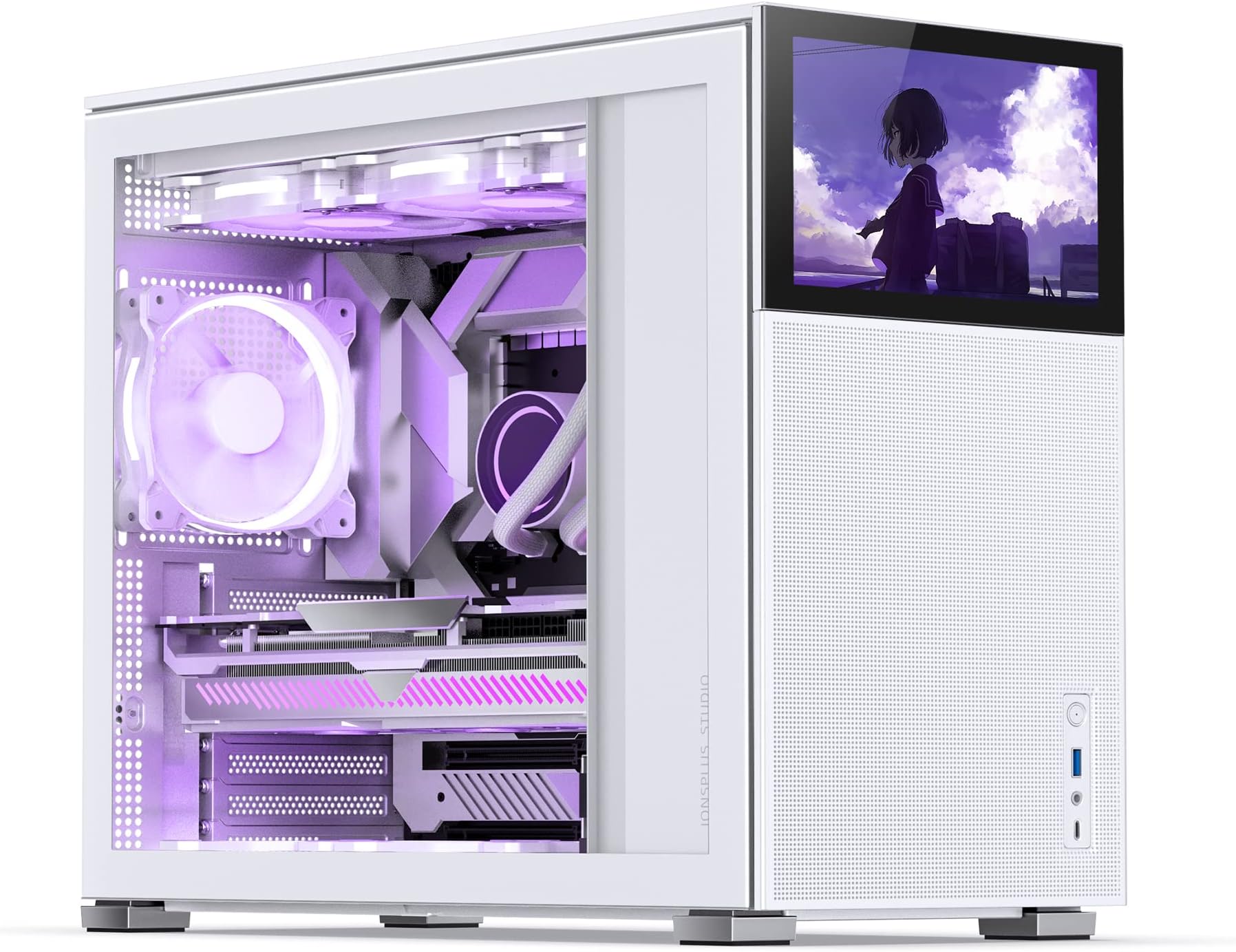





| ASIN | B0BQJ5S99L |
| Brand | Jonsbo |
| Brand Name | Jonsbo |
| Case Type | Mid Tower |
| Colour | White |
| Compatible Devices | Micro ATX (MATX) motherboard |
| Cooling Method | Air |
| Customer Reviews | 4.4 out of 5 stars 62 Reviews |
| Enclosure Material | Metal, Plastic |
| Hard Disk Form Factor | 3.5 Inches |
| Internal Bays Quantity | 407 |
| Manufacturer | Dongguan Sibositong Industrial Co., LTD |
| Material | Metal, Plastic |
| Model Name | D41 MESH SC Black |
| Model Number | D41 |
| Motherboard Compatibility | Micro ATX |
| Power Supply Mounting Type | Bottom Mount |
| Supported Motherboard | Micro ATX |
| Total USB 2.0 Ports | 4 |
| Total USB Ports | 4 |
K**R
The LCD front panel is the BOMB! 12/10 I'd buy this again!
Absolutely BEST computer case I have purchased and worked with out of the many builds I have done. It really is great. Real easy to work with and loom wires. Lots of builder friendly touches and the removable 8-inch LCD front panel, which operates as an additional monitor, looks fantastic! You can display system stats on it or run animated wallpapers on it (both require separate software ro do so) as I do using wallpaper engine. It's my Stormtrooper build so I can switch out different animated Stormtrooper-themed wallpapers to whatever suits me that day and I'm not locked into looking at the same case every day.
Y**.
Fait parfaitement ce qu'on en attend.
C'est le boitier parfait ou presque. c'est juste dommage de ne pas avoir un rack 4 HDD pour un RAID 10 mais tout le teste et vraiment bien pensé sans être trop couteux.
S**.
Excellent case - not a ton of cable management room
This was my first build ever with the help of my partner. Instructions easy to follow, the case is cute and fun and the screen on the front is super cool! Only complaint would be the lack of cable room in the back very thin and hard to get the case on afterward but we managed! And it didn’t come with any fans but that was on me because I just assumed it did! Overall very happy with my purchase
D**K
Decent Attractive Case - I recommend experienced builders only.
I am building a PC for a friend, and she wanted this case because she liked the customizable screen and exterior aesthetics. This case did not come with any fans (first I have seen in a while that didn't). You would think that for the price they could at least include one fan. The design is flawed in a way that makes it not "easily" compatible with all different types of internal components, so smaller ones shouldn't be an issue. I'm not saying that it isn't compatible with large components - I'm just saying that it won't be easy because it's a compact case. The location of internal components, such as the PSU, interfere with a lot. Unless you have a smaller AIO radiator, or one with 90 degree elbows coming off the radiator, you are going to have a harder time with this case. My friend's AIO doesn't have 90 degree elbows coming off the radiator, causing the PSU to give very little clearance. Normally, I have the radiator fans above the radiator, to blow the air into the radiator, but I couldn't because it lowered the radiator, causing a kink in the hose from the PSU. I would have lowered the PSU, but due to a tight fit from the PSU cables I wasn't able to. Before switching the fans I tried reversing the radiator, where the hoses come down in the rear, but it caused them to be in the way of the exhaust fan mount. To make this work I switched it again, placing the hoses above the PSU, but with the fans under it, instead of above, so they pull air through, instead of pushing it. The hoses are not kinked but it's a tight fit, and it worked. The case does have a mount on the front for a fan (behind the front cover), but I would recommend installing the PSU above the lowest mount because it will obstruct the fan mount otherwise. The cables coming from the PSU may still obstruct your ability to mount a fan in the front, so be aware of that - I was unsuccessful in my attempt to mount a fan there. The cable management isn't terrible, but the design makes it almost impossible to hide them coming from the PSU. It has a side cover, that hides the PSU and cables, but only on the side. Due to limited space, the cables were bulging out, for all to see, in front of the hardware. I'm sure that I could have zip tied them, to make them fit better, but was on limited time, so I had the typical bunched up mess under it. The mount for the HDD is (guess where) just under the PSU, but the cables are in the way of the mount, and so tight that there's just no room for the mount. I had to relocate the HDD mount to the left, which worked to hide the PSU cables, but resulted in using the bottom vent holes as screw holes for the mount, instead of the holes intended for the mount. I have provided some pictures to show what I'm talking about. Mind you, I used an 850W PSU (which is the largest I would recommend). If I would've gone with a smaller PSU (650, or 700, or possibly a high watt with a compact design) I would have probably had an easier time, and been successful in mounting a front fan. Don't mind the PCI-E cables coming from the GPU - they're only temporary, until the new ones arrive. I'm grateful that I was able to make it all work in the long run. If they would have added about 5 inches to the height of the tower, or had the PSU mounted on the bottom, along with all the cables, and an internal box to cover them all (like a solid bottom), that would have been amazing, and would have made this my favorite compact case. To anyone looking to buy this case please consider smaller components (especially the AIO), to make your build easier.
M**E
super boitier, mais...
Bonjour à toi qui va lire mon commentaire sur le sujet de ce boîtier modèle D41 MESH SC. Cette tour de type moyenne est vraiment polyvalente, mais du coup pourquoi pas 5 sur 5 ? Concernant la configuration tu pourras mettre à l il n aura pas tellement de problèmes car tu pourras installer un watercooling de 360 sur le haut du boîtier sans soucis de même une grosse carte graphique à 3 ventilateurs passera sans aucun problème. Les quelques branches de l'étoile que je retire sont : 1* Pas de filtre sur la face avant du boîtier et aucun ventilateur inclus 2* Pas assez de profondeur au niveau du passage de câble. Car tu veux tout simplement installer ton contrôleur fan ou voir RGB et qui fait plus d'un centimètres la porte ce fermera pas. 3* Pas la possibilité de déplacer la cage des disques. 4* Tu dois faire un choix entre mettre un ventilateur en 120 sur la face avant du boîtier ou de conserver la cage des disques de stockage des HDD 5* Connectique trop faible sur la face avant, il un USB et un type C. J'aurais preferer en plus un bouton reset, 2 USB 3.2 en plus, ce qui aurais était cool ! Pour ceux qui veulent en savoir plus ou/et du visuel, tu peux te rendre directement sur ma chaîne pcsouris sur youtube.
Trustpilot
2 days ago
1 week ago