
Buy anything from 5,000+ international stores. One checkout price. No surprise fees. Join 2M+ shoppers on Desertcart.
Desertcart purchases this item on your behalf and handles shipping, customs, and support to Senegal.
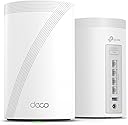
Upgrade your home Wi-Fi experience with the Deco BE10000 Whole-Home Mesh Router. This versatile device can extend the range of your existing mesh network or serve as a standalone router. It covers up to 5,800 sq. ft. with ultra-fast Wi-Fi 7, ensuring your entire home is blanketed under one optimized network. Say goodbye to frustrating dead zones and sluggish connections! †△ Perfect for 4K/8K streaming, lag-free gaming, and lightning-fast downloads, you'll revel in speeds of up to 10 Gbps combined across the 6GHz, 5GHz, and 2.4GHz bands. What's more, it effortlessly handles up to 200 connected devices, making it ideal for even the most demanding smart home setups. Additionally, the Deco BE10000 boosts multi-gig internet and wired connectivity options, featuring four 2.5 Gbps ports and one USB 3.0 port for unparalleled flexibility and blazing-fast data transfers. Setting up and managing your network is effortless with the TP-Link Deco app. Quickly establish your network, customize settings, and monitor network traffic metrics. Most importantly, keep your network and all connected devices safe with TP-Link's premium network security service, HomeShield. Experience the future of home networking with Deco BE10000 – where speed, coverage, and security converge in one unbeatable package. Review: good - Working fine but i cant connect my WIFI 7 devices to this, i mean our android phone is showing WIFI 6e and sometimes WIFI 6 but haven't seen WIFI 7 yet Review: Fácil de instalar - Te permite crear una red de 2.5 a 5GHz, una de 6GHz y una MLO de 5 y 6GHz, además de crear una red para invitados, aislar dispositivos de tu IoT. Con 2 cubre perfectamente 200m² y atraviesa paredes sin tanto problema. Se acabaron mis problemas con la disponibilidad de mis dispositivos.


| ASIN | B0CN8WBXY2 |
| Antenna Location | Gaming, Home |
| Antenna Type | Internal |
| Best Sellers Rank | #3,517 in Computers ( See Top 100 in Computers ) #17 in Whole Home & Mesh Wi-Fi Systems |
| Brand | TP-Link |
| Built-In Media | 1 RJ45 Ethernet cable, 2 Deco BE63 units, 2 Power adapters, Quick Installation Guide |
| Color | White |
| Compatible Devices | Smartphone |
| Connectivity Protocol | Wi-Fi |
| Connectivity Range | 5800 Square Feet |
| Connectivity Technology | Ethernet, Wi-Fi |
| Control Method | Voice |
| Controller Type | App Control |
| Coverage | 5,800 sq. ft. |
| Customer Reviews | 4.3 out of 5 stars 479 Reviews |
| Data Transfer Rate | 10 Gigabits Per Second |
| Frequency | 6 GHz |
| Frequency Band Class | Tri-Band |
| Frequency band class | Tri-Band |
| Has Internet Connectivity | Yes |
| Is Modem Compatible | Yes |
| Item Dimensions L x W x H | 10.7L x 10.7W x 17.6H centimeters |
| Item Weight | 3.33 Pounds |
| LAN Port Bandwidth | 2500 Mbps |
| Manufacturer | TP-Link |
| Maximum Upstream Data Transfer Rate | 5000 Megabits Per Second |
| Mfr Part Number | Deco BE63(2-Pack) |
| Model Name | Deco BE63 |
| Model Number | Deco BE63(2-Pack) |
| Model name | Deco BE63 |
| Number of Antennas | 4 |
| Number of Ports | 4 |
| Operating System | Omada |
| Other Special Features of the Product | Access Point Mode, Guest Mode, QoS, Remote Access, WPS |
| Router Network Type | hybrid |
| Security Protocol | WPA2-Enterprise, WPA3 |
| Special features | Access Point Mode, Guest Mode, QoS, Remote Access, WPS |
| UPC | 840030712692 |
| Unit Count | 1 Count |
| Wi-Fi Generation | Wi-Fi 7 |
| Wireless Compability | 802.11.be, 802.11ac, 802.11ax, 802.11g, 802.11n |
| Wireless communication standard | 802.11.be, 802.11ac, 802.11ax, 802.11g, 802.11n |
E**R
good
Working fine but i cant connect my WIFI 7 devices to this, i mean our android phone is showing WIFI 6e and sometimes WIFI 6 but haven't seen WIFI 7 yet
A**A
Fácil de instalar
Te permite crear una red de 2.5 a 5GHz, una de 6GHz y una MLO de 5 y 6GHz, además de crear una red para invitados, aislar dispositivos de tu IoT. Con 2 cubre perfectamente 200m² y atraviesa paredes sin tanto problema. Se acabaron mis problemas con la disponibilidad de mis dispositivos.
N**L
Blazing fast, rock solid coverage
Upgraded from an older AX mesh system to the Deco BE63 a few weeks ago and the difference is night and day. Setup was painless — the Deco app walked me through everything in about 15 minutes, from plugging in the main unit to placing the satellite across the house. No tech headaches. Speed is insane. I’m pulling close to gigabit wired and wireless speeds throughout the entire house, even in the back rooms where my old system used to drop to like 80mbps. The 6GHz band on WiFi 7 is a game changer if you have devices that support it — pings are super low, no lag on streaming or gaming. Coverage is excellent with just two units. My house is around 2,500 sq ft and signal stays strong from the garage to the upstairs bedrooms. Handoff between nodes is seamless, no dropouts when I’m walking around on a call. The 2.5G WAN/LAN ports are a nice touch for future-proofing, especially if you have a multi-gig internet plan. App controls are solid too — easy to see connected devices, set up guest networks, and run speed tests. Only downsides: it’s expensive, and some advanced features like more in-depth QoS are locked behind the HomeShield paid tier. The units are also a bit large compared to older Deco models, so factor in shelf space. Overall, if you want top-tier mesh performance and have devices that can take advantage of WiFi 7, this is one of the best systems out right now. Worth the price if you care about speed and reliability.
E**Y
Great wifi 7 mesh system.
I went from a 4-node Wifi 6 mesh system to a 2-node BE63 system and it works much better than the previous system. Range is excellent, speed is very good, handling of concurrent devices is very good. The TP-Link app is basic but it lets you see current network activity and prioritize or block specific devices. 6GHz is great if you have a newer laptop that also supports it. I have it setup with wired backhaul and it was very simple to set up. Overall I'm very happy with it.
M**M
Almost Perfect but lacking pro and enthusiast features
tl:dr; There isn't a real web interface to manage the device and you MUST use the mobile apps but its an otherwise solid device I would reccomend Overall I'm pretty pleased with this but I have a few complaints. The Good: - Unboxing was easy and straight forward. Everything is nicely labeled. - Products themselves feel good in hand and feel stable when plugged in - Setup is VERY straight forward once you download their mobile app. If you run into issues, it presents troubleshooting instructions as you go. - Coverage and signale strength are great. Run the optimization tool af you finish your inital setup and you'll be set! - Wired network speeds seem to be acurate and the included cable is of reasonable quality - Good for folks who just want something that "works" in a basic home setup The Bad - The wall adapter is either going to work great for your or present a nightmare. It's an angled wall wart and in my current setup it didn't fit unless I let it cover other outlets - The web interface it all but useless. You have to configure 98% of things from the mobile app. This is really annoying when just trying to copy and paste settings or just quickly manage things without having to dig through menus. - Various network configuration options aren't really easily configuable and are sometimes problematic (getting static IPs to stick with certain devices was a nightmare). Compared to an older ASUS Zenwifi I had, you can't get as granular. - As far as I can tell, you MUST make a TP Link account to manage the device. Why do I need to make an account? What if I just need Wifi but not a network connected to the internet? - The status LED is on the BOTTOM of the unit. Depending on your setup, it's going to be hard to see In Conclusion - Would I buy it again? Yes - Am I happy with it? For the most part - Would I recomend this to someone with a complex home network? No - Would I recomend this to someone who just wants to add highspeed coverage to their home? Yes
Trustpilot
1 week ago
2 weeks ago