Desertcart purchases this item on your behalf and handles shipping, customs, and support to Senegal.
✍️ Elevate your iPad experience—write, draw, and create like never before!
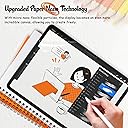
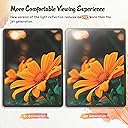
The KCT 2 Pack Paperfeel Screen Protector is engineered for iPad Air 13 and iPad Pro 13 (2024/2025 models), featuring a 0.17mm ultra-thin matte PET film that mimics real paper texture. It reduces glare for outdoor use, maintains precise Apple Pencil sensitivity, and installs bubble-free with plasma adsorption technology. Ideal for professionals and creatives seeking a premium, natural writing surface with added screen protection.
| ASIN | B0CXPL5QJB |
| Best Sellers Rank | #9 in Tablet Screen Protectors |
| Brand | KCT |
| Brand Name | KCT |
| Clarity | 10 |
| Color | Transparent |
| Compatible Devices | Tablet |
| Compatible Phone Models | iPad Air 13 & Pro 13 |
| Compatible Tablet Computer Models | Apple iPad Air 13-Inch (M2), Apple iPad Air 13-Inch (M3), Apple iPad Pro 13-Inch (M4) |
| Customer Package Type | FFP |
| Customer Reviews | 4.4 out of 5 stars 37,613 Reviews |
| Finish Type | Matte |
| Item Dimensions L x W | 10.9"L x 8.3"W |
| Item Hardness | 3H |
| Manufacturer | KCT |
| Material | Polyethylene Terephthalate |
| Model Name | iPad Air 13 & Pro 13 (2025/2024) |
| Model Number | iPad Air 13" / iPad Pro 13" (2025/2024) |
| Number of Items | 2 |
| Product Dimensions | 10.9"L x 8.3"W |
| Screen Size | 13 inches |
| Screen Surface Description | Matte |
| Special Features | Anti Glare |
| Unit Count | 2 Count |
| Water Resistance Level | Waterproof |
R**N
Fantastic paper-like texture!
I am incredibly impressed with this screen protector. It completely transforms the feel of drawing and writing with the Apple Pencil, giving it just the right amount of resistance—it genuinely feels like high-quality paper.The anti-glare properties are also outstanding. It cuts down reflections significantly, making it much easier to work under bright lights or outdoors. It was easy to install without bubbles, and it doesn't sacrifice screen clarity. Highly recommend it for any digital artists or student note-takers!
I**E
Easy Installation, Feels Like Paper
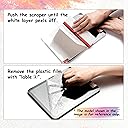
I took a chance on this product because I wanted to use my Apple Pencil for drawing on my iPad Pro and didn’t want to spend a lot of money. I was so impressed that I bought the product for my IPad mini also. Basics It comes with two screen protectors, non-skid pads to rest your iPad on during installation, stickers to act as a hinge for the screen during installation, cleaning supplies, and a squeegee. Installation: Easy Instructions are provided in the package along with a link to the video instructions. Definitely watch the video FIRST and follow them exactly for best results. I’m not good at installing screen protectors on anything larger than a standard iPhone and usually pay someone to install them on an iPad, but I was able to install this product on both an iPad Pro and iPad mini with no issues. The key is using the provided non-slip pads under your iPad and using the included stickers to hold the screen protector onto the iPad at one end, acting like a hinge. Once attached in this manner you clean off the screen and use different stickers to pick up any dust. Then with one hand, you begin peeling off the protective plastic to expose the adhesive to the screen, while using the provided squeegee with your other hand to lay it down and push out any bubbles. Some recommend installing in a bathroom with a hot shower running to reduce dust. Feel It definitely feels like paper. You will go through pencil tips more quickly if you do a lot of shading/coloring. I don’t have anything to compare it to so take that info account, I’m not a professional artist and just draw and color for funsies but I’ve done a fair bit of drawing and coloring lately and am pleased. I’ve only used it for 3 weeks so I can’t speak to its longevity, but with daily use it has held up well. I’m sure it will eventually wear out but it comes with two screens. Look It does make the screen have a matte look vs a glossy look. It isn’t extreme and doesn’t bother me when I watch YouTube videos or play games. It cuts down the glare a lot and makes it easier to use the iPad in sunlight. After using it awhile you will notice streaks or paths from drawing or shading, but cleaning takes these away. Apple Pencil It works great with the Apple Pencil and I’ve had no issues. You will need to replace your tips more frequently than using it on glass, especially if you do coloring or shading. Price I bought it for $7.99. Since it comes with two screen protectors it’s a steal. It’s nice to know that when the first one wears out I have a second one to replace it with. Overall I highly recommend the Paperfeel screen protector for the iPad. It is easy to install and makes the screen feel like paper. It works very well with the Apple Pencil for drawing, writing, and coloring. It cuts glare down significantly and has a nice feel to it. I’ve had it installed about 3 weeks and am very pleased with it. The price makes it an economical option if you don’t want to spend a lot of money or you’re not sure if you’d like a paper feel for your device.
D**Y
The Paper-Like Feel Is AMAZING! Perfect for Apple Pencil Users ✍️
I LOVEEEEE this screen protector! If you use your iPad for taking notes, drawing, creating, or even just watching your favorite shows, this is definitely worth considering. The paper-like texture makes using the Apple Pencil such a satisfying experience, and honestly, one of my favorite things about it is the SOUND! I love the little scratchy sound the Apple Pencil makes against the screen. It really does give you that feeling of writing on paper rather than sliding a pencil across a smooth glass screen. It REALLY Feels Like Paper! The paper-like texture is what makes this screen protector stand out for me. Writing with the Apple Pencil feels much more natural and enjoyable. Instead of that slippery feeling you get when writing directly on a smooth screen, there's a nice amount of texture that makes the whole experience feel closer to using an actual pen or pencil on paper. And the sound? LOVE IT! The subtle scratching sound when the Apple Pencil moves across the surface adds to the experience and makes note-taking feel so much more satisfying. If you're someone who enjoys the sensory side of writing, drawing, or journaling digitally, I think you'll really appreciate this feature. No Issues With Screen Functionality One thing I really appreciate is that the screen protector doesn't interfere with the functionality of my iPad's touchscreen in my experience. The screen remains responsive, and I can continue using my tablet as I normally would. I don't feel like I have to sacrifice the convenience of a touchscreen just to get that paper-like writing experience. The Display Still Looks Great! I also love that the screen protector hasn't noticeably affected the color or brightness of my display. That's important to me because I use my iPad for more than just writing. I still want to enjoy videos, browse content, and look at images without feeling like the screen protector is getting in the way. It's great to have that textured surface for the Apple Pencil while still being able to enjoy my iPad for everyday entertainment. Great for Notes, Drawing, and Creativity If you use your iPad for school, work, digital planning, drawing, or other creative projects, this paper-like screen protector is a great option to consider. It makes writing and drawing feel more enjoyable while keeping the tablet versatile enough for everything else you do on it. I especially love that it works for both productivity and entertainment. I can take notes or work on creative projects and then switch over to watching something without feeling like I've compromised my overall experience. Two Protectors Are a Bonus! The fact that this comes as a two-pack is another nice benefit. Having a second protector available is convenient if you ever need a replacement, whether from wear over time or an installation mishap. Final Verdict This is an easy five-star rating from me! I love the authentic paper-like feel, the satisfying sound of the Apple Pencil against the surface, and the fact that my screen still looks great and functions as expected. If you love taking handwritten notes, drawing, creating digital art, or simply want a more paper-like experience when using your Apple Pencil, I highly recommend giving this screen protector a try. It makes using my iPad that much more enjoyable, and I absolutely LOVE it! ✍️
J**N
Do not use the dust sticker
1. Unless you have access to an industrial clean room, abandon all dreams of dust free application. BUT! To increase your chances, wipe down the surface of the table/desk you’re at and make sure you’re not somewhere with a lot of air circulation. 2. DO NOT use the dust sticker, as it leaves a residue. DO NOT the microfiber, it leaves a TON of fabric particles. You’re better off having a mountain of alcohol wipe pads at the ready and using it to wipe off particles and letting it dry. 3. If you have tiny dust particle near an edge, you have a small window where you can use the alignment sticker to help pick up the film and use a small, neat corner of an alcohol wipe to grab the dust/lint particle. Be careful that you don’t introduce new particles as you do this though. 4. You’ve got to be steady but also quick as the longer it takes, the more opportunity for new dust particles to settle while you wait for the alcohol to evaporate away. 5. Watch the installation video. The part about how to use the positioning sticker is actually important and I might copy the technique for future film installations where possible. If you can apply the film without getting particles between the film and screen, you’ve got a great film that has that lays down flat really well with few bubbles that go away pretty easily. I did waste one film as it got too many dust particles I knew was going to perpetually drive me crazy, but my second installation attempt went much better. I really like the matte texture, and the film cuts down on the shiny glare (but you still get the muted/matte glare). I’m actually not sure that the experience of writing with the pen is all that much improved, and I think this would cause the nib to nib to wear down faster, but I’m okay with it since I like the texture of the film so much as it reminds me of my Kindle Scribe. All in all, even though I gave it a 4 out of 5 for the unhelpfulness of the installation material (dust sticker and microfiber), for the product itself, I would give 5 stars. Also, it cost a lot less than the $45 films I saw at Best Buy and Microcenter
C**E
pretty good
application process was easy to follow with tutorial video. fits great and feel great as well. I like that it has a matte texture and look and it seems to reduce glare a bit which is nice.
V**T
better than paperlike!
I got this screen protector to replace my paperlike screen protector. The old once had been through years of use and was starting to get scratched up, so I got this thinking it would be a temporary solution until I could afford another paperlike one I might not need another paperlike one though! this one is awesome, anti-glare, matte, it's got a rough surface that puts real resistance into the pen. it sticks great so far and it comes with everything you need to clean up your screen and align the new screen protector. the squeegee is even full-size so you can get everything down in (mostly) one go. I had very few bubbles and I don't think I had any issues with dust, which is a first. really surprised at how good this turned out for less than $10, again, especially compared to paperlike's model which is like $50. you get 2 screen protectors in this kit so if you mess up you can always try again. And it's small enough that it fits without getting caught and lifting from my case. Would definitely buy again!
N**S
It Finally Made My iPad Feel Like an Art Tool
I’m currently learning how to draw comics on my iPad, and the KCT 2-Pack Paperfeel Screen Protector changed everything for me. I originally bought my iPad around 2018 specifically for art, but I never really used it for that. The biggest problem was the slippery glass screen. I draw fine on my larger Huion tablet, which is also glass, but its size makes it feel much easier to work on. On the iPad, the Apple Pencil always felt like it was sliding around too much. I considered Paperlike and similar protectors, but I simply wasn’t going to spend around $50 on one. Instead, I continued drawing on Bristol paper and bouncing between that and my Huion. I finally tried the KCT Paperfeel protector, and it’s amazing. Now to be clear it doesn’t feel like smooth Bristol, but closer to hot-press paper and gives the Apple Pencil enough resistance to make drawing feel natural. For the first time since buying the iPad, I actually want to use it for what I originally purchased it for: making art and I'm actually on the verge of buying a new iPad. -Nathyn Masters Night Phoenix Press
K**N
unreliable tools and no recovery from bubbles EDIT
EDIT: Rating went from one star to four. The screen protector itself feels good and my pencil glides smoothly, better than anything ive tried (except for Paperlike). About bubbles: all that were visible on the screen, (including the one in the first photo) went away by themselves. Some bubbles along the edges remained which matters very little and is completely fine. My only issue that remains is the installation and bad tools, same points regarding my initial review. it’s unfortunate how faulty they are because other-wise I could have had an extra screen. If you’re looking into this protector, just make sure you install it flawlessly, the feel of the screen itself is great. ORIGINAL: the dust collecting stickers did not stick well enough to catch any dirt and the microfibre cloth itself would SPREAD dirt onto the surface. after eventually cleaning the surface any barely visible dust would begin to leave air bubbles on the surface which once appear cannot be removed. had to use 2/2 of the protectors that came with the package and by the end i was still left with small tiny bubbles. Tedious process without the reward and the tools were not much help.
M**.
المنتج ليس كما بالوصف
منتج ليس كما بالصورة وسي للغاية والبائع غير امين بالمره
Y**I
Sandpaper grit
too much grit, feels like sandpaper
L**A
EXCELENTES
Muy buena herramienta para aquellos que se dedican a hacer notas en su tableta. La mica es super fácil de instalar, viene con su kit de instalación. La sensación de papel es agradable y facilita la forma de escritura. Se siente todo más fluido. Recomiendo comprar puntas de aleación de titanio para su S Pen si piensan instalar esta mica. No se arrepentirán!
A**R
Whole thing came off as I pulled off the protector film
Went through all the instructions as directed and the whole film came off with the protective film "2" wasting a whole film.
A**A
No está mal, pero no me convenció.
No es la primera vez que compro una mica con acabado mate para mi tableta. Anteriormente tenía una mica “paper” de otra marca que me fascinó, pero dado que era más cara, esta vez, me decidí probar las micas de esta marca (ya que vienen dos por paquete). Sin embargo, para mi gusto estas micas tienen demasiada textura, por lo cual, siento que van desgastando la punta de mi pencil. Además, con esta mica, tengo que aumentar más el brillo, lo que genera que mi batería se consuma más rápido. En lo concerniente a la instalación, pese a que la marca brinda instrucciones muy precisas, en mi experiencia, fue muy complicado poner la mica, y eso, que yo sentía que ese tema de la instalación ya lo tenía dominado, porque le he instalado diferentes micas a mi tableta sin problema alguno. Esta vez no sé qué sucedió que fue bastante complicado para mí. Obviamente esa fue mi experiencia, quizás para otras personas este no es un problema. También comentaría que pocos días de usarla noté rayones y eso no me había pasado con la otra mica. No es un pésimo producto, pero para mi gusto y necesidades no se ajusta. Si quieres unas micas mate a buen precio, con textura notoria, igual y te van a gustar.
Trustpilot
1 month ago
1 day ago