


⌨️ Elevate your typing game with the keyboard that bends to you, not the other way around!
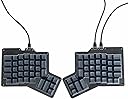
The Apos ErgoDox Hot DOX V2 is a premium split ergonomic mechanical keyboard featuring a 76-key ortholinear layout, hot-swappable Kailh Speed Copper switches, and a layer indicator screen. Designed for professionals seeking comfort and customization, it offers fully programmable thumb keys, real-time VIA/QMK firmware support, and USB-C connectivity with independently functioning halves. Durable PBT keycaps and customizable RGB lighting complete this high-performance typing experience.
| ASIN | B0CYVFWJ1L |
| Antenna Location | Everyday Use |
| Best Sellers Rank | 291,071 in Computers & Accessories ( See Top 100 in Computers & Accessories ) 4,726 in Keyboards (Computers & Accessories) |
| Box Contents | USB Cable |
| Brand Name | Apos |
| Button Quantity | 76 |
| Colour | Dark |
| Compatible Devices | Laptop, Mac, PC |
| Connectivity Technology | USB-C |
| Customer Reviews | 3.4 3.4 out of 5 stars (15) |
| Enclosure Material | Polybutylene Terephthalate |
| Generation | 2nd Generation |
| Hand Orientation | Ambidextrous |
| Is Electric | No |
| Keyboard Backlighting Color Support | RGB |
| Keyboard Description | Mechanical |
| Keyboard Layout | QWERTY |
| Manufacturer | Alpaca Keyboards |
| Model Name | ErgoDox 76 Hot Dox V2 Split Ergonomic Mechanical Keyboard |
| Model Number | Dark - Kailh Speed Copper Switches |
| Number of Keys | 76 |
| Number of Sections | 1 |
| Power Source | Corded Electric |
| Product Features | Backlit, Ergonomic, Hot-Swappable, Low-Profile Key, Split Keyset Design |
| Series Number | 29858581250247 |
| Style Name | Modern |
| Switch Type | Mechanical |
| Theme | Honeycomb |
| UPC | 679529711690 |
| Water Resistance Level | Not Water Resistant |
A**E
A quality build of an ergodox clone. USB-C, nice keys, nice cables. It really is a dream to type on.
J**Y
I do like this keyboard; QMK is a must-have for me. I have to knock off a few stars because this board is a little squirrelly. When I plug it in, I have to unplug it a few times before the board actually "works." Sometimes, one half will work and the other will not or nothing works at all. I had a key setup to turn off and on the RGB, but that only worked for one side of the board. When I update the configuration, sometimes I'll have to do this a few times for it to take. If I plug in the cables in a different configuration, the layers may not work.
M**L
I ultimately decided to return the product because it has one fatal flaw. The cable connections mount point and strength all come from the connection of the connector to the pcb. Any torque or movement to the cable is directly applied to the pcb. I only had my keyboard for a week before the connections were lose enough to the point of just using the mouse on the tray was enough to cause the keyboard to become disconnected and I would have to jiggle the connections to make them work again. Without that problem I would have nothing but great things to say. The displacement of the numbers took a while to get used to when coming from a G710+ but I eventually was able to retrain. The multiple thumb buttons was nice but I didn't find myself using anything but the two large buttons due to the distance and location of the other buttons from the thumb. I also picked the quick acting keys which would trigger with very little keypress and that is exactly what I got. I would find myself making a lot more typos than usual due to slight touches but that is all my my fault for getting this option. The weight and feel of the two halves is decent. Heavy enough to keep them in place on a quasi slippery surface. I was still getting used to the sensitive typing before returning but with enough practice I think it would have been extremely fast typing. Overall, a 10/10 but the connectors brings it down to 0. Ergo, get those connectors mounted securely to the case and run wires to the PCB and I'll come crawling back on my knees asking for another chance.
A**N
Out of the box, this displays the keys that you most recently typed in the right hand LCD. That includes when you just typed your password. It's the sort of feature that sounds neat but doesn't really make any sense. If you dig around online and are pretty handy with code you can flash the firmware with that hacked out. I replaced it with a sort of character per second chart that shows me how fast I've been typing.
M**N
after lots of research I got this, dont regret it
Trustpilot
1 week ago
1 month ago