Desertcart purchases this item on your behalf and handles shipping, customs, and support to Senegal.
🖨️ Print smart, live vibrant — your all-in-one home office hero!
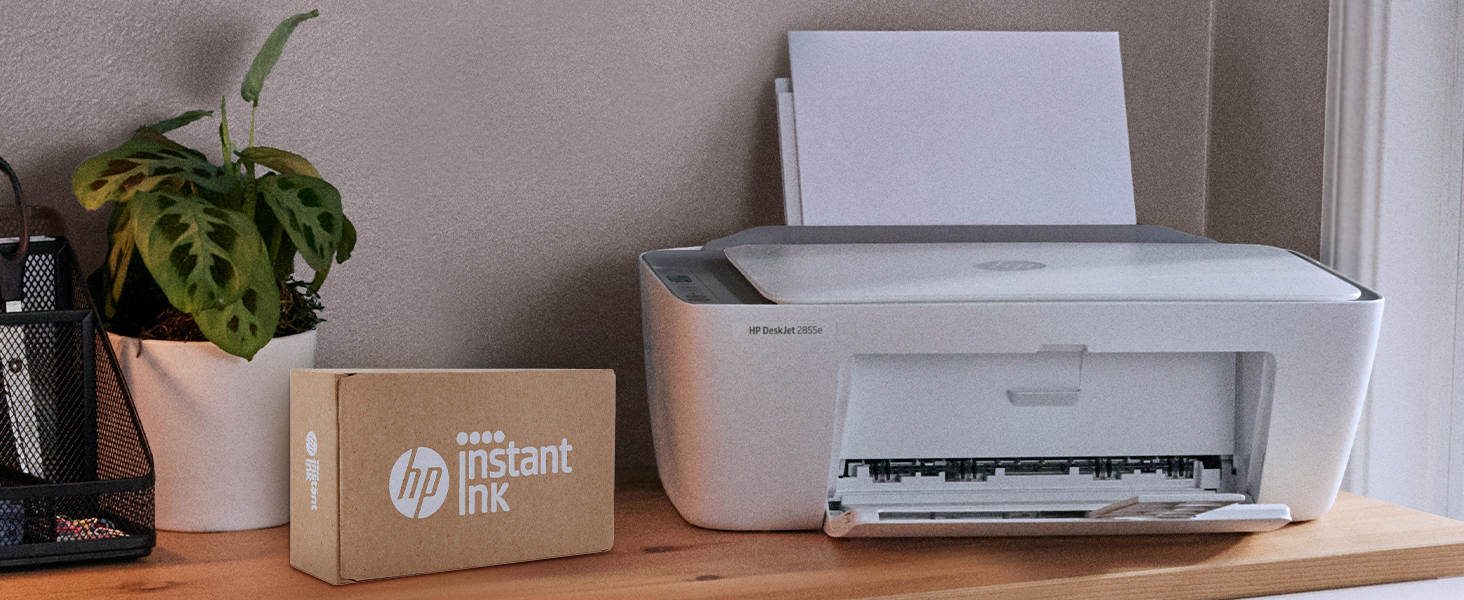
The HP DeskJet 2855e is a compact wireless all-in-one inkjet printer designed for home and student use, offering color printing, scanning, and copying. It delivers up to 7.5 ppm black-and-white and 5.5 ppm color print speeds with a high resolution of 4800 x 1200 dpi. Featuring HP AI for optimized print layouts and a 60-sheet input tray, it connects via 2.4 GHz Wi-Fi and includes a 3-month Instant Ink trial for hassle-free ink replenishment.


| ASIN | B0CT2R7199 |
| Additional Printer Functions | All In One |
| B&W Pages per Minute | 7.5 ppm |
| Best Sellers Rank | #47 in Office Products ( See Top 100 in Office Products ) #1 in Inkjet Computer Printers |
| Brand | HP |
| Built-In Media | 588S5A HP DeskJet 2855e All-in-One; HP 67 Setup Black Cartridge; HP 67 Setup Tri-color Cartridge; Regulatory flyer; Setup guide; Reference guide; Power cord [For ink volume and page yield information, visit http://hp.com/go/learnaboutsupplies ] |
| Color | white |
| Color Depth | 24 bpp |
| Color Pages per Minute | 5.5 ppm |
| Compatible Cartridge | HP 67 |
| Compatible Devices | Smartphones |
| Connectivity Technology | single band wi-fi (2.4ghz only) |
| Control Method | App |
| Controller Type | iOS |
| Customer Reviews | 3.7 out of 5 stars 18,753 Reviews |
| Display Type | LCD |
| Dual-sided printing | Yes |
| Duplex | Manual |
| Hardware Interface | USB 2.0 |
| Initial Page Print Time | 15 Seconds |
| Ink Color | black, cyan, magenta, yellow |
| Is Electric | Yes |
| Item Dimensions D x W x H | 11.97"D x 16.7"W x 6.06"H |
| Item Type Name | Inkjet Printer |
| Item Weight | 10.04 Pounds |
| Manufacturer | HP |
| Maximum Copies Per Run | 9 |
| Maximum Copy Resolution Black and White | 600 dpi |
| Maximum Copy Resolution Color | 4800 x 1200 dpi |
| Maximum Copy Speed Black and White | 7.5 ppm |
| Maximum Media Size | 3 x5 to 8.5 x 14 in |
| Maximum Print Resolution Black and White | 600 dpi |
| Maximum Sheet Capacity | 60 |
| Maximum print Resolution Color | 4800 x 1200 dpi |
| Model Name | DeskJet 2855e All-in-One Printer |
| Model Number | 588S5A#B1H |
| Model Series | 2855e |
| Number of Trays | 1 |
| Other Special Features of the Product | wireless |
| Output sheet capacity | 60.0 |
| Paper Size | 3 x 5 to 8.5 x14 Inches |
| Print media | Envelopes, Glossy photo paper, Paper (plain) |
| Printer Connectivity Type | single band wi-fi (2.4ghz only) |
| Printer Output Type | Color |
| Printer Resolution Horizontal in Black and White | 14 Inches |
| Printer Resolution Vertical in Black and White | 8 Inches |
| Printer Type | Inkjet |
| Printing Technology | Inkjet |
| Processor Count | 1 |
| Resolution | 4800 x 1200 |
| Scanner Type | Flatbed |
| Special Feature | wireless |
| Specific Uses For Product | Office |
| Total Usb Ports | 1 |
| UPC | 196337380097 |
| Unit Count | 1.0 Count |
| Warranty Description | One-year limited hardware warranty |
| Warranty Type | Extended Warranty |
| Wattage | 2.8 watts |
B**G
Perfect printer for a college student!
What's not to love about this great little printer? It does everything most people need—print, copy, and scan—in one compact unit. We've always been big HP printer fans, so we purchased this one for our granddaughter's college dorm room. She was able to set it up quickly on her own, and it worked perfectly right out of the box. The print quality is excellent, the wireless connection has been reliable, and its compact size is ideal for a dorm or apartment. If you're looking for an affordable, dependable all-in-one printer for a student or home office, this is an excellent choice.
A**H
The troublesome program and the frustrating printing experience
I'm really at a loss for words. The printer itself is completely fine, but the program written by HP is a complete mess. The computer took a long time to finally print out a document, but then what happened? I happily threw away the packaging box, thinking everything was fine. But then what happened next? Damn it, the next day when I reconnected, I couldn't do anything. The port couldn't connect, and the program couldn't associate with the device. Later on, on the HP smart page, it showed that I was connected, everything was online, and everything was ready. Then I tried to open a random file from my Office 365 and print it. But it couldn't print out a single document. At this point, I thought, can't be! Maybe it's just an issue with Office. I never even thought to blame this HP printer. But I wasn't giving up. I opened a PDF file. Damn it, it still couldn't print. My computer was doing nothing. Alt+F4 didn't work either. I tried printing from the web. Haha, there was no sign of response at all. Who wrote this "WIRELESS PRINTING – Stay connected with our most reliable Wi-Fi, which automatically detects and resolves connection issues"? Was it written for someone else? For your boss? For your lover? For your mom? You can tell anyone "Oh, it's reliable", but you never told your own purchasing users. You used the most unreliable connection scheme! HP smart? Hp Stupid!!!! The connection program is long, complex, confusing, and no one knows why you have to register an account before you can connect. The network connection technology is even worse. Ha ha, do you know that the WSD port is inherently unreliable? Why didn't they design a backup port? And then you set WSD as the default option. I changed the option but they changed it back. I really can't stand it. Also, the designers never thought that not all networks are stable and long-lasting. Once they go offline or disconnect, this thing will be useless!!! The funniest thing is that downloading this program on a Windows system is a very slow process. During the download, I wasn't allowed to change the storage location. The design like this is like a sewage pit. Who should be buried for such a bad design? Why not something else? Because I suspect that the things that can be called organized in the design of this thing simply can't be sold for value! And that's not all. I tried using other built-in programs to print in an attempt to fix the bug. Damn it, you even won't let me use the most basic method. How can you be so proud of saying that the connection is reliable??? ?? ?
A**S
Easy to Set Up
This printer is easy to set up and works great right out of the box. The print quality is sharp, the wireless connection is reliable, and printing from my phone is quick and convenient. It’s compact, quiet, and perfect for home or small office use. Great value for the price. Highly recommended!
M**S
Ease and Quality ⭐️⭐️⭐️⭐️⭐️
Everything was a breeze and I honestly can’t believe I did it! I have zero patience and I took a chance on this HP printer because my old printer was cabled internet and I wanted a wireless one but I was positive it was going to make me want to pull my hair out trying to get it connected. The whole set up was less than 20 minutes 🙏🏽☝🏽🩷!! I set it up with my phone first and then when it was connected to the WiFi, then my laptop was able to find it on the same network! There’s an option that goes one step further by allowing anyone connected on your WiFi the ability to print on that same printer. The printer doesn’t shake while printing and it also has a scanner that I’ve yet to test or try. I got this bad boy for under 40 bucks during a Prime day sale and if you ask me? It’s a steal. GET IT!
K**4
Best Value on the Market
4 STARS only because HP installation instructions are crap. This is the fourth HP printer I have purchased in the last three years. Number 1 was over $200.00, could never link to the internet with it. Direct printing was successful 10% of the time. Trashed it as the return time was exceeded. HP instructions always seem to make reference to settings that you cannot find. #2 was a cheaper version of #1, same result. Number three was the same one as this purchase. Kept getting a printer cartridge error, never resolved. Returned (not to Amazon) and ordered from Amazon at a $20.00 price reduction but no shipping cost. Well, things started happening... Actually got test prints and info prints, but no file prints. Pulled out a support document that had 22 steps to resolve problem. Could not get past #5 because reference to a non-existent setting. Finally, did pull down of print options. Found a new one. Hit it and VIOLA! GREATEST LITTLE PRINTER UNDER $50.00 EVER! PRINTER 5 STARS, HP SUPPORT 1 STAR
T**N
Great budget printer for everyday home use.
Great budget printer for everyday home use. I have been using the HP DeskJet 2855e for about three months now, and it has been perfect for my basic household needs. Setting it up through the HP Smart app on my phone was straightforward, and the wireless connection has remained steady on my 2.4 GHz network. I mostly print recipes, forms, and occasional school documents, and the text looks crisp and clean. The compact design is also a huge plus since it doesn't take up much room on my desk. The three months of free Instant Ink that came with the printer was a fantastic bonus, saving me from having to run out to buy cartridges right away. If you just need a simple, affordable all-in-one machine to print, scan, and copy at home, this is an excellent choice
A**R
Horrible customer support
Summary: - tried, unsuccessfully, to set the printer up to print from my son’s iPhone and his laptop - printer set-up app will not allow connecting to the university wifi as it is a public network (according to the HP agent) - the set up app does not give an option to complete the set up with an Ethernet cable (cable NOT provided) even though the printer does have an Ethernet port - the manual specifically discourages the use of the Ethernet port as it will restrict the use of some features. Not to mention that obviously the use of an Ethernet cable only allows connecting to a computer and not a smart phone - HP recommends on their website to use the chat option for support as it is faster. Customer support via chat is terrible in response time and support provided - in the end, 40 min wasted on the chat - problem not resolved - stuck with a printer I cannot return as it is past the return deadline - ordered an Ethernet cable and praying it will at least let my son print from his laptop Details: I purchased this printer earlier this summer for my son to take to his college dorm room. He moved in yesterday and proceeded to set it up to print from his iPhone and his laptop using wifi. He is on campus in the dorms so the wifi is the one provided by the university to the students. The printer would not let us set it up saying this wifi network was not supported by the printer/hp app, to try another network or contact HP support. The printer does have an Ethernet port (cable NOT provided) but the setup app only offered the option to set up by wifi, no option to set up using an Ethernet cable. The printer manual also specifically discourages the use of an Ethernet cable and warns it will not allow access to all the printer features. They even mention that they cover the Ethernet port on the printer with a sticker to deter people from using it. And obviously you cannot connect an Ethernet cable to a smart phone. The printer does NOT come with an Ethernet cable so we could not test it. I contacted HP support via their website chat using the link provided in the error message. I had to wait 20 min before being connected to an agent. But the frustrating part was the delay in response from the agent between each single question/answer. The agent asked 2 basic questions in 2 posts - first post was to provide info to identify myself and the printer - second post was to confirm my problem statement. I answered each question immediately and had to wait at least 5 min after each answer to get his feedback. I know it was at least that long as each post on the chat is marked with the time it was sent. After 15 min of wait (in addition to the initial 20 min to be connected to an agent), he answered that the university wifi was a public network and therefore would not work. He advised to try using the hotspot from my son’s iPhone. I answered that my son’s phone carrier/plan does not allow for hotspot so that couldn’t work. I once again waited and waited for an answer and gave up. I cannot return the printer as it is past the return deadline. I ordered an Ethernet cable and hope that will work with the laptop even though the setup does not offer that option and the manual specifically says that connecting via Ethernet is not as good as it does not allow access to all the features. As for printing from the iPhone I guess that is not possible. Could not be more disappointed by the terrible customer support and lack of information in the manual!
C**Y
Cheap. Easy to set up and use. Does what I need.
Easy to set up and use. I mostly print documents i download on my phone. Its great for this or copying. No fax. But you can send a phone fax somehow. I'll probably never use hat feature but who knows. Cheapest one I could get. I was getting one with the fax built in. Then I realized. I have wifi cell phones and stuff. I dont have a landlines. Havnt in years. This is a perfect little printer. I have not yet checked price of ink. Probably similar to others I would assume.
E**A
Marca de calidad
Buen funcionamiento y tamaño para trabajo y hogar.
G**I
Significant value. Very convenient.
I used to go to Federal Express to do all prints. Tired to go to the public library or Federal Express. I highly recommend the public library but it's a hassle. I bought this Deskjet with the printer plan that's only 5 dollars a month. Meets my printing needs. Again Amazon sells the printer dirt cheap that's valued significantly more than it is sold. Highly recommend and the lasers overrated. If you print 100 to 200 pages a month than buy this printer. If you go more the laser might be of better value It does more than enough and Amazon sells it at a significant discount. Fast delivery. No complaints. Very happy.
S**O
Desperdicio de dinero, NO HAY CARTUCHOS.
Desafortunadamente aprendí por experiencia propia que si vives en México y se te indica que la impresora es IMPORTADA no conviene comprarla, en México es prácticamente imposible conseguir los cartuchos, intenté ordenarlos también importados desde los Estados Unidos y jamás llegaron porque los vendedores siempre me dijeron que la mercancía se había quedado bloqueada en la aduana. Traté de devolverla pero el vendedor desapareció de Amazon y me quedé con una impresora inútil.
C**Y
Needs you to pay a monthly fee to use
Do not purchase this printer unless you are prepared to be locked into a subscription service. I didn't realize this printer refuses to work unless you are paying a monthly fee for ink cartridges, but yes ... Found this out about 3 months in. The one redeeming feature is that it was the cheapest printer I could find, and trust, the quality reflects that, but for printing out papers for school it did the job. I am so outraged about this subscription service I'm not sure whether to throw this printer and my money out the window or submit to the monopolization of our society and to yet another subscription fee so I can keep using it. EDIT TO UPDATE' Yes, you can cancel the subscription and opt to purchase your own ink. HOWEVER, once I did this I was suddenly faced with a barrage of issues relating to the printer either ignoring print commands, randomly having wifi connectivity issues (I'm at full wifi bars on every other device) or projects that finally would print, stopping halfway through their print cycle. Great job HP, I don't know how it's possible to rig this thing but I find it suspiciously convenient timing that my printer no longer works after I cancel your subscription fee. I guess this thing is going in the garbage and I will not be purchasing anything from HP ever again. My one positive review is that it worked pretty well for 2.5 months.
T**K
Love this printer !
Love this so far! Easy to set up/ I linked it with my iPad . There are a few steps but it is very doable . The paper jam button comes on sometimes but it’s easy to fix - just realign the paper and press the button again. Compact size, great design . Very happy I purchased this and you can’t beat the price .
Trustpilot
1 month ago
1 month ago