


๐ Elevate your gaming & productivity โ power, speed, and style in one sleek dock!
The GPD G1 2024 eGPU Docking Station pairs a cutting-edge AMD Radeon RX 7600M XT GPU with 8GB of high-speed GDDR6 memory, delivering exceptional 4K gaming and multitasking performance. Its versatile connectivity options include USB 4, Oculink, HDMI 2.1, and DisplayPort 1.4a, supporting multi-monitor setups and fast data transfer. Featuring a TGP toggle for customizable power and noise control, plus a compact, portable design with a 240W GaN charger, the GPD G1 is engineered for professionals and gamers seeking premium graphics performance on the go.
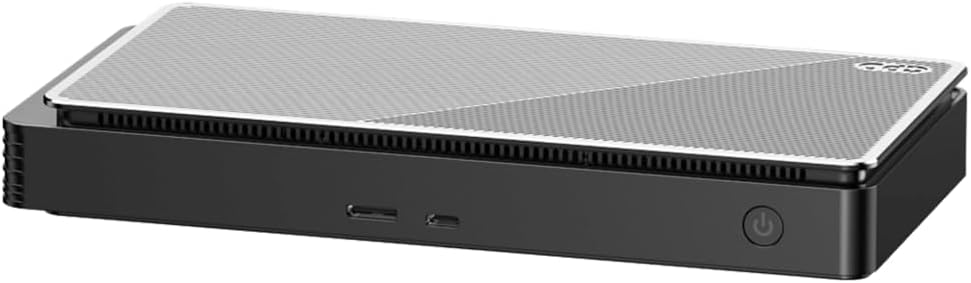



| Brand | GPD |
| Colour | Grey |
| Compatible devices | GPD WIN MAX 2 2023, Mini, updated 4 models, USB 4, Thunderbolt 3, |
| Hardware interface | PCI Express x4 |
| Product dimensions | 22.5L x 11.1W x 29.8H centimeters |
| Total USB ports | 3 |
S**.
Works as it should
I have been using this dock for over 6 months now paired with a legion go and I haven't really had any issues. If you're using this with hand helds then you will more then likely need to know how to side load drivers. This thing gives a real nice boost to your graphics, alot of times it's double or more fps. Will let you play any game on the legion go that we're unplayable before using the dock. Gdp also has pretty good customer service so ya can't go wrong with this dock/ egpu.
R**Y
GPD G1 + (GPD Win 4 or Legion Go or Gigabyte Aero 15 Y9) - curious?
Im using Diablo IV as a performance justification - I dont have or need 3rd party bench mark to tell me synthetic bench mark, because at the end, is how user really feels on performance play and its hookup methods. 4K @ 60Hz is my desireable spec for my monitor. GPD Win 4 2024 -------------------- This is a perfect companion, if you want to use your GPD Win 4 as a 'Docked mode for Desktop Gaming', with 'SFX 2.0' enable' 4K resolution with Diablo IV is pretty smooth running on external monitor. Running eGPU and routing back rendering into internal screen is actually works fine too, but kind of silly Legion Go -------------------- The 7600m XT Driver will cripple the Legion Go internal display and its driver, causing it to be always ON, regardless how you configure your display profile. screen saver / screen timeout, it will never shut off or turn off the internal screen. (to me that is very annoying but up to you - I think at this point im going to gave up my Legion Go, if you recall Legio Go had a EGPU box, now i wonder why they stop selling it) Gigabyte Aero 15 Y9 - built in RTX 2080 Max-Q GPU -------------------- Perfomance actually dropped, your better off with built-in RTX 2080 Max-Q GPU running at 4K @ 60Hz Although, it seems to work in parallel with RTX driver assuming you set up external monitor to drive the EGPU, however audio seems to be lagging no matter what i do. at this point, not much benefit. Pros: Built quality. Internal power supply. Quiet / Turbo Boost switch Power On/Off button Cons: Front port HOST SD slot is in the back No LAN Port (why?) Summary: -------------------- *** Always start with the included Thunderbolt 4 (USB4) cable *** *** precaution with USB-C magnetic adapters for convenient quick release, i use it but just be aware, your introducing random disconnect if magnetic connection to the port is suddenly loose. *** once you can confirm everything is stable and functional for a week, then if you decide to go out of your way using your old (obsolete) cable then my troubleshooting advise from recent experiences, GPD Win 4 seems to be very sensitive to older Thunderbolt 3 cables (no matter what quality or certified it is of).
D**S
Didn't Work and Poor Customer Support
I really wanted to like this eGPU but unfortunately, it did not work. I was able to get it to be detected and installed fairly easily through TB4, the issue is that it was drastically under-performing when playing games. For some reason, games that this should handle fairly easily according to other people's tests online seemed limited to around 32 fps no matter what I tried. Even if I lowered the graphics settings or resolution, it would not see an improvement in performance but still hover around that pesky 32 fps. According to AMD Adrenalin, the GPU was seemingly not being fully utilized and would be underpowered, capped at 60W at the most, rather than 100W. My CPU is pretty decent (LG Gram 16 laptop) and was not being fully utilized either so I don't think it's a major bottle-necking issue. I even didn't notice a performance difference when toggling between 'quiet' mode and the full powered mode. I tried everything from different cables, different ports and power arrangements, made sure the eGPU was selected for applications over the iGPU, reinstalling AMD drivers and even resetting Windows and doing a fresh reinstall of system drivers, nothing worked. I tried reaching out to GPD's customer support but they had an automatic response that they're on vacation and would not respond to inquiries for another 4 weeks or so, which would put me past my return window. I'd imagine they'd have a huge backlog of inquiries when they return too so it would probably be a while before I heard back, if ever. Everyone deserves time off but this is a bit silly. In the end, I have no option but to return it and to look into other options. The design and portability of this was very attractive, especially over the OneX's huge power brick. In the end I believe I will hold out for an AOOSTAR AG02 EGPU Dock which also has an internal power supply and dual TB4/Oculink capability but can be equipped with any normal GPU. As such, I'll end up getting much better performance and longevity and upgradeability anyway for a cheaper price, I just won't be gaming on any trips, which...whatever.
A**E
Not as easy as it could have been
Spent a day trying to get this to work, at the end of the day donโt follow the instructions. Install the drivers and everything etc etc. But to actually use the gpu turn on your device first, than plug in the G1 than turn on the G1 and if your having the same issue as me youโll get a bunch of dings from windows detecting the device. Reboot, and it should start working for you too. If it performs poorly Iโll be returning it.
A**S
Great gpu and thunderbolt dock
Awesome GPU For Triple AAA Gaming, works great with win max 2. Fans do get loud but there is a quiet setting, doubles as a very robust thunderbolt dock. Oculink cable isn't included only thunderbolt 4 though.
Trustpilot
1 month ago
2 months ago