Desertcart purchases this item on your behalf and handles shipping, customs, and support to Senegal.
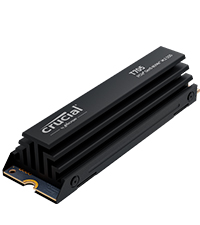
🚀 Upgrade to the speed demon SSD that keeps your creative and gaming edge cool and unstoppable!
The Crucial T705 PCIe Gen5 NVMe 2TB SSD delivers ultra-high-speed storage with up to 14,500MB/s read and 12,700MB/s write speeds, powered by reliable Micron TLC NAND. Designed for Intel 13th/14th Gen and AMD Ryzen 7000 CPUs, it features an integrated heatsink for silent, stable operation under heavy loads. Perfect for gamers and creatives, it includes a 5-year warranty plus a 1-month Adobe Creative Cloud subscription and Acronis cloning software, making it a premium choice for professionals demanding top-tier performance and capacity.


| ASIN | B0CTS93WML |
| Additional Features | Hardware Encryption |
| Best Sellers Rank | #49 in Internal Solid State Drives #402 in Computer Internal Components |
| Brand | Crucial |
| Built-In Media | 1month Adobe Creative Cloud All-Apps, Crucial Storage Executive, Internal SSD, Quick start guide |
| Cache Memory Installed Size | 2 |
| Color | Black |
| Compatible Devices | Desktop, Laptop |
| Connectivity Technology | PCIe |
| Customer Reviews | 4.5 out of 5 stars 394 Reviews |
| Data Transfer Rate | 14500 megabytes_per_second |
| Digital Storage Capacity | 2 TB |
| Enclosure Material | Nand |
| Form Factor | M.2 (2280) |
| Global Trade Identification Number | 00649528940339 |
| Hard Disk Description | Solid State Drive |
| Hard Disk Interface | PCIE x 4 |
| Hard-Drive Size | 2 TB |
| Hardware Connectivity | PCI Express x4 |
| Hardware Platform | x86_64 |
| Installation Type | Internal Hard Drive |
| Item Dimensions L x W x Thickness | 3.15"L x 0.92"W x 0.83"Th |
| Item Weight | 55 g |
| Manufacturer | Crucial |
| Media Speed | 12700 megabits_per_second |
| Mfr Part Number | CT2000T705SSD5 |
| Model Name | Crucial T705 PCIe Gen5 NVMe M.2 SSD |
| Model Number | CT2000T705SSD5 |
| Number of Items | 1 |
| Read Speed | 14500 megabytes_per_second |
| Special Feature | Hardware Encryption |
| Specific Uses For Product | Business, Gaming, Personal |
| UPC | 649528940339 |
| Unit Count | 1 Count |
| Warranty Description | 5-year limited warranty |
P**T
Buy naked version – not this heatsink version
You might think (as I did) that you’re doing better by getting this OEM heatsink version – paying about $30 extra. I learned the lesson in a hard way that; exactly the opposite holds true. Crucial periodically runs deals; selling heatsink version even cheaper than naked drive. Don’t fall for that and simply buy the naked drive, whatever the price. Otherwise (if you buy heatsink version); you’ll either have to do below surgery (which is not for the faint-hearted) or your drive will fail earlier (because of heat) and Crucial will blame you running it that way (and very likely not honor your warranty – more on that later). This Gen.5 T705 is an extremely fast M2 drive. I’m very happy with its unbelievable performance. I use it on my new Asrock Taichi Lite Z890 motherboard. After I assembled my PC, I noticed that the hottest temperature on my system is this M2 drive. Not CPU, not GPU, not RAM modules and not my Gen.4 Samsung 990 Pro M2. While PC is completely idle (not running anything); that Crucial M2 displayed 61C temperature. I stress-tested my GPU (which is milimeters away from this Crucial) and that 61C quickly rose close to 80C (mind you; I’m not even stressing that drive itself). I immediately decided to replace that tiny OEM heatsink, as it’s completely not up to par for a decent cooling job. I’ll number my attached pics – so you can relate to my text here. I use HWiNFO64 freeware to check all my system characteristics. When you look at its reporting for this Crucial drive (pic-1); you’ll see that the drive keeps (in it) record of how long you used it at above 87C (warning) and 89C (critical). So if you (without even being aware) barbecue your drive and send it in for warranty replacement (when it fails); you can guess who Crucial will put the blame on? Now all new MBs put both that Gen.5 M2 slot and Gen.5 GPU slot right next to CPU (distance has to be short). You can see from (pic-2) that; this M2 drive is literally sandwitched between towering wall of GPU (no heat escape that direction) and my humongous Noctua NH-D15 G2 CPU cooler (airflow is there, towards rear suction fan). But it’s absolutely clear that; this OEM Crucial heatsink is just too small to provide adequate cooling. I even didn’t try Asrock MB’s original heatsink for that slot (as it’s even smaller). So it’s not even a matter of preference; you simply got to replace that OEM heatsink. That’s why it’s much easier to buy a naked drive to begin with; so you can avoid below pain of surgery. Another point; those Gen.5 M2 drives are just going thru initial growing pains (in fact, Crucial is still the only company to offer such speed-demon drive). Why is it putting out that much heat?; that is the first question (even more heat than Z890 chipset itself – which works fine with about same size heatsink). You’ll see on one of my attached pics (when I took out the naked drive); there is metal body Phison controller there (where actual two RAM chips have plastic body). Probably that much heat is coming from that Phison controller – not the RAM chips. If those Gen.5 M2 drives are all to put out so much heat; then industry will probably evolve to a different casing – so they can be cooled like CPUs. Time will tell. After searching many M2 heatsinks (active and passive); I decided on this passive Thermalright HR-09 2280 PRO (pic-3). There are ones with active fan cooling. But such small fans always fail in short time and they are noisy. So I went with this largest passive heatsink I could find. I hope that Noctua also starts making large M2 heatsinks. My Phanteks full-tower case can even house twice the height. Width-wise (as you are seeing in pic-3) it’s literally 1 milimeter from CPU cooler. Even if it touches there; no problem, as nothing moving (it might even get better cooling that way). When I run my PC with this new heatsink; Crucial M2 fall back to 47C. Still the hottest component on that motherboard; but much better than previous 61C with OEM heatsink on it. My other Gen.4 Samsung 990 Pro M2 runs at 42C anyway (under Asrock’s large metal surface heatsink). If I ever see my usage pushing it to above 80C; I’ll simply tweak my BIOS fan curve, to run my case fans faster / earlier. So far, 14C saving is good enough for me. Now on to surgery : how to remove naked Crucial drive from it’s OEM heatsink. I repeat: this process needs only two special tools (that you have to use), but more importantly very precise hand control (I happened to make my living as field service engineer – so it’s all easy for me). If you slip your hand once; you can instantly ruin your expensive drive. If you are not sure; don’t even try, I’d humbly suggest. You’ll need an anti-static mat (see wrist connection on pic-4) and blade opener tool (pic-5). No, you can not use a knife or flat-blade screwdriver instead. You were warned. On the side of the drive, you’ll notice two dimple dots on the edges and one flat line (blue arrows on pic-6). Insert your tool firmly but very slowly till you only pass that middle-line (if you push it all the way in; you’ll instantly damage the board/components of your drive; you can throw it away at that point). Once you merely pass that middle-line apply sideways leverage to rock it out of its grasp. Also do the same on both dimple dots. You’ll feel that the bottom casing cover slightly moved (pic-7). Now switch to other side with your tool and do the same there. As you slowly and patiently repeat that left & right few times; the bottom cover will start to come out (pic-8). Attention to the blue sticker indicated by arrow on that pic. As slowly pulling out that bottom metal cover; you’ll be peeling that sticker. No hasty movements there, as you don’t want to damage anything. Now that cover completely comes out (pics 9, 10). Now you remain with your naked drive sticking to actual heatsink, by blue-stickers on the other side (pic-11). This is the step needing utmost precision: you insert your tool between that blue-sticker and heatsink (and NOT between blue-sticker and the chip!). See detail on pic-12. You very slowly push your tool deeper towards other side (so; sideways, not length-wise). You are separating that blue-tape from the heatsink. Don’t you dare to yank the board by pulling length-wise; It’s a very thin board and you’ll simply snap it in two. Just be patient and do above described on those 3 blue-stickers from side to side. After enough loosening of stickers; finally lift your naked drive sideways (never pull length-wise). Pic-13. Now you have to clean all remnants of blue-stickers from both side of your naked drive. You’ll use your fingers and nails doing that (do not use any tool, as you can damage those microscopic components on board. Now your drive is finally ready to be mounted on to new heatsink (pic-14). Follow the simple instructions which come with heatsink. Just pay attention to orientation before you stick on to it; so you don’t put upside down. You’ll also need to align screw-hole of your drive and heatsink. After you place the bottom metal cover; you first firmly push it towards heatsink (firm, but not crushing hard) > then you tighten 4 side screws. So it gets good thermal conductivity thru new stickers on both sides. The hole of that new heatsink lines up with “screw-hole” of your drive. My Asrock motherboard has such “tool-less” rotating notch for that hole. So I was able to slide that notch between heatsink and M2 board. Pay attention how your motherboard mounting is (actually even before starting all this adventure). Because if you need to use an actual screw to mount your M2 drive to your MB; now you’ll need much longer version of this very tiny mounting screw. If your MB also has such “tool-less” thingy, I hope that it’ll also slide in as described above. If you are reading this before you actually bought your drive; I presume that at this point you decided to buy the naked version and avoid that Crucial heatsink nightmare at all cost, correct?!
A**E
Works amazing, 3x faster loads and stays extremely cool
I was second guessing myself after reading the reviews about the heatsink, but mine stays around 39-42°c at idle/ just surfing the web, depending on ambient temperatures, mid 40s to low 50s while gaming, and ranges from 55-70°c under full load depending on how long it's going. A one-hour stress test on OCCT and it never got over 71°c and finished at 70. I have a mid-tower mesh case, tuf gaming x870-plus wifi mobo, 9850x3d and a peerless assassin dual tower 120mm air cooler for my CPU that blows air on the heatsink. Another reason to stay away from AIO's I guess. I get the advertised speeds of 14,500 mb/s read and 13,000 write speeds, sometimes a touch over even. This thing straight up flies compared to my Samsung 990 Evo plus 2tb (7,200 mb/s read, 6,000 mb/s write speeds tested). Double to triple the speeds. During an OCCT stress test the t705 was at around 6,000-6,500 mb/s with both read and write speeds, while my 990 Evo plus was around 2,000-2,200 mb/s read and write. Games launch in 3-10 seconds compared to 15-35 seconds with my Evo, call of duty I'm looking at you for those 10 second or 35 second launch times. I transfer files that took minutes in seconds now. I highly recommend 🚀🚀🚀
K**M
Easy to install
Excellent product from crucial. Was very easy to install and make my new c: drive
J**A
Super fast, stays cool at 60°F
This is working flawless. Exactly what I was expecting.
R**D
Fast and coolish. Warning - heat sink can't be removed
I contacted Crucial support about the heat sink. They said it should not be removed. I bought this thinking that I could remove the heat sink. (I wanted the heat sink just in case. And there was some incorrect advice suggesting it could be removed. Actually, it's likely possible to remove it with a bit of work provide you don't mind voiding the warranty.) I returned the one with the heat sink and got the one without the heat sink. My motherboard has a heat sink that's much better then the stock heat sink with the SSD. Also, it would not fit in my MB with the stock heat sink. The same SSD - minus the heat sink - is fast and runs fairly cool using the m.2 slot on the MB under the GPU. (Gigabyte x870e AORUS PRO ICE.) It's idling at 35C. Under stress it peaked at 65C. I had a slower SSD idle at 60C and peak at over 80C in the same slot, so I consider a 65C peak great.
A**X
Cannot Remove Heatsink
When I ordered this, the version without the heatsink had not been available for as long as I had been watching the price of the T705 (a month). However, I didn't mind paying more for the heatsink, so I planned to just uninstall it and use the much larger and superior one built into my motherboard. Unfortunately, upon starting to install it I found that there was no way to remove the heatsink. The thermal pads are apparently adhered to the heatsink and SSD very strongly. There are no screws to hold the heatsink on like on the previous models; it is instead clipped into place and is apparently impossible to get off without damaging the heatsink and with risk of destroying the SSD in the process, as I saw stories online of. So I opted for a return, and thankfully was refunded fully for just opening the package. I'll be the one to be patient until the version without the heatsink is available and not for an absurd price. I'm sure it is a dream of an SSD, but for now it will just remain that.
S**S
Dead Drive, Dreadful Customer Service from Amazon and Crucial/Micron
UPDATE: 4 months in I still do not have a replacement drive. Crucial/Micron have been 'preparing to ship' a replacement for over 6 weeks. ONLY buy this from a physical store where you can swap out a DOA drive easily and let the retailer get the item replaced. Unfortunately the T705 2TB shipped to me was DOA, tested with 3 different NVME slots on 2 motherboards and an NVME external enclosure. Amazon refused to replace the drive, instead only offering to refund and not honor the sale price on a replacement drive. So I turned to Crucial/Micron to RMA the drive. I initiated an RMA with Crucial/Micron on 11 December and the drive was delivered to Crucial on 23 December. Following a month of emails after delivery, I was informed that Crucial is unable to set up replacement orders. From Crucial Support: "We would like to inform you that we are unable to set up any warranty replacement orders as of now. Crucial.com is temporarily unable to process orders due to challenges with one of our partners." I have yet to receive a replacement drive or a notification of shipment 5 weeks after delivery. This may be a blazing fast drive but be warned of failed drives and atrocious customer service. If you're going to buy this drive I'd highly recommend buying it in a physical store where you can swap if its DOA.
S**E
Nice speedy drive that gets blisteringly hot. Get an aftermarket heatsink, OEM one is not enough.
This drive is great. It's super-fast but also gets super-hot. Do not get this drive with the OEM heatsink. It does not do a good enough job of cooling this nvme. I was getting up to 60-62 degrees Celsius at idle. I removed this oem heatsink and installed the drive in a Thermaltake MS-1 nvme cooler and now the drive runs at 50-52 degrees at idle. Still hot, yes, but these gen5 drives all run hotter than the previous. Just get this drive bare without a heatsink then buy a good aftermarket one. Thermalright has some nice ones too but since everything else is ThermalTake in my pc I went with them.
M**K
El SSD Más caliente pero el más rápido
No le pongo 5 estrellas, no por su rendimiento, que es impresionante, sino porque en tareas intensivas, necesita, a parte del disipador, un ventilador de 50mm o similar que le proporcione un buen “airflow” para que no produzca reinicios, bsods o thermal throttling. En cuanto se le ventila adecuadamente, es de los GEN5 más rápidos del planeta. Abstenerse a comprarlo sin disipador y pensarse mucho si va a recibir correcta ventilación o necesitará apoyo de algún ventilador extra.
J**S
Disco altas prestaciones.
El producto tiene prestaciones por encima de las del pc por lo que consigo las máximas prestaciones de mi equipo manteniendo el disco sin exprimir, por lo que no se calienta y da cero problemas. Puede ser una sobre inversión al no exprimir el disco, pero me aseguro que será muy difícil que me dé fallos o se averíe, por lo que me merece la pena, ya que es el disco de sistema.
G**O
la qualité , le plus avec sont dissipateur de refroidissement , et le prix d'achat
très satisfait d'avoir acheté cette article , Crucial T705 SSD 2To PCIe Gen5 NVMe M.2 SSD Interne Gaming avec Dissipateur , pour tous les futurs acheteur n'ayez aucune crainte d' acheter c'est l'un des meilleurs SSD avec sont dissipateur qui fonctionne a merveille
C**N
Rinde muy mal por el sobrecalentamiento
Uno espera comprar un producto premium al gastar tanto. Compré la versión de 4TB con heatsink para evitar problemas de raíz y resulta que este NVMe 5.0 rinde peor que un 4.0 por los problemas de sobrecalentamiento, llegando a 85C en benchmarks como CrystalDiskMark, alcanzando el punto de Thermal Throttling desplomándose así su rendimiento.
G**.
Top.
In un momento del genere vendute ad un prezzo competitivo. Spedite immediatamente e perfettamente compatibili.
Trustpilot
3 weeks ago
3 weeks ago