
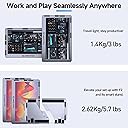




Maxfree F2 Portable Monitor
Product ID: 618118186
Details
- BrandMaxfree
- Screen Size14
- ResolutionFHD 1080p
- Aspect Ratio16:9
- Screen Surface DescriptionGlossy
⚡1ms ultra-fast response
💻Plug & Play Type-C/HDMI
🔄360° swivel rotation
🚀 Triple your screen, triple your hustle!
The Maxfree F2 Portable Monitor is a sleek, triple-screen laptop workstation designed for professionals seeking enhanced productivity and ergonomic comfort. Featuring 14-inch FHD displays with 360° rotation, a smart cooling base, and plug-and-play connectivity via Type-C and HDMI, it supports laptops from 12 to 17 inches (excluding MacBook Air M1/M2). Lightweight and durable with an aluminum frame, it transforms any workspace into a powerhouse of multitasking efficiency.

| ASIN | B0C68PBF3K |
| Aspect Ratio | 16:9 |
| Brand | Maxfree |
| Brand Name | Maxfree |
| Color Gamut | 75 |
| Colour | Silver |
| Compatible Devices | Laptop |
| Contrast Ratio | 1000:1 |
| Customer Reviews | 4.3 out of 5 stars 233 Reviews |
| Display Technology | LCD |
| Display Type | LCD |
| Hardware Connectivity | HDMI, USB Type C |
| Has Color Screen | Yes |
| Image Brightness | 1000 |
| Image Contrast Ratio | 1000:1 |
| Item Dimensions D x W x H | 38.5D x 24.9W x 2.1H Centimeters |
| Item Weight | 2.62 Kilograms |
| Manufacturer | Maxfree |
| Maximum Display Resolution | 1920 x 1080 Pixels |
| Model Name | F2 |
| Model Number | F2 |
| Mounting Type | Desk Mount |
| Native Resolution | 1920 x 1080 |
| Network Connectivity Technology | Type-C/HDMI |
| Product Features | Height Adjustment, Portable, Storageable, Support Arm, Swivel Adjustment |
| Refresh Rate | 60 Hz |
| Resolution | FHD 1080p |
| Response Time | 1 Milliseconds |
| Screen Finish Type | Glossy |
| Screen Size | 14 |
| Screen Surface Description | Glossy |
| Shape | rectangular prism |
| Specific Uses For Product | Photo Video Editing |
| Total HDMI Port | 1 |
| Total Video Out Ports | 1 |
| Unit Count | 3 Count |
| Voltage | 20 Volts |
J**’
Great for Working Anywhere + Solid Customer Service
I purchased these about two years ago and have used them on and off, mainly for working remotely when traveling or just wanting a change of scenery from my desk. They’ve been great for giving me a multi-screen setup anywhere, whether I’m visiting family or even just sitting outside to work. It really makes a difference not being tied to a single screen. The setup is straightforward and the screens are a nice size for productivity without being overly bulky. I do wish the carrying case had a dedicated pouch for the cables, since right now I just keep everything together in a tote bag. It works, but a little more organization would make it even better. After about two years, one of the monitors stopped working. I reached out to Maxfree, and even though I was outside the warranty period, they offered to send me a refurbished replacement for $45. I was honestly impressed with that level of support. Now that everything is working again, I’ve been using them more than ever and really appreciate having a portable workstation I can take anywhere. Overall, a solid product with excellent customer service that made a big difference in my experience.
T**D
Multitasking
Great item!
S**N
This system works great- but HEAVY
Talk about screen space! Double sided sword is: It's VERY HEAVY, (metal framed) so lugging it around for travel can be a bear. Flip side is- it's sturdy as fugg!! Packs up neat and is super tough- looks industrial, too. The screens aren't the best quality, but for travelling, do you really need 4K? Also, these were on sale for under 300 bucks (with tax!) and so far, it's been well worth it. Worked great with my MacBook Pro 15, (I like the way the computer fits onto the built in metal stand/storage box, and doesn't put stress on your monitor. Going to try it with the new company DELL 17" this week. But so far... pretty awesome. Only think that kinda blows is the cable placement- Cables all over the place. They could do a next-gen and fix that easy enough.
S**K
Great for home offices
Pros: -Works well and immediately with modern laptops, for me. I see lots of people here saying they had issues. I am someone who has tons of laptops. I mostly use a MacBook Pro 16 and a Lenovo Yoga Book 9i. It works right away when plugged into both of those, and it stays connected. The only laptop I couldn't get it to work with is an older HP, I think an HP Pavilion 13" that still has USB 2.0 ports and an HDMI port. The HDMI cables included did not get these monitors working. The other laptops have all USB-C ports. Regardless, I literally work all day M-F on the MacBook with one of the two monitors, and then I disconnect it and use it with the Lenovo laptop the rest of the day and on the weekends. I am typing right now using one of the monitors with the Lenovo. During the week, I get more work done faster with these because I no longer have to struggle to find which Window or tab I need. -Personally, I'm pleasantly surprised with the screen quality. I saw the "So Very Bad" review talking about how outdated the quality is, and externally that's probably true (i.e. the huge gray bezel and all that). But I seriously would not and did not expect much from a $300 dual set of external monitors that surely are not made in the US. The price is more than I wanted to pay, for sure, but there are many other more expensive monitors out there with less to offer. And I remind myself that I'm getting two monitors here. All that to say...I stream videos and watch sports games on these, and the quality is HD, the streaming and rendering is actually smoother than watching videos on my Lenovo monitors, and it's just overall better than I anticipated. Yeah, the brightness is not as much as I want, but it's also fairly average once you turn it up to 100 like Windows laptops that came out a couple of years ago. If you're used to MacBook/Apple quality, I can see how you'd be upset. But then, you'd probably hate most Windows laptops and their monitors. It's not specifically these monitors that are "poor quality." The OLED monitors on my Lenovo are literally the best I've ever had, and prior to having jobs that send me MacBooks I was 100% a Windows user. These monitors are like tons of Windows laptop monitors, and MacBook monitors are better than Windows ones, usually. So, something to consider if you care a lot about monitor quality and brightness, especially if you're a MacBook and iPad user only. -I LOVE that these monitors do not have to be placed on the laptop. That means you really can use it with absolutely any laptop. I literally only use these monitors in the arms when I'm at my desk working because I don't have enough space on my desk to sit them down on it. And it's nice that you don't have to use the kickstand to use them and prevent them from falling or sliding like with other monitors I looked at before buying this. I click them in place, arrange the angle and get to work. One monitor literally hangs out in the air and is never in danger of falling. The rest of the time, I sit one monitor on my bed or on a chair and watch videos/sports or read. Cons: -It says it works with tablets and phones but does not include the right cables or adapters for this with Apple products. It mostly includes cables I don't need. I get that they can't really know everyone's setup, but everyone knows that most iPads and iPhones have a different type of USB port than the ones on the MaxFree and many newer laptops. The HDMI adapter I bought that got it to work creates the need for too many cable connections. **I had contacted Support about this, too, before finding an adapter because I was wondering if there was a way to make it work with everything they include, and they never responded.** -The arms that hold the monitors are a bit hard to turn, and you're limited in which arm you can put which monitor into. It cuts down on flexibility in how you can use/turn the monitors. -Sometimes, I can't get the monitors out of the arms without standing up from my desk and pulling upwards (i.e. sitting down and pulling upwards doesn't work a lot of the time). So, the arms and removing the monitors seem to require strength I don't have or I'm just a weakling. -You can't adjust the rotation on the monitor where you adjust the brightness and some other settings, as far as I can tell, or just have it adjust automatically when you turn the monitor in your hands. You have to dig through the display settings on your laptop, which adds work/difficulty to using a monitor with the width going vertically. Really wish the rotation would automatically adjust when you turn the laptop like iPads and now many laptops do. -The kickstands are just not sized right, making them semi-worthless. The ones on the base where you sit your laptop are too small and won't stay up in some cases. Even on my desk, I can't use them and can't get the type of angle I want for my laptop even if I could because they're so small. The ones on the monitors are too thin, making it harder to sit the monitors somewhere like on your bed. My monitors have fallen several times, though luckily back onto a cushioned pillow--I do think it fell on the floor once, though, but luckily it's okay. Very flimsy stands, and I may end up having to buy something to make sitting the monitors down outside of the arms more stable. I guess it's fine on a desk or table, but I don't use these outside of the arms on a desk or table since I don't have the space. It's kind of like they expect a less-than-1"-wide stand to hold up a 14" monitor. This is also connected to my 2nd con, because one of the things I'd do to make up for the stands being crap if I could is put the right monitor in the left arm and stream videos/sports that way after work/on the weekends, since that arm is closer to my bed. Personally Don't Care: -Yeah, yeah, it's kind of heavy to carry. Not an issue for me. And even so, what's really important? Being able to extend the screens and have flexibility or it being 3-6 lbs or whatever it is to carry two screens? And for a lower price than many other dual monitor sets. To me, you really don't even need to take the base and arms with you, if you can find a big enough table/workspace to just sit the monitors on them with stability using the kickstands. I'd just find a way to protect the monitors in the carrying case and keep it moving. Nothing is perfect. As far as taking a laptop, too, I'd just get one of those big backpacks for my back and put everything in it. It takes some thinking/creativity and maybe buying something else, but there are ways to make this work on the go. -Audio quality is low and awful (like, WAY worse than any laptop), but you can just use your laptop's speakers. At least one of my laptops--I think the MacBook--automatically defaults to these speakers, though, when I plug in one of these monitors and I'm not sure why. Need to look into this. Most Wanted -Touch screens -Better kickstands -Easier/better ways to connect to iPads and iPhones that were not released yesterday -Auto rotation
J**H
Durable and easy to use great buy.
This has been a fantastic addition for travel. Seamless transition between destinations and on the go. Decent picture quality. Very stable and sturdy base. Great value for the price. Had it for some time and still works perfectly.
Trustpilot
3 weeks ago
2 weeks ago