Desertcart purchases this item on your behalf and handles shipping, customs, and support to Senegal.
🚀 Elevate your video presence with pro-grade 4K clarity and AI-powered brilliance!
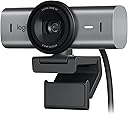
The Logitech MX Brio Ultra HD 4K Webcam delivers professional-grade video conferencing and streaming with 4K resolution at 30fps or 1080p at 60fps. Featuring AI-enhanced image quality, dual noise-reducing microphones, and advanced manual controls, it ensures you look and sound your best in any lighting or environment. Its innovative Show Mode lets you share physical content effortlessly, making it the ultimate tool for modern collaboration across Microsoft Teams, Zoom, and Google Meet.
| ASIN | B07W4DHLWV |
| Antenna Location | video conferencing, streaming, online collaboration |
| Are Batteries Included? | No |
| Battery Average Life | 72 Hours |
| Best Sellers Rank | 7,454 in Computers & Accessories ( See Top 100 in Computers & Accessories ) 62 in Webcams |
| Box Contents | MX Brio, Mount clip with removable adapter, USB-C to C 3.0 cable, User documentation |
| Brand Name | Logitech |
| Camcorder Type | Webcam |
| Colour | Graphite |
| Compatible Devices | Laptop, Personal Computer |
| Customer Reviews | 4.5 4.5 out of 5 stars (707) |
| Digital Zoom | 4 x |
| Effective Still Resolution | 50 MP |
| Effective Video Resolution | 1080 MP |
| Exposure Control Type | Automatic |
| File Format | MX |
| Flash Memory Bus Interface Type | USB 3.0 or USB 3.1 |
| Flash Memory Speed Class | C10 |
| Flash Memory Type | SDHC, SDXC |
| Flash Memory UHS Speed Class | 1 o 3 |
| Flash Memory Video Speed Class | V60 |
| Focus Type | Auto Focus |
| Form Factor | Webcam |
| Has Image Stabilization | No |
| Image Aspect Ratio | 16:9 |
| Image Stabilization Type | false |
| Item Dimensions D x W x H | 5.2D x 9.8W x 6.2H centimetres |
| Item Weight | 174 Grams |
| Lens Type | Wide Angle |
| Log Gamma Curve | Logarithmic |
| Manufacturer | Logitech |
| Maximum Aperture | 4 f |
| Maximum Display Resolution | UHD |
| Maximum Focal Length | 50 Millimeters |
| Minimum Aperture | 15 Millimetres |
| Minimum Focal Length | 30 Millimeters |
| Model Name | MX Brio |
| Model Number | 960-001559 |
| Network Connectivity Technology | USB |
| Number of Batteries | 1 AAAA batteries required. |
| Operating System | Chrome OS, Linux, Windows 10 or later, macOS 10.15 or later |
| Optical Sensor Size | 1/2.7 inch |
| Optical Zoom | 5 x |
| Product Features | Auto Framing, Auto-Light Correction, Noise-Reducing Mics, Privacy Shutter, Ultra HD 4K Resolution |
| Screen Size | 4 Inches |
| Sensor Type | CCD |
| Shooting Modes | Manual, Show fashion, Video call |
| Style Name | Modern |
| Supported Audio Format | AVI (probabilmente supporta formati audio comuni associati a questo formato video) |
| Supported Image Format | JPEG |
| Unit Count | 1.0 count |
| Video Capture Format | AVI |
| Video Capture Resolution | 1080p, 4K |
| Viewing Angle | 90 Degrees |
| Water Resistance Level | Not Water Resistant |
| White Balance Settings | Auto |
| Wireless Compability | 802.11n |
| Zoom | Digital |
M**L
Brilliant images, even on heavily compressed Teams calls
Brilliant images, even on heavily compressed Teams calls - the quality of this thing is evident. Haven't used the built-in mics since I always use a headset anyway so I just needed great video quality. It keeps me in focus and manages poor lighting well which was a key factor for me since I usually sit at my desk with a window behind me, so it compensates for that well without making me look like a shadow. It's not perfect with backlighting mind you...it's still a small sensor etc. But Teams has lighting adjustment built-in, so having a good camera means the software can do a better job. Would say it's definitely on the pricey-side for a camera, when you really think about what it is and compare £150 against the cost of buying a mini-DSLR that would do a better job...but this is compact, and comes with a flexible mount, and also let's you do 4k 30fps or 1080p 60fps. On top of that it feels well made with the metals they've used. EDIT: Between buying it and today (5 months) I discovered a few things that has made this better: - Fortunately my company-provided laptop let me install Logi Options+ which is where I realised that - while it was plugged into a USB 3.0 port - it was only outputting 1080p video, not 4k. Realised it was the cable (I wasn't using the provided USB-C cable as I didn't have any spare powered USB-C ports) so I got a USB-A to USB-C 3.0 cable and now the video quality is even better. - Logi Options+ software is a must to configure it - e.g. framing zoom etc. - I got an ethernet connection fitted so now I get my full fibre speed at my laptop, which made video quality even better on Teams. - While the tripod stand comes with a sticky pad (micro-suction they call it), you can actually slide it off to reveal a rubberised pad instead if you don't want to stick it your monitor or laptop. A nice touch that they don't shout about enough.
S**P
Excellent webcam
I'm very pleased with this webcam. My Caucasian skin tone looks very natural and pleasing without any need for fine tuning. I've tried other premium webcams and the MX Brio image just looks better in my view. The logi option plus app gives good control and I like that you can save custom presets. I do image bluring and background changing in VCam and the MX Brio plays well into VCam...the MX Brio sharp image and dynamic range helps with giving good ai background removal or replacement. The colours are deep and rich and it performs well in low light or with back lighting. The build quality is very premium and enhances my desk appearance. The sound is very good for a webcam...the mics are very directional do that sounds out of view are not recorded....it didnt pick up a loud clicking clock or radio well to the left of the webcam. I trust Logitech as a brand as a Swiss Company...other premium brands being Chinese owned concern me with their software privacy. Summing up I'm very pleased with the MX Brio and highly recommend it.
M**T
Great Webcam
Bought this as I was upgrading my setup at home as my Microsoft LifeCam Studio FHD was getting on a bit. It's like night and day the differnce in image quality. Whilst it was expensive, it was very worth it. I was a little disappointed to see that Logitech as not added support for Windows Hello like it had done with its predecessor. Otherwise, very happy with it. One thing to watch out for is the connectivity is USB C so it may be worth getting some USB C-USB A adapters if not all of your devices have USB C
M**D
Great webcam with minor limitations
4 Stars - Great Webcam with Some Limitations The Logitech MX Brio is a very good webcam, offering sharp image quality and excellent clarity in well-lit environments. It’s been a solid upgrade for my video calls and recordings, with great color accuracy and smooth performance. However, it struggles a bit in setups with RGB lighting or dynamic lighting conditions—the image can look slightly washed out or uneven in those scenarios. If your workspace is well-lit and consistent, it’s a fantastic choice. Overall, a great webcam, just not ideal for RGB-heavy setups.
N**P
Phenomenal
Phenomenal! So glad I bought this.
J**S
Superior Product
Really high quality with additional settings through App. Really impressed with MX series, including Mouse and Keyboard, all superior products that I imagine will last a long time.
A**S
Good cam
Quite pricy but thought I would give it a go. Pleased so far.
M**2
Webcams have a long way to go
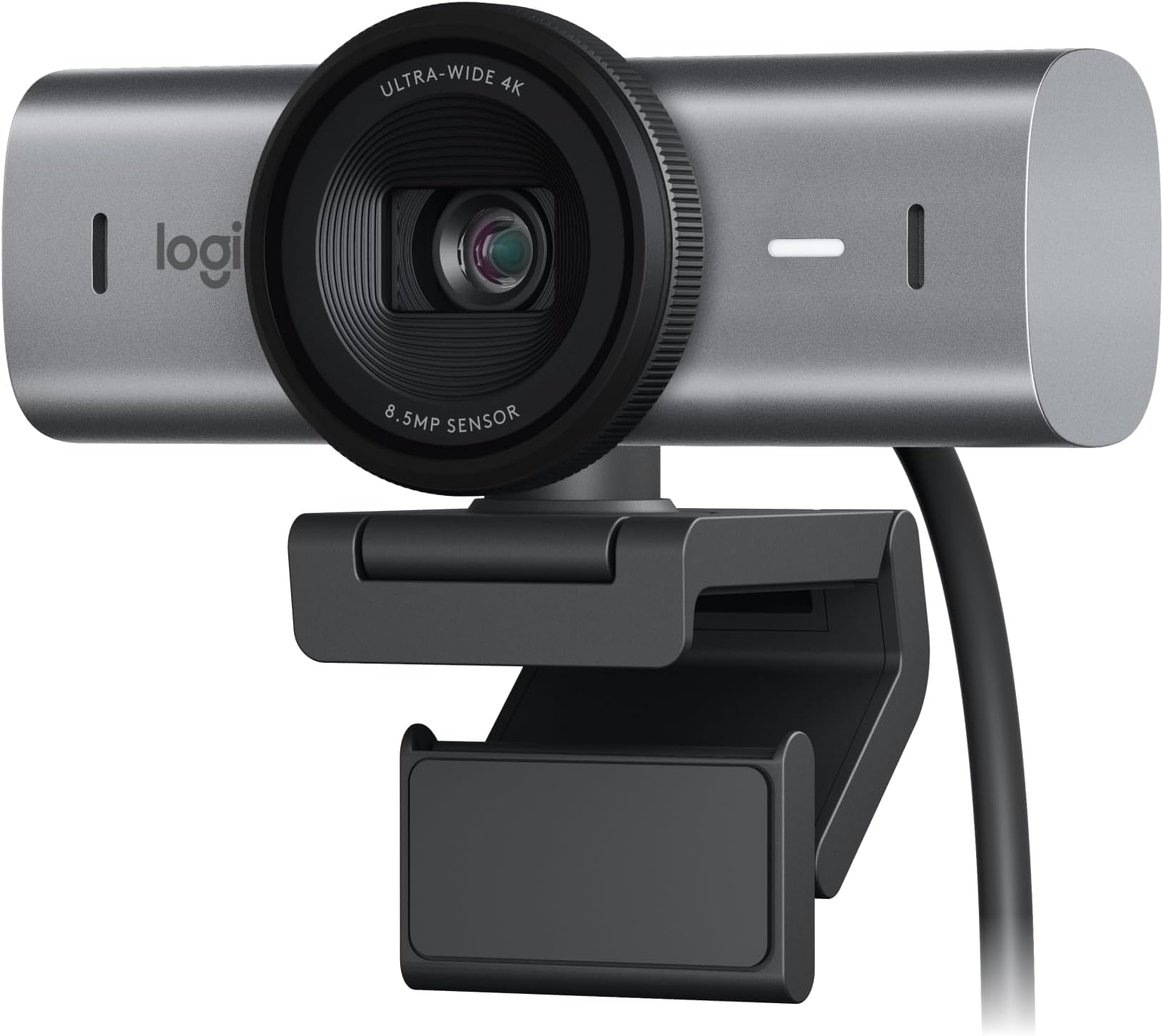
This camera is not cheap. I had the Stream Cam, and thought I’d upgrade, seeing as I have more and more video calls. My office isn’t the brightest of rooms, so I need the camera to work in low light. After a number of attempts at setting this up, configuring the levels, and testing side by side with my other camera, I actually found the quality worse… I tried it in a very well-lit room, and it looked decent enough, but when you look at the price vs quality, I feel that you aren’t getting bang for your buck. Webcams stalled years ago, as people stopped using them; however, now remote and hybrid working is more common, webcams really need to up their game. I decided to refund in the end, as even at the highest quality, it felt as good as a cheaper webcam. I have to give it credit for the feel and look. It has a good weight behind it, and twisting the blanking plate on and off felt good.
R**É
Logitech MX Brio 4K – Starke Webcam mit super Bildqualität
Ich bin mit der Logitech MX Brio sehr zufrieden. Schon beim Auspacken merkt man, dass es sich um eine hochwertige Webcam handelt. 👍 Design & Privatsphäre Das Design gefällt mir sehr gut. Besonders praktisch finde ich den manuellen Sichtschutz, den man einfach vor die Kamera schieben kann. So hat man seine Privatsphäre schnell im Griff, ohne extra etwas abdecken zu müssen. 📷 Bildqualität Die 4K-Qualität macht einen wirklich starken Eindruck. Das Bild ist sehr scharf und deutlich besser als bei meiner alten Webcam. Details sind klar erkennbar und das Bild wirkt insgesamt viel natürlicher und weniger verschwommen. 🔌 Anschluss & Mac-Kompatibilität Als Mac-User bin ich besonders zufrieden mit dem Anschluss. Die Kamera wird über USB-C angeschlossen und es liegt sogar ein USB-C auf USB-C Kabel bei. Das finde ich super praktisch, und falls das Kabel irgendwann kaputtgeht, kann man es einfach austauschen. 🎥 Perfekt für Streaming & Videos Für Streaming oder Videoaufnahmen ist die Kamera meiner Meinung nach ideal geeignet. Laut Logitech Software nutzt die Kamera auch KI-Funktionen, um automatisch Lichtverhältnisse, Fokus und Bild anzupassen. Dadurch sieht das Bild meist sofort gut aus, ohne viel einstellen zu müssen. 🖥 Praktische Zusatzfunktionen Eine Funktion, die ich besonders cool finde, ist die Tischansicht. Die Kamera kann automatisch die Perspektive anpassen, sodass man auch den Bereich vor der Kamera zeigen kann, ohne ständig alles manuell verstellen zu müssen. 📎 Halterung Bei der Halterung bin ich mir noch nicht ganz sicher, ob sie mit einer Art Gummi oder Klebefläche arbeitet. Im Moment hält sie jedenfalls sehr fest auf meinem Monitor. Wie sie sich langfristig verhält, wird sich noch zeigen. ✅ Fazit: Sehr gute Webcam mit top Bildqualität, modernen Funktionen und praktischer USB-C Verbindung. Für Streaming, Meetings oder Videoaufnahmen definitiv eine klare Empfehlung.
C**N
Buena webcam
Es una buena webcam con gran resolución y posibilidades y muy fácil de instalar.
D**L
Super
Qualité rien à dire
T**N
Mx brio ultra
Fungerar alldeles lysande
K**Y
ممتازة بس غالية وفي خيارات افضل
لوجيتك طبعاً غنية عن التقييم، المنتج ممتاز وزي الوصف. العدسة بتاعتها بتغطي الاوضه كلها ٩٠ درجة وتقدر تظبط درجتها لأقل من كده من تطبيق لوجي اوبشنز مانيوال (ثابت) او اوتوماتيك (متغير). تحريك غالق العدسة سهل جداً للفتح والقفل من غير ما تحرك مكان الكاميرا. عزل الصوت فيها الصراحة كنت متوقع افضل من كده علي السعر ده ولكن للأسف خيب ظني. ومش معني كلامي انه وحش، ولكن في افضل.
Trustpilot
1 month ago
1 month ago