Desertcart purchases this item on your behalf and handles shipping, customs, and support to Senegal.
🌬️ Stay cool, game hard, and never compromise your laptop’s power!
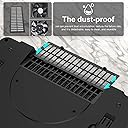
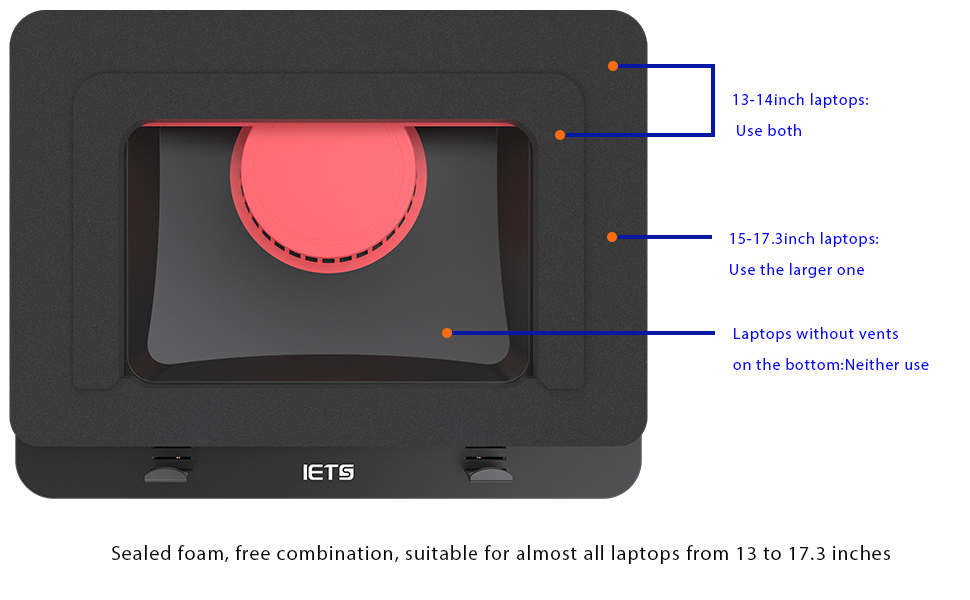
The IETS GT500 is a premium laptop cooling pad featuring dual industrial-grade turbofans spinning up to 4200 RPM with infinitely variable speed control. Its unique sealed foam design provides 360-degree cooling coverage, ideal for 13-17.3 inch gaming laptops, especially those with rear exhaust vents. Equipped with a dust filter and engineered to reduce thermal throttling, it balances powerful cooling with customizable noise levels, making it a must-have for serious gamers and professionals seeking to protect and boost their high-performance laptops.


| ASIN | B09BMYW2JD |
| Best Sellers Rank | #598 in Computers & Accessories ( See Top 100 in Computers & Accessories ) #15 in Laptop Cooling Pads |
| Brand | IETS |
| Color | GT500-B |
| Cooling Method | Air |
| Customer Reviews | 4.4 out of 5 stars 603 Reviews |
| Enclosure Material | Metal |
| Item Weight | 1.13 kg |
| Manufacturer | IETS |
| Material | Metal |
| Mfr Part Number | GT500B |
| Model Number | GT500B |
| Number of Fans | 2 |
| Warranty Description | 1 |
B**Y
In a unique league of it's own in terms of laptop cooling.
Just to address the big complaint real quick, the noise. On their website, they bring immediate and substantial attention directly to this issue. They provide accurate decibel levels for the fan noise on their various models at various speeds. And warn people that this pad may not be for everyone if you cannot tolerate that. They use an industrial grade fan and when you get to between 4,200 and 5,000 RPMS, there is going to be some sound. This is a POWERFUL cooling solution for people that require serious thermal reduction in order to achieve proper performance due to their machines lacking ability at heat displacement, or for other individuals that want increase their possible performance output in gaming or content creation by achieving a greater degree heat displacement and thermal cooling. For example those Overclocking their hardware for max performance and such. If you are one of those people, then this is the pad you want. If you are someone that already has a good gaming laptop that does not suffer from overheating, then you are almost definitely not ever going to need to turn this thing above about half power, in which case, the noise is not bad at all. You can fine tune the power of the fan with a dial that allows you to very slowly increase the revolutions. I have a 17.3 inch Lenovo Legion with an i7 and an RTX 3000 series GPU, Legions naturally have a very good heat pipe system, and prior to this pad, I was just using a cheap pad for elevation and some extra light cooling. Playing Elden Ring at all max settings, while monitoring with MSI Afterburner, and after long periods of gaming, my thermals were between 68-72C, which is great, but I wanted better, and wanted dust protection, so I got this pad, and at all the same settings, at about half power or maybe less, I average about 58-62C and the fans are not loud enough that I even need headphones if I don't want. So the reason I am going into this kind of detail, is to point out, that unless you are having serious cooling issues, which forces you to blast the fans over 70% power, noise can be highly customized to fit your thermal requirements. So that is what I have to say about the main complaint people have with this pad. Otherwise it does what it says. I have a friend that had an older MSI laptop with a good CPU and GPU, but the cooling system just could not handle the hardware, common to MSI laptops. Their laptop was at over 105C which is to the point where you are going to start seeing permanent damage to your system, after getting this pad, and using at or near max power, it was noisy, but it took it from 105C to as low as 75C, that's literally game changing, lol. I have not seen any pad on the market able to come even slightly close to getting those results. It's the difference between your laptop gaming, and your laptop being replaced. On the downside the pad is pretty pricy, can go all the way up to $90 if you want the three data hubs and lightning, which is totally unnecessary, but would be nice if they provided you with all of it for the normal $70 price, but when you have the best laptop cooling solution on the market, with no other brands even coming close, I think it's worth it. This pad can be used by both people wanting to provide security for their expensive laptop, keeping the components cool and preventing dust buildup, at a totally tolerable noise level, or also be a saving grace for people that are in thermal meltdown mode, in which case you are going to require some headphones. Personally I think any serious laptop gamers should take time to consider this device, given the insane price of laptops right now, especially those with dedicated GPUs, this can be a very solid investment. Either way, can't hurt to give it a try. Only people I would not recommend this pad to, are those that have a laptop design that does not have rear intake fans. The pad could still possibly provide you with some cooling effect, but you might want to do some additional research before purchasing. Happy gaming Ya'll.
P**A
I don’t game without this anymore!
I apologize for taking so long to post this because people should get it. If you have a laptop and perform activities that make it run hot like gaming and you’re hoping to cool it a bit for longevity then you should just go ahead and buy this! DISCLAIMER: If your laptop has no vents on the bottom or no vents at all this fan is UNLIKELY to help you. You need those vents for it to force the air through. Without them it probably won’t cool well. I have an ASUS ROG STRIX G15 Advantage edition. If you also have this laptop I suggest getting the liquid metal looked at, it’s likely applied badly leaving bare spots, FYI. Anyway, the video here is from the very first time I turned this fan on so I didn’t know what to expect. I opened Grounded and ran it for maybe 20 minutes or so. Temps got to 75ish. Usually runs around 75-83 for this game. I turned the fan on full speed and this is what it did and how long it took. With the fan this game hovers about 67-75 now. The screenshot is from DayZ which runs a bit cooler, around 65-67 normally now running in the 50’s! Very impressed. I try not to run games without it. It forces cool air in the bottom and out the sides. Good force, you can feel it blowing out on your hand pretty strong from all side vents! I left the sound on hoping go give an idea of volume but the phone is too close to it. It’s noisy but not THAT noisy. If you have headphones on it’s a non issue. If someone is next to you trying to watch tv it might be a bit annoying for them. I can watch tv while using it at a higher volume but it’s not ideal. That said, the fan can be adjusted easily and you may be able to get sufficient cooling at a lower speed which makes it a lot quieter. I can run my Sims 4 game with 400gb custom content on medium speed and get both sufficient cooling and low enough noise level to watch tv while I build. If I’m just browsing or something I keep the fan off. For the price, I was a bit disappointed to see it’s made of plastic rather than metal or a metal/plastic mix. Makes it lightweight but I do worry about the longevity especially with the foam piece. It’s been 5 months and all is well but I do care for my stuff. If you’re rough and lugging it around a lot idk if it could be an issue. You can raise and lower it for comfort. My biggest gripe is the cord. It is VERY short. Too short to go in the same strip as my laptop cord where it was. Had to move the strip to behind my head and even now if I need to get up it’s literally too short to move the tray to the side off my lap to get up for anything. I have to unplug it which is very annoying. It’s a common cord though (my external HDD cord fits it as well as I found out one night when I forgot to bring the cord on a trip) and I’m just going to buy a longer one. If a short cord is an issue for you just save yourself the trouble and grab a long one when you buy this. 100% recommend if you have a gaming laptop. Try it!
A**D
After buying two labtop coolers that were ineffective, this one does a great job for my Acer
I have an Acer Predator Helios Neo 16. It has a GPU and gets quite hot when I run programs that are energy intensive, such as tensorflow for some of my more advanced python programs. I don't game, so I can't comment on that. In the past I tried to use two different inexpensive labtop coolers, one of which was rated on Amazon about the same as the IETS (4.5), but were much less expensive, and neither one lowered the internal temperature of the labtop measurably. I am VERY happy with the IETS, though. It is basic in that there are no glowing lights, no displays of fan speed, but it absolutely gets the job done. Most of all, I wanted a cooler that would not make a lot of noise when its running. This model is excellent in that regards, even though the advertisement warns that it is loud when run at high speeds. I never need to crank it all the way up to near maximum speed, which avoids the loud noise, but the labtops internal temperature still runs 10-20 degrees F cooler even on a very reduced fan speed. I have measured it several times and there is no doubt that it is excellent in its control of internal temperature of the Acer. There is a soft hum at the level I use it, but it is quiet and not jarring. You control the fan speed, by the way, by a small wheel on the left side of the IETS. The unit does not plug into the USB port of the labtop, but has a separate power plug with about a 5 foot long cord. Works fine from my perspective. The unit did cost in the range of 80+ dollars, but my experience is that buying the $25 units that I tried don't get the job done, as does this unit. So, my take home message is if you don't want bells and whistles (I mean, its job is just to cool down the labtop), but you really care about keeping your gaming labtop cool without having to suffer through loud noises, this model performs quite well.
S**A
Cooling is significant well worth it.
Background i7-8565U (HP Spectre laptop). It runs hot and had to use throttlestop to even consider the laptop useable when running anything because HP had the wonderful idea to run a fan curve from 0 to 100% at 95C which didn't always catch it before the laptop would thermally shutdown at 100C. throttlestop did well to keep it below that cooking point but unfortunately had to use the laptop at a pretty undervolted state making it run slow on windows. Mitigated this performance dip by moving to linux however linux didn't have a throttlestop equvalent and the undervolting solutions seems to hit a wall with a locked BIOS leading me to at best BIOS always fan on, but still would run at a lower speed on the cpu fans so overheating was a possibility. (after cleaning out laptop of dust and setting to fan always on, undervolting not an option on linux due to locked by bios) I ended up with the IET GT500. when running at full speed it can get my laptop down to 30C on idle and 40-50C on high demand (which I was seeing 60-80C on idle and 95C to possible shutdown at 100C without the GT500) on quiet lowest setting was getting about 40-60C Idle and 70 to 80C on demand. There is a significant cooling with my laptop since it is a metal frame thin laptop, has bottom vent and back, outflow vents and the cpu fans on always on along with the GT500 fan working with the foam provided. This product has given me full performance on a laptop that was recommended to remain undervolted due to its lack of cooling to run its chipset at its highest setting. Definely would recommend. Only one small caveat probably is the power cable for this cooler is a bit on the short side so would recommend getting an extender for it if you want to use it as a lapdesk for your laptop.
J**S
Works well and has it's own power source!
I have only had this for about a month, but it gets the job done! It is a little noisy, thus the lack of a fifth star. However, I like that there are no lights that stay on. It also has it's own power source, which means it isn't adding to the strain on my laptop. Another feature I love is that variety of adjustments in the tilt of the stand. So far, it is meeting and exceeding my expectations by keeping my computer nice and cool! The adjustable clips in the front also work well to keep my laptop in place on the foam.
L**S
Super cool and not too loud
Just by opening the box I was able to see the difference between this and other models. I’ve tried like 3 others, no matter how many fans or rgb lights they have, there was no airflow on the others. This one I was hesitant about the memory foam used but I can guarantee it’s very very good, the fan is a bit loud, but once it has the laptop on top you barely notice. This laptop (Asus Zephyrus G14) runs at 90 something degrees when playing a game which is super hot, and even hot to the touch. With previous fans, at best it will not climb on the temperature, but will never go much lower than that. I tested this for like an hour already, and it lowered the temp from the mid 90s to roughly 70 and makes it normal to the touch, still feels a bit hot but it’s definitely normal and usable now. This brand do have a better tier in case your laptop is bigger and more demanding, but for a 14” laptop this is amazing! Definitely recommended.
A**.
Modders are going to love this cooler!
Let's get the elephant in the room, out of the way... The cooling benefits of this IETS GT500 are obvious. There are plenty of reviews detailing out the temp reductions. And they continue to come. But the fan is pretty noisy across the adjustment range @ many resonant frequencies. Having said that, if you're gaming, you're most likely wearing a head-set ... so the noise thing is going to be moot. But what about the times you're doing more day-to-day stuff... or perhaps working on your computer in the din of night? Here's the thing: Modders are going to love this cooler. It has all the essentials and no fluff. It's built really well. The foam is a brilliant idea if you take measures to make 'adjustments' so that your down-firing speakers aren't blocked. Easy deal. The inclusion of rubber isolation feet on both the front positions and the adjustable legs is a simple facet many other OEMs fail to think about. Kudos to IETS. The speed control dial (potentiometer) has a good deal of range and as the descriptions accurately note - one can adjust from 0 to 4200 RPM. Dust filter? Bam! It's there. Actual power-pack instead of relying on USB? Bam again! This unit has it. Overall I'm highly impressed with most of the design facets of this cooler platform. I was initially floored at the character of the fan noise and was preparing to return the unit. But now that I've used it for day, I see the potential. The platform is ripe for modification. Modders are going to focus squarely on replacing the fan. Such an easy upgrade from a modders point of view. Find a fan that doesn't have the cogging/commutation/mechanical noise and isolate it from the entire structure with proper rubber treatments... and this cooling pad can & will be elevated to a completely new level. One last thing I will add is that everyone has a different sensitivity to noise and the mechanical fan noise character of this cooler vs. the sound of the movement of air is interdependent. So before you repackage the unit to ship it back to Amazon, take your time rolling through the dial and find a your sensitivity level. For daily use (not gaming), you're likely to find a speed pitch that is more than tolerable. At the end of the day, the IETS GT500 provides a marked set of benefits, not only as a cooling platform but also as an ergonomic stand. Build off of that! ; ) Note to IETS: Engineer some revisions into the fan complex thereby making this thing quieter and/or smoother sounding across the RPM range.. and you'll sell many, many more of these. No doubt. Pros: Excellent overall build quality Not dependent on USB for power Ingenious use of memory foam 4 points of rubber feet insolation Cons: Very coggy fan motor noise Notables: Gave it 3 Stars for Value because I think for this price, the fan noise could have been more controlled & smoother sounding Gave it 3 Stars for Longevity because only time will tell Gave it 4 Stars for Noise because it has resonances - but at least IETS is very candid about what to expect Have at it Modders. This is it ! * Sept 27 - I've taken the unit completely apart. Be advised that you void the warranty in doing so. I've removed the fan assembly and isolated the structure from the top half of the chassis with foam. Man...what a difference!
D**E
If I had a dollar for every crappy laptop fan I have bought..
I feel like I actually found laptop‑cooling nirvana. The IETS GT500 is the first fan I’ve owned that doesn’t feel like it’s going to snap in half if I look at it wrong. The 4200 RPM turbo‑fan is insanely powerful, and even on high, it’s surprisingly quiet— for me, it sounds like just a soft whoosh that disappears into the background. It cools my laptop down in minutes, it is all electric, so it doesn’t steal any USB ports, and feels solid and stable. The legs did pop off once and scared me, but they snapped right back on. I’m convinced they’re designed that way so they don’t actually break under pressure. After several cheap fans literally fell apart on me, this one feels like a forever purchase. Most importantly, it is powerful and will cool your overheated laptop fast! Efficient, quiet, durable—finally, the real deal.
S**F
work changer
this is the first time to comment on a product i bought in amazon , this is the best thing i bought for my laptop you have no idea how much it improved the performance of my laptop , my work depends on opening 70-80 Tabs in chrome that leads to make the laptop too hot and reduce its function after this product the difference is huge and very very happy it deserve every penny
S**.
Reviewing Basic model and V2. Perfect. -10-15’ on first try.
Basic Model: Update: even better after a couple of weeks use. 15-20’ degrees less under heavy use, (went from 95 to 80) and 30-40’ degrees less under light use. It’s perfect. NO RGB LED lights at all. But that’s besides the point. I noticed a 10-15’ (Celsius degrees) decrease in temperature both GPU n CPU. This was the first time use. It’s a bit loud but the same as the laptop fans on max speed. 17.3” Alienware 17 R5. Fits well. Sturdy. The front clips are well positioned and secure the laptop properly. (especially for a laptop V shaped front) I will update this review with further testing. So far I would highly recommend. It’s the only cooling pad that actually made a real difference. It’s quite loud on highest speed but thats the point, high speed strong fans will be loud. But not louder than what am playing n hardly noticeable with headphones. It doesn’t bother me I just lower or switch it off when am not using heavy settings V2 model: After using the basic model for about 6 months my laptop started to get hot again, I think the vents needed cleaning and I always wanted to buy the V2 5000rpm model with USB hub and RGB lights so I went for it. And I was not disappointed. It is much stronger and cools my laptop around 20 degrees tops. It came with a 12v UK plug. USB-C cable to connect to the laptop in order to use the hub. Some comments mentioned the USB not working. One laptop usb port supplies charge marked by a lightning bolt, this is the port that enabled the usb hub to work for some reason I don’t understand as the cooler depends on external power but anyways it worked. The rgb lights work as expected. Now comes the important part. The fan is noticeably stronger than the basic model. My laptop went from 97 degrees on heavy use to around 80. And with light use it went down to 55 and the laptop fan itself was not needed so the laptop automatically switched off its own fans. Room temp was 25. It is v loud tho. But if ur using headphones u hardly notice. And when not using headphones I lower the speed. All in all this cooler is perfect. I have no negative remarks to report. Will update if I find any. If ur looking for a cooler that actually works. I recommend this one. There’s a reason I came back and purchased the more advanced more expensive model. It is pricey but I say worth the price since it does the job reliably. If ur looking for a cooler that has pretty lights there are many cheap ones out there. This one is a cooler. With pretty lights. In summary: it works.
L**.
Works well and it cools
Noicy a bit but cools my laptop from close to 90 to lower 70s
N**Z
Simply works
Brought the temperature down on my PC by upto 7-10 degrees (both on GPU and CPU). Perfect design which helps to lock in air pressure
L**M
9 degrees cooler running
I brought this product mainly because of the reviews and I thought I would test it myself. I own a HP Omen 16 RTX 3070ti with a ryzen 6800. Laptops no cooler. Results was 80 degrees on the CPU and 76 degrees on the GPU. This is under a stress test maxing out both CPU and GPU usage. With the laptop cooler installed. And fans on max. Apart from it being louder then the laptop fans the performance was definitely worth the buy for the cooler. The laptop was now running at steady 71 to 72 ° for the CPU and running at 66° for the GPU which was amazing. This also gained an extra eight FPS for my benchmark tests. The airtight seal around the bottom of the laptop was brilliant. Barely any air would escape the included dust filter was a brilliant idea as over the last 3 years I've had to clean my laptop out every 8 months due to dust. Hopefully this should help preventing me from having to do some risky and time consuming disassembling of the laptop. The size of it fitted quite well on the 16.1 inch laptop. It is an inch higher compared to other coolers but the fan and dust filter definitely makes up for it. And if anyone wants a quick conclusion, definitely makes the laptop run cooler allowing the GPU to run at higher MHz give you more FPS and more performance. The dust filter reduces the downtime on costly and risky repairs to clean the dust out. The air tight seal barely leaked any air. The downside it is noisy on Max fan, but if you wear headphones especially noise canceling, you'll have no problem. I'll definitely recommend this product I'll update this in a few months time
Trustpilot
1 week ago
2 months ago