Buy anything from 5,000+ international stores. One checkout price. No surprise fees. Join 2M+ shoppers on Desertcart.
Desertcart purchases this item on your behalf and handles shipping, customs, and support to Senegal.
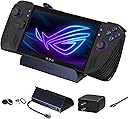
๐ฎ Dock, Charge, Dominate: The ultimate power hub for your gaming lifestyle.
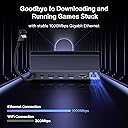
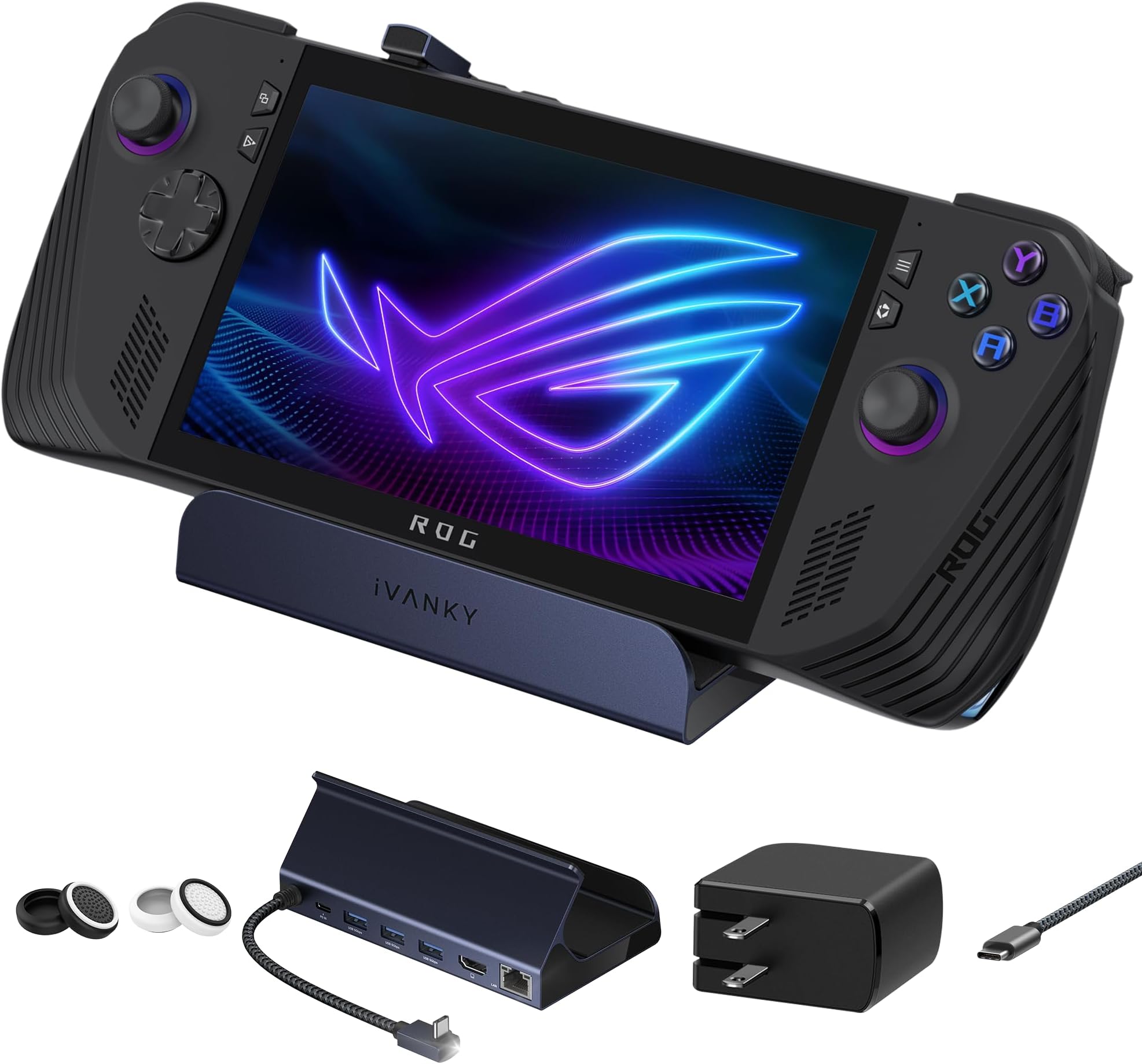
The iVANKY 8-in-1 Docking Station is engineered for serious gamers and professionals using ROG Ally, Legion Go, or Steam Deck. It delivers stunning 4K@144Hz HDMI output, ultra-fast 65W power delivery, and robust connectivity including Gigabit Ethernet and multiple USB 3.0 ports. Compact and travel-friendly, it ensures seamless gaming and productivity anywhere with a 12-month warranty for peace of mind.


| ASIN | B0CPLW693J |
| Best Sellers Rank | 12,976 in Computers & Accessories ( See Top 100 in Computers & Accessories ) 126 in Docking Stations |
| Brand | IVANKY |
| Brand Name | IVANKY |
| Colour | Dark Blue |
| Compatible Devices | Laptops |
| Compatible devices | Laptops |
| Country of Origin | China |
| Customer Reviews | 4.5 out of 5 stars 1,572 Reviews |
| Hardware Interface | Ethernet, HDMI, USB, USB Type C |
| Hardware interface | Ethernet, HDMI , USB, USB Type C |
| Manufacturer | iVANKY |
| Number of Ports | 8 |
| Number of ports | 8 |
| Product Warranty | 2 years |
| Total HDMI Port | 1 |
| Total USB Ports | 3 |
| Total USB ports | 3 |
| Unit Count | 1.0 count |
| Wattage | 65 watts |
M**S
Human review for gamers who travel
This item works very very well with the Rog Ally X. I take both with me when travelling for work. I play alot in hotels. It runs smoothly and fits very comfortably. Buy this for American destinations or if you have a 65w output EU or UK use at home. Fantastic product. Would recommend for gaming away from home.
O**N
Did exactly what I wanted it to do
The iVANKY 4K@144Hz ROG Ally Dock has been an absolutely fantastic accessory and has worked flawlessly from day one. The build quality feels premium, sturdy, and clearly designed with handheld gamers in mind. Itโs compact enough to fit neatly into my setup while still offering all the ports and connectivity I could need. Video output is excellentโrunning 4K at 144Hz looks incredibly smooth and sharp, whether gaming, browsing, or using the ROG Ally as a desktop replacement. Connection stability has been rock solid, with no dropouts, flickering, or connection issues. What really impressed me was how reliable it was when I used it to install SteamOS on my ROG Ally. The dock handled everything perfectlyโUSB devices, external storage, display output, and network connectivity all worked exactly as they should, making the whole installation process smooth and hassle-free. It genuinely turned the Ally into a proper mini PC setup. Charging passthrough works great, the ports are well laid out, and everything just feels plug-and-play. Overall, this is a high-quality dock that delivers excellent performance, reliability, and versatility. If you own a ROG Ally, this is easily a 5-star accessory and highly recommended.
C**S
US plug with a small plastic UK adaptor. Still works as described.
Excellent build. Just waiting for my console to try. The 100w plug comes as pictured with an adaptor for a UK plug socket. It still provides super fast charging to my phone.
A**A
Love the dock
It works well with my Lenovo Legion Go S (the new Legon Go) and it fits well with my busy desk. The setup was easy, too. The ports are great
S**M
Some USB-PD related issues, but overall functional with the right supply. A good purchase.
This dock is pretty plug and play and feels well made with plenty of IO ports, but there are some important caveats when I tried it with an ROG Ally: When used with a Dell Laptop 130W USB-C supply, it charges the battery, allowing for 30W Turbo mode. When used with the OEM ROG Ally 65W supply, it charges the battery, allowing for 30W Turbo mode. When used with an Anker A1383 65W Power Bank, it charges the battery, allowing for 30W Turbo mode. When used with an Anker 317 100W USB-C supply, it seems to succeed but slowly discharges the battery, while still allowing 30W Turbo mode for some reason. It gives no warning like you see when you use an inadequate supply (the i over the battery indicator in Armory Crate). I'm unsure of why the USB-PD arbitration results in some chargers failing to deliver the required power, but it seems to be an issue of compatibility between the firmware of the supply and the dock itself, as the Anker 317 is capable of charging an ROG Ally directly without issue when there's no dock in the middle. It's also not a matter of overall power, as the 65W capable power bank was able to run the Ally in 30W Turbo while also charging through the dock. This product works, provided you have the right charger (it does work with the stock ROG Ally 65W supply).
A**R
Very good
Iโm very happy with it. Dock quality is nice, it sits on it nicely. It was well worth the money in my opinion. Does exactly what I need it to.
M**N
Low score due to a failed PSU, 9 months old and after very little use.
Waited a while to review, scored low due to the power supply leaving the chat last night. Purchased in August 2025 so for the money, has not lasted anywhere near as long as I would expect it to. Also tripped half of the house sockets overnight when it decided to pop. Barley used over its time so extremely frustrating as it wasnโt free. Dock has been flawless and is great for tv or monitor output and all the peripherals youโd need.
K**G
Perfect for Legion Go S.
I bought this dock to use with my Lenovo Legion Go S Z2E and straight out of the box it works perfectly. I use the 65 watt charger that came with my Legion to plug into the dock and the dock itself then allows my Legion to sit nicely in position while its being charged or used. Apart from the port to plug your charger into, there are an additional 3 USB type A ports to plug in peripherals and also an HDMI 2.1 port for monitor connection and an ethernet port should you want to connect to your network wired. I currently use two of the USB ports for a mouse and keyboard and I have also used the HDMI port to hook up to my monitor. In use, the streamlined nature of the Steam OS on the Legion make this a very easy plug-and-play solution. As soon as I power up my device, it connects straight away to my monitor. Things are even better when you go into desktop mode as the OS knows that you are docked and it immediately treats the screen of the Legion as an extended desktop screen! The only thing that I have had to set up 'manually' was the audio output as in docked mode the audio defaulted to the Legions speakers rather than the HDMI audio from my monitor. Overall a highly recommended solution for docking your Legion Go S, especially if you wish to take full advantage of the desktop mode offered by Steam OS.
P**E
Produit non adaptรฉ ร un rog xbox ally X + chargeur problรฉmatique
Produit non adaptรฉ au ROG XBOX Ally X, la version xbox avec ses poignรฉes plus imposantes pose un sรฉrieux problรจme, le dock ne retient pas le ROG. Qui plus est, le chargeur achetรฉ avec, n'est pas exclusif au territoire franรงais et l'adaptateur fourni pour l'embout de la prise ne permet pas la charge. Donc cela fait quand mรชme beaucoup, ร รฉviter pour un ROG ally XBOX + une prise pas destinรฉe au marchรฉ franรงais, je ne saurais que trop conseiller de prendre un chargeur sans adaptateur, donc ne pas prendre de chargeur chez eux. Le service commercial iVANKY a รฉtรฉ trรจs "classe", ces derniers m'ont remboursรฉ les 7 โฌ pour l'embout d'adaptateur au courant europรฉen, et ce, alors que je ne leur demandais rien, preuve s'il en est, de leur sรฉrieux. Concernant la problรฉmatique de maintien de la rog xbox ally X, vous devrez utiliser le support carton fourni avec (mรชme si ce n'est pas idรฉal, notez que le problรจme ne concerne que la version xbox). Note mise ร jour.
A**H
The Type C angle is annoying
The docking station type C connector to the handheld sometimes stuck and the angle is very annoying when you try to connect or disconnect the station.
M**T
Ally Dock
Sehr gut einfacher gut Hamburg
S**C
Nice quality for a fair price
I use this with my ROG Ally and have no complaints. It's straight-forward to set yourself up and I'm using my ROG power adapter plugged into the dock. It's also easy to unplug power when I want to take that with me. The dock has a nice weight to it to ensure the handheld won't tip over if bumped or a cable yanked, so that's nice. I chose this dock because I'm new to handheld PCs and just wanted something basic and cheap to see if I liked the docked experience. I've been really pleased with this and have had no issues at all doing everything I want with it. Also, we used this with a Legion Go too and it worked fine with that as well. The size of the Legion made the dock look tiny but functionally it worked good.
P**A
Good build quality, plug-and-play!
This dock is simply perfect for my Steam Deck, and based on the description, should support a few other mainstream handheld devices as well. It's just plug-and-play. I plugged the usb-C from the dock to my Steam Deck, plugged in my Steam Deck charger to the dock, plugged the HDMI from my 1440p monitor, and it just worked. One small step I had to do specific for the Steam Deck was to go to the Advanced Display settings and allow Max resolution to whatever your display allows. In my case it was 1440p, but it also showed 4k since my monitor supports 4k even though the true resolution is only 1440p. That's it! Just like that, your handheld device is now essentially a PC.
Trustpilot
4 days ago
3 days ago