Desertcart purchases this item on your behalf and handles shipping, customs, and support to Senegal.
๐ Upgrade your rig with the sleekest, coolest NVMe adapter on the block!
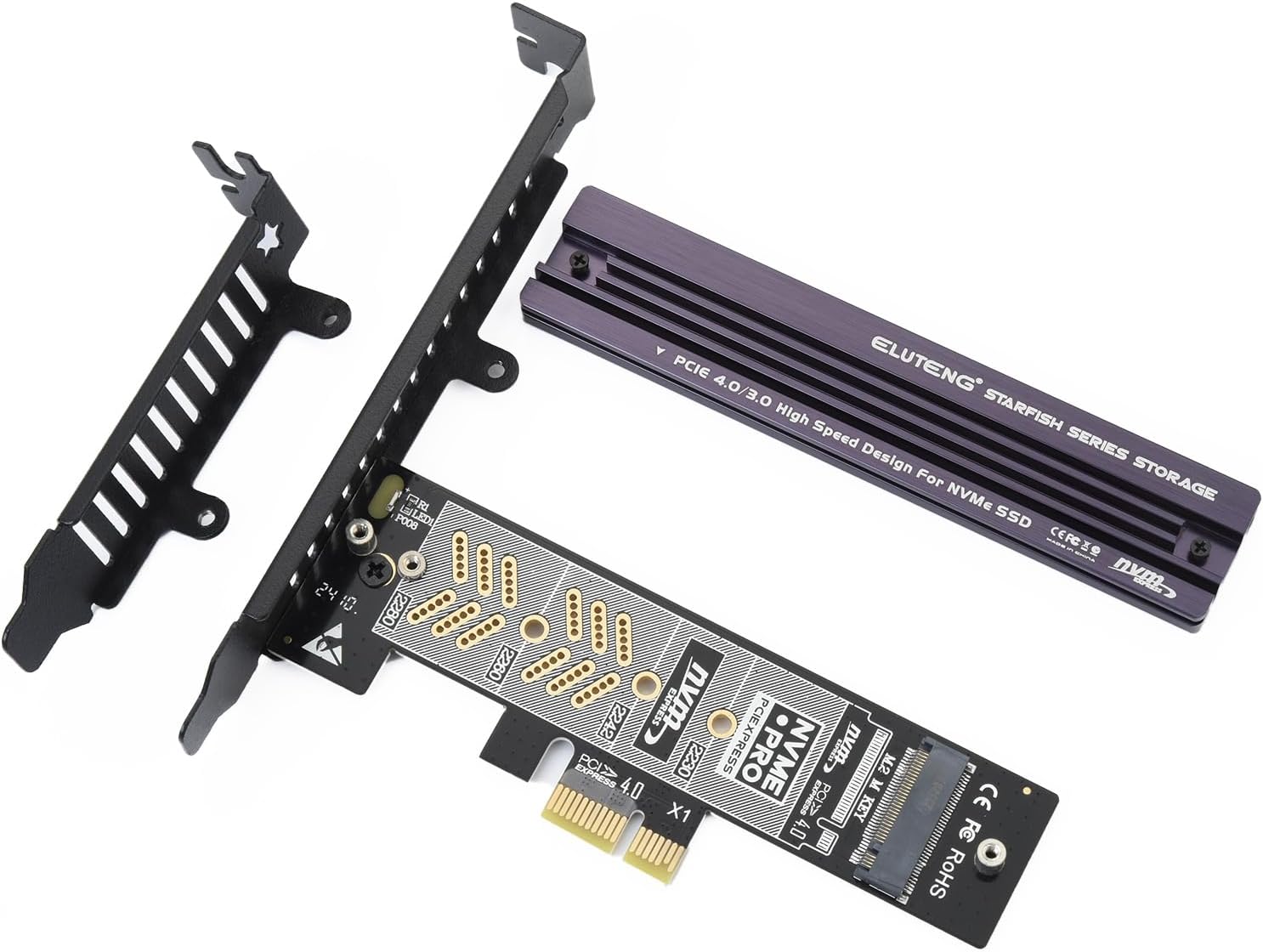
The ELUTENG PCIe NVMe Adapter transforms your M.2 NVMe SSD into a high-speed PCIe card with up to 16Gb/s transfer rates. Featuring a durable aluminum heatsink, it ensures optimal thermal management and stable performance. Compatible with PCIe x1/x4/x8/x16 slots across PCIe 1.0 to 4.0 standards, it supports Windows, Linux, and macOS systems with plug-and-play ease. Designed for professionals seeking reliable, fast, and easy storage expansion, this adapter combines compact form factor with robust build quality and broad compatibility.


| ASIN | B0CN998KS9 |
| Best Sellers Rank | #9 in Computer Memory Card Adapters |
| Brand | ELUTENG |
| Built-In Media | NVMe PCIe 4.0 Adapter |
| Compatible Devices | Windows |
| Customer Reviews | 4.4 out of 5 stars 208 Reviews |
| Hardware Interface | PCI Express 4.0 |
| Manufacturer | ELUTENG |
| Model Number | ELUTENG PCIe NVMe Adapter |
| Number of Items | 1 |
| Operating System | win 7/8/10/11, Linux, MAC OS |
| Style | NVME to PCIe |
| Style Name | NVME to PCIe |
| Unit Count | 1.0 Count |
| Warranty Description | 2 year manufacture |
O**N
Well made sturdy PCB, green activity LED, quality heatsink, PCIe 2.0-4.0 (speed limited by PCIe rev)
I like the low profile and compact design of this PCIe nvnm add in card, since my PCI-E 1x slot sits directly under my video card it doesn't block the fan or airflow like some larger sized cards would, it also has the support plate which can screw into the case for extra support (since it does get pretty hefty once the heat sink is installed), it includes 3 thermal pads with different thicknesses, I used the medium one which seemed to be a perfect fit for my Samsung drive, the heatsink on this card is thick and robust with good airflow design, so far it keeps my drive at a stable 37-41c range even with heavy usage. Design: The PCI-E card is small sized is just a bit bigger then the nvme drive itself, but it feels solid with a great pcb thickness (it doesn't bend or flex), I also like that there are no large capacitors or resistors on the PCB which are known failure points, the card also has a green LED which is always solid green or will flash during drive activity, it can be seen outside the computer case since the support bracket is slotted allowing the light to shine through. (no way to disable the light though). For cons: I did have a slight issue installing the support bracket since it would hit the heatsink support brackets screw on the bottom, causing it to be slanted, I had to shim it with a small o-ring which allowed the pcb to sit flush with the support bracket. Another tiny nitpick is when using a PCI-E card, the normal hard drive activity light on the computer case will not flash like a normal SATA drive, so the activity light on the card is the way to see NVMN drive activity (without using software). NVME Support: I am using this with a Samsung EVO 990 Plus, no compatibility issues, and it passes the drive directly to the OS so it actually shows as the Samsung 990 EVO Plus in the OS, allowing me to update the firmware and use other functions of the drive like TCG Opal, SMART, and it works just like a built-in slot would. Booting: Since I have an older pc, (z77x, pci-e 2.0 era), my PC did require some bios modification to get PCI-E boot support, but not really an issue with this card, after a few bios tweaks I was able to set it up and boot off the card perfectly, this would be a much simpler process on modern computers which shouldn't have any issues booting. Speed: For me my old PC is obviously a limiting factor with just PCE-2.0 1x slots, so I roughly get 480 MB/s (which is limited by PCI-E 2.0 1x bandwidth of 500 mb/s), on modern computers PCI-E 3.0 - 4.0+ will fare much better in terms of speed, this card is limited only by the PCIe speed of the system and the NVME card. Overall I recommend, so far no issues, drive has been 100% stable with no drop-outs or errors, plug and play, no drivers needed for Windows 10/11 or Linux..
H**K
Works perfectly and fits perfectly!
Great addition to my qct1250. Plug and play. No issues.
S**A
Works well, but has a design flaw
This is an initial assessment; I just installed it. I'll update as necessary. This thing came with no installation instructions, not even a follow-along picture sheet. Thankfully, an online installation video saved me a few minutes and a few headaches. Fully assembled, the adapter did not fit nicely into my case. I had to twist it slightly (a) to get it to fit into the PCI slot and (b) for the (supplied and attached) bracket to fit into its designated spot. My best guess: it's misaligned by about the thickness (maybe a bit more) of the supplied mounting bracket. IMO, this is a design error that should have been corrected before going to market. -1 star for the design issue. I'm keeping it "slightly twisted" for now, hoping for no issues down the road. Option 1: Install the adapter without using the supplied bracket. No slight twist is required, but the adapter would not be secure and might fall out over time. Option 2: Start with Option 1, then use one of the case's existing brackets to help hold the adapter in place (no attachment, but a flat surface to impede movement). Might work, IDK. Option 3: involves grinding the supplied bracket for a better fit; probably not for the squeamish. BE CAREFUL: The install video shows two decent-sized screws holding the aluminum cover in place. My device came with much smaller (very tiny) screws, which could easily be lost when removing the cover to install the M.2 card. It would be nice if an additional 2 cover screws were provided, to cover loss and excessive torque. Three heat-transfer pads were supplied, two blue and one thinner pink/red. The install video shows use of a blue one, but doesn't show how the other 2 might be used. There is a gap between the PCB and the M.2 card - makes me wonder about that pink/red one. First performance check: Plugged into a PCIE3.0x16 slot (old motherboard), copying to the M.2 from a local SATA-3 SSD: 500+ MB/sec, plenty for my needs. The same copy, but from a 5400-rpm HDD over a 1-gig ethernet connection: 85 MB/sec. Lastly, the same copy again, but from an SSD-based Windows Storage Pool over 1-gig ethernet: 113 MB/sec. Temperature: about 32 degrees Celsius max (all tests), so the heat sink seems to be working. I don't know if the green light indicates "it's working correctly," or just "hey, green light!" I'd like it to mean their device and the M.2 drive are both in good shape, but there was no manual.
R**6
Does what it is supposed to, nicely made, and provides a way to add a super fast drive!
If you have basic knowledge of NVMe SSD drives, you'll have no problem installing a drive into this PCI adapter. It comes with two chassis brackets of different heights to cover you if whether your PC has a half- or full-height chassis. I found that the full-height bracket fit properly into place without bending, forcing or fiddling. The adapter installed just fine and worked properly from the start. (If you have a brand new drive mounted in it, you'll probably have to go into Disk Management and attach the drive, format it and assign it a drive letter - if you don't know how to do those things, installing a drive with this adapter might be above your pay grade.) So - it was nicely made, installed easily, and the speed of an NVMe drive in a PCI slot - using one of these adapters - is amazingly fast!
C**A
The best quality 1x card on Amazon
This card is working good. Box provided everything you'll need to get it work. PCIE 4.0 x1 is not slow. Actually it is 2GB/s. If you have only one 1x slot left like me, you can use that slot for that additional M.2 storage. There is a bright green activity light, thermal pad+thermal cover as well as all the screws and a little screwdriver. I am happy with my purchase.
M**O
20X Faster than my SSD on PCI3
It works well and it's 20x faster than my SSD.
D**T
Decent enough Gen3x1 to NVME adapter. Unserviceable as Gen4x1 adapter.
The expansion brackets indeed are poorly fitting. They're only held in place with a single screw. Leaving my motherboard (Asus X570) set to Auto PCIe generation negotiation or forcing Gen4, would cause long and/or unreliable POSTs, and no boot. Forced to Gen3, these adapters work just fine. I'm not planning on returning these, as they do work just fine @ Gen3 or lower PCIe spec. The heatsink is a nice plus, and they do include a nice selection of varying thickness thermal pads (that most other adapters neglect). After my immediate need with my 2 adapters in my modern system is done, they'll likely end up in legacy systems for Optane Page File and ReFind, etc. NVME bootloaders.
P**S
Good value for the price
The compatibility is good with this card and the heatsink is a nice addition. So far I haven't found a system this hasn't worked in. If you need a basic pcie to m2 adapter this one will fit the bill.
R**O
works at PCI-e 4 speeds!
Came with all the screws and a heatsink I didn't need but works at PCI-e 4 speeds!
E**C
Low cost yet complete kit that works flawlessly.
Good value, everything is included to make it work. Heat sink is good size too. 2 brackets included for low profile or high profile. I didnโt use any and it holds well in place.
B**S
Missing 1 screw that attaches Board to Metal Bracket.
Missing Screw. A pretty important screw since it attaches the black full (or half) metal bracket to the card. A 2.5 Sata SSD screw I had lying around worked perfectly (it is the only silver screw shown in the picture 6 and 7). I hope you have one. No, a 3.5" hdd screw won't work, too big. In the bag it came with: 1x Miniscrew plastic driver 1x black chonky knurled thumb screw, probably for mounting the black metal bracket to a roomy pc case (10.2mm diameter screw head / 16.4mm long) 1x black thick screw, looks like the one for mounting power supplies, probably for mounting the black metal bracket to a tighter pc case or server rack (9 mm screw head diameter, 6.3 mm long) 1x black skinny screw acting as a spare for the heatsink mount (2.5 mm screw head diameter, 5.8 mm long) 1x silver m.2 standoff for shorter m.2 drives that are 60, 42, 30 mm long (4.9 mm diameter, 3.3 mm tall) 1x black skinny short screw for mounting the silver m.2 standoff, screw goes underneath the black pci-e board and the stand off goes on top (3 mm screw head diameter, 3 mm long) 1x black skinny m.2 screw for your standard 80mm long m.2 drive, the other silver stand off is already permanently on the black pci-e board (3.8 mm screwhead diameter 4.6 long)
N**.
missing hardware (1 screw)
the card was missing a machine screw to mount the pcb to the bezel. An old 2.5 SATA Laptop drive mounting screw fit perfectly.
A**T
Running for a few months no issue
Been running for a few months now without issue.
Trustpilot
1 day ago
1 month ago