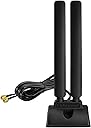
Desertcart purchases this item on your behalf and handles shipping, customs, and support to Senegal.
🚀 Elevate your WiFi game with Eightwood’s tri-band antenna—because buffering is so last decade.
The Eightwood WiFi 6E Antenna delivers tri-band connectivity across 2.4GHz, 5GHz, and 6GHz frequencies with a 5.0 dBi gain and omnidirectional signal. Featuring a magnetic base and a 6.5ft extension cable, it offers flexible placement to maximize WiFi 6E benefits including faster speeds, reduced latency, and enhanced Bluetooth performance. Compatible with PCI-E cards, USB adapters, routers, and more, it’s designed to boost your desktop or gaming setup’s wireless reliability and range up to 200 feet.


| Antennadescription | wifi 6e antenna |
| Asin | B0CJR721ZJ |
| Best Sellers Rank | #99,065 in Computers (See Top 100 in Computers) #300 in Network Antennas |
| Brand | Eightwood |
| Color | RP-SMA WiFi 6E Antenna style 2 |
| Customer Reviews | 4.3 4.3 out of 5 stars (149) 4.3 out of 5 stars |
| Impedance | 50 Ohms |
| Item Dimensions L X W X H | 8L x 7.5W x 22H centimeters |
| Item Weight | 190 Grams |
| Manufacturer | Eightwood |
| Maximum Range | 200 Feet |
| Mfr Part Number | EWUA0190 |
| Model Number | EWUA0190 |
| Number Of Channels | 17 |
| Number Of Items | 1 |
| Number Of Packs | 1 |
User
Bon produit
Ma vitesse de connexion à internet s'est nettement amélioré (environ +30%)
User
Goede antenna
Werkt perfekt, gemakkelijk te gebruiken, heb het gekocht als vervanging van de bluetooth antennas van mijne pc (hebben mijn katten eraf gespeeld ^^)
User
Articolo consigliato
Ho migliorato un bel po la stabilità del mio wifi, dove purtroppo l ethernet proprio non potevo metterlo.
User
Positive surprise
Plug and Play, long cable, has significantly raised the up/down speed! It is nicely heavy and comes with drilling possibility.
User
Best purchase to improve Wi-Fi signal, you will not regret this
This is the best purchase I have made from Amazon in a long time, I highly recommend this product you will not regret it. The problem with screenshots of speed tests is that everyone's network is different with different barriers and sources of interference to Wi-Fi. Additionally everyone has a different internet speed from their internet service provider. What I can say is that I pay for 300 Mbps download and 300 Mbps upload and the reason I had purchased this antenna is because my upload speeds were originally horrible. Before purchasing this antenna I would receive maybe 220 Mbps download and 120 Mbps upload at best following optimal antenna placement. Prior to moving my old Wi-Fi antenna to an optimal placement I was only seeing 40-50 Mbps uploads. Since my download is stronger than my upload that informs me that the router can send data to my computer but my computer struggles to send the information back to the router indicating an antenna problem. This can be confirmed by typing the following command in the Windows Terminal 'netsh wlan show interfaces' which will show you the raw receive and transmit rate of your computer as well as your signal strength represented as a percentage which is a better gauge of determining signal strength than an internet speedtest, just keep in mind these numbers do not reflect internet speeds and are likely higher.Upon purchasing the antenna I gained two Wi-Fi bars and now go between full signal and the loss of one Wi-Fi bar. My internet speed test results now show my download speed maxed out at my internet service provider limit of 300 Mbps and my upload drastically improved to about 250 Mbps. When transferring files internally on my network upload speeds average between 220 and 250 Mbps with the highest speed upload speed observed of 267 Mbps.At the time of this review I have worked in IT for 18 years.
Trustpilot
3 weeks ago
1 day ago