Desertcart purchases this item on your behalf and handles shipping, customs, and support to Senegal.
🖨️ Compact powerhouse for the savvy small business pro—print smarter, faster, and greener!
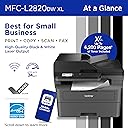
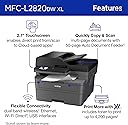
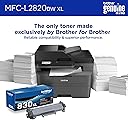
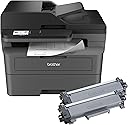
The Brother MFC-L2820DW XL is a compact monochrome laser all-in-one printer designed for small businesses. It offers fast printing at 34 ppm, an XL toner cartridge yielding up to 4,200 pages, and versatile connectivity including dual-band Wi-Fi, Ethernet, and USB. Featuring a 2.7” touchscreen for easy cloud integration, automatic duplex printing, and a 50-page auto document feeder, it streamlines high-volume printing, copying, scanning, and faxing with eco-conscious efficiency and reliable performance.


| ASIN | B0CPL3MLT1 |
| Additional Printer Functions | Copy, Fax, Scan |
| B&W Pages per Minute | 34 ppm |
| Best Sellers Rank | #2,524 in Office Products ( See Top 100 in Office Products ) #360 in Printer Toner Cartridges |
| Brand | Brother |
| Built-In Media | AC Power Cord, Drum Unit, Telephone Line Cord, Toner Cartridges |
| Color | Black |
| Color Depth | 1 bits_per_pixel |
| Compatible Cartridge | Brother TN830/Brother TN830XL |
| Compatible Devices | Laptops, PC, Smartphones, Tablets, iPhone |
| Connectivity Technology | Ethernet, USB, Wi-Fi |
| Control Method | App, Touch |
| Controller Type | Android |
| Customer Reviews | 4.5 out of 5 stars 171 Reviews |
| Display Type | LED |
| Dual-sided printing | Yes |
| Duplex | Automatic |
| Hardware Interface | Ethernet, USB |
| Initial Page Print Time | 8.5 Seconds |
| Ink Color | Black |
| Item Dimensions D x W x H | 15.7"D x 16.1"W x 12.5"H |
| Item Type Name | Multifunction Printer |
| Item Weight | 22.7 Pounds |
| Manufacturer | Brother |
| Maximum Copy Resolution Black and White | 600 x 600 dpi |
| Maximum Copy Speed Black and White | 34 ppm |
| Maximum Media Size | 8.5 x 14 inch |
| Maximum Print Resolution Black and White | 1200 x 1200 Dots Per Inch |
| Maximum Sheet Capacity | 250 |
| Model Name | MFCL2820DW With XL Toner |
| Model Number | MFCL2820DWXL |
| Model Series | MFC-L2820DW |
| Number of Trays | 1 |
| Other Special Features of the Product | Auto Document Feeder, Auto-Duplex, Energy Star, Epeat Qualified, Network-Ready |
| Output sheet capacity | 250 |
| Paper Size | Up to 8.5 x 14 Inches |
| Print media | Envelopes, Paper (plain) |
| Printer Connectivity Type | Ethernet, USB, Wi-Fi |
| Printer Output Type | Monochrome |
| Printer Type | Laser |
| Printing Technology | Laser |
| Resolution | 300 x 300 |
| Scanner Type | Flatbed, Sheetfed |
| Special Feature | Auto Document Feeder , Auto-Duplex , Energy Star, Epeat Qualified, Network-Ready |
| Specific Uses For Product | Home, Office |
| Total Usb Ports | 1 |
| UPC | 012502674023 |
| Unit Count | 1.0 Count |
| Warranty Description | 1 Year Limited |
| Warranty Type | Limited |
R**Y
Great printer, but set up instructions aren't necessarily as "Eze" as they claim.
After years of struggling with inkjets and wasting more ink than I actually used in printing, I finally gave up and bought a toner-based laserjet. Should have done that years ago, but they were so expensive and inkjets were so cheap. Live and learn. I downloaded the EzeSetup as recommended. The printer worked fine printing internal reports and copying, but wouldn't receive print jobs from the wired network, the wireless network, or the USB plugged directly between the printer and the PC. All print jobs showed being sent then changed to "error". Being one who likes to figure things out myself, I kept banging my head against the printer (didn't affect the printer but gave me a headache). Eventually, I saw a link on a Brother support page to a download of the full package for my printer, complete with all drivers, associated software, everything. After I downloaded and installed that package, the set up went flawlessly. Within a few minutes, I was printing and was very happy!! About my only complaint would be the sounds the printer makes to, I guess, let you know it's received your instructions and is processing them. It's easily turned off or turned down through the display screen, though, so it's easily fixed. The printer is quick, reasonably quiet, and turns out great black & white pages; crisp, clear, and easy to read.
D**A
Great, fairly price mononochrome printer, scanner, and fax machine!
I upgraded from my prior monochrome MFC Brother printer, scanner and fax machine, which was a work horse which lasted me 10 plus years ...so far this newer model of the same product is working great, the photocopied documents are crisp and clear, I'm am very satisfied with this choice...
J**N
I gave this Brother five.
This is the best we have ever owned. It was the easiest to setup and run. It is reliable. I wish we bought this years ago.
J**E
Good print for a good printer
A great printer. I am very pleased with it. It seems to be economical. The ink cartridge lasts a long time.
B**D
Does what it’s designed to do at a decent price.
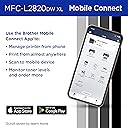
Good B/W printer at a decent price. Great addition to my home office. Excellent connectivity and easy to use through either the Brother app or Apple’s native printer app on my iPhone.
W**W
Great printer- scanner
Had this for a few months now and works great. Love it
G**L
So nice when things go as expected.
Setup and print, scan, fax via wifi frommthe first attempt from both glass and the Win 11 pc. Print quality excellemt. If you need a black and white aio printer, give it consideration.
A**R
Do NOT Buy. Poor Reliability.
This printer is a waste of money. After 5 months, the print quality is terrible (patchy dark/light areas). Even after trying 3 different toners, the problem persists. Customer service refused to help, telling me to pay for a new Drum myself because "consumables aren't covered." If a printer fails this quickly and the company won't fix it, it’s a bad product. This brand is officially on my blacklist.
R**B
Working well
Connected via the ethernet - printing and manual scanning working very well. Have not tried the fax or the auto feeder. Like large paper capacity. Used option to turn off the sound, as the device otherwise plays a little tune every time I turn on my computer. Also, oddly when I turn my computers on Wi-Fi on or switch the Wi-Fi connection the printer comes out of sleep mode, whirs a bit, and then go back to sleep.
N**E
Prix et qualité , parfait.
La qualité Brother . Fiable et impressions parfaites.
W**D
Fausse représentation
Premièrement assurez vous qu'amazon vous envoie le bon modèle, ils m'ont expédié le modèle 2820dw alors que j'ai payé pour le 2820dwXL. Ça pris plusieurs jours pour corriger leurs erreurs, plusieurs agents. Brother laser sont de très bonnes qualités mais le modèle XL ne prend pas en charge le 11x17 comme indiqué dans la description. Tout ce cassage de tête avec le retour du mauvais modèle, l'expédition du bon modèle, les 2 jours perdu à attendre la livraison parce qu'il faut donner un code de sécurité pour finalement un modèle standard, c'est fachant étant donné que je l'ai acheté pour le format 11x17.
Trustpilot
3 days ago
2 months ago