Buy anything from 5,000+ international stores. One checkout price. No surprise fees. Join 2M+ shoppers on Desertcart.
Desertcart purchases this item on your behalf and handles shipping, customs, and support to Senegal.
🖨️ Print smarter, save bigger — the EcoTank way to stay ahead!
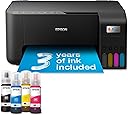
The Epson EcoTank ET-2860 is a compact, wireless all-in-one inkjet printer designed for busy home use. Featuring ultra-high capacity refillable ink tanks that provide up to 3 years of ink, it delivers up to 7,500 color pages and 4,500 black-and-white pages per refill. With fast print speeds (up to 33 ppm B&W), borderless photo printing, and seamless mobile device integration via the Epson Smart Panel app, it combines cost-efficiency with modern convenience. Its heat-free printhead technology ensures durability and low power consumption, making it a smart, eco-friendly choice for professionals seeking reliable, budget-friendly printing.


| ASIN | B0CPYQKRX5 |
| Additional Printer Functions | All In One |
| B&W Pages per Minute | 33 ppm |
| Best Sellers Rank | 216 in Computers & Accessories ( See Top 100 in Computers & Accessories ) 1 in Ink Tank Printers |
| Box Contents | 4 x 65ml individual ink bottles (Bk, C,Y,M), Main unit, Power cable, Setup guide, Warranty document |
| Brand | Epson |
| Brand Name | Epson |
| Color Depth | 24 bits_per_pixel |
| Color Pages per Minute | 15 ppm |
| Colour | Black |
| Compatible Cartridge | 104 Ink Bottles |
| Compatible Devices | PC, Smartphones, Tablets |
| Connectivity technology | USB |
| Control Method | App, Touch |
| Controller Type | Android |
| Country of Origin | Japan |
| Customer Reviews | 4.0 out of 5 stars 1,380 Reviews |
| Dual-sided printing | No |
| Duplex | simplex |
| Global Trade Identification Number | 08715946725918 |
| Hardware Interface | USB |
| Ink Colour | Black, Cyan, Magenta, Yellow |
| Item Dimensions D x W x H | 34.7D x 37.5W x 17.9H centimetres |
| Item Type Name | Inkjet Printer |
| Item Weight | 3.9 Kilograms |
| Manufacturer | Epson |
| Maximum Copy Resolution Black and White | 5760 x 1440 dpi |
| Maximum Copy Resolution Color | 1200 dpi |
| Maximum Copy Speed Black and White | 33 ppm |
| Maximum Print Resolution Black and White | 1200 dpi |
| Maximum Sheet Capacity | 100 |
| Maximum Supported Paper Size | A4 |
| Maximum print Resolution Color | 5,760 x 1,440 dpi |
| Model Name | ET-2860 |
| Model Number | ET-2860 |
| Model Series | EcoTank |
| Model name | ET-2860 |
| Network Connectivity Technology | USB |
| Number of Trays | 1 |
| Other Special Features of the Product | Borderless Printing |
| Output sheet capacity | 100 |
| Paper Size | 21 centimeters |
| Power Consumption Size | 12 Watts |
| Print media | Paper (plain) |
| Printer Output Type | Colour |
| Printer Resolution Vertical Max in Color | 1440 Centimeters |
| Printer Resolution Vertical in Black and White | 567 Centimeters |
| Printer Type | Inkjet |
| Printing technology | Inkjet |
| Product Warranty | 1 year manufacturer |
| Resolution | 5760 x 1440 |
| Scanner Type | Flatbed |
| Special feature | Borderless Printing |
| Specific Uses For Product | Home, School |
| Total USB Ports | 1 |
| Warranty Type | Limited |
| Wattage | 12 watts |
T**C
BUY THIS PRINTER
This is the best printer by far that I have ever owned! It is a no mess no fuss printer. It works when it is meant to work, it scans quickly and with no fuss. The scanner is intuitive and just knows when you want to scan and it asks you if you want to scan and you press three buttons and voila the scan appears on your laptop in perfect quality and clarity. FANTASTIC PRINTER COPIER SCANNER and it is in COLOUR too, what more do you want?
M**N
Excellent ink tank printer, scanner, copier.
The Epson ET-2860 is an excellent ink tank printer, scanner and copier and, at the time of purchase, the cheapest ink tank unit available on Amazon. I have purchased two (one for a relative). Setting up was very easy - connected to an iPhone via wifi and to a MacBook Air via both cable and router wifi. Ink tank filling was simple and straight forward. Printing speed is good, although not the fastest. It is not a duplex (double-sided) printer, although printing odd number pages and then re-feeding to print even number pages is no hardship. (Reading reviews of duplex printers, it would appear that they just have more to go wrong with paper jamming.) My previous printer was a very reliable Epson Stylus SX200 inkjet cartridge printer, now obsolete due to the current macOS. I am a fan of Epson; I have refused for years to purchase any HP products after purchasing an HP Pavilion TX1020ea laptop which rapidly became a brick due to a known video chip problem and HP told me to take a long walk off a short pier…
S**N
Good printer, awful software
This is for the ET-2956 (these reviews seem to be for a wide range of printers, make sure you filter them to get reviews for the correct model). Bought to replace a 5 year old eco tank. As so many people have mentioned, setting it up out of the box is physically easy, until you get to the software setup. It has an app, awful and over complicated. In total it took an afternoon to set up. It shouldn't be this difficult, and I am one of the most IT literate people I know. Epson developers need to read up on human factors before letting something like this out into the wild. Print quality is great, once you manage to overcome the ridiculous default settings.
J**N
Rubbish!
Epson Printer/Scanner ET-2860. I give this product just a one-star rating, only because I cannot make a review without a star classification! It has been a nightmare of an afternoon attempting to set up the product with both my Android phone and my PC. It’s rubbish! Firstly, the build quality is appalling. Secondly, despite the instruction to download the Windows 11 operating software via the Epson website … it doesn’t exist! Also, the setup involved locating the Bluetooth ‘password’. Which was described as being located either on a ‘sticker’ on the side panel, or on the underside, of the product. Having filled the ink tanks with ink, as described within the App, it was nowhere to be found. It therefore begs to be believed why the description of where to find the ‘password’ (i.e. on the base of the product ‘after’ being filled with ink). I therefore attempted to use the product serial number as the password … to no avail, and I therefore followed the instructions for password recovery, which was via a third-party organization who billed me £24 for the privilege. By which time I had then found the password (sticker) attached to the top of the paper exit tray … not as advertised! Hence, I had already paid £24 for a service which I didn’t need (a scam maybe?). Anyway, I digress. I cannot access the printer via Windows, but, I can via my mobile phone … subject to signal strength, which is appalling within my local area. To conclude, I don’t have printer access via Windows. Nor can I access the printer via the router. Edit ... I did mage to eventually access the printer from my PC. However, the print output of a lengthy Word document, including a Table with images, was corrupted. I'll be returning the product for a full refund. Having filled the ink tanks with the supplied inks it’s now difficult to return it via Amazon. As yet, my PC won’t communicate with the printer via USB. The Epson model ET-2860 is the worst printer that I have ever purchased. Be advised, DON’T GO THERE! Spend your money elsewhere. It’s not worth the Amazon price of £156. You’ll be VERY disappointed. As for the scanner … who knows? I’ve not got that far!
B**N
Pretty good all round printer with unkown extras on the Epson site.
We decided to buy an ink tank printer as we'd already wasted far too much money on cartridges. This one was replacing a HP Envy 6032e. I didn't really consider going for a HP ink tank printer as I've had 4 HP WiFi printers over the years and all of them have suffered with WiFi issues (occasionally just refuse to print over WiFi and require driver re-installs and other time wasting fixes (which my HP accredited tech support Son has had to deal with). My Granddaughter has an Epson WF printer she uses for working from home and she told me it's been faultless and advised me to go with Epson. At the time of purchase the ET-2860 was £180 (annoyingly, 2 days after delivery there was a voucher for £10 off that price). Installation via USB is very easy, pretty much plug and play. Installation over WiFi on a Windows PC was a little bit of a faff but nothing majorly difficult. The PC was connected to the router via a physical network cable, while trying to install the printer the software kept saying it couldn't detect the printer. The suggestions to fix it were a bit sparse. As the PC also has WiFi, I decided to disconnect the network cable and try again with the PC connected via WiFi. Problem fixed, the software now detected the printer and installed it without any other issues. Once done, changing all the printer settings etc was no different to pretty much all other printers. Filling the ink tanks is quick and simple. The one thing to watch out for is the fact the attachments on all the bottles is the same so you can accidentally put the wrong colour inks in the tanks, just make sure you double check you're putting it in the right tank and you'll be fine. Print quality is pretty good, text and diagrams etc are sharp. Photo's are pretty good but it wouldn't match up to a printer aimed at high quality photo printing. I printed a photo on some 240gsm semi-glossy paper, the printer had no trouble with the papers weight (it's rated for up to 300gsm) and the printed image was rather good. Colours weren't quite a match for what was on the screen (not as vibrant) but that was more likely to do with my monitors colour settings. Even so, the photo still looked quite nice. I've no doubt some image editing would improve the colours of the printed photo. The only part of the photo that didn't look very good were scenes with blocks of dark gradients (like a large body of water on a dull day). It's didn't look bad and from from more than a foot away you probably wouldn't even notice. The scanner is OK, much like the scanner on any other printer these days. Easily good enough for copying documents and photo's with good accuracy. Like other scanners, set the dpi to the higher settings and it will take a quite while. After the printer was installed I was looking at the features etc, Epson have 2 different sections on their site for templates. I was surpised at how many they had and how varied they were. All sorts of craft projects, birthday/etc cards, photo frames, wrapping papers (obviously for small items with this printer seeing as it's A4). I'm going to have lots of fun with that as I do like making my own cards and things. If HP have anything like that they don't go out of their way to make it easy to find. Overall I'm very happy with the printer. The only things it lacks which you would expect on printers in this price range is a paper tray (which I prefer to rear tray feeding) and automatic duplex. I'm not taking away any stars for those as I knew that before buying. I did consider the ET-2850 as it does have auto-duplex but it was £70 more and I don't need it enough to warrant the the extra cost (the 2850 also still has rear loading paper, if it also had a proper tray I may have bought it - hope you're listening Epson, many people prefer a tray). My £70 HP 6032e that this replaced had both auto-duplex and a proper paper tray, the only other real different between the HP and this Epson is the ink takes so it is a large expense for a printer that effectively has less features. Over time the Epson will of course cost less as replacing the inks is massively cheaper (I did have a HP Instant Ink subsription but paying per page rather than how much ink you use only works out worthwhile if you're covering the pages in ink, which I don't often do - especially as we print a lot of A6 postage labels). Knowing the future ink cost savings I think this is a worthwhile investment. My Son wants to do sublimation printer and apparenty Epson EcoTank printers are the best value for that too.
C**R
GREAT PRINTER
Initially i had problems setting it up, but that's totally my fault, i'm unable to follow written instructions and always think i can skip sections. Once i actually took notice of what to do it was easy to set up. Printing is super quick. The bottles of ink in the package are huge and i've played about a lot and the ink levels haven't even moved. Paper size change is easy. I don't what else to say except i'm over the moon with it. These eco tanks are so much better than the old cartridge type printers. Much less plastic use/waste too. So far i've nothing negative to say but will update if that changes.
V**Y
Great printer - very cheap to run with excellent prints
I bought this when on offer. Epson honoured the 5 year warranty and the £30 cashback which was on offer at the time. Since buying this I printed all my homemade Christmas cards on 250gsm card (using Epson print profile, high quality, standard paper setting). The colours were vibrant and no smudges or strange marks. I have printed labels, documents and many other items since and the ink quantity has hardly moved. It is not a duplex printer but it is easy to manually do this. Not tried printing on photo paper yet, so can't comment on that. It was a faff to set up the network, but I found a video on YouTube which helped a lot. I also connected via usb for the first initial driver set up and downloaded the drivers etc from Epson. Setting up on the phone was easy, though. To keep the printheads clean and the ink flowing you can also assign an email address to it so if on holiday for over a week, you can send a print to it whilst away (either directly or set up a timed email) without having to connect to your phone. I really like this printer and seems to cost pretty much nothing in ink for good quality prints. I would recommend
J**N
Bit fiddly to get it to show printer even when WiFi is connected
A right pain in the bum to get it to show machine to internet. It was connected, but couldn’t find printer. Eventually after 3 hours I managed to get it to show printer, I still don’t know how I did it. Easy to get ink into.. print quality not as good as my old HP, but that had only 10 pages per month on subscription or machine wouldn’t work unless I bought their ink. Consequently that’s why I went for the eco tank printer. Sonos I can print whatever and whenever. I also like the scanner bed. My old one didn’t have one. Overall it’s a printer and it seems fine so far.
S**I
Good but...
Papers always get stuck on the back every time I send a print, and I have to reload it two to three times until it prints.
D**D
Très bien
Première expérience avec cette marque ; parfait !
R**O
Importada de Inglaterra. Un poco cara pero es muy buen producto
La marca ✅ y el servicio de Amazon que fue muy ágil en todos los trámites. Gracias
L**E
Great buy
Brilliant printer, fast wireless, ink replacement is not expensive, ink lasts and last with the tank.
K**A
Top
Prodotto eccellente
Trustpilot
1 month ago
5 days ago