Desertcart purchases this item on your behalf and handles shipping, customs, and support to Senegal.
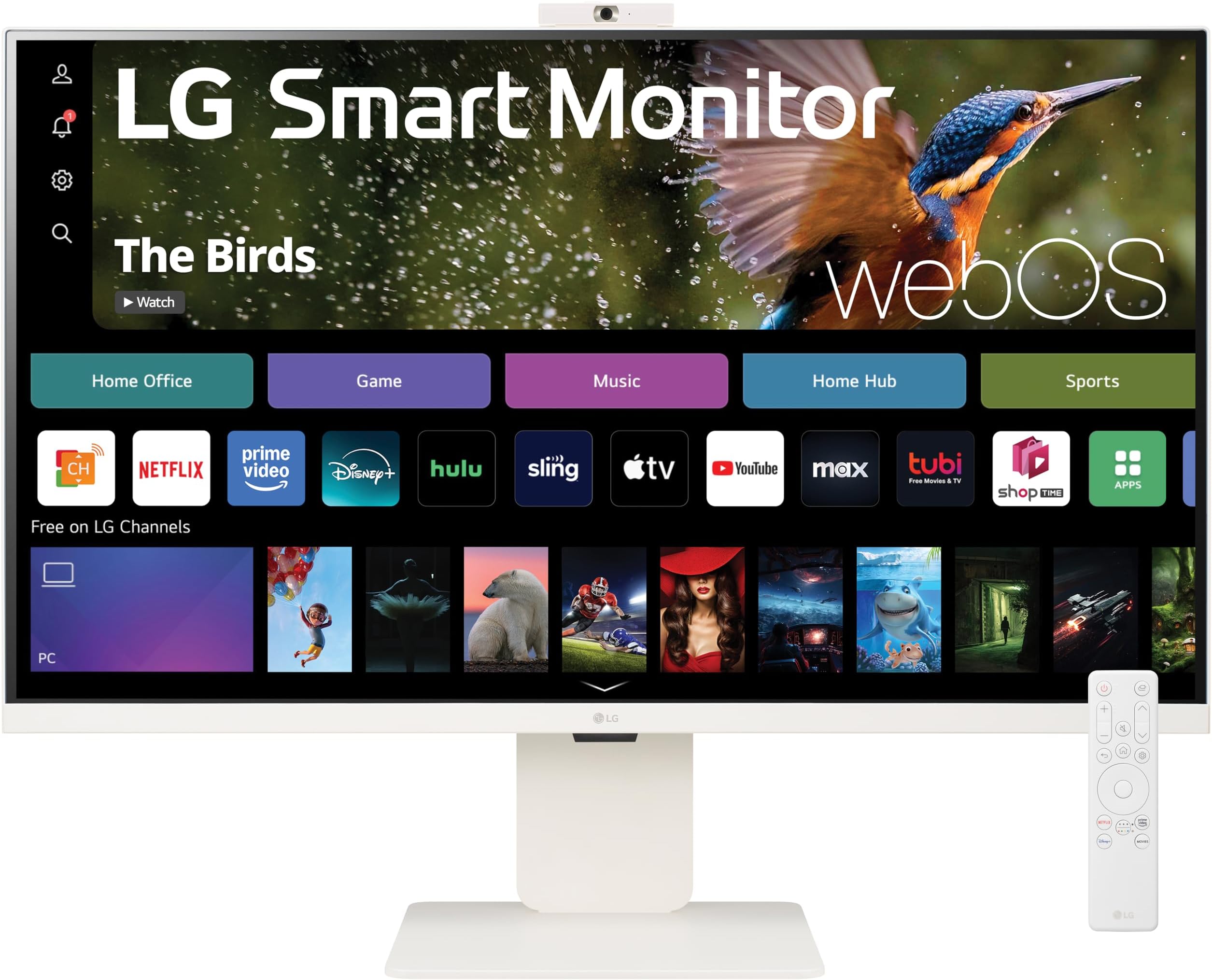
🚀 Elevate your workspace & binge-watch game with LG’s 32” 4K Smart Monitor!
The LG 32SR85U-W is a versatile 32-inch 4K UHD IPS smart monitor designed for multitasking professionals and entertainment lovers alike. Featuring a vibrant 3840x2160 display with 95% DCI-P3 color gamut, USB-C connectivity with 90W power delivery, built-in webOS23 for direct streaming access, and a detachable Full HD webcam, it blends productivity and leisure seamlessly. Its sleek, frameless design with ergonomic adjustments and adaptive sync technology makes it a stylish, all-in-one solution for modern work-from-home setups and compact living spaces.


| ASIN | B0CRF8DDTH |
| Adaptive Sync | FreeSync |
| Additional Features | High Dynamic Range |
| Aspect Ratio | 16:9 |
| Best Sellers Rank | #85,670 in Electronics ( See Top 100 in Electronics ) #2,069 in Computer Monitors |
| Brand | LG |
| Brightness | 400 cd/m2 |
| Camera Description | Built-in Full HD webcam |
| Color | White |
| Compatible Devices | Laptop, Desktop, Gaming Console |
| Connectivity Technology | HDMI |
| Contrast Ratio | 1000:1 |
| Customer Reviews | 3.3 out of 5 stars 55 Reviews |
| Display Resolution Maximum | 3840 x 2160 |
| Display Technology | LCD |
| Display Type | UHD |
| Hardware Connectivity | USB |
| Image Contrast Ratio | 1000:1 |
| Item Dimensions D x W x H | 8.5"D x 28.1"W x 23.9"H |
| Item Weight | 17 pounds |
| Manufacturer | LG |
| Model Name | 32SR85U-W.AUS |
| Model Number | 32SR85U-W.AUS |
| Native Resolution | 3840x2160 |
| Number of Component Outputs | 1 |
| Picture Quality Enhancement Technology | UHD Up-scaling |
| Pixel Pitch | 0.18 |
| Processor Count | 1 |
| Refresh Rate | 60 |
| Resolution | 4K UHD 2160p |
| Response Time | 5 milliseconds |
| Screen Finish | Matte |
| Screen Size | 32 inches |
| Screen Surface Description | Matte |
| Shape | Rectangular |
| Specific Uses For Product | Desktop |
| Total Number of HDMI Ports | 2 |
| Total USB 2.0 Ports | 3 |
| Total Usb Ports | 3 |
| UPC | 195174068687 |
| Viewing Angle | 178 degrees |
| Voltage | 120 volts |
| Warranty Description | 1 Year Parts & Labor |
| Warranty Type | 1 Year Manufacturer Warranty |
N**A
Its been great so far. not for all ppl.
Here is the thing.... when you get one product that meet several tasks, you will get an average for all, instead of the best for each. And specially for the price range. We are building a camper van and we can only fit 32". I was looking for OLED and OLED tv in 32 just does not exist. So I moved to computer monitors, and guess what. a 32 in oled monitor costs the same as a 65 oled tv, on same specs. And on top of that I had to get any google tv device to make it "smart" Is where I found this relatively new thing. "TV Monitor". I almost purchased the samsung M7, then found out that there is an M8, then found out that samsung removed the vesa mounting on m8... and so on. Ended up on LG. I have 6 Samsung tvs and 1 LG. and I'm in love with that oled tv. This monitor tv, has sort of limited hard for the HUB, but still great. My 4k U$ Samsung tv 85" 2023 model is getting slower by every update. I takes forever to exit youtube and go to another app or even live tv from the antenna. And a 50 U$ google tv dongle, does 5 times faster.... In any case, WebOS is proven to be fast and keep that over the updates. The quality of this tv monitor is aceptable. is 4k but playing a YT video in 4k you will notices a little "strobe" over frames, like is struggling to process the image (probably not a good hardware decoder). but will do just fine in 2k or 1080p which is more than enough on 32". 4k Input, or even using plex, will play 4k perfectly. Webcam works easy on PC, and even android (yes). but it has some issues on mac. One 2023 macbook pro detected and worked perfectly, and another 2022 didnt see it at all. It has some anti reflection film, which is nice, specially for the rv. And the brightness is great too The powersupply is HUGE 200W+ 19.5v (exactly as a gaming laptop power supply). I'm planing to do an step up from 12v to 19.5 on the van. Software works perfectly, but I'm used to WebOS. Speakers are like any monitor speaker, no bass, and may be a little mid in some rare cases. BUT you can easy pair a BT speaker. And the tv has a delay adjustment to sync the speakers with the video (If you ever used BT on a tv, you will know that the sound has like 1 sec delay). this feature is just awesome. And you can use the TV factory speakers with the BT at the same time. You can even connect 2 BT (they have a compatibility list) and do like a 2.1 system. The surround effect is cool too (using the BT). which is basically an eco+delay effect The finish is good, and is thin and does not weight too much (specially without the stand). remote is decent too. But you can pair any BT remote with it, if you want to add like a trackpad or keyboard to the equation. It has by default a energy saving on, which reduces the power usage to 50% but is mostly by limiting the brightness. If you primary use it as a computer monitor, and now and then you want to watch YT, or put some background music, without need to play it from your computer, this is a great option. Specially ins mall apartments or vans :D Summarizing, it performs as a decent 400$ tv, and at the same time is a good monitor I think is the best image/software balance you can get today in 32". if you want something better, move to Oled on 42"+
D**I
Good all-round smart monitor, but maybe not for everyone.
I do really like this monitor, but between the audio quality, having to keep the remote handy to always change the input source, and lack of mounting options, I find myself not using it very often. Visually, the screen is impressive and the build quality is excellent. I'm not really sure who this monitor is for, since as a computer monitor it works fine, but there are better options for cheaper and with greater flexibility. As a standalone TV with smart features, you have to use a bluetooth speaker to get the best value out of it. This makes the experience of just using it kinda' clunky as every time you power on the monitor, you have to select the source from the remote, then power your bluetooth speaker on, then wait for it's software to kick in. It isn't the greatest monitor, but it's a perfect all-rounder device. Aesthetically, it fits very well in my room with the white finish.
J**Y
Okay monitor with weird issues caused by WebOS
This product presents an ambitious attempt at bridging the gap between a television and a monitor, yet it falls short in several key areas, impacting its functionality for professional use, particularly with macOS devices. 1. **Input Recognition and Wake from Sleep**: The monitor struggles with automatic input switching and wake-from-sleep functionality when used with a Mac, requiring manual intervention to select the correct input after a tedious loading sequence. This issue significantly detracts from the user experience, suggesting a need for firmware optimization to streamline the process. 2. **Vertical Orientation UI**: Unlike most modern monitors that offer adaptable UI for vertical use, this product's reliance on a TV-based operating system (WebOS) limits its flexibility, omitting vertical UI orientation. Incorporating this feature would greatly enhance its versatility as a monitor. 3. **Sleep Mode Compatibility**: The monitor does not consistently enter sleep mode in sync with an M2 MacBook Pro, indicating potential compatibility issues that could affect energy efficiency and convenience. 4. **Connectivity**: The absence of Thunderbolt support and included USB-C cables is a noticeable downside, especially considering the current standards for monitor connectivity. Providing these cables and enhancing connectivity options could improve its appeal significantly. 5. **Webcam Functionality**: The built-in webcam's incompatibility with popular communication platforms like Teams, Zoom, and Slack on a Mac is a notable limitation, restricting its utility for remote work or collaboration. 6. **Power Plug Design**: The downward-angled power plug design is inefficient, occupying excessive space on a power strip and being incompatible with universal power cords due to its proprietary nature. While these issues are significant, the potential for this Monitor/SmartTV to serve as a general work monitor exists. A firmware update enabling users to disable smart functions of WebOS for a simpler, quick-boot monitor experience with automatic input switching and basic UI element orientation switching could make it passable. To be clear this monitor is not great for color accuracy which should be expected at this low of a price point however I had hoped to use it as my monitor for all my communications and document review. At this point I won’t be keeping this unless my friend wants to buy it off my with these known flaws.
K**E
Don’t buy this is you use Apple
Camera completely incompatible with iMac. System wouldn’t even recognize it was connected. Monitor itself is awesome, speakers not impressive. The instruction manual is useless. Wish this would’ve worked out but can’t waste more time trying to make it happen.
G**R
Solid monitor but drawbacks.
First of all I bought two of these for use with Mac Studios. I really havent used any of the smart capabilities of the monitor so I really cant address those functions. As for being a monitor, the thing works well. I am using the HDMI port from the Mac and everything functions as it should. The monitor is sharp and has several resolutions. The detachable camera is nice and it does have a closable door on it which is a plus. As for the negative parts of this monitor, there are 3. First is that the power cube that comes with this is huge and I mean big. It measures 7.25 x 3.25 x1 and not only bulky but heavy. Second, while the power cord is adequate length (actually too long) the cord that extends from the power cube to the monitor is only 5' in length. This makes it difficult to put the power cube on the ground and bring the cord over the side of the desk to the monitor. It simply isnt long enough. I would prefer a shorter power cord and a longer monitor cord (at least 6' if not 8'). Lastly, there are 3 USB C ports on the back. All 3 are above the power cords in the middle of the back of the monitor. They should have been positioned on the bottom of the back or, better yet, pointing straight down off the bottom of the monitor. Had I known all of the short comings, especially the power cube and cable length, I would have probably selected a different monitor altogether. However, it does work well and the price was reasonable.
A**R
THE BEST purchase ive made
Buying a monitor and TV can be so expensive and annoying when you don't know the downsides to what your buying online. But this monitor I use for my computer and TV, it works perfectly. The only downside is the camera, It honestly doesn't have a purpose. The camera cannot be accessed through Facetime, mirroring to take a picture, or Facetime, nor does it work on Teams, skype, etc. You might have to buy a webcam to put on it but that problem is easily fixed. BUT—the audio is great, the clarity is great, and it's really fast. ALSO—it comes with a remote, but if you don't want to use it, you can also use an app to control it.
K**S
I love all the port options.
I had this monitor and the Samsung version of the same monitor. I found the LG to have better picture and the remote on the Samsung does not have an input Button like this LG. The remote/IOS that I hope I never have to use. It goes on sale frequently and you can score an amazing deal.
G**E
Failure to connect
I made an arrangement today to return my LG 32SR85U MyView Smart Monitor to Amazon. The problems, I believe, center around a buggy menu interface. When in the menu system, it would crash or jump from one place to another. It could not successfully connect to my Netgear Orbi 960 router. When trying to connect, it would jump from the selected network to another network all by itself. It would also loop around after selecting one network and entering the password, it would bring you right back to the network selection screen..I tried with LG support to connect to my iPhone hotspot. Same “could not find access point” results. LG still wanted me to work with my internet provider even though my iPhone uses a different network. It made no sense. The monitor was connected to my Mac mini via HDMI and a USB-C. LG was not able to use the data connection to upgrade/refresh its operating system (no plan B). Of course the web cam never worked. I read in another reviw that if the camera worked it wpould only work with LG apps and not Zoom. That is crazy. The video was pretty good. If I didn’t lose all confidence in its operating system capabilities and stability, I would have probably kept it for the video alone at the $400 price.
M**M
Ok but..
It’s sleek and looks nice using it as a pc monitor the quality is good but the text of the menus doesn’t look really great there is an issue with rendering. The screen doesn’t come with protective sheet, the remote interfere with the other lg’s remote in the room if you have other devices.
J**A
bad cable and no camera function
cable does not work to extend image and use camera built-in. I want to return it.
A**H
High quality product with poor description from Lg
Pros: Great quality, both hardware and software, Cons :the description is confusing; the first of the description says “ Work Smart, Play Smart - LG MyView Smart Monitor is designed for multitasking while you work, play and watch”. I was looking for a smart monitor with PIP or any similar features. The multitasking they talk about is not PiP, or anything similar . It simply doesn’t have PIP or any similar features. The monitor is a smart monitor with apps however it’s certainly not designed for multi tasking beyond any other external smart monitor
Trustpilot
1 month ago
1 month ago