Buy anything from 5,000+ international stores. One checkout price. No surprise fees. Join 2M+ shoppers on Desertcart.
Desertcart purchases this item on your behalf and handles shipping, customs, and support to Senegal.
⌨️ Elevate your tablet game — work smarter, anywhere, anytime!
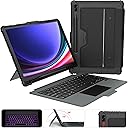
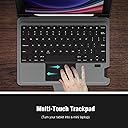
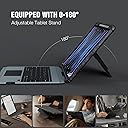
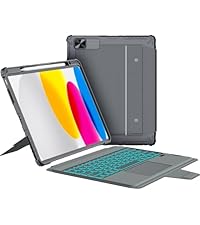
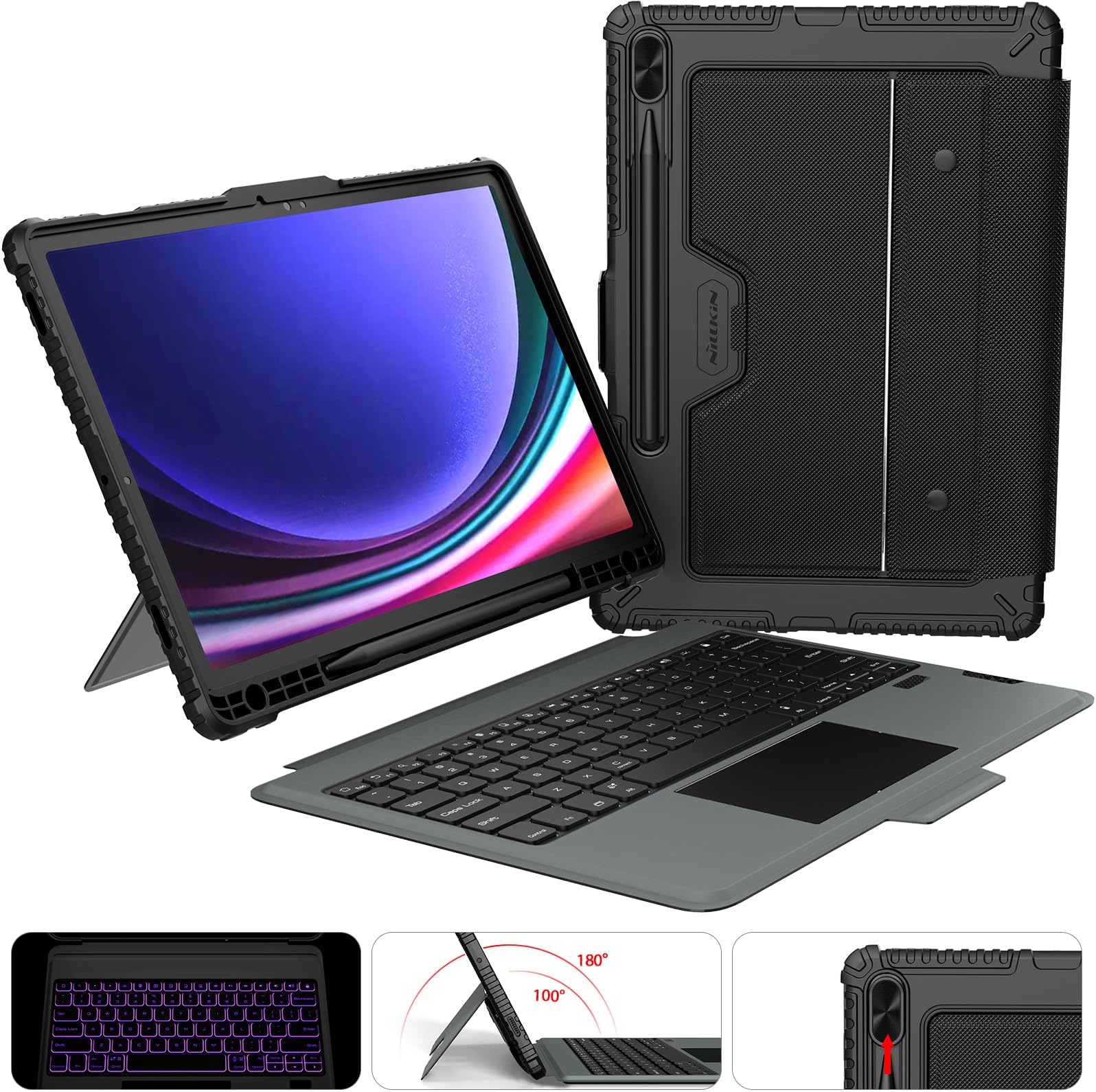
The Nillkin Keyboard Case for Samsung Galaxy Tab S9+/S10+ 12.4" combines a detachable backlit keyboard with a multi-touch trackpad and a robust protective case featuring a sliding camera cover and pencil holder. Designed for professionals on the go, it offers up to 100 hours of battery life, adjustable viewing angles, and enhanced device protection, turning your tablet into a versatile laptop replacement.


| ASIN | B0CKXBHY1T |
| Additional Features | Adjustable Stand, Backlit, Hotkeys and Media Keys, Slide Camera Cover, Trackpad |
| Age Range Description | Adult |
| Best Sellers Rank | #1,151 in Tablet Keyboard Cases |
| Brand | Nillkin |
| Built-In Media | 1*Multi-language manuals, 1*Nillkin for samsung galaxy S9 Plus/S10 plus keyboard case, Slide Camera Lens Cover, USB Cable |
| Color | Black |
| Compatible Device Size Maximum | 12.4 Inches |
| Compatible Devices | Samsung Galaxy Tab S10+ Tablet 2024 12.4", Samsung Galaxy Tab S9+ Tablet 2023 12.4" |
| Compatible Phone Models | samsung galaxy s10 plus tablet 12.4 inch, samsung galaxy s9 plus tablet 12.4 inch |
| Compatible Tablet Computer Models | Samsung Galaxy Tab S10+ 12.4", Samsung Galaxy Tab S9 11", Samsung Galaxy Tab S9+ 12.4" |
| Customer Reviews | 4.4 out of 5 stars 102 Reviews |
| Enclosure Material | Polycarbonate, TPU silica gel |
| Form Factor | samsung galaxy s10 plus/s9 plus keyboard case |
| Item Weight | 1.05 Kilograms |
| Manufacturer | Neekin-US |
| Material | Polycarbonate , TPU silica gel |
| Mfr Part Number | Tab s10 plus/s9 plus keyboard case |
| Model Number | Galaxy Tab S10+/S9+ 12.4 Inch Case |
| Pattern | samsung galaxy s9 plus/s10 plus keyboard case |
| Shell Type | Soft |
| Subject Character | Tab S10 plus/s9 plus keyboard case |
| Theme | samsung galaxy tab S10 plus case with keyboard, samsung galaxy tab s9 plus keyboard case |
| Unit Count | 1.0 Count |
| Warranty Description | 1-year manufacturer warranty |
M**A
So far good. Came as expected.
I saw pictures and videos from other reviews and so far it's as expected. I am not sure about battery for the keyboard yet, I'll need time to test it. In terms if the installation it does gets a little bit hard to put the tablet inside but I think the protection will be good, feels sturdy. The cover itself does weights like or a little bit more than the tablet so as a whole you will feel it heavy but it is kind of expected because of the material and the keyboard itself. I love the keyboard, love the sound, love the feel and even though you can see some fingerprints after you type is not that much compared to other brand I have had. I love that the keys have like a matte tone. Someone reviewed above about the Wn key to shift between windows that doesnt allow you to select the window you want to opne..., if you press that key + Tab and hold the Wn key you can select which window you want to open by pressing Tab till you reach the one. I do that on my windows PC and works the same here. Not sure if I was clear enough but in the video I shared, I do it for demostration. I will review later on how this goes. If I end up returning before 30 days, will edit this review with the reasons.
A**3
Not the original case but a great alternative
So i had the original case keyboard for the Samsung galaxy tab S7+ that cost me a whopping $200. It was great. However I have young kids and one of them lost the kick stand on it. I tried getting it but had no luck. I came into this neat case keyboard and ordered it without any high expectations. Took it for a spin and way really impressed. The fit is right on the money, it did raise my screen protector of in one spot but that was because it was places slightly crooked on my part but i can live with that. The keyboard feels a little stiffer than my other keyboards but i actually prefer it. Nice track pad that works nicely and a small place to place the s pen. The only thing that feels kinda cheap is the camera cove on the back but not a big deal it does its job well enough. Not bad at all
R**S
Fits and works as advertised
Everything is factual on the product page. Fits and functions as advertised. I thought it would be too thick, but it is really pretty thin even with the keyboard. Great quality product.
J**Y
Turn your humble tablet into a portable computer today!
TL;DR - Excellent case, well made, good keyboard and trackpad, clumsy as the dickens for lap usage. Background: I wanted to get a folio case for my Samsung Galaxy Tab S7 FE so that it could pinch hit for laptop duty in the case that such became necessary. My desired parameters were a non-cramped keyboard with integrated touchpad (no point in making the tablet laptop-like and STILL needing an external mouse), wireless/bluetooth connectivity, and some semblance of impact resistance for the tablet, itself. With those in mind, I picked up this Nillkin case with keyboard and touchpad. Does it make the grade, or does it flunk out of summer school? Let's find out... The Good: Right away, I found myself enamored with this rugged protective case. It's thickness and rubberized sturdiness gives one the impression that it can take a beating without sharing with its nearest neighbor (read: your tablet). It features a magnetic closing latch which interacts with the device, causing it to wake when opened and sleep when closed. The cutouts around the case do well to match the various ports, microphone holes, and speaker holes, while the button covers don't add much additional effort to depressing the volume or power buttons. The cutout for the S-Pen holds it perfectly, and the sliding cover for the rear camera provides extra safety for the lenses. Setting up the keyboard and trackpad was a breeze, requiring you to simply select it in your device's bluetooth settings (aptly labeled "Bluetooth Keyboard"), and pair the device. Nearly instantly, the trackpad and keyboard are recognized by the system and ready for use. The trackpad appears to have a speed-based tracking rate, meaning that the slower you move on it, the less distance the pointer travels, and vice versa. For instance, moving at a slow pace, I can only get the pointer from the left edge of the screen to roughly the middle. However, a fast swipe will easily clear the width of the screen. Also of interest, the touchpad registers "click" events both by taps (similar to your phone or tablet's screen) as well as by fulling depressing the bottom-left portion of the trackpad until it actually clicks. Moreover, fully depressing the bottom-right edge of the trackpad until it clicks produces an "alternate click" or "right-click" (as most people probably identify it). As far as the keyboard goes, I am impressed by the quality of the keypresses, as the travel is adequate, and the keys rebound with a certain level of confidence. Spacing is fairly decent, given how compact the keyboard is, though definitely not without compromises (more on that in "The Bad" section). There is a plethora of additional specialty functions accessible via the "Function" (Fn) key, things like adjusting the tablet's screen brightness, volume, disabling/enabling the trackpad, and even the intensity of the keyboard backlight (including turning it completely off). Speaking of which, having a backlit keyboard is an especially nice touch, particularly at this price point. The Bad: Remember how I said that the keyboard spacing was decent despite it being so small? Well, it IS decent, but definitely not world-beating. One issue I keep encountering while typing (note: I probably should have mentioned at the top that I touch type; those of the "hunt-and-peck" variety will likely not encounter any spacing issues) is occasionally to regularly hitting the dedicated screen-lock button located just above the backspace key when attempting to backspace (which I do quite a bit as my error count nearly matches my words per minute on typing tests). My other somewhat major gripe about the keyboard actually centers around the trackpad. I find the trackpad to be too wide relative to the keyboard, which results in one or both palms and/or the base of the thumbs to inadvertently make contact with it, causing the pointer to move around while typing (and causing calamity to ensue). Given the super tight packaging, I presume some concessions had to be made in terms of the design, so just know that this could become an issue if you are a touch typist. My next issue is with the "laptop" usability of the case. Unlike the vast majority of tablet cases which implement an "S" or "Z" type of folding style where bottom edge (technically the left side of the tablet when in the landscape orientation) slots into one of a few "channels" or "grooves" to hold it upright, this case instead employs a sort of "kickstand" behind the body of the tablet. While this works great on a flat, level, hard surface like a desk or table, it's practically pointless to use in your actual lap. If you have any designs on using this configuration in your lap like a laptop, make sure you have a lap desk or bed tray or something handy. The remaining few issues I have are admittedly nitpicks, but things you may wish to consider. The first is that the keyboard is integrated into the removable flap cover. While very easily removable and equally easy to reattach via the two snap buttons, removing the keyboard effectively removes the cover, taking the screen protection with it. I have seen some covers with removable keyboards where the keyboard was attached via magnets or hook-and-loop fasteners (Velcro), allowing you to remove the keyboard while keeping the cover. The other issues are somewhat related, in that the keyboard and trackpad cannot automatically detect when the cover has been folded completely back for using the tablet as, well, a tablet. If you forget to (manually) switch it off, it will still happily register key presses and touchpad input while you attempt to use your tablet. The last annoyance (which some may see as a plus) is that you have to manually power the keyboard/trackpad on and off. I have a different brand folio case for my 10th Gen iPad (feel free to look up my review of it), and it automatically powers on and off based on whether the cover flap is open or not. It makes life a tad simpler, and is a nice-to-have feature, but by no means makes or breaks the deal. Side Note: I really can't speak definitively to battery life, as I just don't use this enough to get a good impression on how long it really lasts. I will say that I brought it with me on a trip for a week and used it at least an hour per day (sometimes two or more). There have been no signs that it's in need of charging, and I haven't charged it since the first day I owned it. Lastly, I appreciate that it utilizes a USB-C port for charging, allowing you to use the same charger for both the tablet and the keyboard folio. Convenience is always good. Conclusion: Looking back on it, I know it seems that I've done quite a bit of complaining about this product. The truth of the matter is, even though I was wordy with the negative aspects, I feel that in actuality they are dwarfed by the positives. This is a fantastic case, great construction, good looking, and packed to the gills with features. And the icing on this delicious cake of a case is the cost for all that goodness. Yes, it may be short of perfection, but I'm willing to wager it's easily within spitting distance.
S**.
Nillkin Fantastic Protective Case & Backlit Keyboard
I recently purchased a Samsung Galaxy Tablet S9+ and selected the Nillkin protective case with a back-lit keyboard. It was simple to set up in the case. I was able to pair the keyboard to my tablet. The case is compact, protects my tablet camera lense, strongly secures the pen. The stand allows for vertical or horizontal viewing and the keyboard attaches and detaches easy enough to be efficient but not so easily that it can accidentally separate. I've been traveling with my tablet for almost two months now and I am very pleased. This is the only case that ypu will need. It would be nice if there were more colors to choose from but other than that, this case performs exactly as advertised.
A**R
Not worth anywhere near $85
I wasn't overly disappointed with this product until I was reminded of how much I spent on this. This item is definitely not worth $80-$90. I will give compliments to the general feel and look of the outside of the cover. It's that rugged ribbed feel you are used to on those waterproof and extra rugged cases without being bulky at all. It still keeps its portability factor. The keyboard also feels nice, keystrokes feel smooth, and the size is pretty good for a portable one. Love the function keys. However, there are just too many things wrong with this combo cover. 1. It will take some strength and patience to actually get the tablet in. I had to try several angles to make sure the inner edges actually held the device snuggly. The edges also tend to tuck themselves underneath the device in the corners which requires some finaggling to ensure it's entirely encased. 2. The camera cover is laughably bad. First, unblocking the camera covers a small part of the flash because the pen blocks it from fully sliding as the the cutout isn't long enough for the pen. If you want to uncover the lenses, you'll have to slide your pen so that's it's only halfway on the tablet's magnet, preventing it from keeping it's charge, and at that, there's a small surface area of the flash light still covered. Then, while struggling to get the tablet into the case, the cover actually fell out of its track and fell out/off of the case multiple times. The scare of thinking I broke it until I figured out how to slide it back in wasn't fun and it felt super cheap. 3. There is no flap or cover to protect the pen and keep it secure against the tablet. So if you slide the pen so that you can uncover your camera lenses, it isn't fully secured by your tablet's magnet and makes me worried the pen will fall off without me knowing. 4. Keyboard as mentioned before has a solid, nice, smooth, and quiet feel to it and honestly feels great for it's size. However, increasing or decreasing the brightness of the backlight oddly has a delay. Not a deal breaker, just odd. But the track pack has a slight delay, stutters, and as of this review, is pretty slow moving and I haven't found a way to increase the speed. Not the greatest track pad. 5. The magnetic stand is a tiny bit awkward to set up. What I mean by this is I felt like I was going to break it my first time testing it out. Undoing it from it's original position on the back of the cover wasn't smooth and required some force, making me think I was going to snap it. But I don't count this as a huge detriment as it does give a wide range of angles and it needs some strength to support the laptop. However, this is a bit of a moot point for the advertised drawing mode as the stand collapses back into place if you lean your hand on it while trying to go for thr natural writing feel and the laptop will fall flat on whatever surface you are using. If I were you, I'd wait until you see this item for under $60.
M**6
Simply Fantastic
This thing is absolutely fantastic. The case is durable, and the keyboard is awesome. The keys have a great touch. I don't personally need the lit keys but it's a nice feature. The exterior of the case is textured material, and I noticed it holds dust and debris a little. I wish these guys made the same case for a Surface Pro 9. I would buy it today !!
S**.
Love it!
Bought 2 of these for the tab s10+. They fit great and provide lots of protection. I only wish you could do more colors
K**A
I am loving it so far
I have owned a regular Nilikin case for over a year, and when I saw this one with the backlit keyboard and touchpad, I thought it can be a great update for my Samsung Galaxy tab s7 FE. I was worried since there are no reviews on here but I've been using it for a few days now and it's exceptional. The case is sturdy and nicely made, the keyboard backlight has multiple colors to choose from, and it's very comfortable to use. It seems to turn the keyboard to a standby mode whenever I'm not using it - the backlight turns off -, and there is an option to turn the backlight off completely so I'd say it's power efficient, but I need more time using it to make sure. The drawbacks are: It's a little heavy, and the keyboard doesn't have Arabic letters. Personally I'm super fine with both.
L**A
Calidad
Se descarga muy rápido y hay que estarlo vinculando apenas dos meses de la compra….
Trustpilot
3 weeks ago
2 weeks ago