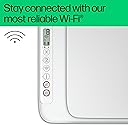
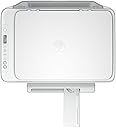
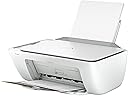
🖨️ Print smart, live green, and stay connected effortlessly!
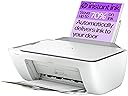
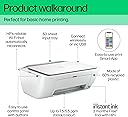
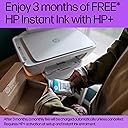
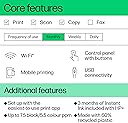
The HP DeskJet 2810e is a compact, wireless all-in-one printer designed for home use, delivering reliable printing, scanning, and copying. It prints up to 7.5 pages per minute in black and white and 5.5 ppm in colour at a sharp 1200x1200 dpi resolution. Built with 60% recycled plastic, it supports eco-conscious users while offering 3 months of free Instant Ink for cost-effective, hassle-free ink management. Its easy setup and dependable Wi-Fi make it perfect for busy millennials seeking efficiency and sustainability.


| Product dimensions | 3.04D x 4.25W x 1.54H metres |
| Controller type | Windows |
| Maximum Supported Paper Size | A3 |
| Included components | DeskJet 2810e All-in-One Printer |
| Print media | Labels |
| Scanner type | Flatbed |
| Max input sheet capacity | 60 |
| Max copy speed (black and white) | 7.5 ppm |
| Compatible devices | [Partial] Computers (Laptops, Desktops) |
| Maximum colour print resolution | 1200 x 1200 |
| Sheet size | 21.0 centimeters |
| Maximum black and white print resolution | 1200 x 1200 dpi |
| Warranty type | limited warranty |
| Colour depth | 1 bpp |
| Dual-sided printing | Yes |
| Maximum copies per run | 1 |
| Manufacturer | HP |
| Model Number | 588Q0B#687 |
| Number of Items | 1 |
| Size | One size |
| Ink Colour | Colour |
| Manufacturer Part Number | 588Q0B#687 |
| Item Weight | 3.42 kg |
J**Y
Reliable & Easy-to-Use HP DeskJet Printer
This HP DeskJet printer is perfect for home use. Setup was quick, and the wireless connection makes printing from my phone or laptop really convenient. The print quality is clear for both documents and photos. Ink lasts reasonably well, and replacement is simple. It's compact, quiet, and does exactly what I need. great value for my everyday printing tasks!
M**A
for little money you get a really good printer in a small size
A very good printer and scanner in one. It works flawlessly from a laptop, via USB, and via Wi-Fi. Easy to set up, and the print quality is very good.
B**Y
Good printer but issues with signing up to instant ink
Good printer, easy to set up, quality of printing was good but had lots of issues trying to sign up to the instant ink service. Good price.
J**M
Really good for the price.
For the price (I got it for half price on Black Friday), this printer is amazing. Very easy to install following the instruction manual and app. The printing quality is also decent for home use. I have no complaints at all.
I**M
Quite possibly the worst printer ever...
Quite possibly the worst printer ever. It's on my WiFi but sometimes takes 3 minutes to print, and I'm on 900mbit/115mbit connection - it's not sent locally either way. The print quality is "meh" at best... Throwing it through a window... entirely possible. The software is utter garbage, takes forever to load anything, feels like it's web based - even on my super fast internet connection and £3000+ gaming PC it is incredibly sluggish and horrible. You send a print and the job "status window" is whats shown in the PC Screenshot, utterly empty, doesn't even work. The Ink level is also utter garbage, was telling me I had full black ink when it was barely printing, very feint greys with lines in them. Now, I've had printers for the best part of 30 years, and this is hands down the worst thing I've ever experienced. Ink levels normally update instantly whilst printing, but not this! Local Print Que? Nope. Can you print via the browser or direct via windows and change any quality settings?? NO! You cannot. You have to load the incredibly sluggish and garbage HP App to change the settings. And you can only choose between "Plain Paperand Photo Paper" there is no card option at all. And the HP app doesn't even let you choose black and white or colour printing. It barely prints, starts printing on photo paper or card to not actually print anything, it pulls the paper in and just prints on absolutely *nothing*. The Instant Ink BS is literally BS, you sign up to say the 50 print package and the inks that come with your printer are included on that, GG, go over that and they want to charge you. The thing that holds the paper in at the back constantly falls down, and you have to faf around getting it back up. As you can see in the photo, the printer is full of ink from printing on absolutely nothing. On normal paper, it's totally fine, but come anything of weight it's an absolute failure. I'll be returning this eWaste.
G**J
Excellent Home Printer – Simple, Reliable, and Great Value
I’m really impressed with the HP DeskJet 2810e. It’s exactly what I needed for home use – compact, lightweight, and stylish in white, so it doesn’t look out of place on a desk or shelf. The setup was very straightforward thanks to the HP Smart app, and the wireless connection was up and running in minutes. The print quality is sharp for both documents and photos, with colours coming out clear and vibrant. Scanning and copying are equally easy, and I love that it’s all controlled from my phone or laptop without having to mess with cables. The 3 months of Instant Ink included is a real bonus – it takes away the stress of running out of cartridges and keeps costs low. The printer is quiet in operation, and it wakes from standby quickly, so no long waits. Wi-Fi reliability has been excellent so far, with no frustrating dropouts. For everyday printing, scanning, and copying at home, it’s a perfect choice – simple, affordable, and does exactly what it promises. Highly recommended for anyone needing a no-fuss, dependable home printer.
K**E
Very Light weight when out of the box.
Brilliant printer works of an iPad apple witch is amazing and of your phone. Love this printer very light weight to. Love the app on it and it good value for money
C**H
Good printer but ?
First this printer would get 5 stars if it worked following basic instructions .Downloaded app for it on a ipad but apart from a annoying advert on full page it wouldn't connect to wifi etc .So watched a few you tube videos but no answers apart from there is several apps to use so tried 3 but no joy then as watched another you tube video he showed on a android phone. So I downloaded the app on my samsung s23 phone and before I know it the page for to key in WiFi password has come up .Having keyed In password for router it now shows solid WiFi blue light. And will now print Internet pages . BUT BE PATIENT TAKES 3 MINUTES to start printing . Problem solved . Hence 4 hours later tried ipad and it works as well just some Internet pages but amazon invoice it won't print but other sites is OK . Plus printed my pages document . Seems sorted took a NHS document and used copy feature on it and made 2 copies etc again it takes its time give 3 minutes etc ,probably quicker but give button for to make copy a good press etc . GOOD RESULTS OVERALL just a shame about connection on ipad .
Trustpilot
3 weeks ago
1 month ago