Desertcart purchases this item on your behalf and handles shipping, customs, and support to Senegal.
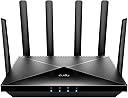
🚀 Stay Ahead with the Cudy P5: The Ultimate 5G WiFi 6 Powerhouse
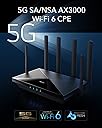
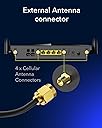
The Cudy P5 is a cutting-edge 5G router featuring Qualcomm’s Snapdragon SDX62 modem delivering up to 3.4 Gbps download speeds, combined with WiFi 6 dual-band technology for blazing-fast wireless performance. Its dual SIM slots and WAN failover guarantee uninterrupted internet access, while detachable antennas allow for customizable signal optimization. Equipped with multiple VPN protocols and advanced DNS security, the P5 is designed for professionals demanding reliable, secure, and high-speed connectivity in home or small office environments.


| ASIN | B0B711GG7N |
| Antenna Location | Home, Small Office |
| Antenna Type | Retractable |
| Best Sellers Rank | 12,594 in Computers & Accessories ( See Top 100 in Computers & Accessories ) 119 in Routers |
| Box Contents | 4 Detachable Cellular Antennas |
| Brand | Cudy |
| Brand Name | Cudy |
| Colour | Black |
| Compatible Devices | Personal Computer, Laptop, Smartphone |
| Compatible devices | Personal Computer, Laptop, Smartphone |
| Connectivity Protocol | Wi-Fi 6, Ethernet, 5G |
| Connectivity Technology | 5G, Ethernet, Wi-Fi |
| Control Method | App |
| Controller Type | App Control |
| Country of Origin | China |
| Coverage | Strong and reliable Wi-Fi coverage over a large area |
| Customer Reviews | 4.3 out of 5 stars 501 Reviews |
| Data Transfer Rate | 2976 Megabits Per Second |
| Frequency | 2.4 GHz |
| Frequency Band Class | Dual-Band |
| Frequency band class | Dual-Band |
| Has Internet Connectivity | Yes |
| Has Security Updates | No |
| Is Electric | Yes |
| Is Modem Compatible | No |
| Item Dimensions L x W x H | 25.3L x 15.3W x 4.8H centimetres |
| Item Weight | 1.1 Kilograms |
| LAN Port Bandwidth | 1000 Mbps |
| Manufacturer | Cudy |
| Manufacturer Part Number | P5 |
| Maximum Upstream Data Transfer Rate | 1500 Megabits Per Second |
| Model Name | P5 |
| Model Number | P5 |
| Model name | P5 |
| Number of Antennas | 6 |
| Number of Ports | 4 |
| Operating System | OpenWRT |
| Other Special Features of the Product | Wi-Fi MESH, 4G LTE, App Control, WPA3 |
| Product Warranty | 2-Year Warranty |
| RAM Memory Installed | 256 MB |
| Router Firewall Security Level | Medium to High |
| Router Network Type | Hybrid |
| Security Protocol | WPA3 |
| Voltage | 12 Volts |
| Wi-Fi Generation | Wi-Fi 6 |
| Wireless Compability | 802.11ax |
| Wireless communication standard | 802.11ax |
A**D
Amazing 5G SIM friendly Router
Amazing product. If you don't have wired broadband but you want fast internet, then this is the next best option. I wanted fast broadband and so decided to get this standalone 5G box to give me universal access to unlimited 5G SIM packages from any carrier. I bought the Cudy p5 and it's very easy to set up. I bought an unrestricted, unlimited data 5G SIM card deal that uses the "Three" 5G network This costs £16 per month. I then put the Nano SIM into the box and, attached the antennas, powered the box on and I had fast 5G wireless internet. Cudy also has a nice web based interface to control the box and they also have an app too which does the same thing. I was easily getting 250 Mbps on WiFi alone but to get the best speeds, plug in the ethernet cable into any device like a TV, Laptop etc and everything gets even faster. You can also create a guest WiFi network for friends and family, select various WiFi channels to improve speeds, free VPN, and it can jump between 2.4 and 5G.or remains fixed if you so choose. The box has so many tips and tricks but overall it has given me fast, reliable and very cheap broadband.
G**M
Feature-Packed 5G Router – Reliable, Fast, and Versatile!
The Cudy P5 5G AX3000 WiFi 6 CPE Router has been a fantastic investment for our home network. The dual SIM functionality is a game-changer, offering flexibility and reliability by switching between networks when needed. The 4x4 MIMO and WiFi 6 technology deliver super-fast speeds with excellent coverage, even in areas with signal challenges. The detachable antennas make it easy to customise or upgrade for better performance. Features like band lock, VPN, Zerotier, and Cloudflare integration provide advanced options for secure and stable connectivity, which is perfect for both work and entertainment. Setup was straightforward, and the router has been rock-solid ever since. If you’re looking for a versatile, high-performance 5G router, this one is hard to beat! 🌐📶
R**D
Excellent Router.
I previously purchased a Spitz GL-X3000 after reading various reviews which proved to be an awful experience with it's instability, constant buffering and poor data speeds, which is now being returned. This, however, has proved an excellent replacement. Great stability, strong signal throughout the house and 5G is now being picked up with no issues whatsover with 150 down/119 up - which is fine where I live in a poor 5G area. So I have saved money and improved my network connectivity/experience!
A**D
Good 5G backup and mesh solution built in
So far so good with nice fast speeds, I am on Virgin 500 Mbps and I get this and a bit more on a WiFi 6 device. I have also connected a couple of WR3000S to this for mesh connectivity for my WiFi devices. The UI is OK, a bit basic but does the job well. I have a three unlimited data sim in as a fail over for my main Virgin connection, the 5G connection is better than my previous Huawei router A good buy and it was on offer.
M**.
Good and reliable, but cheap construction.
We bought this router to replace our copper wired broadband line. Using a 5G Sim card we are getting speeds of around 200mb/s. It's proved reliable and has not caused any problems. It will take two cards which allows the use of different networks if one fails. We also use it within our security system. The only minor criticism is the quality of the plastics used, which are cheap and flimsy. The front of the cover scratches easily with only a minor wipe with a cloth.
R**Y
Very poor experience
I've given this a fair chance, but honestly it is diabolical. Despite all the antennas the mobile phone signal is showing two bars, my old ZTE MC801A with just internal antennas performs much better with the same sim in the same position (3 to 4 bars). It was constantly losing the mobile network. Have gone back to my ZTE MC801A and a Cudy TR3000 and the internet works flawlessly, as it always did before I got the P5. It's a lot of money for a very poor experience.... even things like setting multiple IP/MAC Bindings work well on the TR3000, and is a pain on the P5
S**R
Excellent piece of kit!
I'm using mine purely as a backup network connection for my home pfsense router. I'm not using the inbuilt Wifi or security features, just need it to act as a wired gateway on an 192.168.x subnet. My previous solution was Smarty SIM with a Huawei dongle and a TP-Link travel router. Worked but maximum bandwidth I was able to get was 20Mbps downstream. I live almost on top of a cellular macrocell, thought I'd try and see if I could get an improvement and having watched an "Explaining Computers" Youtube video on the Cudy I thought I'd get one and try it. Put the SIM into the Cudy, powered it up and it pretty much immediately connected to the 3 network on 5G. Absolute snap to set up for my use and checking with Speedtest was giving me up to 401Mbps down and 39Mbps up. Very pleased! I have relocated it and giving about 350Mps but that is more than I need for a backup connection. Very impressed - really pleased with the results so far.
B**N
Best 5G Router with dual sim support
Amazing device with super fast internet support like im getting more than 500 mbps on lyca sim card
S**O
Un router completo e performante
Ho acquistato questo router 5G dopo aver verificato che nella mia abitazione arrivasse il segnale 5G. A quel punto, ho attivato un'offerta SIM con giga illimitati e con l'opzione di accesso prioritario alla rete in caso di intenso traffico. Le impostazioni di base sono facilmente configurabili grazie alle istruzioni fornite, mentre gli utenti più avanzati apprezzeranno la possibilità di personalizzare a fondo ogni aspetto della rete, grazie a un'interfaccia ben strutturata e intuitiva. Il dispositivo supporta entrambe le modalità 5G disponibili: NSA (Non-Standalone), che sfrutta la rete 4G come supporto, e SA (Standalone), la modalità più pura del 5G. Attualmente, nel mio caso, il router opera in modalità NSA, offrendomi velocità di download medie di 210 Mbps con picchi di 250 Mbps. In modalità 5G NSA, dove la rete 4G gioca un ruolo fondamentale, ho ottimizzato le prestazioni selezionando la banda LTE B20 a 10MHz. Questa scelta mi ha permesso di ottenere un segnale più forte e stabile, con un conseguente aumento della velocità in upload da 3Mbps a 10Mbps. La tecnologia Wi-Fi 6 garantisce una copertura eccellente anche in ambienti con ostacoli come muri (nel mio caso il segnale è ottimo anche a 7 metri attraverso 3 muri). Ho collegato senza problemi numerosi dispositivi, sia in Wi-Fi che via cavo Ethernet, senza riscontrare alcuna instabilità. Sono estremamente soddisfatto di questo acquisto. Il router offre un'esperienza di navigazione fluida e stabile, superando le mie aspettative e giustificando pienamente il prezzo.
B**�
Schnelles und zuverlässiges Gerät
Ich nutze den Cudy P5 5G AX3000 mit einer SIM-Karte von O2 und bin sehr zufrieden. Die Einrichtung war schnell und unkompliziert: SIM-Karte einlegen, Router einschalten und nach wenigen Minuten war die Verbindung verfügbar. Der 5G-Empfang ist an meinem Standort stabil und die Geschwindigkeit überzeugt sowohl beim Streaming als auch beim Arbeiten im Homeoffice. Auch mehrere gleichzeitig verbundene Geräte laufen problemlos über das WLAN. Die Reichweite ist gut und die Verbindung bleibt zuverlässig. Besonders praktisch finde ich die einfache Bedienung und die vielen Einstellungsmöglichkeiten. Insgesamt ist der Cudy P5 eine sehr gute Alternative zu einem klassischen DSL-Anschluss. In Kombination mit O2 funktioniert er bei mir zuverlässig und schnell. Klare Kaufempfehlung!
D**R
Good High speed
Good High speed dual SIM card
L**5
Une solution de dépannage efficace. Très bon routeur.
J'ai acheté ce routeur suite à une panne de ma fibre optique, Orange ne parvenant pas à la rétablir à cause, m'a-t-on dit, d'un différent avec SFR, l'opérateur de réseau qui a câblé ma commune (il a fallu près de 2 mois pour qu'elle revienne). Super, la gué-guerre entre opérateurs sur le dos des clients !... L'Airbox prêtée par Orange délivrant un débit chez moi entre 0 Mb/s à certaines heures de la journée et 6 Mb/s dans les meilleurs cas, j'ai donc cherché une alternative plus performante. Le Cudy P5 m'a apporté la solution. J'y ai mis une SIM Wavecom 4 opérateurs : Orange, SFR, Bouygues et Free. Cela m'a permis de tester celui offrant le meilleur débit, SFR en l'occurrence avec un débit descendant d'environ 120 Mb/s. Ca suffit pour mon usage. Je n'ai donc pas cherché à mettre d'antennes extérieures. La SIM Wavecom est chère, mais je voulais pouvoir faire ce test. Et elle contourne les interdictions de certains opérateurs quand on place leur SIM dans un routeur d'une autre marque. J'ai choisi le Cudy après avoir lu de nombreux avis ici. J'apprécie son interface de pilotage par un navigateur très simple et très compète, permettant de faire tous les paramétrages nécessaires, y compris le blocage des fréquences de son choix. Un seul bémol : le WPS ne peut pas être désactivé. Le WiFi7 est parfait pour atteindre tous les endroits de la maison, contrairement à la Livebox. Il passe san problème les murs de parpaings. J'ai lu un avis comme quoi les antennes ne restent pas verticales. En fait, il n'y a pas de problème. Il suffit de serrer correctement leur vis de blocage. Elles restent bien dans la position où on les a mises.
C**N
Sencillo de configurar y potente.
Muy fácil de configurar y funciona perfectamente. Yo lo necesito para conectar en el pueblo donde no me llega la fibra pero sí la cobertura 4G. Para empezar la configuración, una vez lo enciendes, hay que buscar la WiFi que viene en la pegatina y su password en el teléfono u ordenador con el que lo estés configurando. Una vez enlazado, navegas a cudy.net y ahí aparece la aplicación con la que se puede realizar la configuración. Los menús son muy sencillos y yo creo que cualquiera con un mínimo conocimiento puede configurar el router. Me ha sorprendido además que, aunque la SIM tenga PIN, no hace falta eliminarlo para poder utilizar la tarjeta, sólo hay que introducir el código y ya está. Cuando se configura, si cambias el SSID, perderás la conexión. Hay que enlazar de nuevo con el nuevo nombre de la WiFi. Cuidado con eso que puedes pensar que está fallando y en realidad es que ha cambiado el nombre de red. Tengo que probarlo en el pueblo, para valoración final pero pinta muy bien.
Trustpilot
1 month ago
1 month ago