Desertcart purchases this item on your behalf and handles shipping, customs, and support to Senegal.
📡 Upgrade your analog game—streamline, save energy, and stay connected!
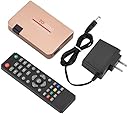
The SAIZHUO RF to HDMI Converter Adapter transforms analog TV signals into crisp HDMI output, supporting up to 251 channels with stable reception. Featuring a wide voltage range (110-240V) and energy-saving auto shutdown, it includes a remote control for easy channel and volume management. Compatible with all HDMI devices, it’s ideal for projectors, multimedia teaching, and network engineering, backed by 24/7 customer support.
| ASIN | B0CJJ9RYSP |
| Best Sellers Rank | #616 in Video Converters |
| Brand | SAIZHUO |
| Color | black |
| Compatible Devices | Projector |
| Connector Type | HDMI |
| Customer Reviews | 2.7 out of 5 stars 44 Reviews |
| Finish | Hdmi |
| Finish Type | Hdmi |
| Input Voltage | 240 volts |
| Manufacturer | SAIZHUO |
| Model Number | df4766d4-0548-4df8-9011-e29474392c4a |
| Number of Items | 1 |
| Number of Ports | 2 |
| Package Quantity | 1 |
| Power Plug Type | Type A - 2 pin (North American) |
| Specific Uses For Product | Projector |
| Unit Count | 1 Count |
C**T
Would not Acquire Channels
I was unable to get this decoder to work, despite having 50 years professional experience with computers, electronics, etc. First of all, the "COAX" connection isn't standard US coax but looks like PAL. I asked the vendor what to use. After a day and a half, the reply was "type C to BNC." Huh? Type C is for USB and there are no BNC lugs on the input port. I asked again if they meant type F (which is standard screw-on coax), but never got a reply. The "coax" connection doesn't have BNC lugs on it, so I wasted some more time getting COAX to PAL adapters. Nowhere in the listing or Amazon recommendations is a special adapter mentioned. Another me-too Chinese product (same picture, functions, etc.) had a recommendation for PAL adapters, so I went with that. Next I had to figure out where to go to change the On Screen Display (OSD) from Chinese to English and set up other functions. The calendar has display issues, the dates don't show up well on the TV screen. I could never get any channels acquired, either with the "Auto Search" or manual functions despite several attempts. Having spent hours messing with this decoder, I just gave up and bought a different brand decoder, ZJBox, on Amazon for about $10 more. It HAS F-COAX connectors already built in. The menu on it starts up in English (OMG!), with the country as USA (double OMG). Next, auto search for channels. The ZJBox took a few minutes to scan (the same COAX connection, no issues there) and came up with 47 different channels, on all of which I could get a good picture. All that took a couple of minutes and couldn't have been simpler. So, if you want to get a decoder which works right out of the box, I recommend ZJBox (Asin B07Z5RGLK6). The SAIZHUO (is this some play on words for "Says Who?") isn't even heavy enough to use as a paper weight, so I returned it.
R**K
** Here's how to get your 70's/80's game console to work with this **
It does work well. It's just not obvious. My Intellivision system is displaying through a modern projector, thanks to this adapter. Here's what to do: If your game system's output is an RCA cable, then you'll need some extra bits of hardware. Although I did see a variant of this item on Amazon which seemed to already have an RCA port built in, this particular variant does not. - Look up an Amazon "Female to PAL Male 9.5mm TV Satellite Antenna Coax Adapter". This SAIZUO converter actually came with one for me, but it's not advertised as part of the package so it may be safest to order one anyway. - Look up on Amazon, "Phono RCA Female to F Type Male RF Connector Coaxial Adapter" - 2 AAA batteries for the remote. And then there is the cryptic menu system. The manual isn't much help. After pressing the remote's menu button, 5 categories will be along the top row. Initially they are in Chinese. You'll want to do the settings in reverse order, so I've listed them that way below. Use left/right to select the column 1-5 below, then up-down to navigate their options, then left/right to change that option's value. Here are the settings I used for it to work for me: 4th column: "Sys Settings" • Select the very first row (It has "OSD" embedded in the Chinese characters), then press right. o Select the very first option, then press right. Everything should now switch to English. The remaining options below I'll list using their English names. o Display Mode - Color System • Set to "Ntsc" o Display Ratio - set to "HD P720" o Advanced Settings - Denoise • Set to "Middle" - Wide Screen • Set to "4:3" Make sure that you game system is turned on, then: 2nd column, "TV Menu" • Auto Scan o Select this, and hone in on an area where SOME signal of the game shows through, and stop the scan. It likely will be right away, no need to scan to infinity, probably. • Manual Scan o Fine - Use this to fine-tune to the best signal. Note that if it has a lot of static mixed with the game image, that’s due to the RF cable and/or its various adapters being loose or too tight. Play with those to improve the signal. • Sound Sys o Set to "M" Works great. I docked a star because it is not obvious how to set it up.
P**J
change format from pal to ntsc ...
awesome little device. the hardest part to get it to work was changing the language from chinese to english. the 2nd hardest part was changing the sound format to one that worked with my 10+ year old best buy insignia tv. 3rd hardest part wasn't hard because i read someone else's review that said you needed to make sure you had a pal to coax adapter. which i had already bought and found out the device came with one. i also already had the rf to coax adapter to plug into the atari 2600 and that into the pal adapter. speaking of pal, change the video setting on the device to ntsc instead of pal, and recommending 4x3 resolution instead of 16x9 for more of the classic look. two thumbs up. worked right the first time on an original 1982 atari 2600.
D**E
Died within a few hours of use
Did the job for a few hours, then mysteriously died. Picture quality was really bad while it was working no matter how I adjusted it. Haven't been able to get it outputting again since it died. I know there aren't a ton of demodulator options out there but I'd skip this one.
M**W
It works. It'd be nice if the picture was crisper.
It is working, but I get a lot of noise in the picture no matter how I have it set.
A**.
DO NOT BUY! Not a standard US RF Connector! (Not sure if it's even a real connector!)
Like some of the reviewers, I bought this to connect to an old video game console, (in my case, an ancient Atari console which had the old, (but back-then-standard), RCA-like "RF" connector). Now I see why they didn't provide an input connector specification. It's NOT standard. It's definitely not BNC (as another one-star reviewer was told by the manufacturer) nor is it the old RF connector (which looks like an RCA connector). I'm perplexed as to what it is and I'm an electrical engineer. I can only guess that this isn't intended for a U.S. market, assuming this is even being sold with genuine intentions. I will try to return it.
R**N
Well, it works. Takes a bit.
Works as advertised. Instructions are rudimentary. Getting into English is the first step. Aspect ratio, PAL vs. NTSC, and sound need to be set. Channel scan takes a while. But it is the cheapest demodulator I could find. I used it on a Colecovision.
P**.
If you use it for what its made for, it is great.
I read the reviews so I was a little nervous about buying this, but it looked exactly what I needed, and it was! I needed a decoder that could accept as input a UK coac cable from a 1980's home computer (a zx spectrum) and convert it to HDMI so I could bring the ancient computer up on my monitor. Once I had figured out how to change the OSD to english from chinese and read the minute instructions, I tuned it in. The picture is not flawless, but I need to get a better cable from the computer, it is thin and over 40 years old, a bit like me if thin meant fat and 40 meant almost 60. Overall, a great little gadget which means I won't need to modify my vintage computers (thats right, I have several).
A**ー
返金または交換して頂きたい
YouTubeで設定のやり方を出している方がいたのでそれを見ながらファミコンに無事接続出来ました。
R**I
ファミコン用に
日本のファミコンを液晶テレビに映す用に購入しました。 その場合そのままだとアンテナの端子を接続できないので変換コネクターもセットで買ってください。ご一緒にどうですか?みたいな画面に映っているやつで構わないです。 説明書が英語と中国語しかなくてわかりにくかったです。 翻訳して理解しました。 細かく設定するとブラウン管に映す時に近い画質でファミコンを映すことができました。多分PCエンジンとかも同じやり方で映ると思います。 ありがとうございます。
Trustpilot
3 weeks ago
1 week ago