


🚀 MiniBook X: Power, Portability & Precision in Your Hands
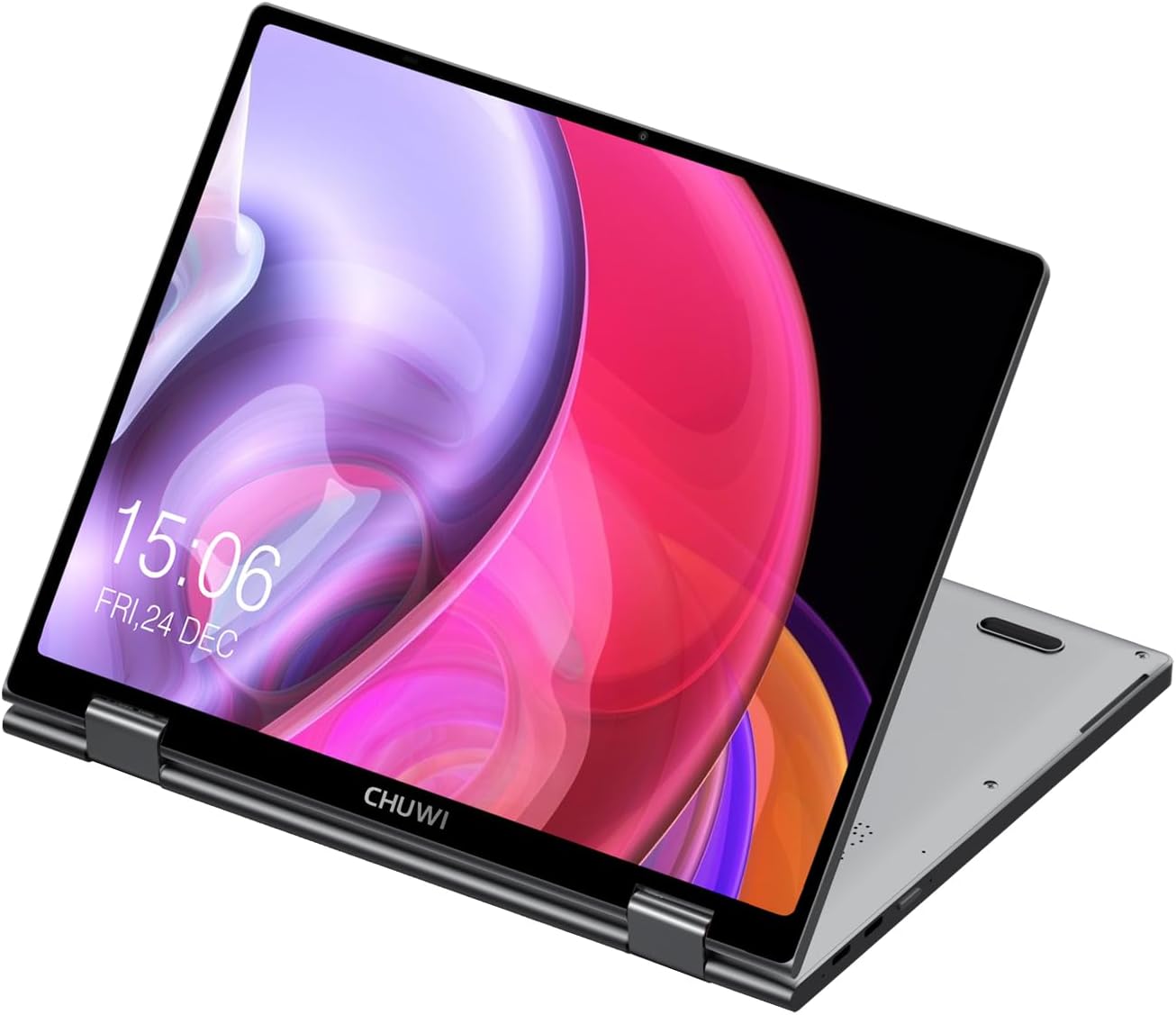
The CHUWI MiniBook X is a premium 2-in-1 convertible laptop featuring a 12th Gen Intel N150 processor, 16GB LPDDR5 RAM, and a 512GB SSD with expansion options. Its 10.51-inch 2K touchscreen with 100% sRGB and anti-glare coating ensures stunning visuals, while the lightweight metallic chassis and 360° hinge offer versatile usage modes. Equipped with WiFi 6, Bluetooth 5.2, a backlit keyboard, and pre-installed Windows 11 Pro with Microsoft Office 2024, it’s designed for professionals seeking a powerful, portable, and stylish productivity companion.



| Asin | B0CH9Q6VNX |
| Audio Features | microphone, speakers |
| Audio Output Type | Headphones |
| Automatic Backup Software Included | Windows 11 Home |
| Battery Average Life Standby | 6 hours |
| Battery Cell Type | Lithium Ion |
| Battery Life | 6 hours |
| Best Sellers Rank | #34,735 in Computers & Accessories (See Top 100 in Computers & Accessories) #499 in 2 in 1 Laptop Computers |
| Bluetooth Version | 5.2 |
| Brand | CHUWI |
| Built In Media | CHUWI MiniBook X laptop, Certificate of conformity, Charger set, Multi-language manual |
| Cache Memory Installed Size | 12 |
| Camera Description | Front |
| Chipset Type | Intel |
| Color | Silver |
| Color Gamut | 100 |
| Compatible Devices | h |
| Connectivity Technology | Wi-Fi |
| Control Method | Touch |
| Cpu Codename | Alder Lake |
| Cpu L1 Cache | 128 KB |
| Cpu Model Generation | 12th Generation |
| Cpu Model Number | Intel 12th Gen Alder Lake- N100 |
| Cpu Model Speed Maximum | 3.4 GHz |
| Customer Reviews | 3.8 3.8 out of 5 stars (215) 3.8 out of 5 stars |
| Display Resolution Maximum | 1920x1200 pixels |
| Display Technology | LCD |
| Display Type | LCD |
| Form Factor | Convertible |
| Graphics Card Ram | 12 GB |
| Graphics Coprocessor | Intel 12th Gen Alder Lake- N100 |
| Graphics Description | Integrated |
| Graphics Ram Type | DDR5 RAM |
| Hard Disk Description | SSD |
| Hard Disk Interface | Serial ATA-300 |
| Hard Drive Size | 512 GB |
| Hardware Interface | 3.5mm Audio, USB 3.0 Type C, USB Type C |
| Human Interface Input | Keyboard, Touchscreen |
| Item Dimensions L X W X Thickness | 9.6"L x 0.67"W x 6.5"Th |
| Item Weight | 0.89 kg |
| Keyboard Description | Gaming |
| Keyboard Layout | QWERTY |
| Lithium Battery Energy Content | 28 watt-hours |
| Manufacturer | CHUWI |
| Maximum Display Brightness | 300 nit |
| Memory Slots Available | 1 |
| Memory Speed | 6400 MHz |
| Microphone Form Factor | Headphones |
| Model Name | CHUWI MiniBook X (N100) |
| Model Number | MiniBook X(N100) |
| Model Year | 2024 |
| Native Resolution | 1920 x 1200 pixels |
| Number Of Ports | 3 |
| Operating System | Windows 11 |
| Other Special Features Of The Product | 360 degree flip, Anti Glare Coating, Backlit Keyboard, HD Audio, Touchscreen |
| Power Device | AC adapter |
| Processor Brand | Intel |
| Processor Count | 4 |
| Processor Series | Celeron |
| Processor Speed | 3.4 GHz |
| Ram Memory Installed | 12 GB |
| Ram Memory Maximum Size | 12 GB |
| Ram Memory Slot Total Count | 1 |
| Ram Memory Technology | LPDDR5 |
| Ram Type | DDR5 RAM |
| Resolution | 1920x1200 |
| Screen Finish | Matte with Anti-Glare Coating |
| Screen Size | 10.51 |
| Speaker Description | Built-in stereo speakers |
| Specific Uses For Product | Business, Gaming, Multimedia |
| Total Pcie Ports | 2 |
| Total Usb Ports | 2 |
| Touch Screen Type | Capacitive |
| Touchpad Feature | Touchscreen |
| Unit Count | 1 Count |
| Video Output | Fully functional type-C |
| Video Processor | Intel |
| Voltage | 120 volts |
| Warranty Description | 1 year |
| Warranty Type | Limited |
| Wi Fi Generation | Wi-Fi 6 |
| Wireless Compability | 802.11ax |
| Wireless Technology | Bluetooth, Wi-Fi |
User
Perfectly Portable: A 2-in-1 Laptop That Surprised Me in All the Right Ways
This compact CHUWI MiniBook X has been such a pleasant surprise. I was specifically looking for something small, lightweight, and versatile, and this little laptop checks all the boxes. At just under a kilogram, it’s incredibly portable—ideal for tossing in a bag without weighing me down. Its 2-in-1 design is a dream; flipping it into tablet mode for reading or streaming feels natural, and the 360° hinge is smooth but sturdy.The screen is a standout. The 10.5-inch display is crisp, bright, and vibrant, with its 1920x1200 resolution making everything from text to movies look sharp. The 16:10 aspect ratio provides a little extra vertical space, which is great for productivity apps. It’s a pleasure to work on, and I love that it doesn’t skimp on quality despite the compact size.Build quality is another highlight. The all-metal body feels premium, not far off from what you’d expect from pricier devices like MacBooks or Surface laptops. Typing on the backlit keyboard is comfortable and efficient—I’ve been able to maintain my usual 70–80 WPM without issue. The keyboard is spacious enough, even in this smaller form factor, and the backlight is a thoughtful addition for late-night sessions.Performance-wise, it’s more than adequate for everyday tasks. Web browsing, streaming, and even juggling multiple apps feels smooth thanks to the Intel N100 processor and 12GB of RAM. I didn’t push it with heavy-duty gaming or video editing (not what it’s designed for), but for typical productivity and entertainment, it runs beautifully.Battery life is solid but could be better. It’s fine for a few hours of work or streaming, but don’t expect all-day use without a charger. That said, it charges quickly through the USB-C port, which is a plus. Speaking of ports, having dual USB-C and a headphone jack is a nice touch for such a small device.The speakers are loud enough for casual use, though they lack depth. That’s not surprising given the size, and they’re perfectly fine for watching videos or listening to podcasts. I wouldn’t expect booming bass from something this portable anyway.One area that really impressed me is the price. For what you’re getting—premium build, great display, solid performance—it’s a steal compared to similar devices. In this size range, there aren’t many options, and I’m thrilled I landed on this one.If you’re looking for a small, versatile laptop for productivity, media, or travel, the CHUWI MiniBook X is a fantastic option. Just keep a charger handy if you’re planning a long day away from outlets.
User
Fantastic tiny Windows 11 laptop with ok battery life, throw out the non-PD compliant charger
I enjoy using this excellent portable tiny laptop for travel and convenient usage. It goes anywhere and fits anywhere, but allows full use of windows 11 and light usage. This is excellent for web browsing, office usage, and general home use. It does get hot when doing Windows updates, but stays quiet and cool in general use. I've used other laptops but keep coming back to this due the tiny size and ease of use.Warning - the included USB-C charger is not PD compliant, and will damage other electronics if you use it. I would recommend tossing the USB-C charger to avoid damage to your electronics, and just use a PD compliant USB-C charger.The touchpad occasionally may be turned off, in which case you have to press FN + ESC to enable the touchpad (also press it to disable the touchpad if you wish).I also used Double Driver to backup all of the Chuwi Windows drivers in case they are needed in the future. Double Driver is a great utility to extract the Windows drivers for backup.The laptop feels super solid, and the keyboard is mostly excellent. The keys are more cramped due to the size, so some keys are a bit easier to miss but I adjusted easily.For the price, this is an amazing laptop that does light home and office tasks very well. The battery life is not great since it has a smaller battery and the N100 chip is not quite as efficient as Lunar Lake or Apple M1 - 4 chips, but this is not nearly as expensive.Overall a great laptop for travel and general light usage.
User
Yo-Yoing Customer Service/Off-gassing Laptop
This laptop is off-gassing constantly. It has caused my several allergic reactions. I cannot use it indoors without coughing. Plugged-in, or unplugged. I reached out to their customer service via their website, which is where you are directed by Amazon. They said to reach out to them via the platform instead. So I did. By the by, getting cusomter service by their website sends an email that requests you sign up for their service system. Which was odd to me, as I'd never had to do that prior, but it is a smaller Chinese company. Which are never known for the same level of support of the larger American based companies I bought before.Well, I reached out here, as previously stated. They told me wipe it down with alcohol, which I did. Then they told me use it for 48 hours in a well ventelated room. I stuck it on its stand, which is how I prop it up towards eye level, as it's a very small laptop, plopped on a game and left it there next to an open window. No difference still sadly. I tried to do some research on this, and found that some laptops off-gas nickle and cadmium. I am for sure allergic to nickle, so that could be it. Whether on the charger (which is rather cheap looking if you've seen it before. Does hiss when it's plugged in to the laptop), or on battery this laptop gives off that smell. Doing nothing, or doing heavier tasks - it gives off the smell. The smell is something sort of acrid, for sure machine based in nature, but even a bit "plastic like" in a way.The laptop is okay, it chokes up at odd points though. Even without too much going on. Say four tabs in Librewolf. No video playing. Gets it choked up at random. Still lifted mind you, so I don't think it's a heat issue. I don't watch videos on this, so I don't think it's that. Not sure what's going on with it. I was hoping to develop some cool things on this, while on the go. But I am not sure I will be doing that with its random slow downs. The company reached out to me and originally offered a free return within' 30 days. I put up my review of the off-gassing and they offered me a full-refund. I was amazed at how kind the offer was, so I redacted my statements. Can't complain about a laptop given in kindness. That offer got rescended the seecond the review came down. So here's my review. It's going back up and I am not talking a thing about it's form or screen or anything.I am talking about what I have noticed is wrong period. With this laptop. The touch screen misses a beat constantly. You go to click on one thing, say a link or a button. You click, and click, and click - and by the third time after minimizing the window screen or hitting the wrong link and having to go back to the previous screen do you hit the link. Unlike a phone, in which you can thumb the side of your browser in order to go back to the previous page, here you must hit the back arrow button in the browser. You will be doing this a lot, due to the misclicks. I believe because the touch screen is not as accurate as more modern ones, but I am not sure. I think it's really just an old tablet screen that has been utilized to make a laptop screen. Hence the rounded corners at the edge of each part of the screen. The arrow keys are mac copies, which you might like if you do not utilize them often. By that I mean, the right and left arrow are full-sized, but the up and down pretty much take the place of a singular key. For someone who often utilizes up and down arrows to traverse applications, this was a bit of a nightmare for me. As this is an already compact keyboard. Speaking of which, I am not sure how a grown man could utilize this laptop without harming themselves. I don't believe there is enough travel for this to be more than a novelty. I have small hands, and it is already cramped. The touchpad is micro, which would not be an issue pending it were a good one. It constantly misclicks. I go to grab a "right click" and end up performing "left click." The edges of the pad on either side perform only a left-click. There is a small 1/3rd of an inch area you can tap to initiate a right click, and anywhere else acts as an explicit left click.The scroll per line speed acts the same for the touch screen and pad. So too fast and you're at warp-speed. Too slow and you feel like a turtle. It's frustrating that they are in conjunction, but that seems a software issue over a hardware. Another issue, which I cannot tell you if it is a hardware or software one, is that the laptop has trouble in tablet mode. Which is supposed to be one of its key features. But a) it slides everywhere if you're not holding it b) it feels like an awful iPad when holding it as it has a fat seam c) some apps will register it's in tablet mode and others won't at all. The UI breaks at times. The keyboard breaks at others. The UI sometimes will get 200% larger, and sometimes stay the same as prior. I want it to stay the same, not enlarge to the point where it is unreadable. Sometimes the keyboard will pop up for a microsecond, and then minimize again. Over and over again, forcing you to restart the laptop to resume functionality. I am still using their probably bootleg version of Windows 11, as it's quite novel (I am a Linux user, and I haven't seen Windows in quite some time). Using its Search option in their Settings brings up nothing. Type in "Power" and no power options come up. But searching out power, you can clearly see there is an entire section labeled "Power." This is an issue you will run into over and over again. I wasn't flustered, as ultimately I was either going to a) reinstall Windows 11, or b) Install something Debian based. Now I'm not going to install jack, as I will be returning this laptop.If you're trying to choose between this or the Freebook - don't. Don't get either. But if you are trying to choose, don't go with the Freebook - as the screen will shake all day with them using the same hinges on that laptop as this one. They have different weights to the screens, and every single review I saw had the laptop screen shaking every time the typed. If that doesn't bug you, more power to you. If you are accustomed to Apple's shiny reflective screens, then there will be nothing new here. This has a reflective screen. Doesn't get too bright or too dim. So it's a bit frustrating to use at night. Speaking of which, anyone who says these horrid blue-white leds they stuck on this keyboard is a plus...is probably a mac user yet again. They are awful, they are invasive. I avoid them at all cost, and sure I mistype from time to time, but I know how to type generally. So I am not dying without them. I actually thought about opening up the laptop, taking the components apart, and using a red paint pen on them so they were less-invasive than they are. If you like them, more power to you! They are hideous to me.So yeah, here's the tea. If you're interested. This isn't a good laptop. It's not the worst I've had. But it is the only one I have physically been allergic to. Which was news to me. In my lifetime, I have been around high-end and low-end laptops. Perhapas by the thousand. Yet this is the only one which within five minutes of being on can cause a pain in my throat that turns into coughing soon after if I don't have clean air filtering into the room I am using it in. Which is naners. Oh, actually one last thing. This battery is as crap as others say. You're getting perhaps 2.5 hours on it. Which isn't much different than any other laptop. Has to be battery size, as I believe this laptop's processor isn't a thirsty one. Another aside is fan control would be nice, as I never hear mine. That would be a plus, if it wasn't off-gasing like crazy. I want to blast whatever is inside of it out so that I can be done with it.I think this is a manufacturing issue, and as others have stated the quality control isn't there. Don't be fooled by the flash. I was. Don't be fooled by the Youtubers, I was. This isn't a "China bad" review. This is a note that Chuwi's quality control, and yo-yoing customer service is a nightmare to navigate and you'd probbaly be better off grabbing a different brand review.Oh, one last thing to note is that I believe it might have been open prior as the cardboard for the device was creased. Which could signal a returned item, being sent out as a new one. But could also be something having to do with custody. Not sure, but I figured I should note that as well.
User
VERY Nifty, Affordable, Portable
I'm a resident physician that gets sent to a new location to work from every 1-3 weeks. Half the time, I would show up to a new workroom and either the desktop or keyboard would be barely usable. I had enough of the nonsense and after watching some Youtube reviews, bought one of these so I could get rid of the nonsense of getting myself acclimated to a new computer multiple times a week. I think this fella makes a great companion for anyone that has a fairly mobile workflow.The closest mainstream alternative I can think of is the Microsoft Surface Go (which I also have). The Minibook X blows the Surface Go out of the water in all metrics that matter. The cost, portability, speed, and battery life of the Minibook are all much better in my opinion. I got tired of the novelty of the Surface Go within a month (the base models are SO slow). I could see myself using the Minibook as my go-to device for work+study for many years to come.Pro:- Keyboard is great particularly for the size. Good tactile feedback, backlit.- Battery life: Last ~3-4 hours for me with fairly continuous use - I usually have ~2 internet browsers with half a dozen tabs each, a word document, occasionally some music playing.- Processor: It's pretty snappy for all basic tasks. I haven't tried to use it for gaming or video editing, but as a work companion, I was impressed it showed no signs of stress when I had 10 docs and dozens of browser tabs open at the same time.Con:- Trackpad: small and takes some getting used to- Heat: particularly with lap use, it gets uncomfortably hot after about an hour of use. It also gets even hotter when it's plugged in - even if left on standby. I carry it in a pouch that I almost always use as a cushion- Speakers: serviceable, but quite grainy particularly at moderate-to-higher volumes.- Scratches: if you place it in a bag, a pen, key, or charger is more than enough to cause some pretty large scratches along the top. I ended up with a 1 inch scratch the first time I put it in my backpack and the only other thing in there was the included charger. Would recommend a decal or putting some cute stickers to protect the hood.- Power button/IO: The Minibook has a pair of usb ports on the right side. Right below them is the power button which is about the same size as the ports. If you have big fingers at all, from time to time you will likely hit the power button by accident. It's the only button on this device I don't like - would've preferred a power button among the keyboard layout.
User
Mixed Experience. It's Been ok for Travelling.
Product itself is just what I needed; small, light (only 2 lbs) and quick enough, has adequate storage as I keep most things in the cloud these days. Charges fine off a USB-C 'fast charging' supply, no need for dedicated PSU which means 1 less thing to carry when travelling. Boots quickly, screen is sharp and just about bright enough in sunlight. It's pretty well put together, the case panels fit well and it feels solid. I like the backlit keyboard, good for sitting up in bed with the lights off. Though I didn't buy this for the tablet function, it does seem to work.The built-in webcam is very poor (low resolution, grainy and washed out colours even in bright light, unusable in low light). Despite claiming Wifi 6, it's slow; I get about 100 megabit close to my Wifi 6 router, my S24 phone is 10+ times quicker. Battery life is not as claimed; enough for 1 movie with a little left, maybe 3 hours tops. There does not seem to be a 'lid closed' feature so it won't, say, automatically go into standby. Screen orientation/auto-rotation seems to have mind of it's own (sometimes boots into portrait mode which can only be fixed manually, sometimes doesn't respond to rotation).Biggest issue has been the noisy cooling fan (intermittent grinding sound though this does not affect operation it's just a bit annoying) leading to whole device being replaced under manufacturers warranty after 7 months (an easy enough process though they insisted I first returned the old one before they sent out the replacement). The new one did the same thing after about the same time so that became an Asurion extended warranty claim.Overall, I can recommend it with caveats. Used daily, it's been fine for sitting up in bed and travelling but it would never be my only PC. Given the problems, I'm glad I got the extended warranty.
User
It's awesome so far.
I got the CHUWI Minibook X for use as a small laptop while traveling. It's been great so far.Office applications run smoothly, the Minibook can easily attach to outside accessories such as a second monitor, mouse, etc. It even works with my old Dell dock. Some reviews said the battery runs down while the computer is off. I didn't have that problem.It's very portable. It's great to be able to tuck it into the travel bag and not feel like I'm weighed down by tech. Battery life is not super long, about four hours for me. That's a tradeoff I'm happy to make for a lighter weight. The power adapter is a small wall wart, not a big brick, which also saves on weight.The keyboard is small but feels fine to use and I love that it's lighted. The touch screen is very handy, it makes this small computer feel much more like a handheld tablet.This computer came with little to no "bloatware" and was easy to set up in my preferred Windows configuration. It uses the new(ish) faster DDR5 RAM, which was one of my must- have features.Only one drawback, Zoom won't do a virtual background on this computer. Which seems to be a Zoom problem, not a CHUWI problem.It's a great value. If it proves to be durable, I'll buy a few more to give as gifts.
User
Great little machine, if you have the right expectations.
First off, this is not a 17 inch gaming laptop. It isn't even a 13 inch Fortnite-capable laptop. I know that might seem obvious, but some buyers have purchased this device expecting far more than it is realistically capable of. On the other hand, if you want a tiny machine that can handle web browsing, video and audio playback, and some light gaming (think older versions of Civilization, Stardew Valley, or at most some recent indies like Dredge), you have come to the right place. The billboard feature of this portable is size, the usability of a convertible laptop in a profile usually reserved for tablet/keyboard combos. In my case I wanted something even more portable (and inexpensive) than my Macbook to take into network maintenance/troubleshooting situations giving me all of the familiar windows/linux network tools in half of the physical space. Now if I have to travel to a site to fix a switch I can have a full featured laptop and all necessary interface cables and accessories in a tiny bag designed to hold an iPad mini and a charging brick (and bonus, if I have to stay overnight at a remote location I can use the same device for games/movies later in the day.Performance is good for the N100 chipset, mostly aided by the not-so-stingy 12GB of RAM included (where most manufacturers would have settled for 4-8GB). Build quality is surprisingly good for the price, I don't feel like I have to baby the machine to keep it from breaking, and there are none of the usual creaks and rough edges common in budget hardware. I am aware of the 50hz limitation on the screen as it ships, as well as some of the software tweaks that can work around this issue in some cases. Honestly, it hasn't been a problem for me yet, but maybe my old eyes are just more tolerant, I will update my review if it becomes noticeable in any applications.Overall, a good machine at a good price for specific use cases. As someone who was burned by the false promises of the netbook craze, it is nice to finally have a useful machine in a sub-sub-notebook profile.
User
Great little machine, fantastic performance is a tiny package!
What an amazing little laptop! I bought this for another person, and using the laptop to set it up for them has been quite enjoyable. The specs are great (4 core CPU, 16GB RAM, 512GB NVMe SSD), and it's in such a small package, it will easily fit in a handbag or satchel. The screen is fantastic, really high res and sharp. The aluminium body is rugged and durable and good looking, and I can't believe how well they matched the plastic lid with the aluminium body's colour and texture (the lid is plastic to allow the WiFi antennas to work well, this is good design). Battery life seems to be about 6+ hours with light usage. There's a 12 volt charger included (not USB-C Power Delivery compatible) which will fry other electronics, so chuck that out to avoid accidents and use Power Delivery on the 2nd USB-C port (which is PD compatible - read the Chuwi forums for more information). Has WiFi 6, Bluetooth, a headphone socket, and two USB-C connectors - which is great for such a small form factor. The person it's intended for already has a USB-C to HDMI adaptor, so it will work fine for connecting to TV's. About the only drawbacks are the 12v non-PD charger, and the question mark over whether the 1st USB-C connector will work with a PD-compatible charger or not (TBC, more research required on my part).
User
تحت التجربة
تحت التجربة
User
Produto lindo, mas péssimo em qualidade
No referente a entrega uma maravilha Chegou antes do prazo; Criei uma expectativa sobre o produto, e me frustrei, esquenta demais, não tem muita entreda USB, descarrega rápido, duração menos de 30minutos .. gostei do tamanho, o mais totalmente arrependida.Se alguém souber como fazer para aumentar o tempo de uso da bateria. Favor avisar..
User
Pequeña pero poderosa!!!! Recomendada
Me encantó, es super pequeña, un poco más grande que un iPad mini. Pero puedo decir que va muy bien, pensé que sería más lenta pero la verdad me sorprendió el N150. Tengo una Asus que pagué casi lo mismo con Celeron, 64gb de almacenamiento y 4GB de ram, puedo decir que nada que ver. Muy fluida, funciona bien, era lo que buscaba para no cargar la otra de Core I5 que está más lenta.3 horas de batería, depende de lo que hagas, me parece bien a mí para ser un equipo Intel con Windows
User
Poor quality
Received the product with defective Fan
User
El equipo no trae la póliza de garantía y las calcomanías del teclado
El equipo no trae la garantía ni las calcomanías del teclado solo viene la mini book en la caja original, instructivo de inicio y eliminador de corriente.
Trustpilot
2 days ago
1 day ago