


🖥️ Triple your view, not your clutter — the ultimate pro setup awaits!
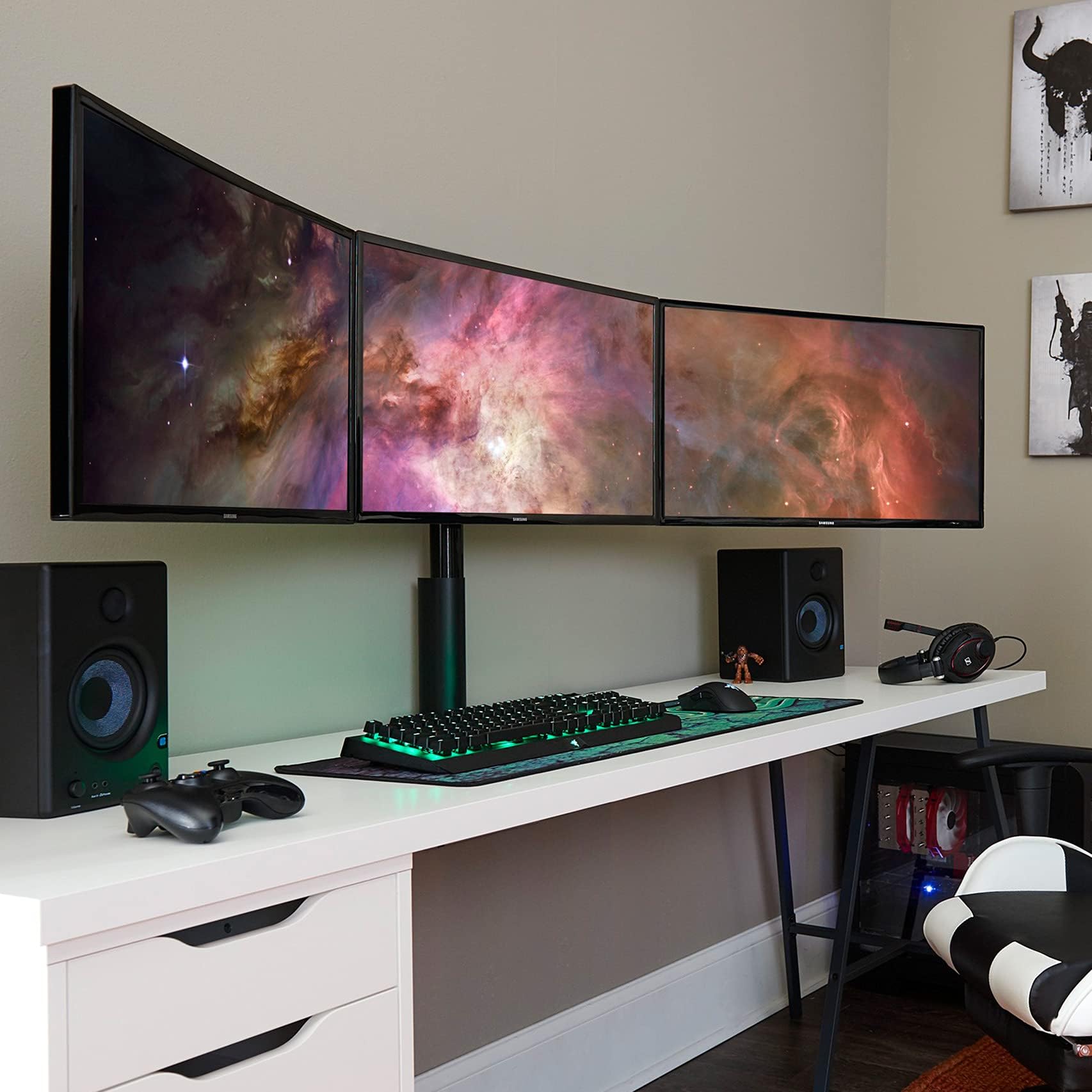
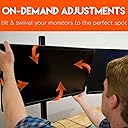
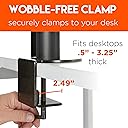
The ECHOGEAR 3 Monitor Desk Stand supports up to three 27" monitors with a robust, polished design featuring tool-free 360º adjustments and a lock-down clamp to eliminate wobble. Engineered for professional-grade stability and customizable tension, it transforms your workspace into a sleek, immersive multi-screen environment while contributing to sustainability with a tree planted per purchase.



| ASIN | B079NNC2YQ |
| Base Type | Leg |
| Best Sellers Rank | #3,314 in Computer Monitor Stands |
| Brand | ECHOGEAR |
| Brand Name | ECHOGEAR |
| Color | red |
| Customer Reviews | 4.5 out of 5 stars 1,641 Reviews |
| Finish Type | Polished |
| Item Shape | Rectangular prism or rectangle |
| Item Weight | 26 pounds |
| Load Capacity | 60 pounds |
| Material | Aluminum |
| Model Number | ECHO-GM3C |
| Number of Items | 1 |
| Number of Levels | 1 |
| Part Number | ECHO-GM3C |
| Riser Color | Black |
| Shape | Rectangular prism or rectangle |
| Special Features | Adjustable |
| UPC | 793795532282 |
G**.
The Perfect Monitor Position
I recently upgraded my home office setup with the Triple Monitor Mount, and I couldn't be more impressed. The easy 3-step setup lived up to its promise, and within minutes, I had the freedom to adjust my monitors in any direction using the silky smooth patented joint design. No tools required, just pure convenience. The ability to tilt, swivel, and align my screens on the fly is a game-changer. The tension knobs on the rail allow me to customize the effort needed to move the screens, ensuring a tailored experience. Setting the perfect monitor height during the initial setup was a breeze, and now I can effortlessly adjust it with just my hands—perfect for those intense gaming sessions or getting through a crucial presentation. The space-saving feature is another highlight. Consolidating three monitors onto one stand freed up valuable desk space for accessories and, yes, the occasional energy drink. The built-in cable management system gives my setup a clean, finished look, making me want to show it off like never before. The custom setup options are fantastic. I can position my triple monitors horizontally or vertically, creating a professional finish that maximizes every pixel. The wobble-free clamp ensures stability even during intense gaming moments, and I no longer have to readjust my screens every time my desk gets bumped. This triple monitor mount is a true game-changer, and I'm confident it will be the last one I'll ever need. As I plan to upgrade my monitors in the future, the tool-free design will make the transition seamless. If you're looking to elevate your PC setup, don't hesitate—grab the Triple Monitor Mount today. You won't be disappointed!
A**R
The best I've found -- as good as it gets (also DOES fit 27")
So if you've ever spent significant time trying to align your multi-monitor setup, and you're looking for a better solution, this is as good as it gets. The design of this product is the best I've seen, and it takes several of the variables out of the alignment challenge. The horizontal bar is one piece of sturdy metal. So instead of the hinge-sag on typical monitor stands, you have a perfectly-level horizontal mounting surface. Then, the VESA mounts connected to that are done in an innovative way. The movement is much smoother than typical monitor stands and the tightening function/method is such that it doesn't change the alignment, like a typical allen wrench tightening does--so you take that variable out of the equation. Is it still difficult to align the monitors? Eh. It's not instant-easy and it's not perfect. Right now I'm about 2mm off on each, but it's consistent. I think if I mess with the screws on the center monitor VESA I can get it even. But it's definitely as good as it gets for what's available in the market. I've spent a Saturday getting two 3-monitor setups level before. This is MUCH easier/more consistent than anything else I've used. The mount for the base is a single-bolt, wide tightening plate, which is better than the typical two-bolt setup (where as you tighten one, it effectively loosens the other). My only complaint is that you can't go through the "pipe" to route cables... I'm solving this by zip-tying the cables together and then zip-tying the bundle to the back of the pipe to hide it. That might bother people if a perfectly "clean" cable install from behind the monitors down (vertical to the desk) is important. In theory you could drill a large hole in the rear base of the pipe and then route the cables over and through/down (it's an empty pipe with an open top, but with thick walls, maybe 3mm, so it would take a serious drill bit... could maybe be done with a Dremel and some time/discs/burrs). Pipe height is tallest I've seen... I'm 6'2" and have a standing desk, and I can get the vertical center of the screens nearly to eye level. The reviews that say this won't work on 27 inch monitors might be for an older/incorrect product. I DO have three 27 inch monitors installed and there was ~2 inches of gap between the three with everything spaced out as wide as it would go before I adjusted them to touching. Finally, with the monitors touching edges, the angle of the outer two monitors is ideal (for me, at least). It's the same as what I had done when I had fully-independent adjustment arms. Bottom line on this item is that if you like having your monitors vertically-aligned, this is the best solution I've found/seen/tried, and I've tried a lot. I'm going to phase this in at my office for everyone's monitor stands. Everyone else with various other typical (though expensive) monitor stands has given up--it's misaligned monitors throughout the office and it looks bad and I think it's bad for morale on some level. This stand fixes the problem.
N**K
Looks great, good build quality, there is one flaw though
So to start out with this thing is great, especially if you are looking to mount three identical monitors. It was an easy process, the instructions are not that great but honestly you can just look at it and figure it out. The biggest gripe is leveling the monitors, my left and right monitors are just slightly lower the main monitor, now if had more room around my desk to properly mount this and even someone to help I could get these perfectly aligned. Looking at the forums, it is pertinent you use the spacers on the outside screens, I used them also on the center one which made it a bit better when it came to leveling. I made the conclusion that the mounting bracket that goes on the rail has some play to it, and if you push up on it when tightening the mount it will add some vertical adjustment to the monitor, now I can only do so much as a single person and with my desk mainly against a wall. Looking at the brackets there is a little bit of space on the top and bottom, even when its fully tightened, so what I plan to do is add a little shim of some sort so that it adds a bit more vertical movement. I will update this review with the results after that slight modification if that works. Overal 10/10 I would recommend this over a triple arm gas spring, not only will those take more space, especially if you are against a wall. Side note: The reason I did not completely move my desk to properly mount this is because I have a metric ton of cables that I spent an agonizing amount of time organizing and routing. To get a sum of what I stuff I have on my desk: Two stream decks External USB DAC Web Cam Keyboard Mouse Mic External doc for laptop and all the hdmi cables that go to each monitor from that doc USB Switch HUB Valve Index UPDATE: Got all the monitors to be leveled, the thing is its is important that all the mounts are put on the bar without the monitors, there for you can ensure that the mounts are properly snug with the railing. Second (you might need a friend, I used a stack of books) I used the largest spacers on the left and right monitors, I did not use any spacers in the center one. After doing that monitors are now uniform.
M**T
Good company, good product, some exaggeration on specs
(Just to acknowledge the nature of the complaints in this review, I invite you to imagine a full chorus behind me singing "First world problems!" over and over, accompanied by the proverbial world's smallest violin, while you read.) This was my second attempt to get a monitor stand for three 27" inch monitors in my office. The first one supported the monitors, but had all kinds of adjustment problems that required constant fiddling. The design of this one is much better. All of the tightening knobs are at right angles to the axis they're tightening, so you don't have to goof around with pushing it past where you want it and then tightening it hoping that it winds up tight and in the right position at the same time. This one, you put it where you want it, and you tighten it, and it stays there. Great! However, it's not all sunshine and roses. The box for this product says it supports 24" monitors, not 27" monitors. The description here (and on their website) says it supports 27" monitors. It also says it supports portrait or landscape orientation. If you put three 24" monitors on here in landscape mode, that'd probably be fine. If you put three 27" monitors on here in portrait mode, that probably also would work fine. So, technically everything they advertise is accurate. But 27" monitors aren't often used in portrait mode, because that'll cause neck strain. What I (and most people, I suspect) want is three 27" monitors in landscape mode. And this monitor stand, as designed, really doesn't do that out of the box. The monitors I used (Viewsonics) were 12lbs each, significantly under the recommended weight limit of 20lbs each. But to get three 27" monitors side-by-side you have to put the left and right ones *way* out at the very end of the bar, where they exert the absolute maximum downward force. After mounting all three monitors, I found that I could not get them to line up. Both the left and right monitor were lower than the middle one, because they were bending the bar down slightly on both sides. (Verified with measurements and a level.) I contacted their support, and I admit the first person I talked to gave me some really irritating run around. I was all set to return the mount, but then a different guy picked up the support ticket, and that guy was a superhero. He didn't treat me like an idiot, and worked with me at length, sending me extra parts, twice, everything I asked for and then some, until we got it where it needed it to be. The result is a bit of a Frankenstein's monster; it bears little resemblance to the pictured product. I'm hesitant to post pictures; I'm not sure they want photographic evidence floating around of the lengths they had to go to to make me happy, because it's probably not sustainable to do that for everyone. Hopefully they will adjust the product design a bit or make a new heavy-duty SKU that contains all the parts I used. For any use other than three landscape 27" monitors, I'm sure it's fine as-is. The other thing to keep an eye out for is that this mounts on the very back of your desk. That much weight pushing straight down on the back of your desk can pretty easily turn a small lateral force, like pushing yourself and your chair away from your desk, into a flipped desk and a no good, very bad day. (This was particularly scary in my case as the far side of my desk is rounded and overhangs beyond what is supported. So my desk is now basically earthquake strapped for safety.) But it looks good and by god it works. Those three monitors are dead level and haven't budged once since I finished the setup. Worth it. Totally worth it.
J**S
Honestly impressed with the build quality on this stand for the price!
I've wanted a triple monitor setup for years, I finally pulled the trigger when Dell released their S2721DGF and was in need of a stand for them. I've got an Uplift standing desk, so wall mounting wasn't an option and everything I looked at online just seemed cheaply made and looked like crap too. Then I found this one, had a decent picture with the monitors sitting nice and level and looked like it was pretty robust in design. I was skeptical of the $150 price tag though, usually good monitor mounts run hundreds of dollars (We have multiple triple monitor mounts at work that were almost 1k lol). When I first took it out of the package I was impressed by how much everything weighted and how solid it felt. The vertical tube wall thickness is 4mm! It was easy to assemble for the most part, getting the monitors aligned perfectly took some time, which I was expecting because I'm OCD about that kind of stuff, lol. There are a few reviews on here talking about how it isn't sturdy and showing the screens panning back and forth, they do not have the hardware on the clamp tight enough! You really need a ratchet with a 4mm allen socket to get it tight enough but it is ROCK SOLID when you get tight! I did modify it slightly because the vertical tube was a bit long for how low I have my monitors mounted, so I cut about 11" off of it so it only sticks up past the horizontal clamp about an inch and not above the monitors like it did when I first assembled it. I also used a through bolt to secure it to the desk instead of the clamp, a standard grade 8 3/8 bolt with a fender washer worked perfectly! Overall, I'm super impressed with this mount, couldn't be happier! 10/10
J**G
Shipped in a tall 5 foot Box! Just 3 Pieces was a Shocker! Easy 30 mins setup!
This Product is solid and the metal is of good heavy and thick metal. I was able to mount 2x 27' Samsung Curved monitors and 1 MSI 27" curved gaming Monitor of 165hrz. No problem and no worries. I would consider this as a top of the line 3 monitor stand setup. Each monitor can slide left to right on the track system that each monitor bracket sits on. Also tilt left to right and tilt up or down with a ease. Having 3 horizontal or 3 vertical or mix it up, is no problem with this set up. If you buy this, you will not be Disappointed! Note easy to set up. There is just 3 pieces to this. (1) Your Base that attaches to you desk, (2) the Height pole which you can adjust height, but 2 people is needed. one to hold the monitors while the other tightens the screws to clap it down. (3) Arm that has all 3 brackets, is already a solid piece which is freaking sweet. I hope this review has made you want to buy this monitor stand. Cause if you were like i was, i spent days and hours shopping for the one i needed! Thanks Seller, and thanks Amazon!
D**E
Beastly, yet silky smooth and versatile! Like Action Bronson in figure skates.
This mount is crazy good! I was pleasantly surprised by the quality of engineering and construction. The mount is basically 3 big chunks of steel with some bolts for attaching your monitors. Fewer moving parts means fewer things that can break. I suspect this thing will outlive whomever I will it to upon my untimely demise. Assembling this mount was dead simple (again, 3 pieces). Simple enough that I completed it as one person with no problem what-so-ever. The included instruction manual is an amusing breath of fresh air. Nice touch. Once everything is mounted up you really understand the splendor of ~72-74 inches of monitor feels like. An unlikely candidate for best feature might be the hip-joint-like swiveling mounts. These babies are siiiilky. Effortless 360 degree rotation with no jerky, sticky spots or worrying you're going to tweak on your monitor. Sometimes I do like 50 said and switch my style up and rock the furthest right monitor vertically and the transition takes about 20 seconds in total. I can't imagine any other 3 monitor mounts being so versatile! A few considerations: If you're considering this mount, be prepared for it to take center stage. Depending on the size of your desk you're probably going to have to shed a few knickknacks. Not only is this baby wide, it's taaaalll. The vertical bar is 28" tall and could probably be 8-10" shorter. I attached this thing to my standing desk (42") and the tops of my monitors are pushing 70" with the mount at half-mast. As a matter of fact I ended up taking down a shelf that was obstructing the height of the vertical pole. Priorities. All this to say be sure to have at least 30" of headroom above your desk to accommodate. Last consideration is to buy longer cables. You could easily need 10' or 15' HDMI cables depending on where your desktop is in relation to the edge monitors and how clean you want your cables to be. If you made it this far you know you want it. Treat yo self! You won't regret it.
P**I
Pretty good, but not without faults
This is a pretty good stand, but there are small issues that really bother me. Overall, it's completely sturdy and functional, but the leftmost mount seems to be sagging, so that monitor is almost an entire inch lower than the rightmost monitor. I have two 23" monitors (same model) on the sides with a 24" monitor in the center, and none of them are lined up. I contacted support about this and they acknowledged a lot of people have had this problem, and their only suggestion was to use a single mount + dual mount combo instead of this one, which isn't an acceptable recommendation. For a product that advertises it can perfectly align three monitors, it's strange that so many seem to be defective in this sense. Also, the cable management is a bit lacking. There are indents on the back of the bar to run wires through, but there's a washer at the ends for some reason which blocks the wires from going fully through. I actually took out the washers because as far as I can tell they don't actually do anything. The cover you're supposed to put on the base of the mount is nothing more than a plastic piece that barely stays in place. I'm not actually sure what it's supposed to do; you can't run wires through it, so I don't get its purpose other than kind of hiding the wires behind it. I'm hoping that when I eventually switch out the two 23" monitors on the sides for the same monitor that I have in the center, it'll fix some of the alignment issues I have, but right now each monitor is basically at a different height, which is very noticeable to me and not very aesthetically pleasing.
T**X
C'est du matériel solide et réglable
C'est un très bon achat. Un bras central solide. La disposition des écrans est réglables grâce aux maintiens pivotants. Mon écran central n'est pas le même et n'a pas la même taille que les 2 autres donc j'ai un léger écart. Le pied central est rotatif. Il faut faire attention car il faut de la profondeur sur le bureau. Le mien fait 80 cm de profondeur et je trouve que c'est le minimum sinon les écrans seront trop prêts de vos yeux. Le bureau doit être assez long, le mien fait 180cm. Pour moi le prix est justifié.
D**L
Excellent quality!
For a £150 price tag I was not expecting anything good, but I had searched around and wasn't finding anything that could offer to hold 3x ASUS VP279HE Eye Care Monitor - 27 Inch, without needing a small mortgage for a custom made one. So I thought I'd try it. Well my doubts were unfounded! It fits the 3 monitors perfectly with a little extra room which would accommodate a bit more of a bezel. The metal is thick and quality. The instructions contained some humor and were easy to follow. It would have only been easier to get this setup if they had come round and done it for me. Adjustments are easy to make without tools. I wish I had just bought this sooner rather than wasting time looking elsewhere.
H**N
Only good arm
I tried a lot of triple monitor arms, all of them except for this one were of cheap quality. They couldn't keep holding my three 27" monitors, couldn't be aligned symmetrically due to molding issues, had screws that would immediately deform into an unusable state, etc. This one is the ONLY one that isn't of cheap quality and won't sag even after multiple years of usage. Highly recommend it to anyone looking for a triple monitor arm. Only issue I'd say is the angle between the monitors is a bit too small, but it's not a huge deal, you do get used to it over time.
R**M
Finicky but worth it
Arrived in two business days to Ottawa, Ontario (shipped from Concord, Ontario). Everything is very heavy duty and feels very quality. I would definitely recommend installing this with a friend as it is a lot of work and heavy lifting at times. I did it myself only because I had to. The only thing that seems like it's going to be annoying is how finicky the stand can be (although I wouldn't be surprised if I figure out a fix for this). I've only owned the stand for about two hours, but because everything can move in every-which direction (because it is incredibly customizable), it is difficult to get all the monitors perfectly lined up as you have to align them on 3-axis. Champagne problems I suppose. Will post picture if I get to it later, but I do rest assured this is better than models with the articulating arms (and droopage, especially after prolonged use).
M**0
Buena compra.
Para empezar, aviso para navegantes: es un paquete GRANDE y PESADO, con lo cual si te toca alguna de las preciadas agencias de transportes que no aceptan depositarlo en drop points, olvidate de salir de casa en todo el proceso de entrega. Una vez acabada la advertencia pasemos a sus puntos fuertes: - Estética: El tener tres monitores en una sola peana lo hace precioso de ver. Elegante y moderno. - Robustez: El puntal del que se sostienen los monitores transmite mucha seguridad. - Versatilidad: Puedes poner los monitores como te de la gana, todos verticales, todos horizontales o combinar. - Calidad: Los materiales muy bien escogidos, y si hay que ponerle un pero, las pinzas de sujeción de los cables yo las hubiera puesto elásticas o con juego. Al ser rígidas en mi caso llegó una rota. Por último un par de consejos a la hora de decidir si hacerte con uno de estos soportes: - Ojo la mesa en la que lo instalas puesto que la fuerza que ejerce es grande. (ojo no olvidarse de poner los topes de goma dentro de la garra o marcaréis la mesa). - Revisar bien el paquete al llegar. Me explico: carece de asa y en mi caso le hicieron un agujero al paquete para agarrarlo. Por suerte no faltava nada. Gran soporte, lo recomiendo encarecidamente.
Trustpilot
2 months ago
5 days ago