Desertcart purchases this item on your behalf and handles shipping, customs, and support to Senegal.
🚗 Capture Every Drive Like a Pro — Stay Ahead, Stay Secure!
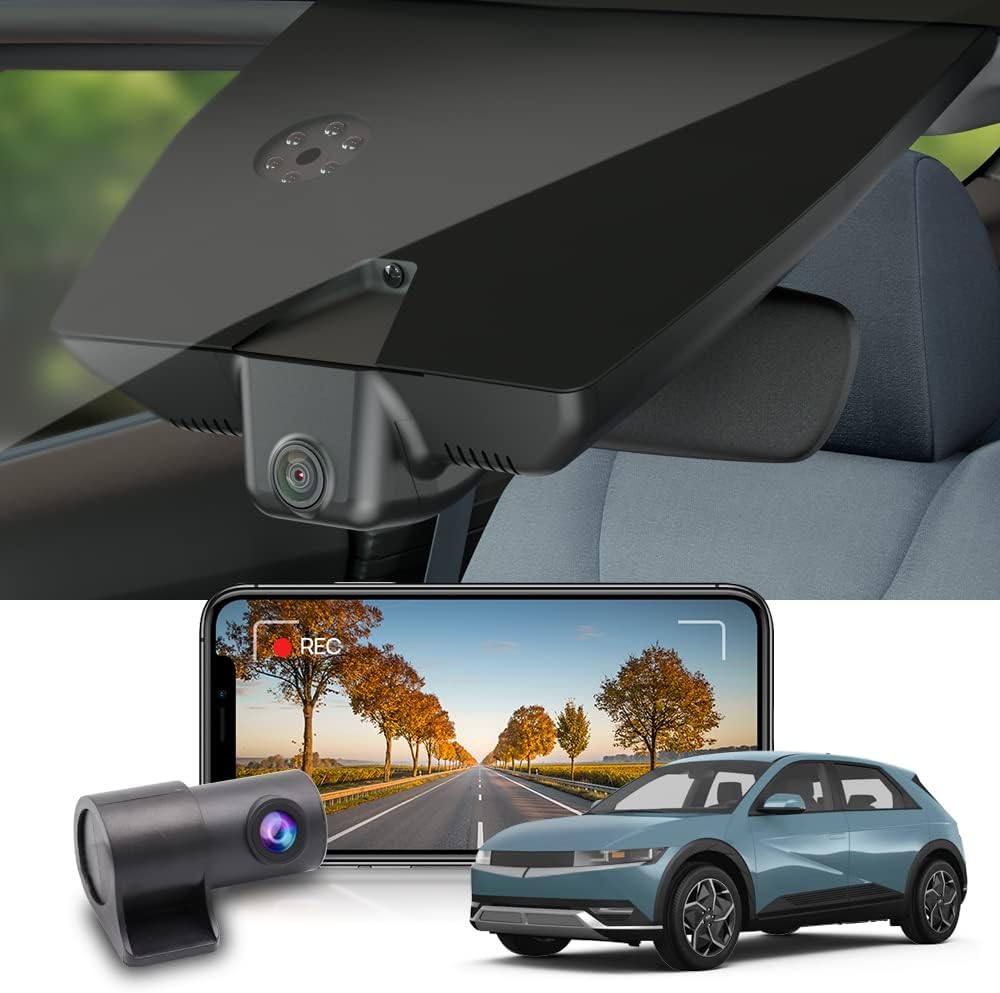
The Fitcamx Dashcam Front Rear is a premium OEM-style dashcam designed exclusively for Hyundai IONIQ 5 SEL Limited (2022-2024). It delivers stunning 4K front and 1080P rear video with a wide 170° field of view and advanced features like G-sensor collision detection, loop recording, and built-in WiFi for seamless app control. Powered via the auto-dimming rearview mirror, it installs effortlessly without compromising your car’s warranty or aesthetics. Comes with a 128GB microSD card and supports up to 256GB for extended recording.


| ASIN | B0BY2T64T9 |
| Are Batteries Included? | Yes |
| Auto Part Orientation | Drivers Side |
| Auto Part Position | Front |
| Battery Cell Type | Lithium Metal |
| Best Sellers Rank | 90,231 in Electronics & Photo ( See Top 100 in Electronics & Photo ) 1,233 in Car On-Dash Mounted Cameras |
| Box Contents | Memory Card, Suction Cup |
| Brand | FITCAMX |
| Brand Name | FITCAMX |
| Colour | Power from Auto-Dimming rearview mirror |
| Compatible Devices | Hyundai IONIQ 5 2022, 2023, 2024 SEL Limited (with Auto Dimming) |
| Compatible with Vehicle Type | Car |
| Connectivity Technology | Wi-Fi |
| Connectivity technology | Wi-Fi |
| Control Method | App |
| Country of Origin | China |
| Customer Reviews | 4.2 out of 5 stars 35 Reviews |
| Display Type | [INF] LCD or LED |
| Field of View | 170 Degrees |
| Flash Memory Supported Size Maximum | 256 GB |
| Flash Memory Type | MicroSD |
| Frame Rate | 30 fps |
| Item Dimensions D x W x H | 29D x 9W x 23H centimetres |
| Item Type Name | dash cam |
| Item Weight | 2.5 Pounds |
| Manufacturer | Dongguan Daozhi Electronic Technology Co., Ltd. |
| Manufacturer Part Number | HD2-Gi000 |
| Maximum Aperture | 1.6 f |
| Model Name | Fitcamx Dashcam Front Rear |
| Model Number | HD2-Gi000 |
| Model name | Fitcamx Dashcam Front Rear |
| Mounting Type | Suction Mount |
| Number of Items | 1 |
| Optical Sensor Technology | CMOS |
| Other Special Features of the Product | Built-In WiFi, G-Sensor, Loop Recording |
| Product Warranty | 1 |
| Real Angle of View | 170 Degrees |
| Screen Size | 7 |
| Special feature | Built-In WiFi, G-Sensor , Loop Recording |
| Vehicle service type | Car |
| Video Capture Resolution | 4K+1080P |
| Video capture resolution | 4K+1080P |
D**N
Buy this
Still serving me well 2 years later, it was relatively easy to install and the quality is good, the oem fit makes it a really good value for money.
D**C
Very good camera
Fits like a glove in the car and easy to install.
D**H
Instructions could be better
The front dashcam is very easy to install, despite the lack of included instructions, just by viewing one of the online reports! However, I have yet to find anything giving advice for fitting the rear camera to my specific car (it's all about how to hide the cabling!), nor have I received a reply to my query regarding this with FitCam. Using the installed front camera via the app is also very easy - I have not yet tried copying files to my computer to scrutinise the recording quality.
C**S
The supplied Y Cable does not fit in a Hyundai Ioniq 5 Ultimate (73 reg)
Went to install this today and found that the supplied Y connector does not fit with my HI5 Ultimate. Sent out a message to the seller as best as I could, but currently worried that I'll have to send the thing back despite otherwise glowing reviews.
J**D
Fantastic dashcam solution for the Ioniq 5!! 📷 🚙
I recently purchased this dashcam after being involved in an accident where I regretted not having one at the time. Fortunately, the other driver was clearly at fault, but having a dashcam would have provided additional security. While researching dashcams for the Ioniq 5, I stumbled upon a recommendation from Ioniqguy for this particular camera. I really wished that OEM would just have a seamless dashcam pre-installed, but this camera helps fix that problem. The installation process for the front camera was remarkably easy. It involved just a few steps: plugging it in and securing it to the windshield's mirror. I particularly appreciate how seamlessly it integrates into the windshield panel, giving it a clean and OEM-like appearance. As with most dashcams, installing the rear camera was a bit more complex, primarily due to the tight spaces of the Ioniq 5's design. Navigating the tight spots to thread the cable can be challenging, especially when dealing with the rubber grommet in the back door. However, with some patience and a clothes hanger, this hurdle becomes manageable. Once all components are connected, the end result is fantastic. Setting up the app on my iPhone and connecting it to the camera was straightforward. The camera uses a Wi-Fi connection, so accessing footage requires connecting to the Wi-Fi network while the car is on. Despite this, the app operates smoothly and is relatively user-friendly. Additionally, the SD card can be easily removed and accessed via a computer for viewing the various scenes. Overall, I highly recommend this dashcam to any Ioniq 5 owner. It's a worthwhile investment that offers a professional installation without being obtrusive or detracting from the car's aesthetics.
G**T
100 % zu empfehlen.
Passt als wäre es ein Original. Kann ich nur empfehlen.
J**L
Genial
Calidad, fácil de instalar, recomendable
M**Y
Fairly easy install - if you're patient.
Front camera installation is pretty straightforward. Routing the cable from the back camera requires a little patience, but is very doable if you're reasonably handy. Start from the right side of the middle panel on the back hatch and gently pry the top corner free - you'll hear a "pop" when the push pin body clip releases. Do this for another 3 or 4 clips and you'll be able to pull the left side of the right panel open. Pop that clip and you'll be able to access the rubber boot that connects the hatch to the main body. Pull the rubber boot off gently, then thread the cable through the boot. I found it easier to push the rear cam cable through the left side of the boot as this is where the seal is tightest. (Make sure you're routing the correct end of the cable through!) Reseat the boot by inserting the wide part of the boot lip into the opening and then pressing up. Then you need to route the cable through to the cabin. Pull the rubber seal up and gently lower the ceiling panel down so you can see where you're trying to run the cable (along the right side of the cabin). Easiest way to do this is to get a coat hanger and make a cable "fisher". Run the fisher from the back of the car to just above the rear seat pillar - it's about a foot. Then reach in between the rear seat side panel and the ceiling and grab that fisher. Tape the cable to the fisher and gently push the cable (with your left hand) as you pull the fisher with your right hand. Once you've got this done, you're almost home free. The rest of the cable routing is really just lifting the rubber seal above the doors up, and slipping the cable above it, and above the ceiling panel. Use the pry tool they provide to help. For the pillars, the pry tool can help create and opening that you can route the cable through. Repeat for the front seat/ front pillar. Then use the pry tool to slip the cable under the ceiling cover at the top of the windshield. Note: If you are installing this in a Limited edition Ioniq 5 - with a digital rear view camera - you'll need to use the BLACK 12 pin connector to tap power. Unplug the factory connector from the metal box on the right side of the rear view mirror assembly (the stuff that's glued to the windshield) and plug your connector in, then connect to the FitCam and you're good to go.
K**L
Super Bilder, auch bei Gewitter schöne Aufnahmen von Blitzen
Fronteinbau wirklich easy. Heckkamera braucht ein wenig Handwerkliches geschick. Himmel muss an den Türdichtungen geöffnet werden
Trustpilot
4 days ago
1 day ago