🖊️ Elevate your digital creativity with precision and power in one sleek stylus!
The Metapen Stylus Pen M2 is a premium active pen designed for Surface and select devices, featuring 4096 levels of pressure sensitivity, tilt support, and a tail eraser for intuitive editing. It boasts a rapid 1-hour USB-C fast charge delivering up to 100 hours standby, with 5 minutes charging enabling 24+ hours of use. Dual strong magnets ensure secure attachment to compatible devices, while its aluminum-alloy body and advanced conical tip provide a comfortable grip and precise input for creators, students, and professionals alike.
| Are Batteries Included | Yes |
| Are Batteries Required | Yes |
| Asin | B0B1CY438Q |
| Battery Average Life Standby | 100 Hours |
| Battery Description | Lithium |
| Best Sellers Rank | #100,641 in Computers & Accessories (See Top 100 in Computers & Accessories) #36 in Pens for Graphic Tablets |
| Brand Name | metapen |
| Charging Time | 1 Hours |
| Colour | silver |
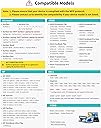
| Compatible Devices | Surface 3 Surface Go, Surface Go 2, Surface Go 3 Surface Laptop, Surface Laptop 2, Surface Laptop 3, Surface Laptop 4, Surface Laptop Studio Surface Pro 3, Surface Pro 4, Surface Pro 5, Surface Pro 6, Surface Pro 7, Surface Pro 7+, Surface Pro 8, Surface Pro 9, Surface Pro X,Surrace Pro 10,Surrace Pro 11 for Business Surface Duo, Surface Duo 2 Surface Studio, Surface Studio 2 Surface Book, Surface Book 2, Surface Book 3 Kobo Libra Colour,Kobo Sage,Kobo Elipsa, Kobo Elipsa 2E |
| Compatible Tablet Computer Models | Kobo Elipsa 2E, Kobo Libra Colour, Kobo Sage, Microsoft Surface 3, Microsoft Surface Duo, Microsoft Surface Duo 2, Microsoft Surface Go, Microsoft Surface Go 2, Microsoft Surface Go 3, Microsoft Surface Pro 10, Microsoft Surface Pro 11, Microsoft Surface Pro 3, Microsoft Surface Pro 4, Microsoft Surface Pro 5, Microsoft Surface Pro 6, Microsoft Surface Pro 7, Microsoft Surface Pro 7+, Microsoft Surface Pro 8, Microsoft Surface Pro 9, Microsoft Surface Pro X |
| Customer Reviews | 4.5 4.5 out of 5 stars (2,437) 4.5 out of 5 stars |
| Item Diameter | 9 Millimetres |
| Item Weight Unit Of Measure | 14 Grams |
| Manufacturer | metapen |
| Manufacturer Part Number | M2-EU-QFY-MPP702 |
| Minimum Required Operating System Version | Windows 10 |
| Model Number | ME-MPP702 |
| Number Of Batteries | 1 Lithium Metal batteries required. (included) |
| Number Of Packs | 1 |
| Unit Count | 1 Count |
User
Top notch quality.
Pen quality is really good specially for Asus rog flow x13 2022 model. Though I wish they have provided few more tips because the tips(3 pcs) cost around 2k inr in india.
User
Not working Bluetooth
Not support the tab
User
Rapport/qualité prix
Envoi rapide et efficace. Utilisation sommaire donc pas de recul pour une utilisation professionnelle. Convient tout à fait ! Je recommande, prix imbattable
User
Good to use.
This is the first stylus pen that I have ever used. I had recently bought a used surface pro which I am liking very much, but the price of a stylus pen is far too much, almost the same price or more than I paid for the surface pro. There were a few cheaper ones than this but in general you get what you pay for so I went with this as it seemed to be generally better than the others in most regards and being rechargeable. It worked straight away with no set up required. I charged it first which only took ten minutes and as soon as I placed the tip near the screen it was working.Firstly it feels good in the hand and has a nice weight. It isn't light but I like that. It feels solid. Writing on the screen feels okay, at least I can write my signature with it and it actually looks like my signature. It also feels responsive enough, not too laggy.I've only been used to using graphic tablets, writing or drawing onto a black slate. Being able to draw directly on the screen is far better. The tilt function is new to me and I like it very much. I have been using it lightly as I have this fear of scratching the screen but it's been fine and haven't seen any marks other than fingers and some keys from the keyboard. It fits snuggly to the side of my surface pro where it has remained and not budged or fallen off, it looks like it belongs there.Overall it is easy to use, feels good and does the job.
User
First stylus for my Surface and I’m impressed
I use this with my Surface Pro 11. I didn’t want to spend the money on the official Surface Pen, so I tried this instead.I’ve had it a couple of months and it’s been smooth from day one. No lag, good pressure sensitivity, and it glides just as nicely as some I tested in stores. It feels sleek and comfortable in hand.You can flip it over and use the back as an eraser, which I like, and the side button works for right-click or click-and-drag. Battery has been solid. I’ve only charged it once. The magnet is strong too. Before I had a case with a pen holder, I’d just attach it to the side and it stayed put.This is my first Surface stylus and I’m happy with it. If it broke, I’d buy the same one again. For the price, it makes sense.
User
Tevreden
Koppelt makkelijk met mijn kobo libre color.Reageert snel op aanraking met scherm.Snel opgeladen.Zeer tevreden over prijs kwaliteitverhouding.Losse tips gekocht omdat ik 'm van de trap had laten vallen (lekker handig) en tip was krom. Werkt nog steeds! Niks mis mee.
User
As expected
Works as expected. Bought it for Kobo Libra Color due to original stylus glitches. Some functions are inverted (erase and highlight, was expected). Otherwise all good.
Trustpilot
2 months ago
1 week ago