Desertcart purchases this item on your behalf and handles shipping, customs, and support to Senegal.
๐ Stay ahead of your health curve with Gluco+ โ smart, swift, and always connected.
The Gluco+ Wireless Smart Glucose Monitor Kit is a clinically accurate, 510(k)-cleared device designed for fast, reliable blood sugar testing. Featuring Bluetooth connectivity, it syncs with the free Gluco-Smart app for unlimited data storage and health pattern tracking. With a rechargeable battery supporting up to 200 tests per charge and a compact travel-ready design, this kit includes 100 test strips, 100 lancets, and all essentials for convenient, on-the-go glucose monitoring backed by a 12-month warranty and dedicated support.




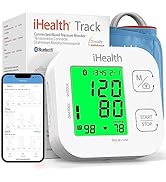


| ASIN | B0CHMBPH7P |
| Battery Cell Composition | Lithium Polymer |
| Best Sellers Rank | #6,585 in Health & Household ( See Top 100 in Health & Household ) #5 in Blood Glucose Monitors |
| Brand | iHealth |
| Brand Name | iHealth |
| Customer Reviews | 4.2 out of 5 stars 4,522 Reviews |
| Included Components | 1 Smart Glucometer, 1 USB Charging Cable, 1 Lancing Device, 1 Travel Case, 100 Lancets, 100 Test Strips, 1 Quick Start Guide, 3 Manuals |
| Item Dimensions L x W x H | 1.35"L x 0.75"W x 3.8"H |
| Item Highlight | 510(k) Cleared, Bluetooth Blood Sugar Monitor for Home Use, Free Smart App, Portable Diabetes Testing Kit with Travel Case |
| Item Weight | 0.32 kg |
| Manufacturer | Andon Health Co., Ltd. |
| Model Name | Gluco+ |
| Model Number | BG5S100 |
| Number of Items | 1 |
| Number of Packs | 1 |
| Operating Time | 5 seconds |
| Part Number | BG5S-100*100 |
| Product Dimensions | 1.35"L x 0.75"W x 3.8"H |
| UPC | 850044118243 |
| Unit Count | 1 Count |
P**.
Empowering Control: My Experience with iHealth Gluco+
Facing a new diagnosis of Type 2 Diabetes was daunting. The need to monitor my blood glucose levels consistently was something I had not anticipated, but a recent hospital stay made me realize its importance. Enter the iHealth Gluco+ Wireless Smart Blood Glucose Monitor Kitโa game-changer for anyone navigating this new terrain. Clear and Concise Directions The first thing that struck me about the iHealth Gluco+ was how user-friendly it is. The kit comes with clear and concise directions that make the setup process a breeze. Even for someone like me, who was new to the world of blood glucose monitoring, the step-by-step instructions were easy to follow. Easy-to-Use App One of the standout features of this monitor is the accompanying app. The app was simple to install and took just a few minutes to set up. Once installed, it seamlessly syncs with the monitor, providing real-time data on your blood glucose levels. The app also offers insightful charts and logs, making it easier to track your readings over time. This functionality has been incredibly empowering, giving me the data I need to manage my condition effectively. Reasonably Priced Despite all these advanced features, the iHealth Gluco+ is reasonably priced. It offers excellent value for money, especially considering the peace of mind it provides. For anyone managing diabetes, knowing that such a reliable and user-friendly tool is available without breaking the bank is reassuring. Pros and Cons Pros Clear and Concise Directions: Easy setup and straightforward instructions. User-Friendly App: The app is simple to install and use, offering valuable insights and tracking features. Affordable: Reasonably priced, providing great value for money. Cons Container Issue: I wish the needles came in the same containers as the test strips, but this is a minor inconvenience and not a deal-breaker for me. Final Thoughts The iHealth Gluco+ Wireless Smart Blood Glucose Monitor Kit has been an invaluable tool in helping me take control of my health. Its ease of use, combined with the comprehensive app and reasonable price, makes it a top choice for anyone needing to monitor their blood glucose levels. If you're looking for a reliable, user-friendly solution, I can't recommend the iHealth Gluco+ enough. Take control of your health and make monitoring your blood glucose levels a hassle-free experience with iHealth Gluco+.
A**Q
My first (and second) Glucometers and I love them
This is the first and second Glucometer I have purchased and used on myself. Not my first one I have used and not my first one to buy stuff for. Honestly I have used or been around 50% of the big name brand insurance provided, drugstore sourced or doctor recommended ones available in the last few decades and knowing this day was coming I have had my eye on these compact user friendly inexpensive smart monitors for a few years. Fast forward to needing one and I bought one of these on a steal of a sale confirmed I needed it and talked with my health care professional and he approved of it so when it was on sale again I bought a second. Honestly it was as cheap to get a second than order a refill and so far the refills are cheaper and easier to get than the ones for other family members. Its super easy to use and compact, the supplies are great, the lance works fine and is easily adjustable, and the charge life on the meter is good. So much nicer than having fancy batteries or proprietary chargers, or even regular AA or AAA batteries that you run out of since nothing uses them. Numbers match meter to meter over the 2 I have and match what my labs show. Its not 100% the perfect solution, but super useful. If they made a slightly bigger slightly better carrying pouch I wouldn't complain (move the strap at the bottom towards the zipper side and I can fit the lance better and keep the little tube for the test strips in all the time) especially if they came up with a way to store some of the lancets in it other than a zip lock baggie in the stretchy pouch or buying a separate container. I love the USB charging, but it would be 11% better if it was USB-C because nearly everything else I have is. The app was a pain to pair with the first meter at first and I don't know why I did everything in the instructions but when I tried again 2 days later it worked flawlessly and so did the second meter. It would be nice to be able to track your own labels like "In the middle of breakfast" or "after taking my xyz" and if it had an easy to use food log, or optional configurable reminders to pop up a notification 2 hrs later to take the "after breakfast" reading but that's asking a lot for this price. If your on the fence just buy one, its compact easy to use and has memory and a simple display on the device so if you are busy and not able to link it you can just take your readings and record them later.
F**R
Great Little Glucose Monitor.
I have been using this Smart Glucose Monitor Kit daily for about six months, and love it. It seems quite accurate (especially compared to the totally UNRELIABLE ARM PATCH monitors from a different provider that I had used for months previously). I canโt recommend it highly enough! With this Smart Glucose Monitor, I can easily learn how my Glucose level responds to various food types and amounts, to activity and rest, and to exercise, outdoor heat and humidity. Itโs convenient to transport when traveling, and is easy to use.
V**R
Good value and easy to use system
Simple, easy-to-use system with good supporting software and tracking app. However, I only gave it four stars because Iโve had some inconsistencies in reported glucose levels. The results were compared against itself using a different finger prick and using a Lingo biosensor.
J**N
Amazing!
Sooo easy to use with your phone and connects right away. The app is soo useful to track trends and other data. This thing is an amazing deal! The needles they provide donโt even hurt as well.
V**P
Like living in the Buck Rogers era!
I just ordered the iHealth/ iGluco+ due to my current/ previous diabetes kit and I have been so awe-struck by the new technology! This diabetes kit is really a game changer for me! iHealth meter is so accurate and I love the app due to so many modern features! I have noticed some neutral to negative reviews here about the iHealth/ iGluco+ meter and I want to give some more helpful instructions that should work better for you if you're new to diabetes or new to this device. First, you'll want to charge the meter for 6 - 8 hours not any less! If you only charge it 2 - 4 hours when you receive it, the following day it will show E-3 code repeatedly. If this happens to you plug it back in and charge it 6 - 8 hours. Next, open up your smartphone and turn on your Bluetooth device in settings. Sit your smartphone next to where you're sitting and pick up the diabetes meter. Next, you'll want to make sure you have all of the kit items next you you - diabetes meter, lancet pen with lancet inside, alcohol wipes, test strips box, lancet box, band-aid and testing bottle. next, you'll want to remove the lid from the testing bottle and replace the lid. Add one drop on top of the testing bottle lid. This next step is very important-take a test strip and turn it over to the blue side. Insert the end with the bars into the machine forcefully. You'll hear a click and the machine will turn on. next, put the opposite end of the test strip (blue side)into the drop of liquid and wait 3 seconds. The machine will give you a number somewhere around 68. This is great! Underneath the machine toggle the circle button and the test strip will eject. Repeat this step with your blood after you've pricked your finger with the lancet. Wait 3 seconds and the machine will give you a number. Below 69 is non diabetes while 69 - 119 is borderline. 120 - is diabetic. On the app you will see a settings menu and hit the history tab. On history at the bottom of the page you'll see a blue circle with a white water droplet in the center. Hit that icon. Now your test strip reading will be added to the app. These steps should help you if you run into any issue.....
J**D
Accurate and dependable
Iโve been using this device for nearly a month now with no issues. Iโm getting similar readings to what my doctor received. No issues with battery or Bluetooth that other users reported. Easy to use and I appreciate the ability to customize meal times and tracking.
A**R
Is this device accurate?
It's easy to use with the app giving instructions for steps. Sometimes I forgot to turn on my Bluetooth and the app did that for me. The concerns are: I couldn't read the note I added to the app easily in order to track what I ate. The camera in the app I haven't figured out yet. I got one device from prescription. Sometimes I used it to double check. The iHealth sometimes matched and Sometimes 10ish unit lower. 9/18/26 I started to wonder its accuracy. For the same blood taken back to back, it gave me results 79, 103, and 95 within 1 minute.
Trustpilot
4 days ago
3 weeks ago