Desertcart purchases this item on your behalf and handles shipping, customs, and support to Senegal.
🎮 Dominate your digital domain with LG UltraGear’s epic curve and speed!
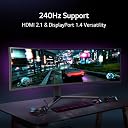
The LG 49GR85DC-B is a 49-inch curved UltraGear gaming monitor featuring a massive 5120x1440 DQHD resolution, 240Hz refresh rate, and 1ms response time. It supports VESA DisplayHDR 1000 for stunning HDR visuals and covers 95% of the DCI-P3 color gamut. Designed for competitive gamers, it includes customizable gaming modes, advanced sync and stabilization features, and a sleek, borderless design with LED backlighting, making it a powerhouse centerpiece for any high-performance battlestation.


| ASIN | B0BY3W5NST |
| Adaptive Sync | FreeSync Premium Pro |
| Additional Features | Curved |
| Aspect Ratio | 32:9 |
| Best Sellers Rank | #59,327 in Computers ( See Top 100 in Computers ) #1,636 in Computer Monitors |
| Brand | LG |
| Brightness | 400 Candela |
| Color | multi |
| Compatible Devices | Computer |
| Connectivity Technology | VGA |
| Contrast Ratio | 1000:1 |
| Customer Reviews | 3.8 3.8 out of 5 stars (272) |
| Display Resolution Maximum | 5120x1440 |
| Display Technology | LCD |
| Display Type | LCD |
| Global Trade Identification Number | 00195174053843 |
| Hardware Connectivity | DisplayPort, HDMI, Headphone, USB 2.0 |
| Has Color Screen | Yes |
| Is Electric | Yes |
| Item Weight | 32.5 Pounds |
| Model Name | 49GR85DC-B.AUS |
| Model Number | 49GR85DC-B |
| Mounting Type | Wall Mount |
| Native Resolution | 5120x1440 |
| Number of Component Outputs | 3 |
| Picture Quality Enhancement Technology | Yes |
| Refresh Rate | 240 Hz |
| Resolution | 5K QHD 1440p |
| Response Time | 1 Milliseconds |
| Screen Finish | Glossy |
| Screen Size | 49 Inches |
| Specific Uses For Product | Gaming |
| Total USB 2.0 Ports | 3 |
| Total USB 3.0 Ports | 3 |
| Total Usb Ports | 3 |
| UPC | 195174053843 |
| Viewing Angle | 178 Degrees |
| Voltage | 120 Volts |
T**E
I am used to having between 3 and 6 1080p monitors to create a curved experience while having usable screen real estate. The problem I had was the monitor bezels and the fact I was trying to make flat panels appear to curve. I saw this on sale for some $500 off and bought it. I was like a kid waiting for Santa and when it arrived, I couldn't wait to get it hooked up and game! It was too large for my desk. Nothing else would fit! No worries, I have another desk, glass, that will more than accommodate this large monitor. With anything, there are pros and cons, so lets get to it. Pros: The adjustable height stand is a must-have. Once you set it's height, it stays. The assembly was easy yet frightening at the same time. The base was a sinch to assemble. Virtually no glare at all The curve allows for a nice natural turn of the head while still allowing great peripheral visuals while looking at the center. The refresh rate is perfect. While there are higher refresh rate monitors out there, this is the largest monitor I've had that doesn't make me sick to my stomach. Freesync Pro works. That's it. It works for G-Sync on Nvidia cards as well as AMD's Freesync. This is a must-have as it prevents any screen tearing (where the motion on the screen changes quickly, it splits the image horizontally) without the performance hit that VSync creates. Its beautifully designed. Picture in Picture! YES!! You can hook up a Fire stick and a computer and watch a football game while playing a video game. More on my experience with this in a minute. Cons It is huge when it comes to width. Make sure you have the space, with some to spare, before purchasing. Running games at high settings and the monitor at its standard resolution requires a beefy graphics card. It's somewhat harrowing to put the monitor on the stand by yourself. Get a second person. Due to the curve, I didn't even attempt to lay the monitor face down and attach the base. The backlighting should be brighter. Otherwise, what's the point? While it has DTS:X Headphone support, there are no speakers. I'd be happy with the bare minimum for system sounds, but it does pass the DTS:X Headphone sound from the computer through the monitor to a headphone jack just to the left of the power/menu button. I'm not happy with the menus not having an exit option. You have to wait for the menu to time out and close. Now, back to the Picture in Picture statement. I spent $3,000 on a Samsung Ark 55" gaming monitor. Weighing in at 90 lbs, I got the beast unboxed and everything plugged in. It looked fantastic. The problem with the Gen 1 version is no Picture in Picture; in fact, you cannot split the screen or anything you would expect. So, back to the store it went. Now, for $2,000, you can buy the 2nd gen Ark and get all four inputs on screen at once, but I just don't think it's worth it. If you need to rotate that big monitor or need four inputs on screen, go for it, but for me, I love this LG at a 32:9 aspect ratio!
M**N
J'aime beaucoup les produits LG, je trouve qu'ils sont sous-estimé. Cet un très beau moniteur pour un gamer. Même pour la productivité. Si vous faites de la photographie c'est autre chose. Les couleurs, bien que très jolies dans l'ensemble, ne sont probablement pas ajusté de façon juste et neutre. Image ultra rapide. Sans grand défauts. La luminosité me déçoit très légèrement. J'avais auparavant un 1000 nits en hdr comme celui-ci mais le LG est nettement moins lumineux. Ça ressemble plus à du 600. Je suis installé à 1 mètres exactement pour suivre la courbure 1000r et c'est très confortable. C'est une alternative très valable à un moniteur Samsung plus dispendieux...
R**S
The right Monitor can define your rig. With panoramic views, snappy response times & a great colour pallet, This monitor brought my game to the next Level. Now that I see them clearly focus fire does the rest! a Big MWO Thumbs-Up !!
J**)
Such a great monitor! If I want to use it to play a game with the 240Hz engaged, I have to drop down to 3 monitors. That is NOT an issue with the monitor and is solely a limitation of my video card. I switched from the another brand's 49" curved widescreen with the same resolution but only 144Hz max refresh. This was a great choice because the other monitor definitely had some backlight bleed that this monitor does not have at all. The backlight is even throughout the entire monitor. It's really nice for handling aggressively wide spreadsheets or remotely accessing someone's computer that has multiple monitors and you can see all of their monitors with ease on this one screen.
W**N
Monitor itself is alright, but getting three stuck pixels in matter of days is just unacceptable. it's not $150 monitor
Trustpilot
2 months ago
1 month ago