Desertcart purchases this item on your behalf and handles shipping, customs, and support to Senegal.
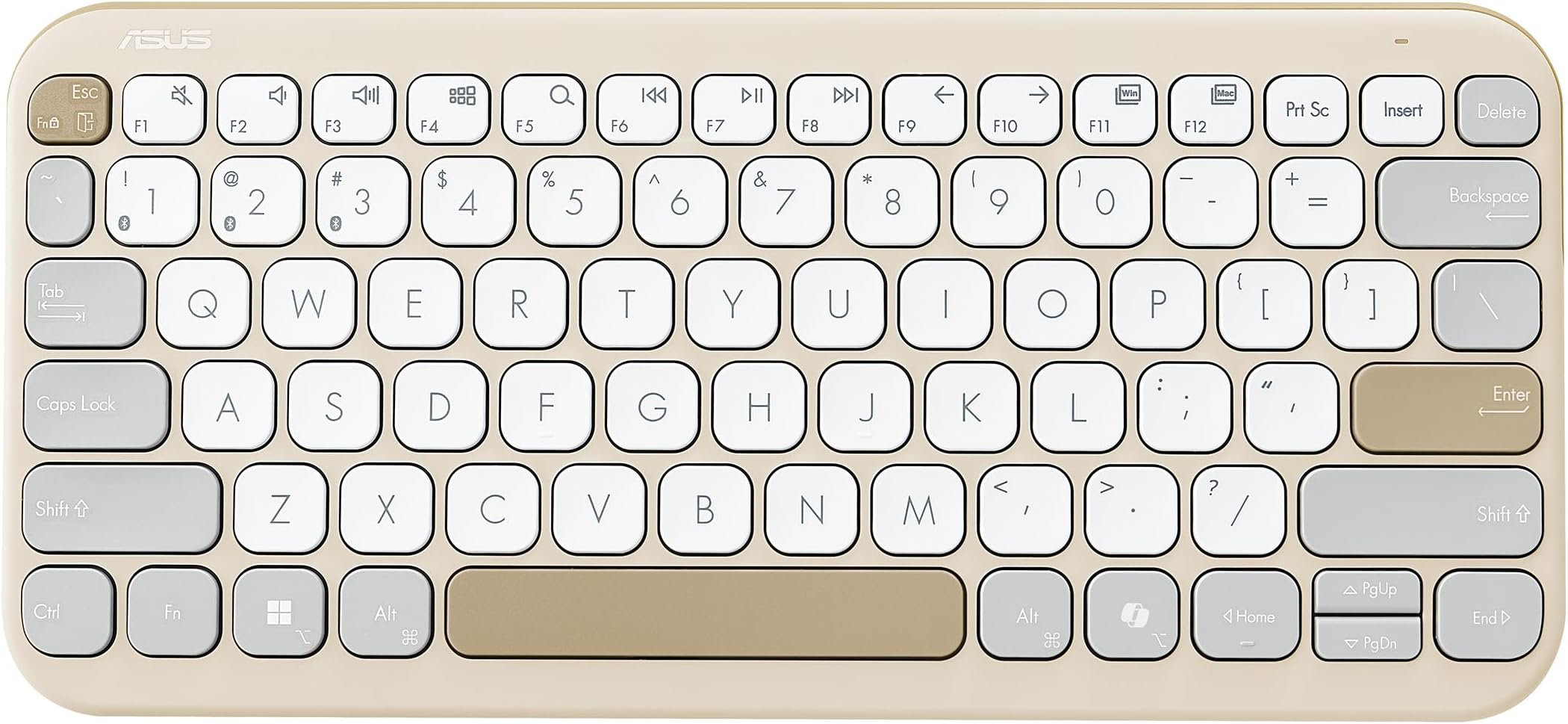
⌨️ Elevate your workspace with silent style and AI-powered smarts!
The ASUS Marshmallow KW100 Wireless Keyboard in Oat Milk combines a compact, minimalist design with silent scissor-switch keys and a dedicated AI Copilot key for instant assistance. Compatible with Windows, Mac, Chrome, iOS, and iPadOS, it supports seamless Bluetooth connection to up to three devices. Its ergonomic features include adjustable kickstands and system-switch keys, while a long-lasting 2-year battery life and durable key switches ensure reliable performance for professional and creative multitasking.


| ASIN | B0CFF15D4N |
| Antenna Location | Business, Education, Everyday Use, Multimedia, Personal |
| Best Sellers Rank | #561 in Computers & Accessories ( See Top 100 in Computers & Accessories ) #12 in Keyboards |
| Brand | ASUS |
| Brand Name | ASUS |
| Colour | Oat Milk |
| Compatible Devices | Laptop |
| Compatible Operating System Family | Windows |
| Connectivity Technology | Bluetooth |
| Country of Origin | China |
| Customer Reviews | 4.3 out of 5 stars 700 Reviews |
| Enclosure Material | Plastic |
| Hand Orientation | Ambidextrous |
| Importer Contact Information | ASUS INDIA PRIVATE LIMITED, 402, Supreme chambers, 17/18, Shah Industrial Estate, Veera Desai Road, Andheri (West), Mumbai 400053, India |
| Item Dimensions L x W x H | 28.2L x 13W x 1.8H Centimeters |
| Item Type Name | Keyboard |
| Item Weight Unit of Measure | 375 Grams |
| Keyboard Description | Multimedia |
| Keyboard Layout | QWERTY |
| Manufacturer | ASUS, G.TECH TECHNOLOGY LTD. NO.8, JINYUAN 1ST ROAD, TANGJIAWAN TOWN, HIGH-TECH ZONE, ZHUHUA CITY, GUANGDONG, CHINA |
| Manufacturer Contact Information | G.TECH TECHNOLOGY LTD. NO.8, JINYUAN 1ST ROAD, TANGJIAWAN TOWN, HIGH-TECH ZONE, ZHUHUA CITY, GUANGDONG, CHINA |
| Manufacturer Part Number | 90XB0880-BKB0X0 |
| Minimum Required Operating System Version | ChromeOs 134, Windows 10 |
| Model Name | Marshmallow Keyboard KW100 |
| Model Number | KW100 (Oat Milk) |
| Number of Items | 1 |
| Number of Keys | 3 |
| Number of Packs | 1 |
| Packer Contact Information | G.TECH TECHNOLOGY LTD. NO.8, JINYUAN 1ST ROAD, TANGJIAWAN TOWN, HIGH-TECH ZONE, ZHUHUA CITY, GUANGDONG, CHINA |
| Power Source | Battery Powered |
| Product Features | Integrated Stand, Lightweight, Portable |
| Recommended Uses For Product | Business, Education, Everyday Use, Multimedia, Personal |
| Special Feature | Integrated Stand, Lightweight, Portable |
| Switch Type | Scissor-Switch |
| Unit Count | 1.0 Count |
| Warranty Description | 1 year warranty provided by the manufacturer from date of purchase |
F**T
Good-looking and comfortable tablet keyboard, with a small learning curve
I received the ASUS Marshmallow KW100 keyboard in proper brand-new condition, and my initial impression has been very positive. The keyboard looks good, feels well made for a compact plastic keyboard, and the colour options are one of its strong points. The key travel is also good, making typing comfortable for regular work, browsing, messaging, and light productivity use on a tablet. I am currently using it mainly as a tablet keyboard. The typing experience is pleasant and the keys are quiet enough for everyday use. The keyboard is slim and can still fit inside a standard laptop backpack, so it is portable to an extent. The only initial difficulty I faced was pairing it. It took a little time to understand the correct Function-key and Bluetooth-key combination needed to put it into pairing mode. It is advertised as supporting up to three devices, but I am still figuring out how to create and switch between multiple device profiles properly. Once paired with the tablet, though, it works well. For tablet users, there are a few practical considerations. It is not extremely small, so it may feel a little large if you want something that is very easy to carry everywhere. Also, there is no protective cover included, which leaves the keys exposed while travelling. You need to be a little careful when carrying it in a bag with other devices or accessories. It also does not include a trackpad, so you will either need to carry a separate mouse or use the tablet touchscreen alongside the keyboard. A positive point is the battery arrangement. It uses AAA batteries, and the battery compartment at the front is easy to access and replace. That is much more convenient than keyboards with sealed rechargeable batteries or difficult-to-reach button cells. My only concern is pricing. Since this is a plastic keyboard with no metal construction or trackpad, it could have been a little more affordable. It is also a light-coloured keyboard, so it will need regular cleaning and maintenance to prevent it from looking dirty over time. Overall, this is a nice, comfortable, and visually attractive Bluetooth keyboard for tablet and everyday use. It is worth considering if you value typing comfort, quiet keys, and colour options, but keep the size, exposed keys during travel, lack of a trackpad, and slightly premium pricing in mind.
S**Y
A good typing experience, but probably overpriced.
I bought the Green Tea Latte. It comes with a thick bunch of paperwork and 2AAA batteries. There's an on-off switch at the back. The letters are crisp and clear. The key travel is decent. It's silent. It gets into some battery-saving mode if not used for 5 to 10 mins (didn't measure). Hence, you can't start typing as it requires one stroke and a second to wake up. So, get in the habit of hitting the space bar if you don't want your documents to have typos. At this price (Rs 2899), it should have been backlit and should have come with lithium-ion batteries. If that would have made the price to Rs 3000, then it would have made more sense. Nevertheless, this is a good one. Update: The keyboard goes to sleep too fast.....and requires a keystroke to wake up, leading to typos!
D**I
Nice slim & small profile keyboard
Likes: - small, takes less space, easy to connect, works as expected - has a kickstand also 👍 - keyboard layout is also perfect Dislikes: - ArrowUp/ArrowDown keys are tiny - The most significant downside: it auto disconnects (auto sleep) after 2 mins, so you need to keypress to re-connect it (this is not a good experience)
S**L
Must buy if you are looking for budget friendly Mac layout low profile keyboards
Reasons why I chose this keyboard: 1. Mac layout - Easy to use if you are accustomed to the mac style keyboard layout. 2. Too much hand movement while using navigation keys - It is compact, same size as mac keyboards. Therefore, very little hand movement. I was using a full size keyboard earlier. 3. Mac cmd and alt signs on the keys - I get confused when there are shortcuts with those signs. It is easy to understand those shortcuts as the signs are given on the keyboard. 4. Separate shapes for up/down and left/right keys - Since the size is different you can understand which one is what just by feeling them, without looking at them while typing. 5. Perfect shape for my small hands - Again one of the reasons I chose this because I don't like moving my hands too much while typing. 6. Value for money - All my requirements met at 2k :) Things I didn't expect and I liked: 1. Ergonomics - The keyboard is slightly tilted and you can adjust the height as well. Two levels are available. I used MX Keys before and I still feel at home with Asus Marshmallow. 2. Good build quality - Honestly I feel it same as Logitech MX Keys build quality wise which costs around 4 times more than this. 3. All functionalities I needed are available - Dedicated media keys. Windows/Mac layout switch. Things I miss: 1. Capslock led light - I usually press the caps lock by mistake and there is no way I can understand from the keyboard that it is on. 2. Odd placement of the fn key - Although I haven't felt it so far, but the fn key could have been placed on the right side of the space bar or the leftmost part (where ctrl key is present, same as Mac). This is just my personal preference. 3. Dark color option is not available - Only trendy looking colors are available. Professional subtle colors like gray can be added :)
A**A
Go for it!
Simply amazing. Don't listen to other reviews; even I was skeptical when planning to buy a keyboard. Ultimately, I bought the KW 100 instead of the Logitech Pebble, and I am NOT regretting any of my decisions. I love this keyboard. Battery life is amazing; it's been almost 2 months, and it's still at 100% charge. Durable keyboard. Smooth and responsive typing. All in all, a value-for-money and stable buying option if you are looking for a keyboard with silent typing.
S**I
Not pairing after few months
It was working for 3months then stopped, trying to pair now but it is not showing in any device to pair. On press of fn it bilnks four times and stops. I tried pressing F so the blink lasts to pair no help. Changed the battery no help..worst product with the price i paid
B**H
Quality much cheaper than expected
I received this keyboard yesterday and after using it for more than 7 hours, I found it has both pros and some glaring cons. Pros: • The connectivity is much faster than the previous bluetooth keyboard I was using, logitech pebble. • There are a lot of complaints that it goes inactive and takes a moment to respond, but that's generally what happens with a bluetooth keyboard. I actually found this one to be much more faster to respond than logitech. • My typing on this keyboard is very fast. Because of the square keys as compared to logitech's round ones, it didn't need any adjusting to. The fingers simply glide on this keyboard, making for a very buttery smooth typing experience. The keys also have a pleasant sound, not too loud but also not silent. Just perfect for me. Cons: • Sadly, it feels much cheaper than logitech. The build is nowhere near as sturdy, and due to the matte finish, it feels a lot less premimium than logitech. • It also rattles and shakes on my desk, which is very frustrating in general. I have to put a cloth underneath to make it stable. All in all, I will continue to use this, but I wouldn't recommend this keyboard for a long term.
B**U
my cat is in heat and marking territories
actually very good and great size too i love the color sadly my cat peed on it and i can’t use it anymore but it was good while it lasted will prolly buy it again when i have the useless money to spend
Trustpilot
2 weeks ago
2 weeks ago