Desertcart purchases this item on your behalf and handles shipping, customs, and support to Senegal.
๐ Triple your screens, triple your productivity โ the ultimate dock for the modern pro!
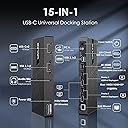
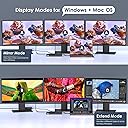
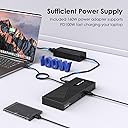
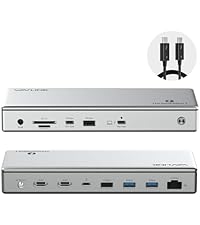
The WAVLINK USB C Docking Station WL-UG69PD25PRO-US is a powerhouse hub designed for professionals demanding seamless multi-monitor setups with triple 4K@60Hz support. Equipped with a 160W power adapter delivering up to 100W laptop charging, six ultra-fast USB 3.2 Gen2 ports, 1Gbps Ethernet, and audio connectivity, it ensures a versatile, high-performance workspace. Compatible with the latest Mac M1-M5 series, Windows, Chrome OS, and more, this dock breaks macOS display limits via DisplayLink technology, making it a top-tier productivity solution for hybrid work environments.


| ASIN | B0BNNCXR6J |
| Best Sellers Rank | #77,017 in Computers ( See Top 100 in Computers ) #448 in Laptop Docking Stations |
| Brand | WAVLINK |
| Color | Jet Black |
| Colour | Jet Black |
| Compatible Devices | Apple M1/M2 and Intel Macs (with macOS 10.14 or later) /Microsoft Surface line/HP Spectre x360 series, /Dell XPS 13 & XPS 15 / Latitude, Lenovo Thinkpad T series. Latitute 7280/ Latitude 5310 2-in-1; Precision 7730/7750; Laptop 5590, HP Spectre Laptop 13-af001TU/ Spectre x360 13t/ Spectre folio/ Specter x369; Elitebook 840 G5 series/ Elitebook X2/ Elitebook x360 1030 G3/ Elitebook 745 G6/ Elitebooโฆ |
| Compatible devices | Apple M1/M2 and Intel Macs (with macOS 10.14 or later) /Microsoft Surface line/HP Spectre x360 series, /Dell XPS 13 & XPS 15 / Latitude, Lenovo Thinkpad T series. Latitute 7280/ Latitude 5310 2-in-1; Precision 7730/7750; Laptop 5590, HP Spectre Laptop 13-af001TU/ Spectre x360 13t/ Spectre folio/ Specter x369; Elitebook 840 G5 series/ Elitebook X2/ Elitebook x360 1030 G3/ Elitebook 745 G6/ Elitebook 830 G6/ 2018 HP Elite 800 G4; Envy Geforce mx250/ Envy x360 Laptop (15z-ds100); Z book 15u G3/ Zbook 17 G4, Lenovo Yoga 720-13IKB/ Yoga 730/ Yoga 900-13ISK/ Yoga 910/ Yoga 920/ Yoga 930/ Yoga 940-14IIL; 3rd generation Thinkpad Yoga; Yoga15 Thinkpad Ultrabook Pro; Thinkpad E590/ Thinkpad P72/ Thinkpad T470/ Thinkpad X1 Carbon; Legion Y530; Lenovo C930/ T480s/ X390/ 81N8, Microsoft Surface Book 2/ Surface Go/ Surface Laptop 3; Surface Pro 7,Huawei Macbook Mate10 or later; Google Slate (2019); Chromebook C340-15; SanDisk Cruise Glide; Razer Blade 2017 (gtx 1060); Pixel book go 2019/2020 Compatible devices Apple M1/M2 and Intel Macs (with macOS 10.14 or later) /Microsoft Surface line/HP Spectre x360 series, /Dell XPS 13 & XPS 15 / Latitude, Lenovo Thinkpad T series. Latitute 7280/ Latitude 5310 2-in-1; Precision 7730/7750; Laptop 5590, HP Spectre Laptop 13-af001TU/ Spectre x360 13t/ Spectre folio/ Specter x369; Elitebook 840 G5 series/ Elitebook X2/ Elitebook x360 1030 G3/ Elitebook 745 G6/ Elitebook 830 G6/ 2018 HP Elite 800 G4; Envy Geforce mx250/ Envy x360 Laptop (15z-ds100); Z book 15u G3/ Zbook 17 G4, Lenovo Yoga 720-13IKB/ Yoga 730/ Yoga 900-13ISK/ Yoga 910/ Yoga 920/ Yoga 930/ Yoga 940-14IIL; 3rd generation Thinkpad Yoga; Yoga15 Thinkpad Ultrabook Pro; Thinkpad E590/ Thinkpad P72/ Thinkpad T470/ Thinkpad X1 Carbon; Legion Y530; Lenovo C930/ T480s/ X390/ 81N8, Microsoft Surface Book 2/ Surface Go/ Surface Laptop 3; Surface Pro 7,Huawei Macbook Mate10 or later; Google Slate (2019); Chromebook C340-15; SanDisk Cruise Glide; Razer Blade 2017 (gtx 1060); Pixel book go 2019/2020 See more |
| Customer Reviews | 3.8 out of 5 stars 177 Reviews |
| Hardware Interface | 3.5mm Audio, DisplayPort, Ethernet, HDMI, USB 3.1 Type C, USB 3.2 Gen 2 |
| Hardware interface | 3.5mm Audio, DisplayPort , Ethernet, HDMI , USB 3.1 Type C, USB 3.2 Gen 2 |
| Item Weight | 18 Ounces |
| Manufacturer | WAVLINK |
| Mfr Part Number | WL-UG69PD25PRO-US |
| Model Number | WL-UG69PD25PRO-US |
| Number of Items | 1 |
| Number of Ports | 13 |
| Number of ports | 13 |
| Total Number of HDMI Ports | 3 |
| Total USB ports | 6 |
| Total Usb Ports | 6 |
| Unit Count | 1.0 Count |
| Wattage | 100 |
A**R
Works as promised BUT install the drivers
If you are cool with updating your own drivers, you have found the PERFECT dock for PC and Mac. Everything this dock says it can do, it does. 4K at 60hz. Up to 4 mirrored or extended screens, if you include the laptop monitor itself. 10gb per USB port. Audio, speakers and mic. And it runs smoothly. I have two computers. A Lenovo Thinkpad (PC) laptop and a MacBook. The PC didnโt require a driver. It was genuinely plug-and-play. But the MacBook did require the driver. I plugged it in and it didnโt work. (Actually, let me specify that. The other aspects of the dock worked, like the audio and USB ports. Just the screens didnโt work.) The problem isnโt the dock. The problem is macOS. Mac is notorious for having compatibility issues. In order to have a dock that works well with both PC and Mac, you have to rely on a third-party driver (DisplayLink) to make it run. That being said, here is why Iโm giving the dock 5 stars: Wavlink tells you upfront you will probably need to install a driver. The manual for the dock specifically tells you to install the driver AND tells you where to find it. The website it takes you to is very self-explanatory and the install is easy. It took me less than five minutes to find and install the driver. As a further note, when I upgraded to macOS Sonoma, I did have to download and install a new driver also provided on their website. AGAIN, THIS IS NOT WAVLINKโS FAULT. THIS IS APPLEโS FAULT. THIS DOCK IS BUILT ON DISPLAYLINK, A DRIVER WHICH IS NOT PROPRIETARY TO MACBOOKS. MAC WILL NOT AUTOMATICALLY UPGRADE THIS DRIVER FOR YOU. THIS IS WHAT YOU ARE SIGNING UP FOR. In conclusion, I love this dock. It does everything it says it can do and Iโm not bothered by updating my own drivers. ***UPDATE - 18 months later*** Still works exactly the same as the day I bought it. Have not had to update the driver in over a year. Still 5 stars. Going to buy a second one for my office at work.
A**S
Excellent Docking Station.
Love it. Slim design, better cord management, excellent space saver. Works perfect and has plenty of ports for my needs. Best overall for price. Works with Surface pro laptop. Power adapter is a USB A. I have 3 monitors connected and have zero issues with them. My inky concern is the docking station does het pretty warm. Do not place it near anything that would possible melt. Other than that I am very satisfied with this purchase.
W**M
Great dock depending on model you receive
I have three of these docks that my company is using with M3 Macbook pros. They work great with dual and triple monitors. I ordered three more for some M4 Macbook pros we just received. The new docks are labeled as a Pro version while the previous docks I received are labled as a Max version. The Pro version does not work with the M4. We tried all of them and the screen blacks out every few seconds with a dual or triple monitor setup. The M4 works great on the previous docks we received that are the Max version. The only difference I can see between the two models I've received are the Max version of the dock includes a 180W power supply while the Pro version is 160W. With the 180W power supply, the M4 has no issues connecting. Other than the discrepancy in the models, the Max 180W dock works great and has been in use for over a year. I took one star off due to the recent models received.
V**G
This is a very nice docking station.
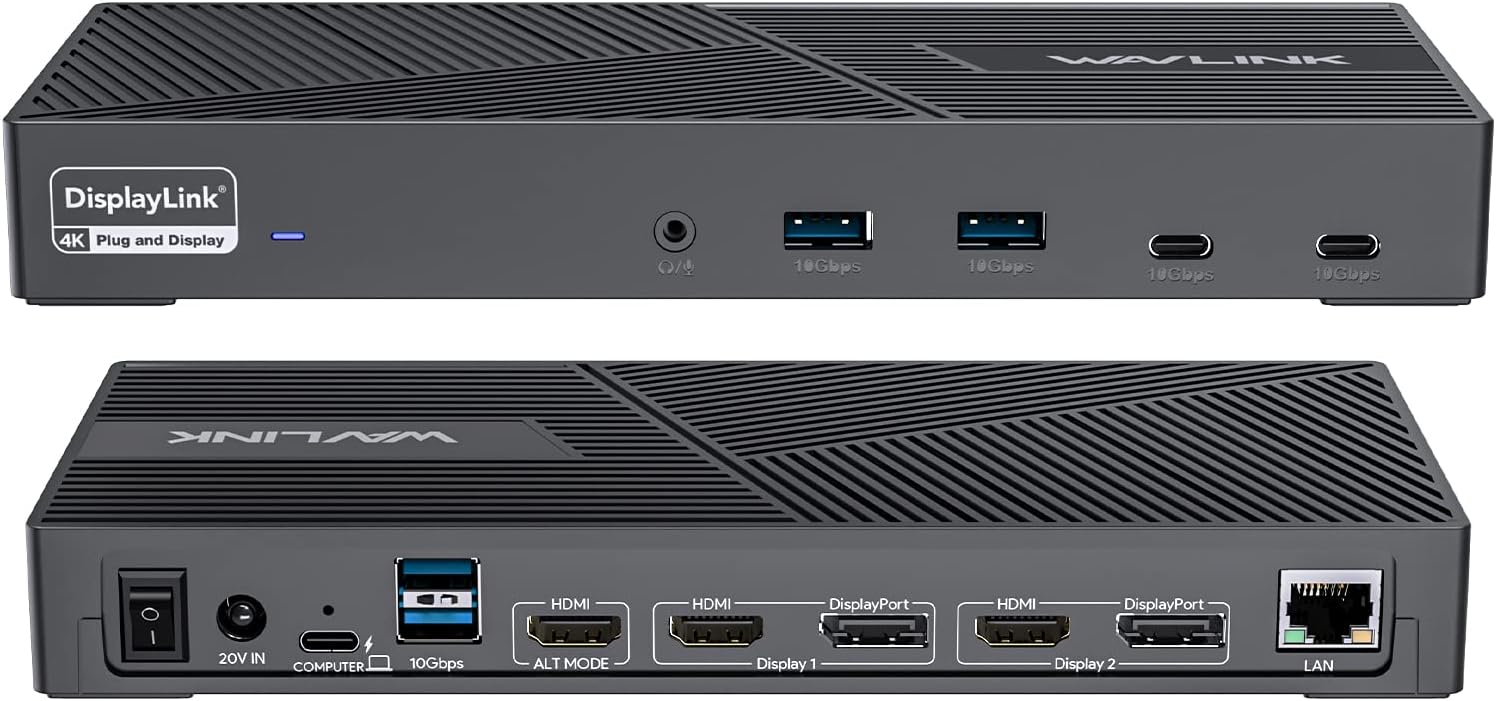
I have only had this docking station for a couple of days but love it so far. I have a M2 macbook air that only has the ability to use 1 external monitor. This docking station allows for a total of 3 external monitors. The first monitor needs to use HDMI. The 2nd and 3rd monitors can use either display port or HDMI. The power cable, the cable from macbook to dock, and the ports for all the monitors are all in the back. The front has a headphone jack, 2 usb ports, and 2 usbc ports. The ports are useful for charging anything that you need. In my case, the keyboard, the mouse, the ti-84 calculator, ipad, and anything else that uses those chargers. One thing that I did not know until now is that you no longer have to charge macbook when using this dock because when the macbook is hooked up to the dock, it actually charges the macbook (bonus). I was originally going to give it 4 stars because every time i shut down the macbook and restarted it, I had to go to applications, display link, and open it up before the 2nd monitor would show up. I was messing around with the settings and there is a setting that allows you to automatically have it open up upon startup. Anyways, it does everything you would expect and that they advertise. I have only had it for 2 days now so I can't comment on long term use, but it's great so far. 3 month update. The docking station is just ok after having it for 3 months. When I turn the macbook on, sometimes it does not recognize that docking station, most of the time it does. When it comes to charging the macbook when it's plugged in, it's weird. It first started and stayed at 100%, but now it shows it's charging but at 93%. It will actually go down to 80%, but then start actually charging again. It's weird. The last thing that I'm not happy about is when you have multiple monitors hooked up, the first additional monitor you have will work perfectly fine and smooth, but the 2nd monitor lags when you move your mouse on it. For example, if you are browsing a web page and scrolling, you can clearly see how it lags. If I knew all of this before I bought my macbook air, I would have just bought the macbook pro and not had the issue with needing a docking station with displaylink technology. This will do the job as I only have about 8 more months left of school and I will finish, but there are probably better products out there.
S**N
Great asset to my system
My prior docking station failed, and I was led to this docking station as the price was between the highest and lowest, and the reliability assessment was high. It was delivered quickly, and I was able to install it pretty easily. I did look up the instructions on YouTube, which made the installation quick and easy. I am delighted with the results of the replacement and use my system daily. I highly recommend this item. My tech basic knowledge is low, and I was able to install this in 45 minutes.
Trustpilot
4 days ago
2 weeks ago