


🔥 Dominate the game with DARKSTAR precision and power 🎮
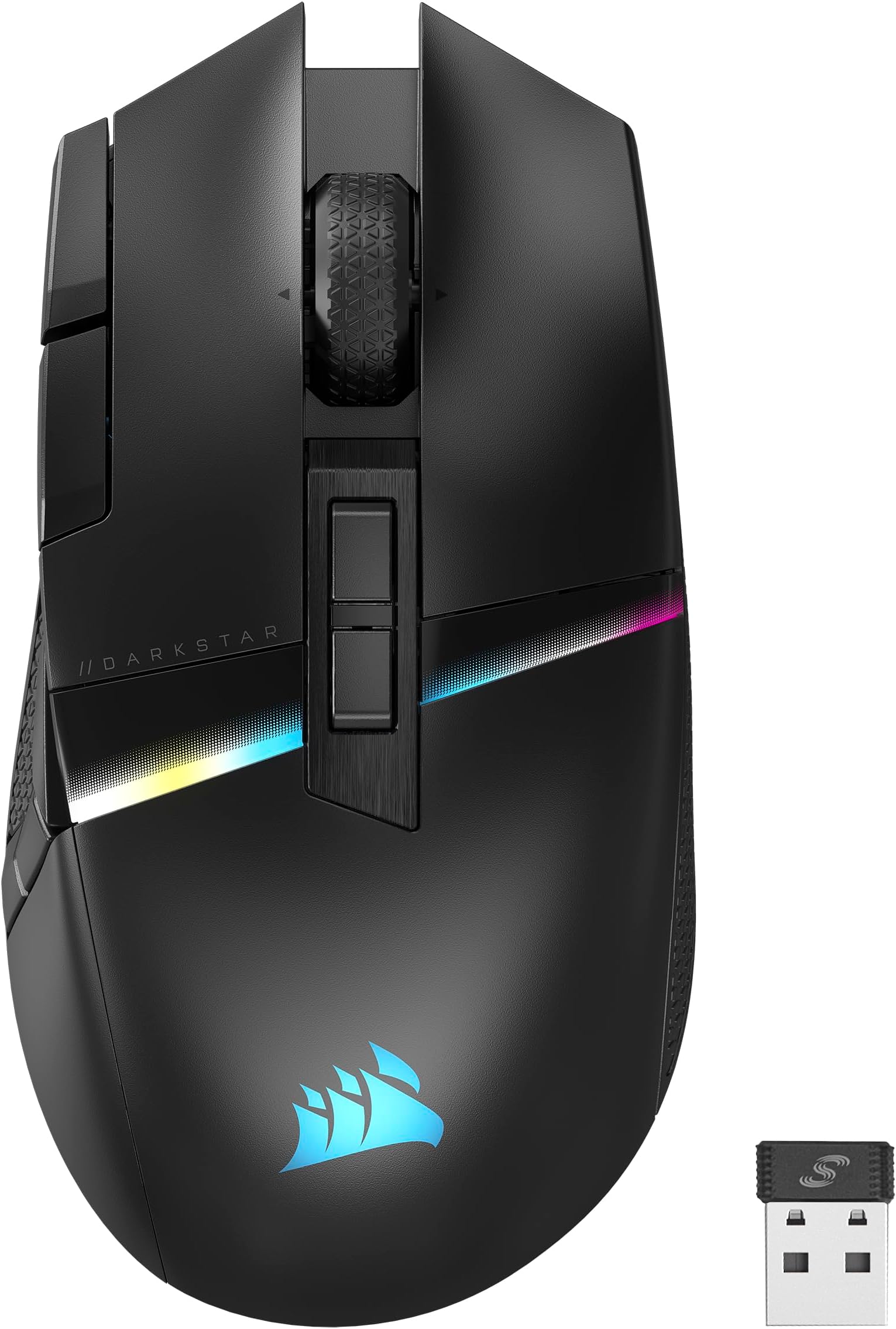
The Corsair DARKSTAR RGB Wireless Gaming Mouse is engineered for MMO and MOBA pros, featuring a blazing 26,000 DPI optical sensor, 15 programmable buttons including a strain-reducing six-button side cluster, and up to 80 hours of battery life. With sub-1ms SLIPSTREAM wireless and Bluetooth connectivity, plus full customization through CORSAIR iCUE software, it delivers unmatched precision, comfort, and personalization for serious gamers.



| ASIN | B0CCVXDLGG |
| Additional Features | Ergonomic Design, LED Lights, Programmable Buttons, Rechargeable, Wireless |
| Antenna Location | Gaming |
| Battery Average Life | 80 hours |
| Best Sellers Rank | #1,465 in Video Games ( See Top 100 in Video Games ) #89 in PC Gaming Mice #142 in Mac Gaming Mice |
| Brand | Corsair |
| Button Quantity | 15 |
| Color | Black |
| Compatible Devices | Personal Computer |
| Connectivity Technology | Bluetooth, Wi-Fi |
| Customer Reviews | 3.1 out of 5 stars 232 Reviews |
| Enclosure Material | Plastic |
| Hand Orientation | Right |
| Hardware Platform | Mac, PC |
| Included Components | CORSAIR DARKSTAR WIRELESS Gaming Mouse, Safety Leaflet, USB Charging and Data Cable, USB Wireless Transceiver, Warranty Card |
| Item Dimensions L x W | 5.08"L x 2.67"W |
| Item Weight | 3.36 ounces |
| Manufacturer | Corsair |
| Mfr Part Number | CH-931A011-NA |
| Minimum Required Operating System Version | Windows 10 |
| Model Name | DARKSTAR WIRELESS |
| Model Number | CH-931A011-NA |
| Mouse Maximum Sensitivity | 26000 dots_per_inch |
| Movement Detection | Optical |
| Movement Detection Technology | Optical |
| Number of Batteries | 1 Lithium Polymer batteries required. (included) |
| Number of Buttons | 15 |
| Operating System | Windows 10, Windows 11, macOS 10.15 or later |
| Power Source | Battery Powered |
| Range | 1.0 meters |
| Special Feature | Ergonomic Design, LED Lights, Programmable Buttons, Rechargeable, Wireless |
| Style Name | DARKSTAR RGB |
| UPC | 840006649489 |
| Unit Count | 1 Count |
| Warranty Description | 2 year manufacturer |
M**D
The Diamond in the rough (for the most part)
This is the first mouse I have taken a chance on and was actually extremely happy and still am (I have tried Redragon, other similar cheap Chinese knock offs, all the high end companies and everything is the same mundane crap). Please consider this mouse if you like fairly light weight, comfy in the palm, decently accessible side buttons and good battery life. My ONLY 2 complaints would be 1: The connection will occasionally pause or something weird from time to time. like I will turn right or left and the mouse won't follow but after about 1.5 seconds will fast forward catch up. Very very annoying but does not happen often enough. 2: the Two buttons where the back of your thumb/ the fulcrum would click are placed too far back in my humble opinion and I tend to not use them because of this. Takes too much mental effort to slide my thumb back far enough to comfortably feel and click them. I could also have small thumbs. Would seriously consider buying another just to have in storage for when Corsair decides to discontinue this one as well since it isn't what every other gamer is buying. The software works and isn't buggy. It doesn't advertise it well in my opinion, but the mouse has kinetic buttons ie: literally tilting it forward, backward, left and right. I would say this button system has about a 75% reliability and i enjoy using them in games like World of Warcraft. The other thing i had to get used to is the left and right click. They are WILDLY soft comparted to any mouse I have had in the past. I almost thought it was defective at first but the mouse performs amazing and after getting used to not having to put all my force in my finger presses (bad habit), the soft clicks are just plain nice. There are still some of us out here who think the side grid system buttons these gaming companies like Razer, Logitech, and even corsair seem to think are the best way to introduce multi buttons. I may be the 1% here but I find it to be a really stupid idea. Even if I'm the minority, I find that muscle memory tends to form and stay a lot stronger when you have unique, different shapes. if you want one of the best examples I have ever seen, Google and image of the discontinued "Steel Series Rival 500". this thing actually worked around your thumb and added some incredible movement that wasn't 3-4 lines of 4 buttons in rows. I would legit sue Steel Series for everything they are worth for discontinuing that mouse if I knew I'd win. You all who use mice like the Razer Naga and the other exact copies of that side button grid system confuse me but again, I could definitely be the weird one here.
M**E
Mouse has so many critical issues they have to trick you on Amazon
THIS REVIEW IS FOR THE "DARK STAR RBG", IF YOU ARE WONDERING WHY THAT NEEDS TO BE CLARIFIED, READ FURTHER. If you search google regarding this mouse you will find ENDLESS numbers posts on reddit, the corsair forums, Toms Hardware, etc complaining about this mouse. And not 1 or 2 problems, it seems like every time I read a new post, the mouse has a completely different but critical error. I bought this mouse when it was a new release and it had very few reviews, so I went to check Amazon again expecting a terrible rating. I'm surprised when I see a 4.1 star score, much higher than I expected. I start to read reviews, then it hits me: most of the reviews are for "Style: Corsair Dark Core RGB Pro". What? The Dark Core is a completely different mouse. The ergonomics are different, it only has 2 side buttons, it costs half the price. Why is the Dark Core listed as a variation of the Dark Star? Is there a way I can filter to only see the Dark Star reviews? Yes there is, but quite tricky to find. First filter reviews by one of the star ratings. Then a filter window with more options will appear. Then you can filter "Format: Show Only Reviews for the Dark Star RBG." Then it made perfect sense. Out of the 2,464 ratings ONLY ONE HUNDRED AND EIGHTEEN are reviews for the Dark Star. See attached images. Yep, Corsair took this garbage mouse with more critical failure issues than you could imagine, and listed it as a variant of a COMPLETELY DIFFERENT mouse that probably isn't as terrible. That level of deception and general scuminess should be reason enough to never consider buying this mouse, but if you want my personal experience: I owned this mouse for about 2 months, it worked great. I liked the feel, the button placement (most mmo mice buttons are too clustered), then out of nowhere the 2.4ghz receiver stops working. Just bam, no more wireless. At this point I am well beyond Amazon's 30 day return window, so I switch it to Bluetooth mode. Maybe the polling rate is worse, I really couldn't tell the difference, so I continue to use it in Bluetooth mode. Then, want to guess what happened yesterday? Yep, Bluetooth mode stops working just as abruptly as the dongle did. Try to connect via Bluetooth? The mouse LEDs pulse a blue color, which according to the manual means "BT wireless mode – pairing failed". The mouse wasn't dropped or damaged, I didn't even update the firmware/software, just randomly died for no apparent reason. So now, I can try to deal with Corsair customer service, which everything I have read about them says they are, slow, often not willing to send new hardware, and when they do send new hardware it rarely fixes the problem. So I'm going with option B, never buy another Corsair Product as long as I live, I strongly suggest you do the same. I can forgive a company for releasing a product too early, with trash software and faulty components, it happens often unfortunately. But deceiving customers by listing this mouse as a variant of a well-reviewed mouse to hide how poorly it sold and how many problems it has? Absolutely disgusting, absolutely cannot be forgiven.
S**M
not going to buy again
i bought this mouse because i like "mmo" mice with extra buttons for additional key presses and macros so i can have all kinds of things like voice push to talk, or in game abilities on the thumb buttons but i will not be purchasing this mouse again and wish i had gone with something else. nothing is inherently wrong with the design but despite having larger hands can not swap easily from the front and back thumb buttons so for my use i feel that they are too far spread apart. my thumb rests too far back natually to reach the front buttons without reaching a bit too much and messing with my grip on the mouse. on things like a naga or g600 i can usually use about 3 rows comfortably with needing to do a bit too much thumb curling to be comfortable to reach the bottom row so if you feel the same this may be an issue for you. my main complaint with this mouse however is the terrible software. Icue is the bane of my existance. multiple times the mouse has not had the right dpi despite having no settings changed so i have had to open icue and "calibrate" the mouse by moving it around my mouse pad at a specific speed so that it goes back to the right dpi when it starts reading the matt properly (linus tech tips desk mouse pad so you know i am not using a weird surface.) additionally the software keeps creating new profiles i only want the one so eventually i went through the hastle of setting up all 3 profiles as the same setting since it kept adding profiles... to ensure i was unhappy the software now made 3 more default profiles brining the total up to 6 for no logical reason i can figure out... while on the point of profiles if the icue software is not running i can not get the mouse to have onboard settings saved meaning that if anything happens to icue or i exit the program my settings get thrown out the window and i hope you like default profiles (might be why i keep getting default profiles added the system refuses to save over onboard memory and keeps importing default profiles onto my pc profiles if they are not already there) now for the thig that made me write this review that pissed me off more than anything else. after months of having my macros set up just the way i like them the lighting configured and the dpi set up i restarted my computer today and macros/thumb buttons are not working i check the software and it indicates that "ICUE macro execution is not working properly. Please repair the installation of ICUE." anooying but i got to add/remove programs to check what modify options i have and windows had the modift AND the uninstall option greyed out so i can not do either somehow... ok i check in the software and it is up to date so i can not try to update it and see if that repairs icue... i downloaded a new copy of the installer from the official website and do not have the option to repair using that either as it does not appear to even properly install correctly it appears to just be putting files in a program files folder and telling windows it exists with no other configurations being respected... i have come to this conclusion because when i tried to install on top of my existing files thinking that might repair the core features the install refuses to continue as there are files in the folder already... so to get my macro's and keybinds working i have to reinstall icue... but i can not uninstall it with windows... and i can not select to uninstall it from the official installer and there is no uninstall button i have found in icue itself so i am left with deleting the files in the corsair program files folder and then installing the program again and rebuilding my entire profile again... i don't want all the stupid plugins and dashboards and light controls for all the crap i don't use i just want a gaming mouse that is reasonably light, has a bunch of additional buttons and just works... preferably with the profiles saved on the mouse so i can plug it into any computer and it will just run without needing to install stupid software packs edit: I am now looking for a new mouse because the scroll wheel no longer works. I have never had this happen before but when scrolling up or down the mouse randomly detects scrolls in the oposite direction so it is a gamble if it will scroll... stay where it is... or even scroll in the wrong direction while fighting back and forth... i checked online and this is apparently an issue with this mouse with people noting that they take their mouse apart and mess with the scroll mechanism to get it working again... I am not interested in messing with the mechanism personally so this mouse lasted about 6 months most of which were filled with various instances of annoyances caused by the software.
S**F
Updated: Its a very good mouse with a very annoying mandatory firmware update.
I was cautious because many of the reviews said it's difficult to program, and requires complicated steps. It really isn't. Go through the tutorial when the software opens and it's easy. The mouse feels great, and the buttons are all within reach except for the back-most button on the top, which requires moving my hand partially off of the mouse. But there's a huge bonus to this mouse that they don't even mention in the description! Or at least I didn't see it. It actually has SIX extra programmable buttons. Okay, not quite buttons, but there's scroll left and scroll right on the mouse wheel, which you can reprogram, and there are four tilt axis on the mouse that are also programmable. I was worried because the mouse as stated has 2 fewer buttons than the mouse I was replacing, but I actually ended up with buttons to spare. The scrolling is nice, almost everything about it is nice. My only gripe is that the forward/backwards buttons are lower on the mouse than I'm used to, so my muscle memory keeps missing them when trying to use them. I'll get used to that though, and it may even end up being a positive, since they're closer to my thumb than all of my other mice. Overall great mouse, and I don't understand why some of these negative reviews have said what they said. I'm really enjoying this mouse so far. Edit: Minus one star for too frequent mandatory firmware updates. When a new firmware version comes out, they completely disable the mouse. Then you have to connect it to the computer via USB, and you're forced to install the firmware. You can't do anything else with the mouse until you update the firmware. Firmware is not software, and there's no need to take such drastic measures to force updates on users. Edit 2: Seriously, who's genius idea was it to completely kill the mouse when firmware becomes available and force the user to update? Now I'm sometimes getting updates every single day. You are forced to keep a USB cable nearby because the mouse just flat-out stops working when an update is available and won't start working again until after you update. You cannot disable this either. It's becoming very annoying. I haven't had it happen during a gaming session yet, but I imagine it will only be a matter of time before I lose an arena match because my mouse stopped working mid-fight.
K**Y
Corsair Darkstar, the mouse you NEED
It has been a little over a year of me owning this mouse, so I feel this is a long term review. For mice, I feel that is important. Before I get into this, it is important to know that I am a gamer. I use the mouse all the time, every single day. So with that said, let us discuss the durability of the mouse. The mouse itself feels like great quality. The buttons feel great, the scroll wheel feels like quality, and it simply feels nice in my hand. I use a claw grip, and it works fine for me. The mouse in the year of owning it is showing some wear, however, for the amount I use it, I feel it is holding up extremely well. One year out, and the mouse is still working and going strong. Function wise, I experience no lag with this mouse, even though I use it wirelessly. I have a Corsair headset as well, and with that, I am able to pair the headset and this mouse together, meaning, I only use one slot on the computer. The buttons are all fully customizable. I came from one of those 12 button mice, the kind with 12 buttons on the side, so this design concerned me slightly as it didn't have 12 buttons, but instead, 6 on the side, and a few more on top. Despite this, I really like this design much better for several reasons. First, it is easier to tell which button is what, as they are placed in a way that makes button memory very easy. Two, if I need more functionality, I can make one of the buttons a kind of "shift" button, meaning, I can make a secondary profile, doubling the function I can have. The thumb area on the mouse that the buttons surround is nice, allowing me to lift the mouse without pressing anything. The lift gestures are incredible and add a lot to the mouse. It is like having 4 more additional buttons. This is definitely a unique mouse. So the question you must be asking yourself "is this mouse really worth the price? Admittingly, this mouse is more money then some of the others out there. I tried the cheaper mice, and they all failed under the year mark. This mouse, however, is still going strong. I had a Corsair mouse many years ago, and it lasted about 4 years of heavy use. It seems like this mouse MAY do the same, and if it does, I would say it is definitely worth the price. The one thing I learned, if you are going to buy something that you use every single day, something you rely on, it is best to spend a bit, and get something you will not only like, but something you can rely on. I feel this mouse describes that perfectly.
T**G
BLUETOOTH SUCKS
I purchased this because I love my Corsair K70 Keyboard and I wanted to try and synergize propherials to limit the amount of software needed to do the fun RGB "gamer lights". I have been a loyal Logitech mouse fan for a very long time so I took a little bit of a gamble with this one but I was sick of the terrible double click problem of the G502. I make money playing games so it's important my mouse is reliable and accurate. This is my initial assessment of the Corsair Darkstar Wireless Mouse. I have not attempted playing any sort of game or messing with DPI. I have only downloaded iCUE and troubleshooted so far. Set up: - No quickstart guide in the box! There is a QR code for connecting to the site to find the guide. Normally not an issue but this is my first ever wireless mouse and it required troubleshooting immediately. Turns out the USB port I plugged it into died today. 😭 Luckily I know how to navigate windows with just a keyboard. - Bluetooth required a system restart to "work". - After downloading iCUE using the bluetooth it bugged out. It repeatedly typed "2" without the keyboard being pushed and was only registering the 5th or 6th click. Turning it off and on fixed the 2 issue which was randomly not connected to the keyboard at all. However, the clicking issue remained. Restarting did not fix it. BLUETOOTH IS UNUSEABLE! - Finally figured out how to connect via WiFi and requested a firmware update which will only update when it's plugged in. This is when I discovered my dead USB port. It's working now without any clicking issues that I can tell so far. Have not tested it in a game. Issues I have with the Design: - It's light. I like my mouse to be heavy. There are no extra weights for me to add to change the feel. - Scrolling will be obnoxious. There is no lock/unlock for fast or slow scrolling. If I need to do a long scroll it's gonna take forever. THINGS I LIKE: + It's pretty. 😀 + RGB Gamer lights + Side button design allows for a place to rest your thumb without pressing buttons. + Lots of side buttons I can program for skills in games that isn't too much of a stretch to reach with my small hands. Only two buttons are difficult but I'm not gonna fault them because most mice are not made for smaller hands. TLDR 3 Stars is generous and only because of the aesthetic and side button design. This mouse is dangerously close to being returned. I will try it for a week and I'll update this if I think it needs further information.
A**L
Worse than a $40 logitech.
This mouse has been a pain in the neck since the moment I plugged it in, partly because of awkward ergonomic issues, but mostly because of iCUE. I had originally considered it as an option to replace my old mouse because of youtubers saying it was a "mouse for large hands" (says a lot about some youtubers' hands I guess), but frankly it's so narrow I have to curl my hand around it. I accidentally right-click a lot. The switch in the LMB makes the most grating metallic screeching noise whenever I press down on it. iCUE is the work of strange, amorphous beings from a distant galaxy who have been assigned the task of making an interface uniquely uncomfortable for the human experience. It is clumsy, redundant, misleading, disorganized and unresponsive. But worst of all, Corsair actually PATCHED OUT functionality from this mouse a couple months ago -- capping its wired polling rate at 1K Hz, as opposed to an originally advertised 2,000 Hz. They've made sure to scrub all mention of that, even though they still pinky-swear you can get 2K over their horrible wireless solution. For good measure the engineers of the planet Crabulon-V made sure to revamp the interface as well, deprecating other vaguely useful features and making the UI even more convoluted and confusing. And now the icing on all of this is that the mouse wheel has begun to misread, and it's getting worse every day. As old as it was, as badly decayed as the switches in it were, at least my old Roccat Nyth didn't try to give me carpal tunnel. It even had the same polling rate as this RGB-enabled torture device does after firmware updates. Waste of $100, just as it was at $150. Do better for yourself.
P**A
El mejor mouse de Corsair.
No le falta nada. A diferencia de muchos otros mouses con multiples botones, los del Corsair Darkstar están posicionados de forma que no estorban al momento de jugarlo y accedes a ellos de forma completamente intuitiva. La funcionalidad del sensor de inclinación es increible para realizar multitud de tareas, en lo particular lo configure para abrir la calculadora, el navegador y el bloc de notas con solo inclinar el mouse. El que posea 3: Por cable, 2.4Ghz wireless y bluetooth lo hacen sumamente versatil para conectarlo a donde sea. También se puede anexar al dongle usb de los headsets corsair como el HS80 para disminuir la cantidad de conectores y funciona de maravilla. En modo 2.4Ghz y enlazado con el dongle de mi HS80, de vez en cuando, las luces se desactivan y los leds indicadores del DPI se ponen a parpadear en un tono celeste. Cuando esto sucede el mouse deja de funcionar, pero basta con reiniciarlo para que se arregle. Sin embargo, no se asusten, esto jamas me ha pasado mientras lo estaba usando o jugando, solo cuando lo dejaba ahí descansando mientras veia un video o algo así. Esto pasa de forma aleatoria y es relativamente recurrente, aún así no es una gran molestia. Es un mouse increiblemente ligero, el más ligero de todos los inalambricos que he probado, lo cual es bueno para no sobreesforzar la muñeca. Su mayor virtud es su ligereza, la cantidad de macros que puedes programar en el, lo cual en mi caso particular ha resultado ser muy útil; y la versatilidad de conectarlo a donde sea. En cuanto a los puntos negativos: La bateria, dura bastante y eso, pero tener una batería recargable dentro del mouse siempre es malo, ya que con el tiempo se degrada y debe ser reemplazada. Por eso preferiria que tuviera un facil acceso a la batería o sea una pila AA genérica. Con las nuevas pilas AA recargables por USB-C eso sería la mejor opción para no preocuparse por quedarse sin energía jamas. Otro punto en contra que veo es su construcción: Comparado con el legendario M65, este está hecho mayoritariamente de un plástico de alta calidad, lo cual lo ayuda a ser más ligero, pero se nota menos duradero, aunque eso es algo que solo el tiempo dirá. Finalmente, otra cosa que hecharía en falta es la posibilidad de tener un spin infinito de la rueda del mouse como lo tienen los de Logitech y un botón lateral, un poco más grande y tal vez de aluminio, como el que tiene el M65 para el modo sniper. En conclusión, las virtudes del Corsair Darkstar son demasiadas y si lo estás dudando: sí, vale completamente la pena el precio. Es ligero, versatil, intuitivo, etc. Si estás buscando un mouse definitivo, este es, tienes tantos botones y gestos a disposición como puedes necesitar para programar todo tipo de macros. Es todo lo que necesitas ya sea para: Jugar, programar, escribir, etc.
J**D
Absolute Perfection. The Ultimate Wireless Gaming Mouse!
The CORSAIR DARKSTAR RGB isn’t just a mouse it’s a game-changer. From the moment I picked it up, I could feel the premium build quality and flawless design. The weight is perfect, the grip feels natural, and every click is buttery smooth with zero lag. The wireless performance is insane no stutter, no dropouts, and the battery life just keeps going. Gaming sessions that used to leave me frustrated are now completely immersive thanks to pinpoint accuracy and ultra-responsive tracking. And let’s talk about the RGB lighting, it’s breathtaking. Fully customizable, vibrant, and perfectly synchronized with Corsair iCUE. My setup has never looked so alive. Honestly, I can’t imagine going back to any other mouse. If you want precision, speed, comfort, and style all in one, the DARKSTAR RGB is worth every penny. This is not just a mouse, it’s a statement for any serious gamer.
J**R
MOUSE USADO E PAGUEI PRECO DE NOVO!!!!
O MOUSE VEIO USADO COM VARIOS RISCOS E PROBLEMA NA RODA DE ROLAGEM, COMO SOU TECNICO TIVE DE DESMONTAR O MOUSE PARA PODER CONSERTAR!!! ESSE É UM MOUSE RARO E DIFICIL DE ACHAR POR ISSO NAO ACIONEI A GARANTIA! VENDEDOR NAO FOI DE BOA INDOLE!!!! E O PIOR PAGUEI O PREÇO DE NOVO!!!!
Z**R
PUBLICIDAD ENGAÑOSA | ¡ME INTENTAN CESURAR!
[PUBLICIDAD ENGAÑOSA] Quiero empezar esta reseña advirtiendo de abstenerse a la compra de este y futuros productos de CORSAIR debido a prácticas anti-consumidor y publicidad engañosa. El ratón de CORSAIR modelo DARKSTAR WIRELESS RGB fue anunciado y publicitado inicialmente con una tasa de sondeo de «2,000 Hz (hertz)». En su software iCUE, estaba la opción de elegir esa tasa de sondeo tanto para usar el ratón con cable o de manera inalámbrica. Tiempo después, hubo una actualización del software iCUE el cual decidieron quitar la opción e intentar pasar desapercibidos, haciendo énfasis en que el dongle SLIPSTREAM WIRELESS sí soporta una tasa de sondeo de 2,000 Hz, pero el ratón no y CORSAIR jamás ha dado un anuncio oficial en ningún lado; al contrario, están silenciando a las personas que intentan hacer viral esta información. [Adjunto pruebas con imágenes.] Si eres residente de México, te invito a denunciar ante la PROFECO a la empresa «Corsair Gaming, Inc.» por prácticas anti-consumidor y principalmente por PUBLICIDAD ENGAÑOSA. [MAL DISEÑO DEL RATÓN] De manera subjetiva, los botones laterales pueden ser del agrado o no para muchas personas, especialmente a su tipo de agarre en un ratón. Sin embargo, hay un fallo en la disposición de los dos primeros botones laterales, justo debajo el típico botón de la asignación de «adelante». Los dos botones están más «lejos» o mejor dicho «cuestan más presionar», como si estuvieran un poco más «hondos», lo que dificulta su pulsación, especialmente el de «en medio» entre el botón de «adelante» y el primero.(Empezando de abajo hacia arriba.) [DISEÑO DE FÁBRICA DEFECTUOSO EN LA RUEDA DEL RATÓN] Desde el inicio, tuve ligeros problemas con la rueda del ratón, la típica situación en donde deslizaba hacia abajo y, de repente, hacía lo contrario. Esto fue muy raro al principio, pero después de seis meses, la rueda del ratón está tan atrofiada que es evidente el mal diseño de fábrica del ratón. Por cada deslizamiento hacia abajo que hago, sube dos, y viceversa, haciendo imposible que en programas o juegos que requieren el uso constante de la rueda del ratón, sea inviable usarlo. [VERGÜENZA] CORSAIR debería de tener vergüenza publicitar un producto con cierta característica y después quitarla y hacer como «aquí no pasó nada, nadie se dará cuenta». Prácticas anti-consumidor y desleales hacia sus clientes y se ríe de nosotros en nuestras caras. Estoy por desarmar mi ratón e intentar solucionar el problema de la rueda por mí mismo, y si alguien quisiera intentar hacer lo mismo (suponiendo que tenga el mismo problema), la única marca/empresa que pude encontrar que venden las almohadillas de ratón para este modelo (DARKSTAR WIRELESS) es «FeetGlide» que reside en Ucrania. [CONCLUSIÓN] Mientras no haya una empresa con un software equiparable en funciones a las de Logitech, Corsair y Razer juntos, y que haga diseños de ratones con múltiples botones, sensores de calidad y para diferentes tipos de agarre y juegos, seguiremos siendo la burla del condado. Estoy trabajando para ser aquel que sea el antihéroe de las marcas y empresas corruptas y desleales como CORSAIR.
C**V
No gasten su dinero
Es un ASCO de producto. Y no estoy exagerando, si lo compran se van a arrepentir. De un gamer a otro, no gasten su dinero. Cuidense.
A**R
The most annoying mouse I've ever used
I got this mouse because I like having an array of thumb buttons, but dislike the feeling of having a grid of 10+ buttons where I'm trying to grip the mouse. I play various FPS and RPGs and this mouse gives me a decent grip with plenty of customizability. But that is where the positives end. This mouse seems to left click on it's own, but only when using an internet browser for some reason. It never seems to happen in a game, but it makes surfing extremely frustrating. This mouse constantly drops profiles and software. Every time it goes into sleep mode, it wakes up as the factory default profile and I have to reopen the drivers to fix it. The mouse also frequently seems to forget its firmware version, often completely dysfunctional until I plug in a spare mouse, and update the drivers that way. This happens at least every other day, sometimes 3-4 times a day.
Trustpilot
3 weeks ago
1 month ago