


🎯 Level up your game with LG UltraGear: where speed meets stunning 4K clarity!
The LG 27" UltraGear 27GR93U is a premium gaming monitor featuring a 4K UHD IPS panel with 144Hz refresh rate and 1ms response time. It supports HDMI 2.1 for next-gen console compatibility, NVIDIA G-SYNC, and AMD FreeSync Premium for smooth, tear-free gameplay. With VESA DisplayHDR 400 and 95% DCI-P3 color gamut, it delivers vibrant visuals. The ergonomic stand offers tilt, height, and pivot adjustments, making it a versatile centerpiece for serious gamers seeking high performance and immersive visuals.
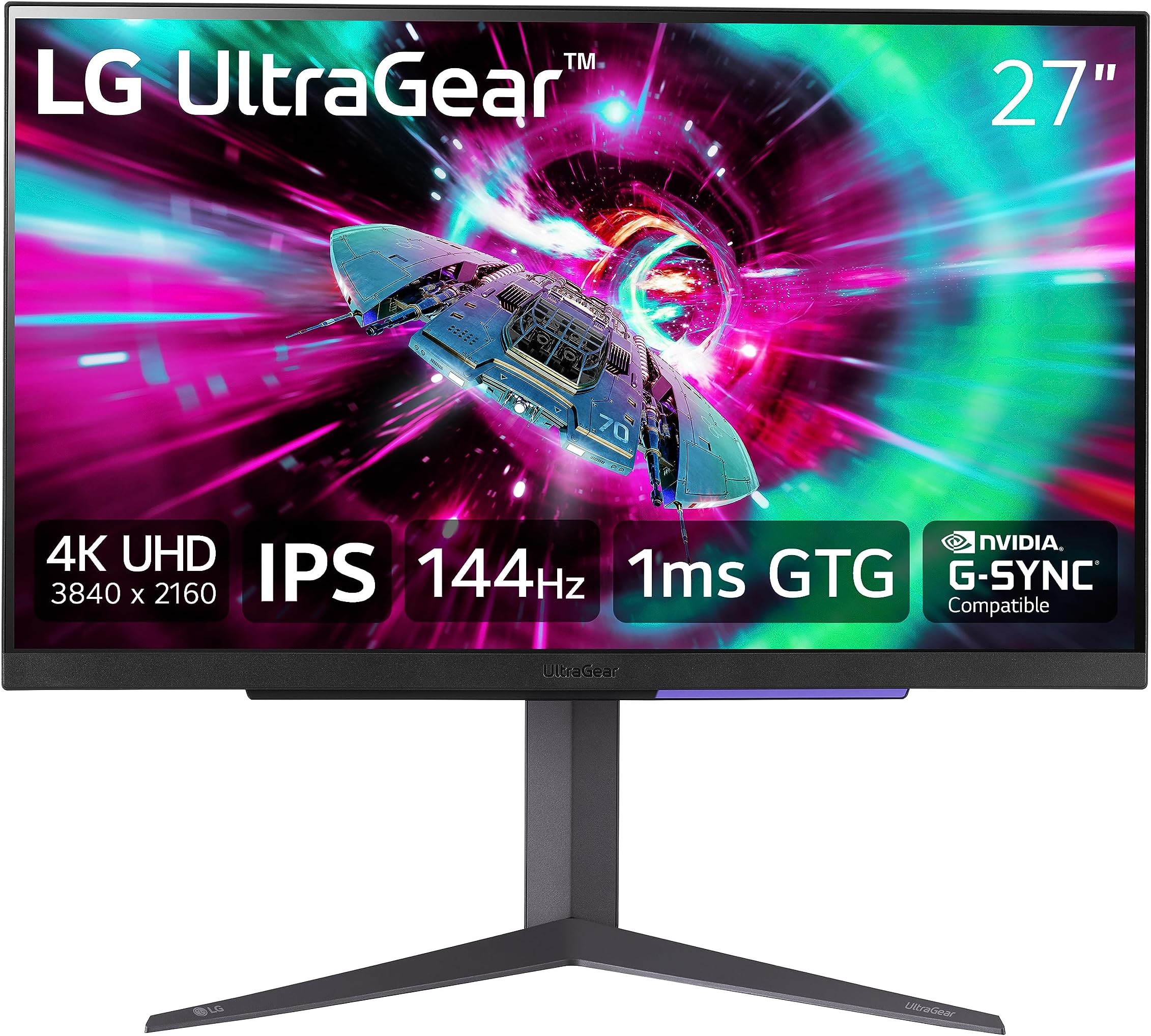


| ASIN | B0C63B9CZX |
| Adaptive Sync | FreeSync Premium |
| Additional Features | FreeSync Premium |
| Aspect Ratio | 16:9 |
| Best Sellers Rank | #121,324 in Electronics ( See Top 100 in Electronics ) #2,666 in Computer Monitors |
| Brand | LG |
| Brightness | 400 cd |
| Color | Black |
| Compatible Devices | Gaming Console |
| Connectivity Technology | HDMI |
| Contrast Ratio | 1000:1 |
| Customer Reviews | 3.1 out of 5 stars 528 Reviews |
| Display Resolution Maximum | 3840 x 2160 |
| Display Technology | LCD |
| Display Type | LCD |
| Hardware Connectivity | DisplayPort, HDMI |
| Image Contrast Ratio | 1000:1 |
| Item Dimensions D x W x H | 10"D x 24.2"W x 22.7"H |
| Item Weight | 14.1 pounds |
| Manufacturer | LG |
| Model Name | 27-inch UltraGear Gaming Monitor |
| Model Number | 27GR93U |
| Mounting Type | Wall Mount |
| Native Resolution | 3840x2160 |
| Number of Component Outputs | 2 |
| Picture Quality Enhancement Technology | Yes |
| Pixel Pitch | 0.16 |
| Power Consumption | 31 watts |
| Refresh Rate | 144 |
| Resolution | UHD |
| Response Time | 1 milliseconds |
| Screen Finish | Matte |
| Screen Size | 27 inches |
| Screen Surface Description | Matte |
| Specific Uses For Product | Gaming |
| Total Number of HDMI Ports | 2 |
| Total USB 3.0 Ports | 3 |
| Total Usb Ports | 3 |
| UPC | 195174053881 |
| Unit Count | 1 Count |
| Viewing Angle | 178 degrees |
| Warranty Description | 1 Year Parts & Labor |
| Warranty Type | 1 Year Manufacturer Warranty |
A**O
Great Monitor but LG Should Work On Their Packaging
My last monitor, the Dell 34 inch ultrawide U3415W, is still going strong. It is a great 1440p ultrawide with a 60hz refresh rate. I had been reading a lot about high refresh rate monitors for a couple of years but nothing in the 32 inch size was ever available without some sort of big compromise. That is, until this monitor came out. As per the Monitors Unboxed review on YouTube, this monitor has a single overdrive experience for the Variable Refresh Rate. What this means in plain English is that if you choose the "Fast" VRR mode for the display (which is the default out of the box), you will be a great experience whether you are gaming at 144, 90 or 60 fps without the need to change settings on a per game basis. For example, on my 7900xt with Ryzen 3700x, I can get 144fps on Forza Horizon 4, lock the frame rate at 90fps on Cyberpunk, or have around 45-50 frames on Starfield, and all games look great with no ghosting or other graphical artifacts. Colors on this monitor are great as is the brightness. While this monitor does not have true HDR capabilities such as a mini-led array of lights, the monitor is very bright at its out of the box setting of 40 out of 100. Dark scenes are nice an inky without any noticeable backlight blooming as can occur on other LCDs (such as my old U3415W which did have noticeable blooming around the edges of the screen). Colors are great as per the supported 10bit color panel and thanks to HDMI 2.1 can be enabled at the same time as a 144hz refresh rate unlike other monitors with HDMI 2.0 or below. For those with 60hz monitors thinking about upgrading to 144hz but still not sure if it is worth it, trust me when I say it totally is. While there was a big jump in clarity moving from 1440p to 4K, the jump from 60 to 144 trumped the resolution increase. This is because the faster refreshing screen eliminated a lot of the blur when items are in motion. This was particularly noticeable in Forza when trees on the size of the road where incredibly crisp and there was no smearing or blur on the leaves as you drove past them. This was also noticeable at the 90hz rate in Cyberpunk when looking through the windows in the Downtown area while driving around in your bike. In the battle of ray tracing vs. high refresh, I now understand why so many people advocate for refresh rate as the impact on image quality is amazing. Lastly, the only negative in my review, since I do love this monitor, is the packaging. When the monitor arrived, it was nicely packed but there was no peel of protection on the screen itself. The screen enclosure was enveloped in a foamy wrap but the screen itself did not have any sort of plastic covering as you see on TVs when you open them. It is for this reason that I believe a small scratch did exist on the screen which I only discovered after about 3-4 days when on a sunny Saturday morning the light from an open window on a powered down monitor revealed the flaw. As you can see from my two screenshots, you cannot see the scratch when the monitor is on (and believe, I have tried everything to catch it). So, since e-waste is bad, I won't be returning the monitor as I honestly cannot tell when using it. But, if you are the type of person who this would bother, make sure you use a small flashlight or similar to inspect the screen when you first get it. In closing, this is a great monitor worthy of 5 stars. The colors, brightness and 144hz screen all combine to make it a treat for the eyes and a great experience for gaming . I highly recommended it and believe that if you are coming from 1440p and 60hz, you will love it.
M**I
Two Defective Units in Five Months. Don't Ignore the Reviews
I'm writing this as a warning because I ignored the reviews and I'm paying for it now. Back in October 2025, I was coming off a Samsung 49" super ultrawide that I'd been using since 2020. Loved that monitor, but I needed to switch to a dual-monitor setup, so I started shopping for two 27" 4K displays. I do some gaming, so the 144Hz and G-SYNC on this thing looked great. Did a bunch of research, and this UltraGear kept coming up as a solid pick. At around $500 per monitor, I figured I was getting something decent. These aren't budget monitors. Here's the thing though. Before I bought them, I looked at the reviews. 3.4 stars. People talking about pixel problems, quality issues, all kinds of stuff. And I thought, "Eh, Amazon reviews can be weird sometimes. I'll take the chance." That was my mistake. If you're looking at a $500 monitor with a 3.4, just don't. There's a reason it's that low. The First Problem: Day One I bought two of these from a seller called "A Simple Deal" on Amazon. Set them both up, and right away one of them had a blemish trapped underneath the panel. Not on the screen. Under the glass. You can't wipe it off, you can't fix it. It was right in the middle of the screen. On top of that, there were two dead pixels near the top right. I've never seen anything like the blemish thing before on any monitor. And look, I know dead pixels happen, two isn't the end of the world, but combined with a blemish under the panel? On a $500 monitor? Come on. So now I haven't even used the thing yet and I'm already dealing with a return. I contact the seller and it becomes this whole thing. They tell me to go through the Amazon return process. I ship it back via UPS. Amazon generates a replacement order automatically, but then it gets canceled. I ask the seller what's going on, and they basically say they don't do replacements and I need to place a new order after the refund goes through. The problem is they were low on stock. I needed two matching monitors and they had maybe one or two left. So I had to buy another one separately and wait for the refund on the bad one. It worked out eventually, but it was way more hassle than it should have been. The best part? After they got the monitor back, they sent me a photo of it displaying a news website covered in images and said they didn't find any issues. I had to explain to them that they need to pull up a white screen so you can actually see the blemish. I sent them my own photos with everything circled. They did end up processing the refund, so I'll give them that. But the whole back-and-forth was annoying. I'm not going to completely trash the seller here. There's a lot of moving parts with Amazon, the fulfillment side, and the manufacturer. They gave me my money back in the end. But the real problem is LG's quality control. A blemish under the panel and dead pixels on arrival? That should never leave the factory. The Second Problem: A Few Months Later My new monitor setup works fine for about three months. Good image quality, no complaints. Then in January 2026, I'm sitting at my desk, look over at my left monitor, and there's a huge vertical green line going straight down the screen. Not subtle. A bright green line with sparkling, glitching pixels spreading out a few inches to the right of it. Looks like the panel is failing. Then it goes away after like 10 to 20 seconds. And I'm thinking, okay, maybe that was a one-time thing. It wasn't. It's happened about four times now, always the same monitor, always the same spot. Shows up for about 20 seconds and disappears. If you look through the other reviews on this listing, people are describing the exact same thing. Pixel lines, artifacts, panels failing within the first year. The Warranty Situation So I go to LG's website to file a warranty claim. This monitor is five months old. Their system says it's "deemed out of warranty." Turns out their warranty goes off the manufacture date, not when you actually bought it. So if the monitor sat in a warehouse for a while before I purchased it, that time counts against me. That's a terrible system. I hop on their chat support and it's the standard scripted experience. They tell me to try swapping the DisplayPort cables to rule out a cable issue. Fine. I swapped the cables between my two monitors to see if the problem followed the cable or stayed with the monitor. Same monitor, same problem. Still intermittent, still not happening all the time, but it came back. So it wasn't the cables. It's not my machine. It's literally that panel that has something wrong with it. So I chatted LG support again, referenced my previous ticket number, and the person told me they'd send me an email with a shipping label and instructions within 24 to 48 hours. I didn't get that email. They never sent me anything. Had to chat them again two days later and finally got someone to actually send me the label and instructions. I shipped the monitor out to LG on February 23rd. From that point on, I received zero communication from them. No emails, no updates, nothing. LG does have an online repair tracking system, but it's pretty terrible. It shows who's handling it but doesn't give you any actual status updates. No email notifications throughout the entire process. At one point the tracker said "ordering parts," and then it just said "completed." No details on what they found wrong, what they repaired, or what parts were replaced. On March 6th, I got an automated email from FedEx saying the completed repair unit was being shipped back. That FedEx notification was the only communication I received during the entire process. Not from LG, from FedEx. I got the monitor back on March 10th. So I was without it for about two and a half weeks. As for whether the repair actually fixed it, I can't say for sure. The green line issue was intermittent to begin with, showing up maybe four times over a couple of months. I'm not going to sit around testing a monitor I've already lost confidence in just to find out if LG actually fixed it. I've already moved on. Bottom Line I went ahead and bought two Dell S2725QS monitors to replace these. I need two matching monitors and I couldn't sit around waiting for LG to maybe fix one while the other could develop the same issues any day. The Dells have been fine so far and seem way more reliable out of the box. Two separate defects on two separate units in five months tells you everything you need to know about LG's quality control on these. If you're reading this and thinking about buying this monitor, learn from my mistake. The 3.3-star rating is there for a reason. The quality control problems people are reporting are real. There are better and more reliable 4K 27" monitors out there for the same price or less. Look elsewhere.
D**E
Perfect to max out Xbox Series X outputs on HDMI 2.1
Great high end for console gaming. Checks every box to game on Xbox series X at 4K, but underwhelming performance on PC based on FPS or hz abilities if you are playing competitive first person shooters. Great quality and functionality overall!
A**R
Ghosting in Black Desert and stuck pixel after 135 hours of use
First of all, I casually play Black Desert, which is a Korean MMORPG. In my previous ASUS 24 inch monitor at 1080p, I didn't have any issues with excessive black shadows on my main character. When calling the horse, there is ghosting and on this new LG monitor, there's ghosting as well. So this could be an issue with Black Desert. However, I never experienced any excessive black shadows on my old monitor when I play at ultra max settings. On the new LG monitor, there is a lot of ghosting at 4K ultra settings. It doesn't matter if it's at max or not. So I have to play it using REMASTERED mode with FXAA to get rid of most or all of the ghosting. I like TAA better, but there is still minor ghosting and shadows that aren't supposed to be there. FXAA does not look as great as TAA. So this could be another issue with Black Desert meaning that it was not optimized for 4K. Or I could be wrong and maybe there's an issue with this monitor or both. The other issue here is that after 135 hours of use, I experienced a stuck RED pixel as you see in the screenshots. This is my first LG monitor and I'm already disappointed. I have until February 1st to return it and I definitely will. LG is off my list. I will be fair to note that the stuck red pixel disappeared well within 24 hour since I noticed the issue as you can see on the last two screenshots for testing. However, for reviews stating that LG makes the best IPS panels, this proves the opposite. I might have to settle for a gaming LED, mini LED, or OLED TV which will cost more. But I definitely don't want to experience any ghosting in 4K for any games that I'm playing. Another issue is that GTA V does not recognize my resolution as 3840x2160p. I'll try changing settings here and there again, but this monitor is definitely going to be returned. For a monitor that costs $510 in total and still causes issues is a huge rip off. Also, I called LG customer service and the service rep named Rue didn't even get back to me. He left me hanging on the phone. So I decided to go through Amazon's return process when I told him to do it on my behalf. Life ain't good. Life's GARBAGE. ***UPDATE*** As of 12/22/24 around 10am, I noticed another stuck pixel. This time, it's towards the upper right side of the monitor and it's green. This is a huge let down. I thought about giving 3 stars to be fair. But now, it's down to 1 star.
B**E
Great specs on paper, but failed right after warranty
Purchased this monitor in November 2024 and it worked beautifully for about 14 months. The 4K resolution with 144Hz refresh rate was impressive while it lasted - games looked amazing and the colors were vivid. However, on January 7th, 2025, just weeks after the warranty expired, the monitor developed serious horizontal flickering lines across the bottom third of the screen. I did extensive troubleshooting to rule out any external issues - tried multiple cables (both HDMI and DisplayPort), tested with different computers (Mac and PC), and even tried different power outlets. The flickering persisted even on the monitor's built-in menu, confirming it's definitely a hardware failure. After reading other reviews, I'm noticing a concerning pattern of these monitors failing just outside the warranty period. I suspect LG might be pushing the hardware too hard trying to achieve both 4K and high refresh rates - it seems the components just can't handle it long-term. While $550 isn't the most expensive monitor out there, it's certainly not cheap, and any hardware at this price point should last significantly longer than 14 months. I've owned several LG monitors in the past and they've been reliable, but I cannot recommend this particular model. I'll be going back to 1440p monitors which seem to have better long-term reliability. Pros: Excellent picture quality when working Great color accuracy Smooth 144Hz refresh rate Cons: Failed just after warranty expired Horizontal flickering lines developed Poor longevity Multiple reports of similar failures Expensive for such short lifespan Save yourself the frustration and look elsewhere, or at least stick to 1440p if you want reliability.
E**S
First impressions (32 inch)
Great monitor right out of the box. I like it bright so I use the “game stetting 2.” I am a little worried reading the reviews about the monitor getting corrupted by issues. I’ve read reviews and Reddit pages outside of amazon and it seems the screen you get is like playing the lottery when you get a bad one. If I had to guess sometime last year LG sent out some bad batches. Hoping I got one of the newer ones but you never know which products you buy that have been lingering around a warehouse for months. Hoping I got one that lasts. As long as there are no uprising issues, I would rate this (from S-tier (best) to F tier (worst) as an A- or B+ based on specs, quality, and pricing. I played Hell Divers 2 on 4K ultra settings with a 3080ti getting about 80-90 fps and I was very happy with the way the monitor looked. Didn’t see any flickering ,dead pixels, or dim spots. Very enjoyable experience. If I had to criticize, I would like speakers and a remote! I would also like a function to have two different rgb colors going at the same time. (If you can do that someone please tell me how!) I think it would be cool to do a blue and red as a star wars theme to go with a starwars lightsaber back ground! Disclaimer: I have no opinions on the stand that comes with the monitor, I use an arm clamp on my desk to maximize space. Update: 4 months later- still great still 5 stars 😊 Update: 1 yr 3 mos. Still great no issues , 5 stars
Y**I
It has a fan
This monitor still has uniformity issues. Next to my 2015 and 2016 monitors that don't have this problem it's quite obvious. But not nearly as bad as other monitors I've bought recently and had to return. The screen is darker around the left and more noticeably right edges. Something I'm willing to live with since no one seems to make monitors that don't have this problem anymore. The biggest surprise was that this monitor has a fan. If you have open back headphones, you will hear it, quite loud, between songs. If you're sitting in silence, you'll hear it, even over the fans from your gaming PC and air purifier. I'd gladly have paid an extra $30 for them to stick a huge chunk of metal on the back as a heatsink and forgo the fan. As a monitor: It's good. Looks nice. For desktop usage I set it to 175% and everything looks good, and the same size as things do on my 24" UHD monitor that's at 200%. For gaming: I got 1st place in an online matchmaking session. I haven't decided if I'll return yet. There was nothing on the amazon page indicating that there is a fan. Edit: turns out mine was defective causing the fan to often run at full speed no matter what. Perhaps another sample would fix this.
O**S
Broke itself 2 days after warranty.
Bought this on November 24th, 2023. Writing this a year and two days later, on November 26th, 2024. Looked and worked great out of the box until this morning, when all of the sudden I booted up my PC to find a 3-inch wide section of the screen was covered in multicolored vertical lines. Did all the troubleshooting with no positive results and noticed the error was also present on the “no signal” screen so I contacted support. It’s an issue with the monitor. Mind you, this thing has been sat in the same spot on my desk since I set it up. The box was undamaged when it arrived, it was securely packaged, and I haven’t tossed it around or anything. This is a construction issue, likely some kind of faulty connection somewhere that just happened to give out at exactly the same time as the warranty. To her credit, the customer service agent I connected with was very helpful and understanding, and said she’d speak to her supervisor about this since it’s so close to the warranty. I’ll update this if I hear back on that end. Without the warranty, though, repair’ll be $350 (and assuming that’s not including shipping, it might as well be the full cost of a new monitor). *Absolutely the hell not*. At that price it’s cheaper and less hassle just to get another monitor so even if it breaks in a year like this piece of junk it won’t sting as much. Tl;dr: great monitor if you only need a monitor for exactly one year and/or love extortionate repair costs! lovely customer service but that doesn’t really fix the hardware issues. look elsewhere.
S**B
I loved it, until it died on me.
Ignoring the issues inherent with LCD and IPS, this was a perfect monitor. I really loved it. I enjoyed it for 8 months, and then it suddenly died. The screen got all messed up with some random lines and patches, the on-screen menu wouldn't even come up. I tried to set up warranty service through LG but there was no easy way to do it. They didn't support setting up service through their website, and just told me to use their service locator and take it to one of those locations. They were all independent repair shops, and the closest one on the list told me they don't even do LG repairs. The next closest one to me was about an hour away. Luckily that guy was very accommodating and even picked up and dropped off my monitor since he comes to the area regularly to do other work. He said the panel needed to be replaced. Now I have the monitor back, but who knows how long it will last this time, and I only have less than 4 months warranty remaining. I wouldn't buy another monitor from LG after this.
A**R
LG monitor
This item was a Christmas present and was faulty and had to be sent back and awaiting refund
N**A
Great monitor, terrible service, quality and reliability
The monitor was great, but have serious quality doubts. Got a red vertical pixel line within 1 and a half year of usage. Customer service refuses to provide service because warranty is only 1 year. Does not recommend this product!!
A**.
Finally a GOOD 4K IPS display
It seemed like every 4K IPS display before this had "something" wrong with it. The 32" LG Ultragear 32GR93U checks all the boxes. It's not that it offers any specific amazing feature, but that it's "good" at everything. It lists DCI-P3 95% but is actually around 97%. It has good response times. It has the full 48 Gbps HDMI 2.1 speed, so is able to output 4K 144 Hz without resorting to DSC. And it doesn't come with gimmicky bloat, so keeps the price down. Some people will complain this is not full HDR, but it isn't meant to be. This display produces pristine text, something full HDR can't do due to their abnormal sub-pixel layouts. Although this doesn't have the contrast of full HDR, it does still have the great color gamut. Best of all there's no worry about screen burn-in. If this is important to you, along with wanting good text, then this monitor is currently the best option available, and will be for some time to come.
T**S
Clear and Bright
I could always rely on LG brand displays with my laptop and previous TV. One of the best displays and highest quality. It's why I chose LG for this monitor. Great, sharp picture and the brightness is brilliant. HDR is very sharp. It's actually too bright with a white background on some of the pre-made settings; no problem, I can easily switch to reader mode to tune down the brightness. I use it mostly for gaming and it works well over 120 fps ( depends on game). I was surprised the audio headphone output is very high quality with my logitech headset + microphone, better than USB. The RGB color effect on the back is very smart looking also. If you are using the AMD/GSync option it only works with DP input. Definitely would recommend this monitor.
Trustpilot
3 weeks ago
2 months ago