Buy anything from 5,000+ international stores. One checkout price. No surprise fees. Join 2M+ shoppers on Desertcart.
Desertcart purchases this item on your behalf and handles shipping, customs, and support to Senegal.
🚀 Unbox, Print, Amaze — Your Mini 3D Studio Awaits!
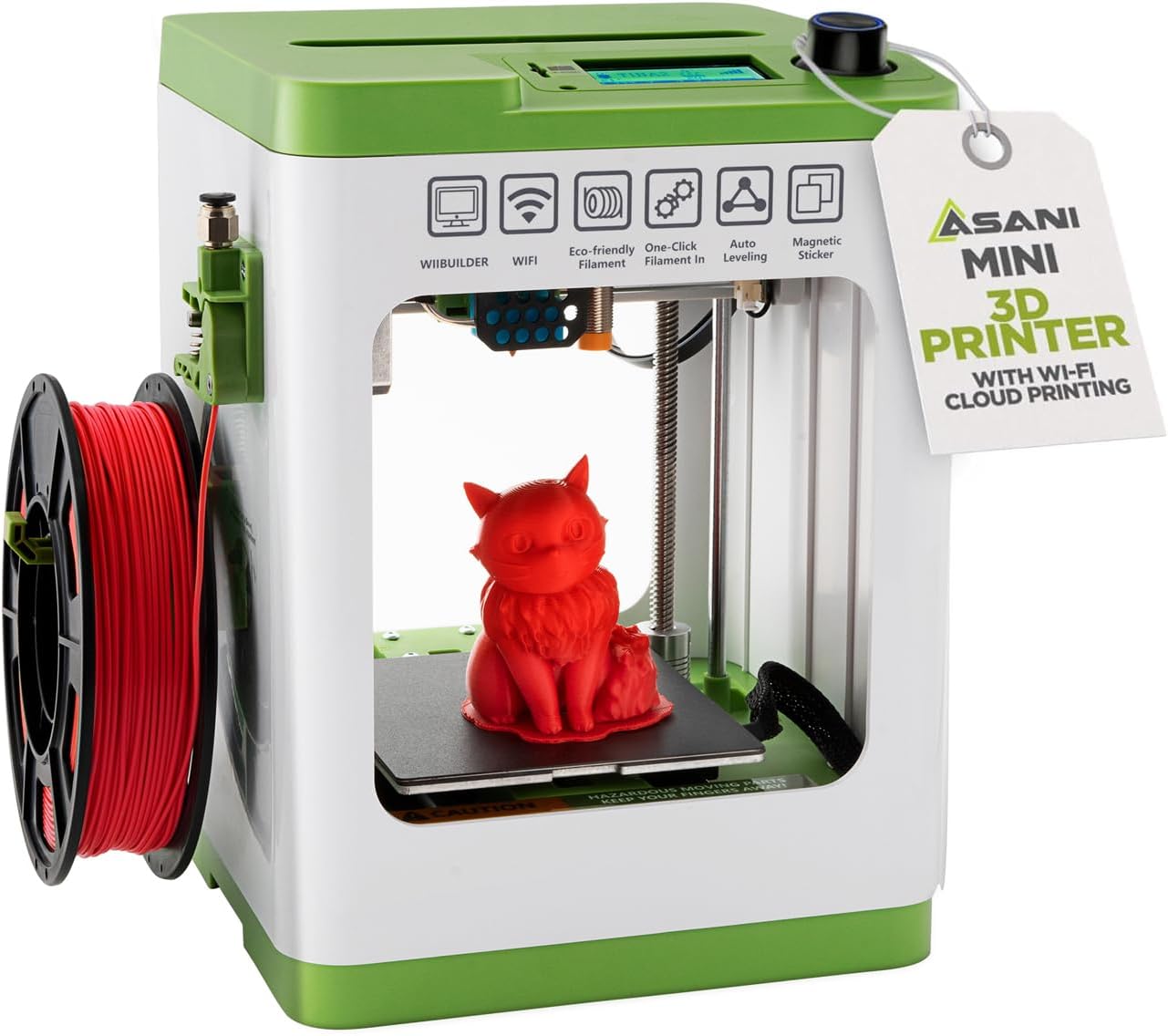
This fully assembled mini 3D printer starter kit is designed for kids and beginners, featuring a compact footprint (8.3”x8.3”x11.4”), auto-leveling with dual Z-axis for precision, and one-touch filament loading. It includes 10 meters of PLA filament, a microSD card preloaded with models and slicing software, and supports WiFi connectivity across MAC, Windows, and Linux platforms. Perfect for hassle-free, high-quality 3D printing at home or school.


| Best Sellers Rank | #29,440 in Industrial & Scientific ( See Top 100 in Industrial & Scientific ) #45 in 3D Printers |
| Brand | Asani |
| Color | Green |
| Compatible Devices | Laptop, Personal Computer, Smartphone |
| Customer Reviews | 4.1 out of 5 stars 444 Reviews |
| Item Weight | 6.4 Pounds |
| Material | Pla |
| Product Dimensions | 8.3"D x 8.3"W x 11.4"H |
P**S
Great 3D Printer for young people and beginners of any age!
I have been using 3D printers for well over ten years, and have worked with an evolving succession of models from four different companies. This technology is getting better and better. My grandchildren have grown up playing with (and loving!) a variety of toys I have made with the printers. When I saw this printer at Amazon, I thought of my 12 year old grandson, and that he is totally ready to start working with a printer of his own! After unboxing the device I set it up. Ha ha… Oh my goodness, there was virtually nothing to do beyond removing various packaging and transit tape pieces. Really, just hook up the filament feeder tube! I thought that before I deliver the machine to my grandson, I should try it out to make sure it was easy to use. It is great! I inserted the micro-sd card into the slot at the top of the machine, and away I went> * I printed one of the designs from the card (the rabbit). The quality was fantastic! So smooth! * I then set up the printer on the network using the combination of steps outlined: Loaded the app on my Android phone. Connected with Bluetooth. Configured the printer on my WIFI network. Then I chose a design from an online collection using the app, and directed it to “slice” the design and print it. The resulting print was flawless! (For anyone reading this who has not ever used a 3D printer, design files are normally in a format with a file extension of “stl”. These files can be adapted to print on a given brand/model of printer by “slicing” the file into printable layers as “gcode” files. Those files contain all the detailed layer by layer “instructions” for the specific printer. This may sound complicated, but the beauty is that to use this printer, you really do not deal with the underlying mechanics of it! You just select a design, and the app+printer does the rest! * Then I selected a design from the well known “thingiverse” web site and downloaded the corresponding “STL” file. This printer comes with two optional “slicer” applications (with versions for both Windows and Mac) on the included micro-sd card. I loaded the MS-Windows version of the “Wiibuilder” application on my computer and loaded the selected design into that app. I then transferred the gcode file to the micro-sd card, and reinserted that card in the printer. Again, perfect results! Some details about the printer: *It has a self-leveling bed which makes it very simple for beginners! (one bit of awkwardness for other 3D printers is the need to periodically manually “level” the print surface. *The print surface is a thin magnetic plate that sits inside the printer on the platform that moves back and forth as it prints. These magnetic plates have become more common on printers. Once the print has completed, you lift the magnetic plate off the platform. By gently flexing the plate, the edges of the final print begin to separate from the plate, and you can remove the print. By default this printer creates a thin pad under each print. (this helps deal with another potential difficult aspects of 3D printing.) it is then easy to peel that away from the print, and you are done! (As with any 3D printer, occasionally a few lines of the plastic printing material is left on the bed. These can be removed with a small metal putty knife of the sort used for patching plaster on walls. * This printer uses small spools of filament. When you shop for additional spools, (and additional colors!) be sure to AVOID the typical 1kg spools. There are a variety of vendors who have 250g spools of 1.75mm PLA filament which will work with this machine. Be sure to check the spool diameter… 12cm – 13.5cm diameters work for this machine. Although the smaller than standard spools may seem annoying, actually it is a blessing. It is nice to print in a variety of colors. I probably have 15 large spools that I use with my other 3D printers. The spools do degrade over time, so the smaller spools used on this printer help keep the printing material fresh! Summary: This is the perfect machine for beginners. The print-bed is smaller than typical machines, but that is absolutely fine for beginners! Everything is simple to use and almost every step is painless. Highly recommended as a first 3D printer! My oldest grandson will love it! And soon I will probably be buying a couple more for my younger grandchildren!
N**A
neat little beginner 3d printer for someone getting started - even youngsters
This mini 3D printer has been a good getting started 3d printer. I've been using a more robust printer for some time but the appeal of a smaller footprint along with something I can share with my nieces & nephews as well as the neighborhood kids was appealing. The compact size is really convenient, and it came with everything needed to get started, including the MicroSD card with USB reader, filament, replacement nozzle, bed plate, and glue stick. I also like that it doesn’t require Wi‑Fi, which makes setup simpler and more straightforward. Overall, it’s been easy to use and a nice option for kids or first-time users.
R**S
Save yourself hours of frustration and buy a REAL 3d printer.
I own two Elegoo Neptune Pro printers and am reasonably experienced with the 3D printing process and what to expect from a printer as far as usability, reliability and quality. The Tina2s does not exhibit any of the three qualities. Once you venture beyond using the smartphone app to download premade models from the Poloprint cloud you'll be in the deep end of the pool. I spent the better part of a week trying to get the little printer to do anything useful. Right off the bat don't use the roll of white filament that comes with it. Whatever you print will stick to the build plate so solidly that it will be almost impossible to remove without damaging the surface. I used it with the Poloprint android app and the included Cura slicer and Wiibuilder slicers and found that if I worked at it I could print a usable model less than half the time. The amount of 'stringing' left on the objects is copious to say the least. The Tina2 and Tina2s user groups are full of posts looking for help at overcoming numerous types of print failures and getting little in the way of solutions. The adhesion on the included build plate is poor and not even close to the what you'd expect from any other pei coated print bed. It's necessary to clean the plate every time and use the included glue stick on the area where the model is going to print and even then the adhesion is uneven and parts of the first layer will often peel off. The biggest issue with anything you print will be the stringing - spider web filaments running all across parts of the model. I found that there is no combination of retraction settings in the slicers that will make any difference on the amount of stringing and this is backed up by many Tina2 group posts. I believe this is because of a major design flaw with the way the filament extruder is constructed. There is a tube running from the extruder unit over the top of the printer and down into nozzle which makes it very difficult for the filament to be retracted quickly enough to keep the hot filament from continuing to be pushed out between nozzle moves. This leaves trails of fine pieces of filament string everywhere. These things are just the tip of the iceberg. I would have given the Tina2s a zero out of five if I could've.
I**M
It's so easy and works well!!
I had a project, and the easiest way was to do 3D printing for it. I've wanted a 3D printer since early Maker Bot days but never had the funds or enough reason to get one. So, after searching a while I found these. This model was actually one of the highest rated printers on all of Amazon. The build size is slightly limiting for the long haul, but sufficient for a while: 100mm height x 120m x 100mm. Once I received and unpacked mine the process was mind bendingly simple; just take off the tape, a stopper, a sticker, plug the tube in, put the filament roll on and put the end in the clampy feeder, insert the SD card, connect the power, pushed the reset button after selecting a language so I didn't even setup WIFI, selected load filament, picked a print from the SD card (called TF in the menus) and a while later I had my very own Benchy! I included pictures of the Benchy which was done straight out of the box without changing any settings. To me it's quite good considering. For reference I had broken Benchy during a stress test for my design is why the chimney is being used as a prop and there is a crack to one side of the front. I also made a design for the project I partly purchased the printer for at TinkerCAD which was MUCH easier than what I had expected to have to do. I'm aware there are more complex options available, but I'm still new and it was surprisingly capable. The model I made was created with .1mm precision in TinkerCAD, sliced and saved to the included SD card with the WiiBuilder program included on the SD card (super easy, just a couple clicks) and then printed directly from the SD card in the printer (so simple and easy). The print wasn't perfect, but I did .1mm building and the printer does .2mm printing so there were bound to be issues. I still successfully used the first print of my design, it's a CPU cooler adapter for a mini pc and I included a picture of it in action. I'm printing a fan cover for the cooler currently and I'll include a picture or two of it when it's complete. Also, a lot was included in the package, even a glue stick which a VERY HIGHLY RECOMMEND USING with all prints. They say it help things stick, but it keeps things from sticking too well which helps when removing the little pads under each model. Also, the glue is easily cleanable (I use chemical alcohol), I still have some stuff stuck on the printer bed from the first print without the glue, but nothing left stuck from prints with the glue. Someday I'll use the WIFI or USB, but for now I'm just keeping it simple and quick. The only issue I've encountered so far is amazon sellers started sales less than a week after my purchase... Update: It finished printing the fan cover and I added some pics. It's kind of sloppy looking inside, but it's not really the printer's fault. The plastic was flexy near the top until the ends were connected.
I**N
Amazing Starter 3D Printer for Beginners
As a first-time 3D printer owner, I couldn’t be happier with this purchase. Everything you need is included in the box, and the printer comes fully assembled, which made setup incredibly easy. I was printing my first model within minutes of opening the package. The auto-leveling works perfectly, filament loading is simple with one-touch buttons, and the print quality is surprisingly good for such a compact machine. It’s quiet, lightweight, and doesn’t take up much space — perfect for home use or kids learning 3D printing. This is truly a beginner-friendly, stress-free printer that delivers great results. Highly recommend it for anyone new to 3D printing!
K**K
So fun!
My hubby has wanted a 3D printer forever so we settled on this model and it has been such a fun experience, especially with my kids. Right out of the box, it was really easy to set up. The instructions were clear, and I didn’t feel overwhelmed like I thought I might. The printer connected to my computer and Wi-Fi without any issues, and I was up and printing in no time. It is very user-friendly. The screen interface is simple to navigate, and there are lots of preset designs you can print, which made it easy to start printing fun little toys and gadgets right away. My kids especially love checking on the printer as they watch their selections come to life. The print quality is pretty solid for a mini printer. We’ve printed small action figures, keychains, and some fun accessories, and they’ve all turned out great. The printer isn’t too loud, and it doesn’t take up much space, so it’s perfect for our table downstairs. My hubby just got a bunch of new colors to print with. For the price this really exceeded my expectations. Clean up is easy and we can’t wait to learn how to create new things! Highly recommend!!! Overall, this has been a great purchase. It’s simple, reliable, and perfect for beginners or families wanting to get into 3D printing without a steep learning curve. Would definitely recommend it for anyone looking for a fun, easy way to get started with 3D printing!
E**E
Fantastic kit for first-timers. Great way to dip your toe into the 3D print world. Start simple.
I think this is a fantastic 3D print kit for beginners. I've been thinking about getting something like this for a while and decided to grab this Tina2S based on a recommendation and after reading the positive reviews of other first-timers. Everything was well packaged, and a few key pieces were secured by tape and foam for shipment. The instructions were detailed with clear steps on what to remove and how to set it up. Just be sure to follow the written instructions, and don’t forget to look at the photos, too, because there are specific cues (like action arrows and shapes of parts). Thinking back - following the printed quick start guide was an excellent way to dip my toe into 3D printing. There are a few different files pre-loaded onto a microSD card so that you can start seeing the machine in action right away. How cool. I picked the "hand" model out of curiosity. The 3D printing process itself is mesmerizing. I couldn't help but just stare at it a lot while it was going. The light stays on the whole time and it's not too loud. I liked how you can see the time on the screen and the completion percentage bar. The finished hand... was certainly a surprise. Posted photos so people can see what it looks like completed. Print came out great but the hand template probably would not have been my first choice if I had known what it looked like beforehand. Still, it was fun to take a gamble! I think the 3D printing world is just so incredibly vast. You can really go as deep as you want to depending on your interest, time, budget, etc. For a casual person starting out like me - this kit is a great way to get started.
A**N
Perfect Starter Kit for 3D Printing Newbies!
Recently, I made a choice to start learning about 3D printing and found this complete starter kit. It has really changed everything for me! I know it will be very good when I take printer out of the box, already put together. Small size is perfect for my little apartment and fits just right on desk without using too much room. Setting up was very easy because of the auto-leveling feature. I am not very good with technology, but the simple design made it super straightforward for me. The 2.4” LCD screen is easy to understand, and the flexible magnetic build plate makes taking off prints very simple. I have been using the model designs that come already installed on the microSD card, and what I made looks really good. One of the best things is the one-touch filament loading. Changing between PLA and TPU filaments is fast and easy to do. The printer has dual z-axis rail that make sure every print is done with very high precision. This is really important for the detailed small models I am making. A special memory was making a custom keychain for my sister's birthday. She really loves unique and personal gifts, and her face when she saw it made me so happy. This 3D printer has brought a whole new level of creativity for me, and the Active Pause & Resume Print features make it even more useful, especially when I must leave for some time. The open-source printing feature is a plus, letting me try out different slicing software. If you are new like me or want to teach kids about 3D printing, this starter kit includes all the essentials. It's been a very good investment, and I feel excited to see what other things I can make!
Trustpilot
3 weeks ago
2 months ago