


⚡ Power your build with premium speed and control — don’t get left behind!
The ASUS PRIME Z270M-PLUS is a high-performance Micro ATX motherboard featuring Intel’s flagship Z270 chipset. It offers dual USB 3.1 Gen 2 ports for ultra-fast data transfer, physical overclocking switches for easy CPU and RAM tuning, and advanced cooling controls via ASUS Fan Xpert 4. With support for dual NVMe M.2 drives, SLI/CrossFire multi-GPU setups, and customizable Aura RGB lighting, it’s a versatile choice for professionals and enthusiasts seeking reliable power and style in a compact form factor.
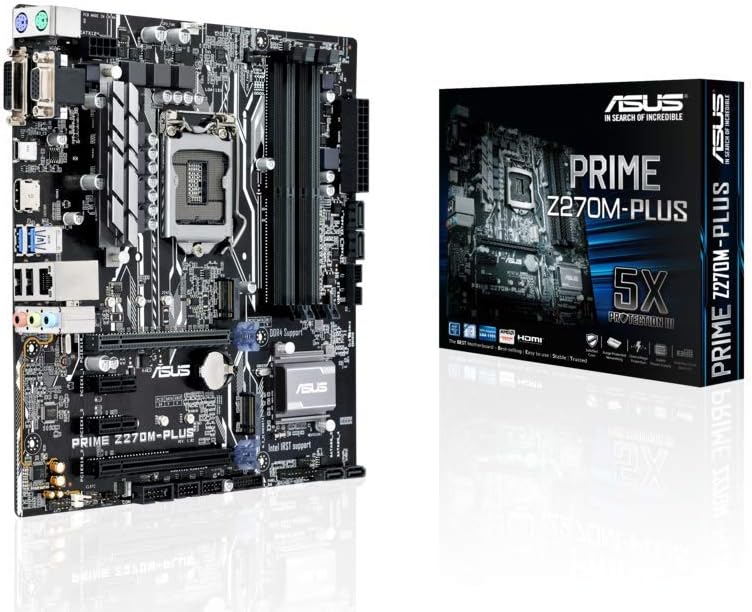


| ASIN | B01MRZXM5J |
| Available Memory Slots | 2 |
| Best Sellers Rank | 183,271 in Computers & Accessories ( See Top 100 in Computers & Accessories ) 1,757 in Motherboards |
| Brand | ASUS |
| Brand Name | ASUS |
| CPU Model | Core i3 |
| CPU socket | LGA 1151 |
| Chipset Family | Intel |
| Chipset Type | Intel Z270 |
| Chipset type | Intel Z270 |
| Compatible Devices | Personal Computer |
| Compatible Processors | Intel Celeron, Intel Pentium |
| Compatible devices | Personal Computer |
| Compatible processors | Intel Celeron , Intel Pentium |
| Customer Reviews | 4.4 out of 5 stars 1,727 Reviews |
| Global Trade Identification Number | 04712900574227 |
| Graphics Card Interface | Integrated |
| Item Weight | 0.9 Kilograms |
| Main Power Connector Type | 24-Pin |
| Manufacturer | Asus |
| Manufacturer Part Number | B990M80 |
| Memory Clock Speed | 3866 MHz |
| Memory Storage Capacity | 64 GB |
| Model Name | Prime Z270M-Plus |
| Model Number | B990M80 |
| Number of Ethernet Ports | 1 |
| Number of Ports | 14 |
| Platform | Not Machine Specific |
| Processor Socket | LGA 1151 |
| Product Warranty | Manufacturer warranty for 3 years |
| RAM Memory Technology | DDR4 |
| RAM memory technology | DDR4 |
| Ram Memory Maximum Size | 6 GB |
| System Bus Standard Supported | SATA 3 |
| Total HDMI Port | 1 |
| Total PCIe Ports | 1 |
| Total SATA Ports | 6 |
| Total USB Ports | 4 |
| USB 2.0 | 2 |
| Unit Count | 1.0 count |
A**.
Fantastic motherboard! Another great ASUS product!
Fantastic board yet again from ASUS! This board feels premium high-end, and in relation to the entire range of Intel 1151 (Skylake and Kaby Lake) chipsets and boards available it certainly is high end, considering it's based on the mainstream flagship Z270 chipset. However, this board is really only mid-range in the ASUS line up, with the ROG boards considered their top tier, yet the Prime Z270-A is still an excellent board for the price point. It has all the essential features these days, such as SLI/CrossFire support, two NVMe M.2 in 4x PCIE mode, of which one is backwards compatible with SATA mode, and support for the higher echelons of DDR4 fequencies out there depending on how good your CPUs memory controller is. The board also has a few little touches in particular that I really liked, which I wouldn't have expected to find on this board , considering it's not a Strix or ROG product: -- Firstly, both Type-C and Type-A USB 3.1 Gen 2 10Gbit/s ports on the back panel. Some boards advertise USB 3.1 capability, but are actually referring to USB 3.1 Gen 1 which tops out at 5Gbit/s like USB 3.0 does. This board offers Gen 2 at 10Gbit/s. -- Secondly, there are physical switches on the board for enabling CPU over-voltage, and RAM XMP. These switches must be set to the 'on' position for the relevant settings to be selectable in the UEFI. There is also the 'MemOK" function, which is very useful for compatibility with certain RAM modules. -- Finally, the board has Aura RGB support built-in which is nice, even though I'm not on the RGB train yet. I know, I'm missing out on crucial FPS without it, but I'll survive! The system I built with this board was a breeze to get up and running, and the legendary ASUS UEFI BIOS had a lot to do with that! I got my 7700K clocked to 5.2Ghz at around 1.355v, with my RAM running at 3200Mhz fully stable over a 48 hour stress test. It was so easy with this board! I could have pushed the CPU even further, as it still has some headroom. I think 5.2Ghz is perfectly fine for now though, that's a crazy clock speed, and more than I expected. An all round excellent board at an excellent price. It does lack some of the bells and whistles that ROG boards offer, but if you can live without those, then you won't regret your purchase!
S**R
Fantastic motherboard as per usual
I have always been a fan of ASUS motherboard since getting my first one in 1998. But this is my first foray into UEFI. The layout of the UEFI seems alien to me compared to the legacy BIOS, but it is easy enough to navigate through. There are section for RAM, CPU, fan controller and Boot sequence. As of performance, it is good so far, though not a real heavy gamer, my main reason for getting this motherboard is the CPU and my work type, which is video rendering and other types of creative works that need a good solid motherboard
T**N
Excellent supplier
This is a review of the motherboard. The seller is: Green recycling. Regarding the seller: Excellent service! I was checked by them to make sure I knew what I was doing which is a good thing to do. I have seen some “interesting” reviews on Amazon from people who seem to be a bit inept! The packaging was excellent and the delivery took eleven days. Of course Amazon wanted a review almost before it was delivered which is just not going to happen. I took a while to get the equipment together. Here is the list of new equipment Motherboard: ASUS LGA 1151 MAXIMUS IX HERO CPU: Intel Core i7-7700K 4.2 GHz QuadCore 8 MB Cache CPU CPU cooler: Thermalright Peerless Assassin 120 SE CPU Air Cooler Memory: Corsair VENGEANCE LPX DDR4 RAM 16GB (2x8GB) Power supply: Corsair RM750e modular Graphics card: MSI RADEON RX 590 ARMOR 8G OC System drive: Samsung MZ-V6E500BW 960 EVO M.2-2280 500GB I was repurposing a case that I had used to build a computer for my son. I also had a HDD and a SSD. Building it was a rather slow procedure with the necessity of removing part of the HDD rack to allow for the large modern graphics card. It could be said that the space was a bit cramped! I got it all together and tested it with a small monitor. All was well. Then I did some cable management and the computer refused to POST. This turned out to be the power plugs in the power supply which had fallen out! These are suposedly clipped in. I seems that the clips had not clipped. Anyway this was not the first place I looked, so it turned out to be an ID ten t error (Id10t). Does it run Windows 11? I do not know and care even less! I am running Linux Mint and all is well. This is the second computer I have built with one of these motherboards. It is my backup if the first one decides to fail. The original is a triple boot: Linux Mint, Arch Linux, and LMDE. It is used for video editing and processing. It had a new motherboard. This one is of course secondhand. If problems develop I will modify this review.
M**L
A great choice
I don't know what people are saying about being a pain to do a BIOS update or having problems with an i7 7700K out of the box? I wrote to Asus and asked whether it does come supporting the mentioned chip out of the box regardless of bios version and they confirmed that it did. So I bought it and I'm glad I did. It's a great board and love the RGB lighting too. As for updating the BIOS - I've never done that to a motherboard before in my life but I went into Asus site, downloaded it to USB and updated it no problem. Quick, simple, first time. So this has been a great no hassle buy and build for me and I'm sure it will be for you too.
S**N
A great motherboard. It installed really easily in my microATX ...
A great motherboard. It installed really easily in my microATX case and I have had some great performance with it. The BIOS is a bit crowded and is the reason why Asus lose a point. Once you get used to it, it's fine, but there are a bit too many options I think. Some people wish to overclock and others don't, so I think the non-overclockers (that's me) shouldn't have to see the myriad of CPU and memory adjustments that can be made. That said, most of the options in the BIOS can be ignored so you can focus on the options that count. I installed Windows 7 64-bit and it works perfectly with this motherboard (note: Skylake CPU is required if you want to use Windows 7, Kaby Lake CPU will not work). I enabled the Compatibility Support Module, enabled XHCI hand-off and Legacy USB mode, ensured Secure Boot was disabled and used Asus' EZ Installer (included with the board) to create a bootable USB stick preloaded with Wndows 7 and appropriate USB3 drivers. Windows 7 runs great. The front page of the BIOS has a really easy one-click performance button. You can set it to "standard" (which sets all the clocks to default speeds), "optimised" (which gives everything a small overclock") or "power saving" (which maximises the power saving features of the board at the expense of performance). I typically don't overclock, I usually run everything at stock speeds. But for this board, I chose the "optimised" setting and the performance boost is quite nice and was really easy to do. You just have to remember to save BIOS settings and restart after changing the performance setting in order for the changes to take effect (this is not made clear in the BIOS). The BIOS includes Asus QFan which has made fan control really easy. With my old board, I had to use a resistance cable to reduce fan speed but with QFan, I just draw a graph showing where the speeds should rise and fall depending on temperature. It's really easy and it's great to have this feature in the BIOS. The manual includes descriptions of all the BIOS features. This is great but it would have been better if the manual stated the recommended settings for various scenarios. For example, "Enable XHCI handoff if you use Windows 7" or "Secure boot requires Windows 10". Overall, a really good board with good performance and some nice BIOS features.
P**D
I'm sure this is a great motherboard, but beware if you are fitting an ...
I'm sure this is a great motherboard, but beware if you are fitting an i7-7700K chip. Despite the website stating that their MOBO is ready for the i7, the BIOS are in fact out of date, it comes shipped with 0505 BIOS - to work with the i7 you need 0604 BIOS. If it is a new build, like mine then you are up the creek without a paddle because you cannot update the BIOS because it will not boot up. Then of course ASUS product service gives a 48 hour response time, if you try to call them, they redirect you to the website and then hang up on you. Thanks ASUS!
T**)
Fantastic motherboard, and best looking
I have been after motherboard like this for years since the p67 sabertooth but they have been out of my price range till now. The Z270 mk1 is a fantastic mobo the aisuite 3 software is the clear winner for thermal management though not at the moment thanks to Microsoft metldown/spectre patch. I have my fans set in the UFEI Bios instead waiting for Asus and Microsoft to fix the issue with the latest patch. The 40mm fan (bought separately) really makes a difference for the VRM. If thermals and stability are what you are looking for then TUF series mobos are worth the purchase.
C**S
Great value for money that doesn't skimp on the important features, performance or reliability.
Just thought I'd add my two cents here. This is my first built PC in a long time, having more or less being on the Mac side of things for the last 15 years or so. However, I want to get in to VR gaming, so I got this. Really impressed with the board and I'm running Hackintosh 10.12.6 Sierra on it with everything working perfectly. Teamed it with a 960 Pro NVME SSD and I'm over the moon - been running with no problems for several months. Recommend this highly especially at the price! My first ASUS product, but not the last...
F**Z
Imprescindible para gaming con Kaby Lake
La ASUS STRIX Z270G GAMING es una Placa base mATX LGA 1151 compatible con la última generación de procesadores Kaby Lake de Intel. Exprime al máximo el rendimiento de estos empleando DDR4 en dual channel, 4000mhz máximo overclokeados a traves de su interfaz de BIOS, que es muy sencilla. Dispone de todas las características de las plazas ATX grandes aunque con menos zócalos PCI-E, pero si no es problema para ti tienes placa base de altas prestaciones para mucho tiempo. A destacar el sistema de sonido espectacular SupremeFX y la iluminación RGB Aura que queda genial en las cajas nuevas. Por otra parte, no es una placa exclusivamente para gaming. En mi caso particular, he montado con ella un NAS de alto rendimiento con el que poder jugar, pero en reposo se puede activar su genial sistema de ahorro de energia pasando de 680W a solo 52W. Transcodifica perfectamente 4K60p empleando Plex por red a una television y también en remoto. La caja viene muy completa con un kit de instalación del procesador, la placa trasera, un par de cables SATA de alto rendimiento, el cable SLI HB + el puente SLI para tarjetas gráficas, un kit de tornillos para montar los discos M.2 (imprescindibles) y otras cosas adicionales como distintivos y pegatinas de ROG. Asus no solo sigue manteniendo sus cotas altísimas de calidad de materiales, sino que además se va superando en rendimiento. Un muy buen producto con una calidad/precio insuperable. PD: el PCB en color negro tiene un acabado increible.
A**R
Had a few hick ups but good board in the end
Had a few hick ups but good board in the end. Would of given it a 5 star but had to play around in bios a bit to much and updating drivers was a bit iffy.
F**T
Hochwertiges Mainboard für Gaming Enthusiasten
Um für die nächsten Jahre bestmöglich gerüstet zu sein, habe ich mein bisheriges älteres Gaming Mainboard gegen das aus der ROG Serie stammende ASUS Maximus IX Formula ausgetauscht. Der Lieferumfang ist ordentlich, was man in dieser Preisklasse auch erwarten kann. Neben den üblichen SATA Anschlusskabeln wird eine Dualband-WLAN-Antenne, SLI HB Bridge Verbindung, M.2 Halterung mit Schraubenset, relativ viele verschiedene ROG Aufkleber, Verlängerungskabel für RGB-Leiste, Treiber-DVD sowie ein gedrucktes Handbuch mitgeliefert, welches allerdings nur in englischer Sprache ist. Ein deutschsprachiges Handbuch (Motherboard-Installationshilfe) ist auf der Treiber-DVD enthalten, aber dieses hat den Stand Dezember 2012. Hier hat ASUS leider geschlampt. Eine aktuelle deutschsprachige Version des Handbuchs mit 114 Seiten kann man sich im PDF Format aber bei ASUS runterladen. Das Mainboard ist solide und stabil verarbeitet. Auf der Rückseite befindet sich eine Back Plate aus Stahl und auch große Teile der Vorderseite sind durch ABS Abdeckungen geschützt. In dieser Kombination und mit den verstärkten PCIe „SafeSlots“ können auch sehr schwere Grafikkarten eingebaut werden, ohne dass sich das Mainboard durchbiegt. Die gesamte Material- und Verarbeitungsqualität des Mainboards wirken sehr hochwertig. Aktuell besteht mein gaming rig neben dem neuen ASUS Mainboard aus folgenden Komponenten: - Nanoxia Deep Silence 3 Gehäuse - Intel Core i5-6600K 4x 3.50GHz So.1151 CPU - 16GB (2x 8192MB) G.Skill RipJaws V rot DDR4-2400 DIMM - Gainward GTX 1070 Phoenix Golden Sample - 256GB Samsung SM951-NVMe M.2 2280 PCIe 3.0 x4 32Gb/s MLC SSD - 480GB OCZ Trion 150 SSD - 550 Watt Thermaltake London Modular 80+ Gold Netzteil - EKL Alpenföhn Brocken 2 Kühler Das neue Mainboard soll dabei als Grundlage dienen, in nächster Zeit auf eine Wasserkühlung in Verbindung mit einer GTX 1080i umzurüsten. Alle Komponenten konnten zügig montiert werden und das Board funktioniert auch unter Last zuverlässig und problemlos. Als System Laufwerk habe ich eine SM951-NVMe M.2 SSD eingerichtet, welche dank der 32 Gb/s Anbindung extrem schnell startet. Das ist schon ein spürbarer Unterschied zu einer herkömmlichen SSD (von einer HDD will ich erst gar nicht sprechen). Das UEFI ist gelungen und es bietet sehr umfangreiche OC Einstellmöglichkeiten, um das letzte aus seinen Komponenten raus zu holen. Das macht schon richtig Spaß. Alternativ kann man mehrere Einstellungen auch in der mitgelieferten Al Suite 3 Software vornehmen. ASUS nennt das „5-Wege-Optimierung: Systemweites Übertakten per Mausklick“, wobei ich persönlich ein Overclocking im Bios / UEFI eindeutig bevorzuge. An Anschlüssen hat das Board mehr als ich brauche, inklusive 6x USB 3.0 sowie jeweils 1x USB 3.1 vom Typ-A und Typ-C. Laut Hersteller wurde ein neuer SupremeFX-S1220 Audio Codec eingebaut, welcher durch einen ESS Saber Hi-Fi ES9023P Digital-Analog-Wandler sowie einen Texas Instruments RC4850 OP-Verstärker unterstützt wird. Um das Klangpotential wirklich ausschöpfen zu können, braucht man aber einen qualitativ guten Kopfhörer. Ich selber nutze ein XIBERIA T19 Gaming Headset. Bei einfachen Kopfhörern hört man nicht wirklich Unterschiede im Vergleich zu einem Standard Audio Codec. Durch die Aura Beleuchtungssteuerung kann man mehrere Lichteffekte einstellen, was nett anzusehen ist, aber für mich eher zweitrangig ist. Das ist ja bekanntlich Geschmackssache. Für mich persönlich waren die Anschlussmöglichkeiten und Überwachungsmöglichkeiten für eine Wasserkühlung wichtig und in dieser Hinsicht ist das Board sehr gut ausgestattet. Die für die Mainboard Kühlung zuständigen CrossChill EK II Kupfer Kühlkörper können optional in die Wasserkühlung eingebunden werden. Zusätzlich gibt es Anschlüsse und Sensoren, um die Wasser Durchflussmenge sowie die Wasser Eingangs- und Ausgangstemperatur zu überwachen. Weiterhin möchte ich die eingebaute WLAN Funktionalität erwähnen, welche ich zumindest bei keinem meiner vorherigen Boards hatte. Unterstützt wird 802.11ac WLAN im Dualband mit 2.4/5GHz und MU-MIMO Technologie. Rein theoretisch lassen sich dabei Übertragungsraten bis zu 867Mbit/s realisieren, wobei ich selber nur in diese Richtung gekommen bin, wenn der Rechner direkt neben dem WLAN Router stand. Ein Stockwerk tiefer kam ich noch bis zu 585Mbit/s. Aus meiner Sicht handelt es sich bei dem ASUS Maximus IX Formula um ein sehr gutes und solides Mainboard mit überdurchschnittlicher Leistung. Bisher bin ich mit dem Mainboard zufrieden und ich fühle mich für die nächste Zeit gut gerüstet. Wer keine WLAN Funktion und keinen mit Wasser kühlbaren CrossChill EK II Kühlkörper benötigt, sollte sich alternativ das Asus ROG MAXIMUS IX HERO näher anschauen, da dieses über ähnliche Eigenschaften und Leistungsdaten verfügt, mit Ausnahme der oben erwähnten Funktionen.
G**L
Formidable
Produit reconditionne . bundle mode d'emploi OK ,,,, sait tout rien d'autre . pour les performance sait le jour et la nuit comparé a mon asus z 170-s . overclocke de la RAM et du processeur en quelque clic .mon i 5 6600k va encore me donné du remis avant de le changé .sinon livraison rapid top
T**K
Ottima Scheda Madre (poche luci però)
Qualità Prodotto: 10/10 La scheda si presenta subito molto solida e robusta. Nessun problema nell'installazione, nessun problema relativo al Bios; la macchina che ho assemblato è partita subito al primo tentativo (ed è il primo PC che assemblo). Ottima quindi anche per chi è alle prime armi nell'assemblare hardware. Ho trovato utilissima anche la CPU installation tool contenuta nel pack, la quale permette di istallare la CPU in modo molto facile e veloce, anche per i meno esperti. Perfetta compatibilità con SSD di tipo M.2 NVMe (anche come disco di avvio) senza dover cambiare alcuna impostazione del Bios. L'i7 7700K che ho installato funziona alla perfezione, e sono presenti tutte le opzioni necessarie per effettuarne un Overclock ottimale. Ho apprezzato molto la presenza di un paio di porte USB 3.1 Gen 2 (10 Gbps), una di Tipo A, l'altra Tipo C. Ottima anche l'interfaccia del bios, di utilizzo intuitivo, fruibile anche attraverso l'uso del mouse. Molto molto valida anche l'uscita audio analogica a 7.1 canali; la qualità del DAC (convertitore digitale/analogico) integrato è superiore a tutti gli altri PC che ho potuto ascoltare finora, tuttavia di sicuro non eccelle, d'altra parte parliamo di DAC integrati in un PC (già l'audio riprodotto dall'uscita analogica della mia Playstation 3 è di qualità nettamente superiore). Estetica: 7/10 L'estetica sarebbe da 10 in realtà, è una scheda veramente bella, sfolgorante e sobria allo stesso tempo grazie alla sua colorazione nero/grigia con alcune trame in simil-fibra-di-carbonio. Tuttavia do 7 perché mi ha leggermente deluso il comparto luci: troviamo un solo (seppur molto luminoso) punto luce RGB posto sulla copertura interna delle porte posteriori. I colori e le transizioni si possono personalizzare tramite il software Aura fornito nel DVD incluso (anche se consiglio di installare la versione più aggiornata direttamente dal sito di Asus). Packaging e Accessori: 10/10 Asus cura veramente molto la percezione di qualità data dal packaging e dal comparto accessori: Veramente tutto molto curato e rifinito. Gli accessori sono più che abbondanti, superando ampiamente le esigenze di un normale utente. Sono addirittura presenti numerose stickers. La confezione contiene: - La Scheda Madre, - 4 cavi SATA, di cui 2 con terminazione a L, - 1 cavo RGB, - 1 doppio ponte SLI, - 2 distanziatori e 2 viti per la 3D Printing Mount, - 2 distanziatori e 2 viti per il montaggio di SSD M.2, - 1 CPU Installation Tool, - 1 pannello di copertura posteriore, - 2 fogli di stickers, - 1 (presunto) Sottobicchiere ?, - 1 card promozionale, - 2 fogli di istruzioni rapide, - 1 Manuale di Installazione, - 1 DVD contenente i driver e le tool software. Spedizione di Amazon.it: 9/10 Servizio impeccabile come sempre. Arrivato con un giorno di anticipo. Unica pecca, forse non avrebbe guastato un imballaggio leggermente più protettivo dal momento che parliamo di prodotti per cui si sganciano non proprio pochi quattrini. Difetti Riscontrati: Poche luci RGB. Sarebbero state gradite un po' più porte USB, soprattutto 3.1. Non è equipaggiata con Wi-Fi ne Bluetooth, attenzione quindi a chi servissero. (La versione più completa Asus Strix Z270E ne è provvista. Link: Asus Strix Z270E Gaming Scheda Madre, Nero ) Il manuale delle istruzioni non riporta quasi nessuna spiegazione scritta, nemmeno in inglese, ma quasi esclusivamente illustrazioni molto spesso non sufficienti ad un'adeguata comprensione del processo di installazione e soprattutto di collegamento dei vari connettori. Il software fornito nel DVD incluso oltre a non essere aggiornato, e a mio avviso anche dalla discutibile utilità, potrebbe crearvi non pochi problemi, come a me è successo: dopo l'installazione dei software il PC andava in crash (con schermata blu) dopo pochi secondi dall'avvio, e ha ripreso a funzionare correttamente solo dopo aver resettato le impostazioni del Bios. La mia configurazione: Scheda Madre: Asus Strix Z270F Processore: Intel Core i7 7700K, di 7a Generazione Kaby Lake, 4 core 8 thread, 4.2 GHz (4.5 GHz TurboBoost) Scheda Grafica: Gigabyte G1 Gaming Geaforce GTX 1080, 8 GB GDDR5X Memoria Ram: Corsair Vengeance LPX, 32 GB (2x16 GB), DDR4, 3000 MHz, CL15 Disco di Avvio: SSD M.2 NVMe Samsung 960 EVO, 250 GB Disco di Archiviazione: Western Digital Blue, 3,5", 1 TB, 7200 RPM, SATA 6 GB/s, 64 MB Cache Unità Ottica: Masterizzatore Blu-Ray LG Alimentatore: Corsair CX850M, 850 W, Semi Modulare Dissipatore: Corsair Hydro H100i v2, 240mm Case: Corsair Obsidian 750D, Full Tower ATX Conclusione: Nel complesso si tratta di una scheda madre più che valida, con qualche difettuccio collaterale secondario che comunque non riguarda assolutamente il funzionamento o la qualità intrinseca della scheda. Mi sento quindi di consigliare caldamente questa scheda madre a tutti coloro che abbiano intenzione di acquistare un processore Intel di 6a o 7a generazione, tranne magari a coloro che diano molto peso ad una prominente illuminazione RGB, ma voglio ribadire che globalmente si tratta di un ottimo prodotto che ha soddisfatto pienamente le mie esigenze ed aspettative. Voto complessivo: 9/10
Trustpilot
2 months ago
1 month ago