Desertcart purchases this item on your behalf and handles shipping, customs, and support to Senegal.
🚀 Double your screens, double your impact — work smarter, not harder!
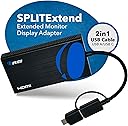
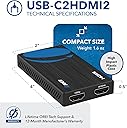
The OREI SplitExtend HDMI Splitter enables professionals to extend or mirror a single HDMI source across two external displays at 4K@30Hz. Compatible with a wide range of operating systems and featuring both USB-A and USB-C connections, it’s designed for seamless multi-monitor setups that boost productivity. Requires Intel i5 or higher and driver installation for optimal performance, backed by a 1-year warranty.


| ASIN | B0C3PFQZ4G |
| Best Sellers Rank | #79 in Computer Cable Adapters |
| Brand | OREI |
| Color | Classic Black |
| Compatible Devices | Windows 11, 10, 7, 8.1, Mac OS 10.10 or higher, Android 7.1 and above |
| Connector Type | USB Type C, A |
| Current Rating | 1 A |
| Customer Reviews | 4.1 out of 5 stars 1,728 Reviews |
| Finish | Chrome |
| Global Trade Identification Number | 00850031132511 |
| Item Dimensions | 4 x 2 x 0.5 inches |
| Item Type Name | SplitExtend |
| Item Weight | 45 g |
| Item dimensions L x W x H | 4 x 2 x 0.5 inches |
| Manufacturer | Orei |
| Manufacturer Contact Information | [email protected] |
| Mfr Part Number | USB-C2HDMI2 |
| Model Number | USBC2HDMI2 |
| Number of Items | 1 |
| Number of Ports | 2 |
| Package Quantity | 1 |
| Packer Contact Information | [email protected] , 99250 12671 |
| Power Plug Type | No Plug |
| Specific Uses For Product | PC, Laptop |
| UPC | 850031132511 |
| Unit Count | 1 Count |
| Warranty Description | 1 Year Warranty |
| Warranty Type | Limited |
C**S
Works with the older laptops
This is just what I needed!!! Over the past year, I have purchased numerous dual-screen extenders, only to find out they wouldn’t work because the USB-C port on my laptop doesn’t work. Yes, I know—total buyer error, not the products’ fault! I probably should have read the descriptions a little more carefully. 😂 Since this is a work laptop, I needed to find a more affordable solution rather than replacing the entire computer. Then I found this one with USB-A compatibility, and it was exactly what I needed! I am finally back to full functionality, and I couldn’t be happier with my purchase. If you’re dealing with a similar USB-C issue and need another option, this is definitely worth checking out. Highly recommend!
B**T
Updates my old Dell Desktop to dual monitors.
It works on my Dell 8930 Desktop. My Dell desktophas only 1 HDMI output and no other display out put so I needed something that allowed 2 extended displays. Just a note: My computer needed the driver installed. If you enter the link, be sure to include the https: before the www as this is a secure website and without the https: it ignores the rest of the link. My Dell is about 10yo updated to Win 11. It still runs well for me. OREI setup was easy. The Dell has 3.1 USB-C ports so all connection worked. Even though I set it up extended under Windows Display settings, when I powered up both displayed were duplicates. but I found I could move apps, etc between displays so I could run different apps on different displays. I am happy with it and it was easier and cheaper than adding a graphic card to my Dell. I don't game so variable or fast refresh rate is not an issue for me. One monitor is 1080P and the other is 4K so this is ideal for me.
H**B
it does not work with a Cube PC Computer
I purchased the OREI after trying two other HDMI 1 to 2 expanders. The first one connected to my cube, running windows 10, via the HDMI port and the second was tried using the USB C port. The first two behaved identically. Yes I had video but the mouse was screwed up. The problem was that the mouse would not shift between the two monitors unless you moved it left on monitor 1 and then found it on the right side of monitor 2. As my wife said this set up was driving her crazy I researched the OREI. The video was well done and I had high expectations but alas, NO JOY. It behaved just as the other two, much less expensive boxes, did. I then downloaded the drivers that were referenced on the video....I thought surely this is the problem..... Again "no Joy". I could make it work if I powered on the cube and then connected the OREI with one monitor (a DELL) , then connected the second monitor (a Samsung) to the orei..... not the way it should have worked but the mouse behaved well..... then the next problem surfaced.... the Samsung monitor was fuzzy..... the dell monitor was perfect (crisp, bright) and if you did a reboot, the old mouse problem would come back. Oh yes changing the ports that fed the monitors on the OREI did not help.... the dell remained crisp and bright while the Samsung got fuzzy regardless of which monitor setting I used with windows or which port on the OREI I used... If I only used the Samsung monitor on the cube, without the OREI, all was perfect ...bright crisp and very easy to read.. the same with the dell..... both monitors behaved as what I would expect. In addition, the cube would not start a program on the desk top. The mouse would move to the icon but nothing worked if you single or double clicked on any program located anyplace. Now I am not planning to return it, but really think I should as it was a failure from the beginning, but I have given away the other 2 expanders and really need a way to work with 2 monitors. I have resigned myself to simply using it with the limitations noted above. Perhaps this works OK with a Mac (I have not tried it with my Macbook Air) but if that is the case then the description need to be clear on that point. I purchased it because I had a desktop cube and wanted to run two monitors .... Therefor, I can not recommend it as any kind of a useful solution..... thus the 1 star rating I will try their tech support line as a very last resort ..... but I have very low expectations as this type of device should be a plug and play and unless there is some magic software that will make it work, then it is close to worthless.... as a true dual monitor interface that sort-of works it does fine. But I would never buy it again nor would I recommend it.
J**O
Perfect for setting up 3 monitors!
As someone who relies heavily on multitasking for productivity, finding the right tools to maximize efficiency is essential. The OREI HDMI Splitter proved to be a game-changer for me, seamlessly extending my display to two additional monitors and allowing me to work twice as efficiently as before. First and foremost, the HDMI splitter performed exactly as advertised. With my desktop having only two ports for monitors, I was initially limited in my ability to multitask effectively. However, with the OREI HDMI Splitter, I was able to connect two additional displays to my setup, creating an extended workspace that perfectly suited my needs. Whether I'm creating videos, running scripts, or staying connected with email and text, having three monitors at my disposal has revolutionized my workflow. Setting up the HDMI splitter was a breeze. After locating the website and downloading the necessary driver for my PC's Windows version, all three monitors sprang to life effortlessly. The 1 in 2 out configuration allowed for seamless connectivity, and I was up and running in no time. In terms of customer support, OREI offers the assurance of a full 1-year warranty along with lifetime support, ensuring peace of mind for users. The package includes the OREI SplitExtend HDMI adapter for dual monitors and a user manual for easy setup and troubleshooting. In conclusion, the OREI HDMI Splitter has exceeded my expectations in terms of performance, ease of use, and compatibility. For anyone seeking to enhance productivity through extended display capabilities, this device is a must-have. With its seamless operation, versatile connectivity options, and reliable support, it's a valuable addition to any workstation.
J**A
Cumple las expectativas versus la realidad
Cumple con las funcionalidades y características que me motivaron hace la compra. Llego a colombia antes de la fecha estimada Lo probé en un MacBook Pro M2 de finales de 2023, con una pantalla QHD y un TV de 32” todo como pantalla independientes extendidas. Para que funcione bien es necesario instalar los drive que indican en el manual de instrucciones y listo, nada más. Super fácil Ahora solo queda probar la calidad de sus materiales contra el uso intenso que le voy a dar, comentaré nuevamente en un mes
A**R
Last Resort: This Worked for Me
I was told by an employee at a big tech store that my laptop could not support dual monitors. I am glad I didn't take "no" for an answer. I ordered the OREI SplitExtend as a last resort, and so far, so good. The device was easy to install, compatible, and produces good sound (consider adding speakers if you need theater- or gaming-style sound). Give it a try if you need to add two monitors to your laptop. Your productivity will increase immediately. Potential Con: Sometimes my mouse does not move as fast as I desire through all three screens. It moves fine between the two monitors, but getting it back to my laptop is sometimes slow/difficult. I am trying to determine if it is user error. I may post an update later.
A**R
Great cost great product
If you want a lower cost, but high-quality splitter this is it. I feel like the picture quality was really good. The sound quality has been really good and it’s small so I appreciate having it on my very small desk. It’s compatible it was easy to uninstall. I would recommend this product to anyone who just wants a simple non-expensive splitter. I’m really happy with the purchase.
C**Y
Connector issues
This did work fine for a year. No issues. However, nearly 1 year in, the USB-C connector popped out and couldn't be put back in, leaving only the USB connector available. Not what I need. All I did was move my laptop forward, LOL. So cheap and expect to replace within a short time. Think I will try another brand this time.
A**.
Plug and Play – No Drivers Needed
I’m really happy with this adapter. It worked straight out of the box with my Windows 11 laptop, with no need to install any drivers, which was a pleasant surprise. I was initially sceptical that USB could reliably drive an HDMI display, but it works perfectly. I’m using it with a Lenovo laptop running Windows 11 and two 21.5-inch Acer 1080p monitors, and it extends the displays perfectly with no issues. A great solution if you need to add extra screens without any complicated setup.
P**T
Nice
One word best, solve my problem of multi setup for trading
A**D
Faltaba el manual
Faltaba el manual de instrucciones, por lo demás el producto funciona bien
E**N
Does not work
Individually, both monitors work using the macbook hdmi port. The software macOS InstantView has been installed. However, when the splitter is plugged in, it does not give an option to connect through the software. Upon plugging in through the splitter, both monitors will briefly display the instantview load screen, but then go dark.
R**A
Valeu a pena
Conversor sensacional. Eu não estava conseguindo colocar as duas telas que estão no extremo na vertical e manter o 2k da tela central. Meu Pc não tem duas entradas HDMI, apenas uma. Com esse conversor consegui manter duas telas na vertical e uma na horizontal, mantendo o 2k. Valeu muito a pena.
Trustpilot
2 months ago
1 day ago