Buy anything from 5,000+ international stores. One checkout price. No surprise fees. Join 2M+ shoppers on Desertcart.
Desertcart purchases this item on your behalf and handles shipping, customs, and support to Senegal.
🔐 Elevate your entry game with next-gen smart security — because your home deserves the future.
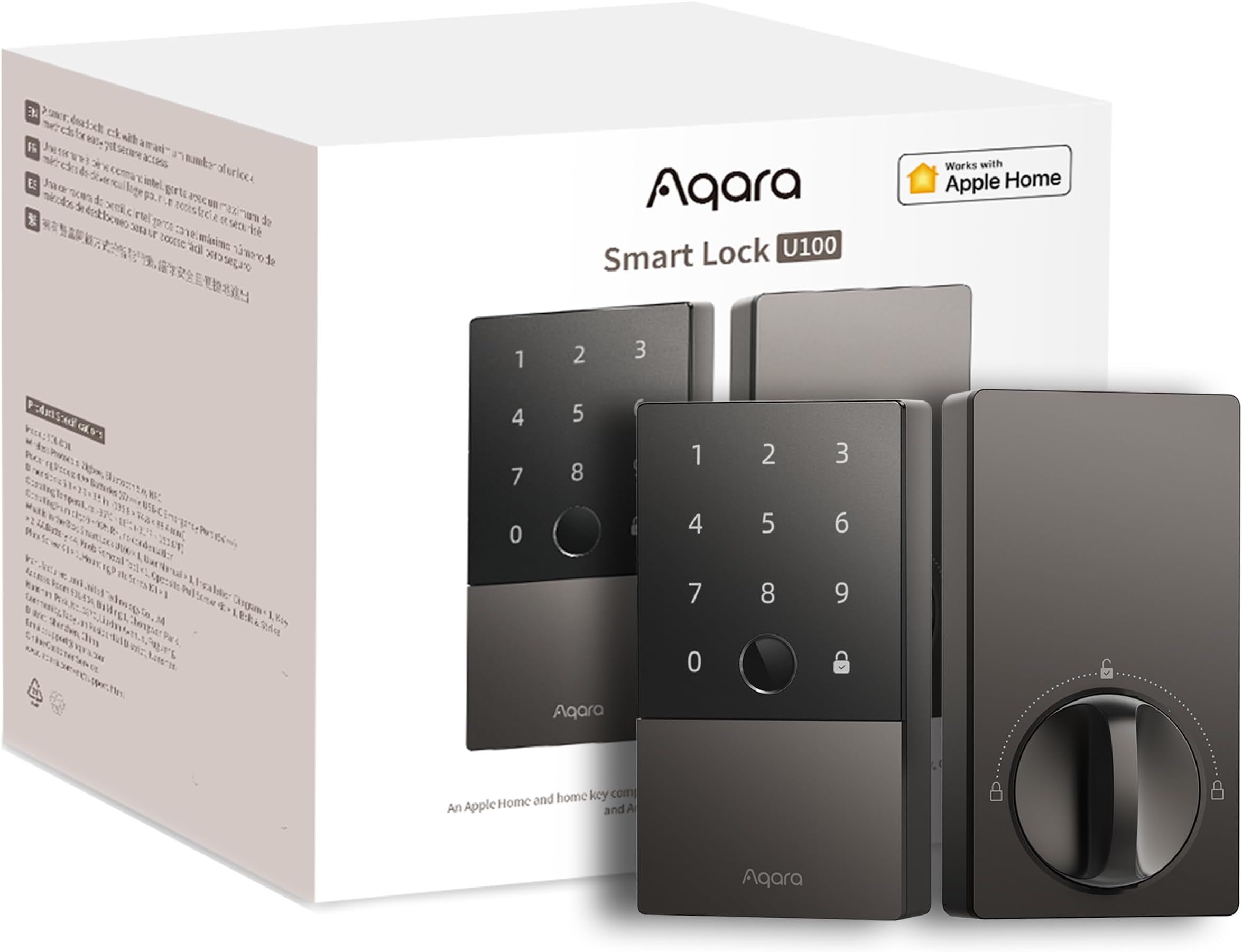
The Aqara Smart Lock U100 is a premium biometric deadbolt featuring AES-encrypted fingerprint access for up to 50 users, seamless Apple Home Key support, and multi-platform smart home compatibility including Alexa, Google, and IFTTT. Built with durable zinc alloy and IP65 weatherproofing, it offers long-lasting power with 8 months battery life and emergency USB-C charging. Its advanced features like auto-lock, Do Not Disturb mode, and multiple unlocking methods make it the ultimate smart security upgrade for modern homes and offices.


| ASIN | B0BZSD2L1W |
| Additional Features | Keyless |
| Best Sellers Rank | #5,034 in Tools & Home Improvement ( See Top 100 in Tools & Home Improvement ) #28 in Deadbolts |
| Brand | Aqara |
| Brand Name | Aqara |
| Color | Gray |
| Connectivity Protocol | Bluetooth, Zigbee |
| Control Method | App |
| Controller Type | Amazon Alexa |
| Customer Reviews | 4.2 out of 5 stars 2,481 Reviews |
| Included Components | AA Battery * 4, Installation Accessories, Mechanical Key * 2, Smart Lock U100 * 1, User Manual |
| Item Dimensions | 5.27 x 3.46 x 2.91 inches |
| Item Type Name | Door lock |
| Item Weight | 1.6 Kilograms |
| Item dimensions L x W x H | 5.27 x 3.46 x 2.91 inches |
| Lock Type | Biometric |
| Manufacturer | Lumi United Technology Co., Ltd |
| Manufacturer Part Number | SDL-D01 |
| Material | Zinc |
| Material Type | Zinc |
| Model Name | SDL-D01 |
| Model Number | SDL-D01 |
| Number of Pieces | 1 |
| Recommended Uses For Product | home security, office security, access control for shared spaces, smart home automation |
| Shape | Rectangular |
| Smart Home Compatibility | Smart Home Compatible |
| Special Feature | Keyless |
| Style Name | Modern |
| UPC | 192784000922 |
| Unit Count | 1.0 Count |
S**E
Great for iPhone Users, Good Features
I wanted a Smart Lock that would be easy to use, support Apple Home key, include fingerprint and a physical key option. The Aqara U100 has all of these features that I am looking for. I am replacing an existing deadbolt and was expecting a simple remove the old and then install the new, hoping the existing holes would work. I did end up having to get my drill out to enlarge the hole for the bolt, which took some effort and added 30 minutes to the installation. Luckily that was the only modification I had to make on my door. One thing that gave me a little trouble with the lock installation was making sure everything was level, I was off slightly in my first try and the fit was a bit off, with the bolt not functioning smoothly. It was easy to correct with the help of a level and hardware was installed. One thing to note is that I had some trouble pulling off the battery cover. Installation videos showed it easily pulling off but I had to use some plastic tools to pry it open. The Aqara app was easy to follow and adding the lock was straight forward. I did separately add an Aqara hub, as I will likely in the future, look to add the lock to Google Home. I first added the lock to the hub and then I added the hub to Apple Home. In Apple Home, both the hub and the lock appeared on my dashboard. I could control the lock from the Home app, but the Home Key feature did not work. I then added the lock directly to Apple Home, which enabled Home Key, but then it showed the lock twice on the Apple Home dashboard, which was confusing. I then deleted the first instance of the lock that was added by the hub so that I only had one instance. Tested and everything along with Home key worked. The Aqara U100 works really well. I can unlock by tapping my Apple Watch or iPhone. My wife and kids have Android phones, so they are accessing with fingerprint. I picked up an NFC card to try with the lock and it also works great, though defeats the purpose of being keyless but can be useful in certain situations such as visiting guests where a passcode is not optimal (elderly family members in my case). I am planning to set up Google Home later on, so that the lock can be opened via the Google Home app on Android. Too early to comment on battery life, but from reviews I've seen, I expect them last up to a year. The lock comes with batteries, but I did also get a 4 pack of lithium AA's to use with the lock, thinking that may provide a longer life between battery changes, but only time will tell. I really like this lock given the relative ease of installation and all of the options for unlocking. I would say that if you have an iPhone, this is worth a consideration. If you're an Android user, maybe not optimal, but still very usable. I picked up this lock during the recent Spring sale and feel this is was a very good purchase.
A**X
Very Fast and Reliable
I got the Aqara Smart Lock because it works with Apple HomeKit, and I love the idea of just holding my phone or Apple Watch to unlock my door. It's super cool and convenient since I always have my phone and Apple Watch with me. Setting it up took a bit longer than I thought it would, but it wasn’t hard—just a little time-consuming. Once I got it up and running, it worked great with Bluetooth. The Bluetooth connection can take a few seconds to connect when I’m close to the lock, so it’s not instant. But once it connects, I can see logs of who opened or closed the door and control the lock. You really need the Aqara hub if you want to check logs or control the lock away from home. I ended up getting the Aqara Smart Hub E1, which is the cheapest one I could find. It took a bit of work to connect it to my Wi-Fi since it only works on 2.4GHz. I had to temporarily disable the 5GHz band on my Eero router, but thankfully, the Eero app made that easy. It disabled the antenna for 30 minutes, which was more than enough time to finish the setup. Make sure you set it up in the Aqara app first before syncing it with HomeKit. I accidentally tried to set it up in HomeKit first, and that caused the Aqara app to not recognize it, so don’t make the same mistake I did! Once the hub was connected, the lock connected super quickly, much faster than with just Bluetooth. You do have the option of controlling the lock with just an Apple HomeKit hub like an Apple TV or iPad without using the Aqara hub at all, but having the Aqara hub is way better. It gives you faster connections and access to all the management tools while away from home, unlike HomeKit, which only lets you lock and unlock it remotely. So if you just care about unlocking and locking while away from home and already have an Apple TV as a hub, then you technically don’t need the Aqara hub as well. Overall, I really recommend the Aqara Smart Lock. It’s the fastest operating lock I’ve ever used, the fingerprint sensor is the most accurate I’ve seen, and it’s been extremely reliable. It has so many ways of opening it that my family finds it very convenient. I love this lock, and I hope it continues to work well for many years.
L**O
Love the options to enter our home
I was at a point where my wife would get mad at me if I was home after her work shift and I didn't unlock the door in time since her keys were always either lost, or deep in her large work bag. I decided to look into something where she didn't have to worry about her keys anymore and it was simple and reliable for her to use. This solved all our issues. This works with HomeKit almost perfectly except for one thing. I like the fact that the fingerprint reader is accurate and fast. It never feels like we're waiting too long for it to unlock. It takes maybe about a second to confirm your fingerprint, and then it makes a chime, and then you can hear the door unlock. I haven't had an issue with the fingerprint reader. I know some people have complained, but I just make sure my fingers are dry and it works 99% of the time. I think the biggest flaw when using the fingerprint reader is the angle that you programmed it at. I would say, program your reader with the door closed, and as close to a real-world scenario so the angle is as accurate as possible. I like that it also has a combination code (6-digits) that you can also program in, just in case your finger is dirty or wet. This is a good back up. I like that it has a physical key as well. I'm still someone that likes to carry my keys everywhere, and it just helps with ease of mind that I know if anything electrical fails (like the battery dying), I still have my physical key to use to enter. I haven't had any issues with the battery after 6 months, and the app still states that my battery percentage is high. I'm sure they last longer than the stated (8 months). I also like that it integrates with HomeKit. We both have iPhones and being able to use NFC by just tapping our phone on the door is amazing. I usually have my phone in my hands, and this is another cool feature to use, granted I don't use it as much as the fingerprint reader. Also, I cannot get the HomeKit key to work on my wife's phone, so I can't really recommend this as a good working feature. I wanted to be able to just share the key through HomeKit whenever I need to let someone in my home when I'm not there, but the way I've been doing that is just unlocking it through the HomeKit app when I know someone is waiting by the door. This takes about 30 seconds for it to unlock, but it's a nice feature to have when someone needs to get inside your home for an emergency. Overall, I would highly recommend these to anyone looking to get smart home locks. I've already received a couple of compliments and when people come over, they ask about them all the time. Don't spend too much time looking anywhere else, these locks make it easy to enter your home and make sure it is secured at the same time.
A**L
Better than my old Schlage
Why did you pick this product vs others?: Pros: Super easy to install. Nice features over other smart locks. Nice sturdy build. Apple Homekey works great (also see below). Fingerprint sensor works great. Cons: Knob on back feels a little flimsy compared to other locks I’ve tested. Homekey only works with one phone unless you buy a separate Apple hub device. Overall, this is a great lock and nicer than my 5-year old Schlage with much improved features. I was slightly let down for the lack of having the ability to have my family use Homekey without purchasing a separate hub. Although this is no fault of Aqara’s, it doesn’t seem to be explicitly mentioned in their advertising or documentation that you need to buy a hub to use Homekey with more than one device.
D**S
A Critical Assessment of 3x Aqara U100 Smart Locks After One Year of Use
As an owner of 3 Aqara U100 smart locks for approximately one year, my experience has unfortunately led me to a position where I cannot recommend this product or the Aqara ecosystem for most smart home applications. While the locks offer some basic smart home functionality, they fall significantly short in areas crucial for remote management and reliability. Connectivity and Hub Performance: A primary and persistent issue lies with the unreliable connectivity between the U100 locks and the Aqara M3 hub. Despite being situated well within the stated 50-foot range, each of my three locks frequently disconnects from the base station. This inconsistent connectivity severely undermines the "smart" capabilities of the system. Severely Limited Remote Administration: The most significant drawback of the Aqara U100 is its baffling limitation on remote administration. Essential functions such as adding or removing users, creating or deleting access codes, and managing most security features require a direct Bluetooth connection to the lock. This design choice renders the "Smart Hub" largely ineffective for true remote management. For landlords, vacation homeowners, or anyone needing to manage access from a distance, this limitation is a deal-breaker. The hub's remote functionality is essentially restricted to locking and unlocking, and even that is contingent upon the aforementioned unreliable connection. Inconvenient Multi-Lock Management: The lack of centralized user management across multiple locks within the same household is another major frustration. There is no a_bility to add a user's fingerprint or access code once and apply it to multiple U100 locks. Instead, each fingerprint and code must be manually programmed at each individual lock. Furthermore, any updates or removals of access codes also necessitate direct Bluetooth access. Resetting and Reconfiguration Issues: In instances where a lock loses its connection to the base station or the broader smart home ecosystem, a factory reset often becomes the only recourse. This process is not only inconvenient but also results in the complete loss of all programmed fingerprints and access codes, requiring users to physically re-enroll at each lock. This highlights a significant lack of robust backup and restore functionality. Disappointing Battery Life (Exterior Doors): The battery performance of the U100 locks varies drastically depending on their location. For our garage door lock, which is exposed to outdoor temperature fluctuations, a set of four AA rechargeable batteries lasts approximately one month. In contrast, the two indoor locks achieve a more reasonable lifespan of around six months. Non-Existent US Customer Support: My attempts to seek assistance for various pairing and base station issues through Aqara's official website and email channels have been met with silence. This lack of responsive US-based customer support is a significant concern for a product in the smart home security sector. Conclusion: For individuals seeking a reliable smart lock solution with robust remote access and management capabilities, particularly for applications like rental properties or vacation homes, I strongly advise looking elsewhere. The Aqara U100, in its current iteration, fails to deliver on the promise of a truly "smart" and remotely manageable lock. While it functions adequately as a basic offline lock utilizing fingerprint or access code entry, its significant shortcomings in connectivity, remote administration, and support make it an unreliable choice for any scenario demanding remote interaction or automation.
S**E
Works Great!
I recently upgraded to the Aqara U100 Smart Lock, and I couldn’t be happier with my decision. From installation to functionality, this smart lock has exceeded my expectations in every aspect. Installing the Aqara U100 was a breeze, thanks to the clear and comprehensive directions provided. The sleek design of the lock adds a touch of modern elegance to my door, enhancing the overall aesthetic of my home. One of the standout features of this smart lock is its integration with Apple HomeKey. The seamless compatibility with Apple’s ecosystem enhances the user experience and makes managing access a breeze. I particularly appreciate the thoughtful design choice of hiding the manual key behind a decorative plate. Not only does this add an extra layer of security, but it also maintains the sleek appearance of the lock. Although I encountered a minor hiccup during installation when I had to add it to the Aqara app twice, it was a small inconvenience compared to the overall experience. Most importantly, the Aqara U100 has passed the ultimate test—the wife test. Its ease of use, stylish design, and reliable performance have earned it her seal of approval. In conclusion, I highly recommend the Aqara U100 Smart Lock to anyone looking for a secure, stylish, and seamlessly integrated smart lock for their home. It’s a game-changer that combines functionality with flair, making it a must-have addition to any smart home setup.
P**.
Good quality, well designed smart door lock.
Overall this is an excelelnt product amd very good value. I chose it specifically for its Apple HomeKit integration and was not disappointed. The device itself is well made and designed and has “Apple like” quality. HomeKit integration was simple and quick via the QR code on the battery compartment. Some great features, especially the fingerprint reader which , so far, is flawless in functionality. Installation was largely straightforward until I got to attaching the battery on the back of the door. The two screws needed are ridiculously small and very fiddly to insert. Patience and a tiny screwdriver (not included) are required for this part. Recommended.
R**H
Very Nice HomeKit Enabled Smart Lock
When I decided to install a smart lock on my front door there were limited options for devices with HomeKit integration. I ended up with Google's Yale smart lock. It was a decent product but did not offer HomeKit integration. So when I read about Aqara's lock I decided to make a switch. Very happy I did. Installation was very easy since the door was already prepared. I had the lock installed in about 10 minutes. Configuring the lock is done in the Aqara app and it was very easy to add to my HomeKit. There are four options for opening the lock. There is a key (doubt I will use that but it's a nice option. The keyhole is hidden behind a panel on the lock, out of site. You can also open the lock by holding your iPhone or Apple Watch close to the keypad. This makes getting in the door when my hands are full very easy. I really like both of those options. There is a fingerprint scanner too. That is probably the most often use method for opening the lock I use. Finally there is a keypad with code. My family members all have codes to get in and out of the house. I can manage the codes from the HomeKit app. I get a HomeKit notice whenever someone comes in or out of the house. There is also a privacy mode that keeps the door locked. The lock can be configured to lock as soon as the door is closed that behavior can be controlled in the Aqara app. I really like that feature since I don't have to remember whether I locked the front door. If you set up an automation in HomeKit to lock your door when you leave home you'll have to confirm the locking action in your HomeKit app each time. I prefer to just have the lock activate as soon as the door is closed. Setting up the lock in HomeKit is very easy. Adding or removing access is very simple. Notifying someone they have access is kind of cook. Once you set up a new access code HomeKit will ask you if you want to text the code to the person it's for. I like that. You can also set up one time or limited home access. Nice if you have a housekeeper who comes in on a schedule or want to set up a temp passcode for pet or house sitter. Over all I am very pleased with this product and I am looking at some of their other products based on his positive experience.
ع**ي
رائع
جهاز ممتاز جدا ويعمل مع أبل هوم كيت بشكل ممتاز جدا. أكثر ما أعجبني به هو دعمه لنظام nfc من أبل حيث أضع هاتفي الآيفون على الجهاز ويفتح بشكل مباشر دون الحاجة إلى فتح قفل الآيفون بعد تفعيل ميزة الوصول السريع.
S**R
Loving it
I did lots of research and finally found Aqara as the best option for me. Easy to install, very high quality build and well integrated with home assistant.
U**Y
Don’t Buy - Don’t waste your money and time and harm your door
I bought this product a few months ago. At first, it worked perfectly fine, and I installed it on my main door. However, after a short while, it started showing errors and stopped functioning properly. The door wouldn’t open or close as it should, and I ended up being locked out several times. Unfortunately, I received no real help or support — only generic replies telling me to update the software online. The customer service is nonexistent. You’ll just be creating problems for yourself if you buy this product. Don’t waste your money — you’ll regret it. My advice is to choose a product that actually provides reliable customer support.
C**.
Muy bueno
Excelente calidad, muy fácil de instalar. Desafortunadamente requiere el hub de la marca y no es compatible con hubs que ya tengo pero eso se arregla.
C**V
¡Debí comprarla antes!
Fácil de instalar, confiable, siempre funcional (al ser de baterías, no te deja afuera si se te va la luz, pero debes cuidar la diva de las baterías para no llevarte sorpresas). Creo que es un buen kit con buen precio pues incluye dos llaves NFC, llaves físicas, usa huella, funciona con Apple HomeKit nativamente (generalmente abro usando mi Watch); puedes escoger código por habitante y además puedes mandar llaves temporales a visitas (muy útil para la señora del aseo sin tener que darle un juego de llaves). La amo.
Trustpilot
5 days ago
1 month ago