🔥 Elevate your game with OLED precision and speed — see what others can’t!
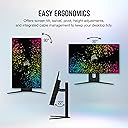
The Corsair XENEON 27QHD240 is a premium 27-inch OLED gaming monitor featuring a 2560x1440 QHD resolution, 240Hz refresh rate, and an ultra-fast 0.03ms response time. Engineered with LG OLED technology, it delivers exceptional HDR10 visuals with 98.5% DCI-P3 color accuracy and self-lit pixels for perfect contrast. Compatible with NVIDIA G-SYNC and AMD FreeSync Premium, it ensures tear-free gameplay. Its versatile connectivity includes HDMI 2.1, DisplayPort 1.4, and USB-C 3.1 with 60W laptop charging, while the adjustable curved screen offers customizable immersion for both work and play.


| ASIN | B0C3SFTL1X |
| Adaptive Sync | G-Sync Compatible |
| Additional Features | Adaptive Sync, Eye Care, Flicker-Free, High Dynamic Range, Ultra-Slim |
| Aspect Ratio | 16:9 |
| Best Sellers Rank | #153,748 in Electronics ( See Top 100 in Electronics ) #3,326 in Computer Monitors |
| Brand | Corsair |
| Color | Black |
| Connectivity Technology | Auxiliary, DisplayPort, HDMI, USB Type C |
| Contrast Ratio | 1500000:1 |
| Customer Reviews | 4.2 out of 5 stars 104 Reviews |
| Display Resolution Maximum | 2560 x 1440 pixels |
| Display Technology | OLED |
| Display Type | OLED |
| Hardware Connectivity | 3.5mm Audio, DisplayPort, HDMI, USB 3.1 Type A, USB 3.1 Type C |
| Image Contrast Ratio | 1500000:1 |
| Included Components | AC Power Adapter, Corsair XENEON 27QHD240 Display, Monitor Stand Base, Monitor Stand Neck, Power Cord |
| Item Dimensions D x W x H | 8.83"D x 20.9"W x 23.8"H |
| Item Weight | 13.9 pounds |
| Manufacturer | Corsair |
| Model Name | XENEON 27QHD240 |
| Model Number | RDD0023 |
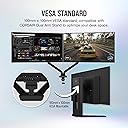
| Mounting Type | Wall Mount |
| Native Resolution | 2560x1440 |
| Number of Component Outputs | 1 |
| Picture Quality Enhancement Technology | OLED |
| Refresh Rate | 240 hertz |
| Resolution | QHD Wide 1440p |
| Response Time | 0.03 milliseconds |
| Screen Finish | Glossy |
| Screen Size | 27 inches |
| Screen Surface Description | Glossy |
| Shape | Flat |
| Specific Uses For Product | Gaming |
| Total Number of HDMI Ports | 2 |
| Total USB 3.0 Ports | 4 |
| Total Usb Ports | 5 |
| UPC | 840006698654 |
| Warranty Description | 3 year manufacturer |
| Warranty Type | 3 Years Manufacturer Warranty |
G**I
Beautiful OLED Monitor
Great monitor with amazing colors. The matte finish I am pretty used to and it is not overwhelming. I honestly prefer not seeing a reflection in my monitor as I sit right next to a bright window. I play a lot at night but I still use it during the day sometimes for work. Brightness isn’t the BEST but it is more than enough for me to play competitive games. The screen protects itself in a way that whenever pure white is shown on screen it usually comes off as grey which I don’t mind. For work it is a little adjustment/dimmer (when in pure white docs). Although for gaming, I don’t need my eyes seared by every flash bang to be competitive, so I’m not missing out there. HDR is ok but I’m not a huge single player person and I typically keep it off most the time. A nice item for working from home is that I can power/display my usb c charging laptop with one cord to the monitor. No additional power cords/supplies are needed to plug into the monitor to charge my laptop ~60watts (I think) while showing a picture on screen. The monitor power cord alone supplied enough for itself and an excess of 60w to charge (the monitor cord itself has a larger power brick due to this). Keeps my desk clear of unnecessary/excessive cords. Response time is stellar and quality is top notch. No dead pixels. I really enjoy this monitor and the only reason I would ever change it is to upgrade from 1440p 240hz to a 4k 240hz monitor. Even then, 1440p OLED is almost perfect on a 27 inch display except text clarity is the only real improvement I would see from 4k resolution (OLEDs are typically a bit worse for text clarity).
D**R
Amazing but requires some understanding
All the reviews complaining about flickering don't understand one thing: You can only use 240hz if the game you're running has uncapped FPS or sets the maximum FPS to 240hz. If the game's maximum FPS is set to 60 or 120 and your monitor is set to 240hz then your screen will flicker! Thus you simply need to change either the game or the monitor's FPS to match and resolve the flickering. Before I understood this I was about to come here and write a 1 star review because it was really annoying but now I understand that this monitor is simply amazing. I went and played Diablo 2 Resurrected; was wondering why the game looked so dark then I cast Frozen Orb and the entire screen lit up and it looked real like 3D and like the image wanted to jump off the screen. My jaw dropped. I tested Forza Horizon 4 and it also looked so good and real like the game was popping off the screen. But then I went and played a game like Dead by Daylight and it has so many darks and so few lights that nothing really has an opportunity to "pop". So these OLED monitors really depend on a mixture of darks and lighting. Anyway, if you buy the monitor like I did make sure to do the firmware update, turn on HDR and follow the color calibration options like they recommend on the website, and make sure your monitor's FPS setting matches the in the permitted in-game FPS to avoid the flicker.
C**E
10/10
Best viewing experience ever
A**O
Good color and clarity. Constant issues with HDR video editing. Bad VRR Flicker
The monitor looks great for games and HDR content. Using it for video editing with davinci resolve has been a nightmare. The screen constantly blanks out to the point it is unusable or has terrible flickering when scrolling through footage. Brightness drops quite a bit when there is a lot of white on the screen as well so its difficult to get an accurate grade sometimes. If you are just using it for gaming, its not a bad deal if you can deal with the refresh rate flickering with g-sync/freesync on. If you are doing any sort of content creating that requires HDR I would take a hard pass. Ended up returning it.
E**C
Great monitor for PC and PS5
Using this for about two months, this monitor is stellar. Coming from a 1080p 240hz Alienware, the image quality, contrast, and color reproduction on this monitor is awesome. There are some growing pains with OLED that keep it from being perfect. Text and web browsing seems a bit…fuzzy? It lacks a little clarity. There seems to be some vertical bands when looking at gray. I thought it was burn in but I’m told it’s normal for OLEDS. And with Gsync enabled, some dark games have an annoying flicker. I didn’t find any of these things to be deal breakers because the image is soo *chefs kiss*. For content, this monitor is fantastic . But if you want a monitor that does everything extremely well, or the best that it could. I don’t think the OLED tech is quite there yet.
J**H
Almost perfect
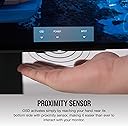
Had been eyeing this for a while. Went back and forth over it for weeks, finally went to Best Buy to look at it in person to see if the picture quality was really worth it. Was sold instantly after seeing it in person. Local Best Buy sucks and I couldn't find anyone to actually get the monitor for me in store and ended up just ordering from Amazon after I left. All the reviews for this monitor are really on point, but the most surprising thing I like that seemed over sold in all the videos I watched on this is how well the motion sensor for the controls under the panel works. Seemed gimmicky and pointless but it just works and is really useful. The amount of built in USB ports is really nice as well, that gets glossed over in most of the reviews I watched. OLED does take some getting used to. Particularly with how finicky software acceleration can be in certain programs. If this isn't your only monitor it will reset real quick if you move something accelerated off screen onto this monitor. Mildly annoying for a couple days while you figure out which programs to disable hardware acceleration with, but not a huge deal. That's my only real complaint after using this for about a month. Also the warranty is really what sold me on this over some other OLED panels I was looking at. Particularly over AOC's OLED. They claim the same warranty but the fine print on theirs basically voids their coverage for even using the monitor regularly.
C**T
Bought 3 27" They Were All Defective
One had random static all over the monitor, one had a bright White line in the middle of the monitor and the third was constantly flickering. Absolutely unacceptable at this point, I'm guessing they're having this sale because they have a bad batch of panels or something. Waste of my time.
W**.
What a monitor!
This thing is amazing. Gets really bright and he image quality is amazing, and of course with this being an OLED panel, the colors and contrast are unmatched. The high refresh rate, high resolution, and awesome contrast makes this a great monitor for any task. Gaming, general entertainment, and even productivity. I thought I'd be disappointed by the matte anti-glare coating on the screen but I don't really notice it during use and am even kinda glad it's there. Its not super matte finished, I'd say it's more semi-glossy. I don't think you can go wrong with this monitor if it's in your price point. I think it retails for 1000, but I got it on sale for around 600, and at that price, this thing is truly unequalled.
Y**R
Una joya para gaming exigente
Compré este monitor Corsair OLED en diciembre y, después de varios meses de uso intensivo, puedo decir que ha sido una excelente inversión. La calidad de imagen es simplemente espectacular: colores vibrantes, negros profundos y una nitidez que realmente se nota en juegos de todo tipo. Lo uso principalmente para gaming (FPS, RTS, MOBA) y el rendimiento ha sido impecable. La alta frecuencia de actualización y el bajo tiempo de respuesta hacen que todo se sienta fluido y preciso, ideal para juegos competitivos. Además, las herramientas que incluye para prevenir el burn-in son efectivas y fáciles de configurar, algo muy importante en monitores OLED. Hasta ahora, cero problemas. Muy recomendable si estás buscando una experiencia visual premium para juegos.
E**I
Finally a winner!
I have used all the oled monitors that are available in the market. I do have a lg c2 55 that I use for RPG, and TV, corsair for work (I code, text isn't an issue for me - Is it crisp? No, Would you notice? With 110 PPI I would say no issue for most). Corsair just nailed the monitor I/O - I love the way they designed it. PS5/Xbox - you got hdmi 2.1. PC no issues with display port, and Type-C DP - The only high end gaming monitor that provides this (I love type-c DP, I could just plug in one usb-c to my work laptop, and not worry about power supply (its adequate unless you are gaming), and monitor's USB hub as the monitor has usb-c upstream port (What happened to lg, dell, Asus - still stuck with USB-A - This isn't a game changer, but a nice to have!), and the type-c DP. So, Monitor's Input switch is all it needs to switch your accessories between machines. This works great for people who work and game on different machines but single monitor. NO RGB -> I like my monitors black. This is subjective, so for people who are into RGB this is a let down. Movies & TV -> Nothing special to me, as I have a 55 c2. A television obviously excels with its AI upscaling, smoothing and so on. Blacks -> Its just black, once you switch to oled you will love the blacks and would never go back (Proceed with caution!) Webcam placement -> I had issues with AW34DWF because no magnetic attachment support, this monitors works perfect. Gaming -> AW34DWF - Colors are just amazing. When you get to WOLED panels, you will notice how over-saturated Quantum Dot panels are, and I eventually started appreciating the colors on WOLED. Brightness -> I game and work with lights on, I have no issue at all. There is a built in ABL(Auto brightness limiter) that is aggressive, but interesting part is it doesn't affect you while gaming. But, regular desktop usage takes time to get used to. There is a brightness stabilizer - If you use this the brightness is way below sub-par. I would recommend turn off brightness stabilizer and get used to the built-in ABL. This way you get the best experience it could offer in terms of brightness. Even with lights OFF (a dark room) - With brightness stabilizer ON - You just can't game. I think they have done this because of the 3 year burn-in warranty. It took me 2-3 days to get used to ABL. No I barely notice it. Hope this helps someone. I have finally decided to keep this, my hunt for an OLED monitor started in March, and finally came to an end!
M**X
Panel defectuoso
Producto defectuoso. El monitor en sí, es buenísimo, lástima que llegó con un defecto de fábrica, en cuanto lo prendí me percaté de líneas anormales al cambiar colores, así que al llevar a cabo el test de pixeles muertes me salió esa espantosa línea.
7**E
Good
Magnifique j’adore
S**E
ok
ok
Trustpilot
3 days ago
1 week ago