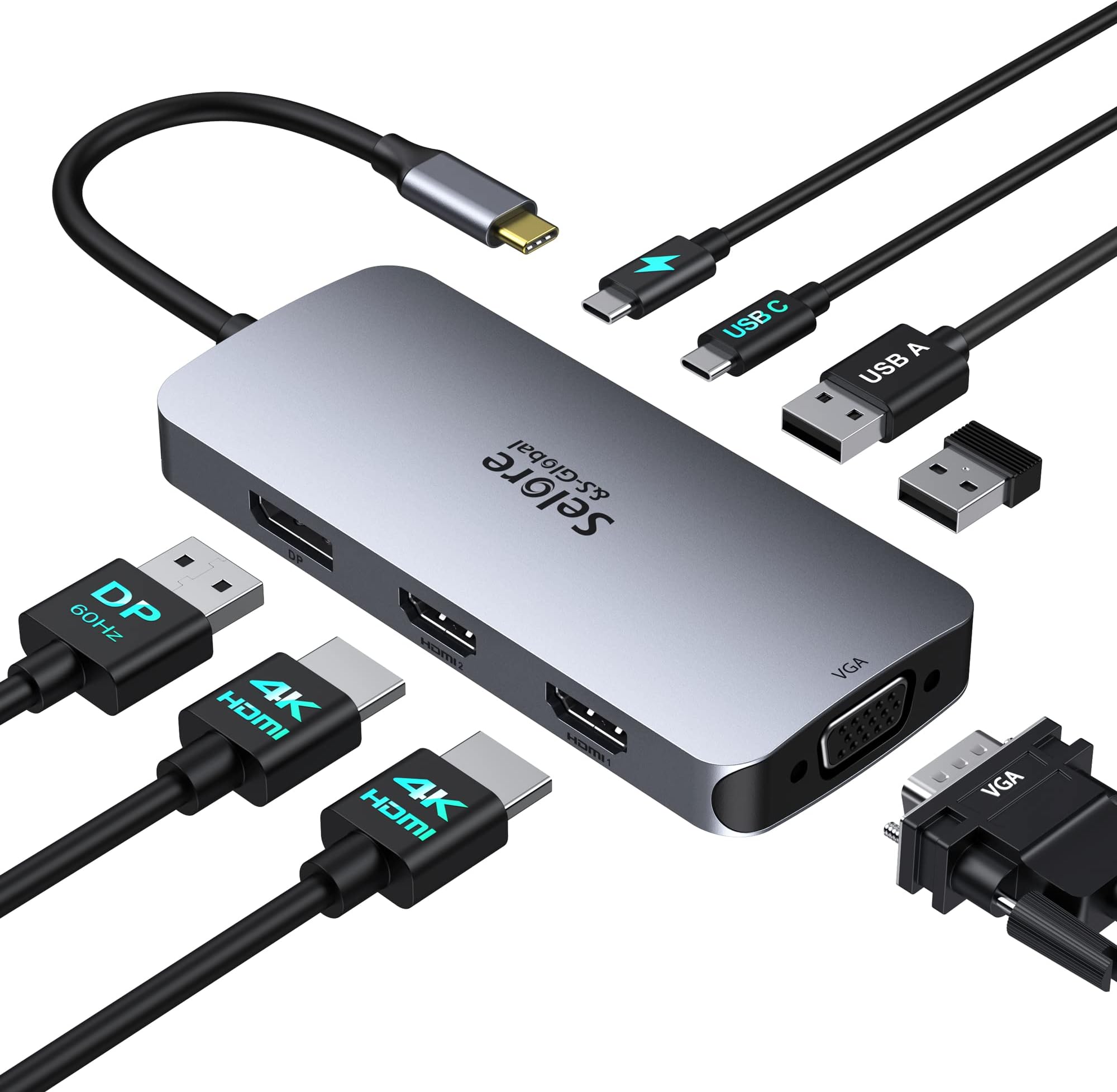
🚀 Triple your screens, double your power, one sleek dock to rule them all!
This USB-C Docking Station is a powerhouse multiport adapter designed for professionals craving a triple-monitor setup with dual HDMI and DisplayPort outputs supporting up to 4K resolution. It delivers blazing 100W power delivery charging and versatile connectivity including USB-C, USB 2.0, VGA, and PD ports. Compatible with major laptop brands, it streamlines your workspace by consolidating multiple devices into one sleek hub, perfect for maximizing productivity and seamless device switching.


| ASIN | B0BTD44C3P |
| Are Batteries Included | No |
| Best Sellers Rank | 1,127 in Computers & Accessories ( See Top 100 in Computers & Accessories ) 11 in Docking Stations |
| Brand | Selore&S-Global |
| Colour | Dual HDMI + Power Delivery |
| Customer Reviews | 4.3 4.3 out of 5 stars (2,146) |
| Date First Available | 30 Jan. 2023 |
| Guaranteed software updates until | unknown |
| Item Weight | 80 g |
| Manufacturer | Selore&S-Global |
| Operating System | Chrome OS, Windows 10, Windows 8 |
| Product Dimensions | 8 x 4 x 1 cm; 80 g |
| Wattage | 100 watts |
N**E
Excellent docking station- very useful
Excellent device very useful and practical. Always with my pc wherever it goes.
A**N
Three high res outputs in one connector
The only USB C hub i could find that gave triple high quality outputs ( 2 x HDMI and 1 x DP but that was easy to fix with a DP - HDMI cable). Now we have three external screens and all the peripherals run through the hubs built in to the DELL monitors (connected to this adaptor). Such a neat solution as we need to use multiple laptops (work and personal) so we can switch between them easily. Most of our laptops can power the three screens and the internal screen giving a total of four screens which is amazing.
P**L
A nice little USB-C Dock with plenty of outputs.
Works well generally, The only minor issues I have, sometimes I need to re-plug into the Surface Pro 7 for it to properly wake up everything attached, but more annoyingly (for me) is that it refuses to drive my dual 1920X1200 monitors in their native resolution at the same time. Yes I know this is an unusual resolution but that's what they are (DELL U2412M). This little dock seems to max out dual screens at 1080P which I guess for most is fair enough. I'm not sure if this is a Windows 11 issue but I don't think so as other (cheaper) USB-C docks I've tried worked at native 1920x1200 dual screen, but were missing the network port - which makes docking the Surface and making the most of 1GB LAN/Internet impossible, so I'm living with a stretched 1080P for now!
K**R
It did what it was meant to - worked out the box - no hassle
I bought this to replace the really bad one I got from work. I can now share my work laptop display with my own x3 27" screens (x2 HDMI x1 DP in my case). I found that using extra cables and just switching inputs manually on my x3 PC screens as needed means: • I can have from 1-3 additional screens switched to my work laptop as needed, leaving the others available to my home PC. • I did not have to purchase additional hardware such as a KVM to achieve exactly the same thing. • My eyes cope far better with the large screens for intense work sessions. • I am no longer juggling Teams windows when hosting calls and trying to share content. My only negative observation is that “sometimes” the DP port does not pick up the monitor correctly. However, I have found that unplugging the USB C cable from the laptop and plugging it back in again resets the device and the DP input is picked up again. (The DP input also gives me a lower resolution than the other two – but that’s probably down to me and losing the will to live tussling with Windows Settings) Although I would love to say it enables me to play fantastic games at blistering framerates with amazing resolutions, in fact what it does is give me a very cost effective and significant positive impact on my work productivity, apart from now when I should be working *cough*.
M**N
From one monitors to two
I purchased this product to help with my dual monitor PC set up. My PC only has one HDMI port and 2 usb ports. This product was a life saver for me. It allows me to connect two extra monitors and a couple of other USB devices hassle free. If the devices need more power, you can just plug a USB-C charger into this port.
A**A
Intermittent lag
It worked excellently the first few days. Recently, my display has started lagging seriously and then it comes back to normal after a while. It can be annoying at times. Overall it’s a good portable product but I feel it won’t last very long.
T**Y
Meets all of my needs
I purchased this to add two additional monitors to my work laptop. I can use the DP port for one monitor and the VGA port for the other. It works really well. I could also use the DVI-to-HDMI if need be, and that works too. Very pleased with this dock. It meets all of my needs.
A**R
Cannot switvh screens between devices
When I switch screens this device locks up, forcing the device to require a reboot
A**O
A Hub USB C funciona optimamente e muito prática, aconselho mesmo.
C**N
Funciona perfectamente, solo hecho en falta que la conexión al PC no sea por un cable independiente
J**R
This device works great! I use it with a 15'' Asus Zenscreen, a Samsung S24 Ultra and Prograde card reader to move 40Gb video files around and previews (no editing). Quick and easy. J.
B**9
If you need to have a usbc monitor output this is one of the few that can do that. Only one signal but handy to have if you have to share ports on the laptop. Light thin and sturdy with a longer cord to accommodate awkward setups.
K**R
Works well with my dual monitor setup. I have had no issues. Good value for the money.
Trustpilot
1 week ago
3 weeks ago