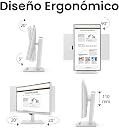
🚀 Elevate Your Workspace: See More, Do More, Stress Less!
The BenQ GW3290QT is a 32-inch 2K QHD IPS monitor designed for professionals who demand clarity, comfort, and connectivity. Featuring a 2560x1440 resolution at 75Hz, USB-C with 65W power delivery, and a fully ergonomic stand, it supports multi-monitor setups via Daisy Chain. Eye-care technologies like Brightness Intelligence Plus and TÜV Rheinland Eyesafe certification reduce eye strain during long hours. Integrated noise-cancelling microphone and speakers enhance communication, making it an ideal choice for coding, business, and creative workflows.


| Adaptive Sync | FreeSync |
| Asin | B0BZ4QC2L6 |
| Aspect Ratio | 16:9 |
| Best Sellers Rank | #5,219 in Computers & Accessories (See Top 100 in Computers & Accessories) #118 in Monitors (Computers & Accessories) |
| Box Contents | 1.5M Power cord 16A , USB-C Cable, HDMI signal Cable, QSG;Safety Instruction |
| Brand Name | BenQ |
| Color Gamut | 0.99 |
| Colour | White + 32 inch |
| Customer Reviews | 4.1 4.1 out of 5 stars (1,472) 4.1 out of 5 stars |
| Display Technology | IPS |
| Display Type | LED |
| Global Trade Identification Number | 04718755089497 |
| Hardware Connectivity | DisplayPort, HDMI, USB 3.0, USB Type C |
| Has Color Screen | Yes |
| Image Brightness | m2 |
| Importer Contact Information | BenQ India Pvt. Ltd. 9B Building, IIIrd Floor, DLF Cyber City, DLF Phase III, Gurgaon, Haryana, India -122002 |
| Item Dimensions D X W X H | 6.3D x 71.5W x 42.9H Centimeters |
| Item Type Name | Monitor |
| Item Weight | 10 Kilograms |
| Manufacturer | BenQ, BenQ Corporation 16 Jihu Road, Neihu 114, Taipei, Taiwan |
| Manufacturer Contact Information | BenQ Corporation 16 Jihu Road, Neihu 114, Taipei, Taiwan |
| Maximum Display Resolution | 2560 x 1440 Pixels |
| Model Name | BenQ Monitor |
| Model Number | GW3290QT |
| Mounting Type | Desk Mount |
| Native Resolution | 2560 x 1440 |
| Network Connectivity Technology | HDMI, USB, USB Type C |
| Packer Contact Information | BenQ India Pvt. Ltd. 9B Building, IIIrd Floor, DLF Cyber City, DLF Phase III, Gurgaon, Haryana, India -122002 |
| Picture Quality Enhancement Technology | Brightness Intelligence Plus, Low Blue Light Plus, Coding Mode |
| Processor Count | 1 |
| Product Features | Adjustable Stand, Built-In Speakers, Eye Care, Pivot Adjustment, Swivel Adjustment |
| Refresh Rate | 75 Hz |
| Resolution | QHD Wide 1440p |
| Response Time | 5 Milliseconds |
| Screen Finish Type | Matte |
| Screen Size | 32 Inches |
| Series Number | 2790 |
| Shape | Flat |
| Specific Uses For Product | Business, Desktop, Gaming |
| Total Hdmi Port | 1 |
| Total Usb 2 0 Ports | 4 |
| Total Usb 3 0 Ports | 1 |
| Total Usb Ports | 1 |
| Total Video Out Ports | 1 |
| Unit Count | 1 Count |
| Viewing Angle | 178 Degrees |
| Voltage | 240 |
| Warranty Description | 39 months warranty from date of manufacturing or 36 month from date of invoice, which ever is earlier |
| Warranty Type | 3 Years Manufacturer Warranty |
User
Excellent Quality, but Check Your Desk Space First
It’s been nearly a year since I bought this monitor, and the product quality has held up incredibly well. The colors are vibrant and accurate, making it absolutely great for programming, watching videos, and everyday media consumption.A major highlight is its versatility—it works flawlessly across a wide variety of devices, including Samsung DeX, MacBooks, and tablets.My Advice on Size:One important piece of advice for potential buyers: please check your desk space before buying to ensure it can comfortably accommodate a 32-inch monitor. This is my first external monitor, and while I love the quality, going straight for the larger size made me realize just how massive it is. At times, it feels a bit too big for my setup, so make sure you actually want and have room for this much screen real estate!
User
All rounder Monitor - Developers choice
A must have monitor for Developers/coders. What a great all rounder it is. Just works like a breeze with minimal cabling.I connected this monitor to my laptop with just one USB-C cable. Thrown my laptop charger, usb hub, hdmi cable everything out of my working desk.The monitor gets display connection from USB cable and charges the laptop back via the same USB cable.Not only that, it provides second desktop display to be connected via Display Port cable to my very old monitor seamlessly with the help of Multi-Streaming Transport technology (called Daisy chaining). So, no second display connection is required.Not only that, we can connect the usb dongle / mouse keyboard USB cables, memory stick, directly to this monitor. That gives connection to those from laptop via the same USB cable.Not only that, you can charge your mobile from monitor.Not only that, it has inbuilt noise cancellation mic and loudspeaker which allows to attend meeting hands-free.Not only that, it has special operating modes, coder mode enables display optimised for coding ( dark backgrounds pitch black and will not affect the eyes from the long time staring, e-paper mode makes screen like a real paper when we are reading documents.For making this features in our complete control the monitor has a small joystick 🕹️ under the screen easily and quickly accessible.No other monitor can be better than this in the situation of working-from-home.
User
Good one for dev | Value for money
Product is good for development and coding usecases.Pro:1. 🔗 Supports daisy chaining2. 🖥️ Acts as a docking station3. ✓ Main highlight is eye care and coding mode. Really makes difference. But yes, not unique can can be tuned on any monitors by playing around with colors and running picture.4. ✓ Auto brightness 🔆 is one of the unique and underrated very useful feature.5. 🖥️Screen size hits that sweet spot at 27 inch for development. Ideally a 24 to 27 inch is ideal. With current microservices and agentic development 27 is bit better then 24.6. 💹With all the features packaged in this, in deed it is value for money.7. 🖥️The IPS panel is good. Took few mins initially to settle down. Initially started showing layered pictures and then everything went fine. Using it with thunderbolt connection.One big miss could be dp++ port. This will allow connecting with simple adapter cables to HDMI. Currently it's only dp. Hence would need some active adapter or cable to connect. Dp++ offers better compatibility.
User
Best product
Best investment ever, clarity is awesome, been using this more than a year now. Speaker is not good butit's not mentioned to have good speaker duh.Brightness is also good and manageable.
User
Never again BUY a BenQ product.
BenQ is a nightmare for anyone buying it's products. I had ordered this monitor in May 2025 with a 3 year warranty. However, the screen suddenly blacked out in August 2026 (well within warranty period). When the technician came to repair it, he started finding reasons to claim that the screen was damaged by us so that BenQ doesn't have to repair or replace its faulty product under warranty. Eventually, he claimed that there was a scratch of width one-tenth of a hair, and went away saying that the monitor can't be repaired or replaced. All money / warranty assurances drained away in a minute. They are FRAUD. Never buy a BenQ product again. I never write negative reviews for any of my purchases but BenQ crossed all limits and are a CHEAT.
User
Excellent
Exvellent
User
Good product
Nice, easy to use, speaker also nice, Value for money.
User
Good for the Price, But Has Some Flaws
I bought this over a year ago, and overall, it’s a good product. However, a 32-inch screen feels a bit too large for a desk setup. That said, it works flawlessly with a Mac. The built-in speakers are poor and almost unusable. Occasionally, weird lines appear on the screen. In this price range, it offers good value for money. The color accuracy is decent, and the resolution is sharp. It’s easy to use, has good build quality, and comes with HDMI and USB-C to C cables, which is a plus.
User
A single usb C cable does it all!
If you have a laptop with a usb c DP alt mode and charges through it enabling a single USB-C cable to handle video, data, and power which is a very convenient feature which i love about this display just make sure if your laptop supports it.It great for long office use because of the eye care features.
User
Good monitor for programmer
Good one
User
Se avete una scrivania piccola e lavorate con un Laptop: Prendetelo!
L'ho installato in 10 minuti tra una riunione e l'altra.è estremamente conveniente facile da installare, letteralmente basta collegare i 2 (DUE!!!) cavi e togliere tutti gli altri cavi del laptop! è perfetto se avete una scrivania poco spaziosa come la mia: giusta dimensione visto che non posso allontanarlo troppo, 1 solo cavo nella presa e 1 sulla scivania, e anche la base non è assolutamente ingombrante inoltre è piana quindi potete sfruttare anche quello spazio.unica pecca (ma anche questo lo sapevo già dalla descrizione): i comandi per i setting sono un pò complicati da navigare.
User
Prisvärd skärm med perfekt bild
Jag gillar dessa, nu har jag nu tre stycken. Bilden behöver ändras till sRGB och ljusstyrkan sänkas och sen är bilden väldigt bra! Flimmerfri bild, bästa antireflex jag sett.Lite minus kring designen, klumpen i nedkant och hur knapparna sitter. Men inte värt prisskillnaden till något annat. Synd det inte är 120 Hz, men det blir förstås en helt annan prisklass. Gillar formatet 3:2, tidigare 16:10-användare.Lite tröga att starta upp, mjukvaran till Windows är inte perfekt, buggig, men inte betydande.
User
Big fan of this size, and the automated brightness control
I'm a full time software developer. I was using a 25" 1440p Dell (nice, but discontinued) and needed to get a second monitor for another location.I initially picked 25" over 27" on purpose, having read Nick Janetakis's article on the ideal screen size for developers (long, but worth a read). I find text on a 24" to be just as legible as my 16:9 25", but appreciate the extra height of 16:10. I also prefer the colours and contrast on the BenQ, and its ability to adjust itself to the ambient lighting conditions is superb.So in all respects, I prefer this BenQ to my Dell. I'm still using the Dell, but on a different desk. No need to buy stuff we don't need, right?I was also 28" curious, and did try the 28" version. It's got a very nice image, but (as a tiling window manager user) I found that I was turning my head left and right a lot, and rarely looking at things in front of me. It's tall too, so a lot of stuff I'd need to read would be near desk level, which has a fairly negative impact on my posture.Conclusion: I'm far better off when my windows (which fill my screen) are on a display whose edges aren't so difficult for me to see.This is also why I prefer a single screen. I usually put code on one workspace, documentation on another, and switch between them with a keystroke more quickly than I could turn my head to look at another screen. Occasionally I need docs and code side by side, in which case I'll put a browser next to my editor. That works great too. Often I'm working on an app, and will put the app's UI next to the editor so I can see the impact of my changes in real time. Also great. And if I need to see two different files, they're visible side by side in a full screen editor.End result: I'm pretty confident I've got the best monitor on the market for tiling window manager users who don't want to be turning their head a lot, looking up/down too much, etc.Also, on looking up/down, beware a monitor that's so tall that you need to read things above eye level. It requires your eye to be wider open than normal, which increases the rate at which the lens dries out. Combined with our tendency not to blink when looking at a screen, this can increase your chances of getting dry eye disease. I'm now an eye drop user, and I think it's because I used to position a monitor a bit high. So that's another reason not to get a bigger one.
Trustpilot
3 weeks ago
2 weeks ago