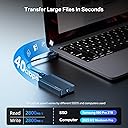
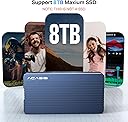
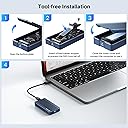
Wow! What a few weeks it has been. For some, my initial review was blunt and critical. I had a unit arrive that initially worked, albeit slowly and not as expected. Soon after, the unit stopped responding and wouldn't mount a drive. I thought this product was garbage. However, I did some very thorough research. The product I received had been used before, and I unknowingly thought it was a new product. To summarize a very long story, the prior user did not insert the SSD in correctly, damaging the connector component and cracking (a few at least) solder joints that was making it work initially, but then as heat was applied the cracks became more apparent through thermal expansion, and BAM! The unit was dead. I initially thought this was a product malfunction, but this turns out to be on Amazon's side by returning used products and placing them as new. I had a lengthy conversation with the seller, and they are working with Amazon to ensure these things don't happen again. I agreed with them, that when you buy a new product, you should expect a new product, and not something that has been used before only for Amazon to throw it back on the shelf. This has apparently increased in frequency with Amazon, and thus this places blame squarely on them. Therefore, my review is below as I returned the defective unit, and bought a brand new one that I was able to test out. Like many of you, NVMe Enclosures are not a completely new idea, but they have remarkably increased in performance in the last year or two. This is because NVMe rely on the PCIe bus which typically is attached to a motherboard, offering the very best and top speeds that the motherboard is capable of handling. When you start moving toward enclosures, they are not "directly" attached to the motherboard, and thus are limited by the cable, receiver technology, and enclosure itself. Whereas USB (and Thunderbolt, for that matter) have promised to simplify this technology, it instead has increased its complexity to confuse all of us! First, you are looking for an enclosure. No surprise you already have a 2280 (think size, 22cm by 80cm SSD "stick", and NOT a SATA stick, don't bother with those anymore) SSD that you want to use, but either don't want to put it into a computer or you have a spare one on hand. That's where these enclosures come in handy; they can utilize the SSD attached to the computer as a "mega USB thumb stick" to increase storage and a whole benefit of other factors. Now, as we discuss speeds, USB sticks are actually surprisingly slow. Even some of the best, expensive ones are only able to pump out 100-200 MB/s write speeds (reading is almost always faster and easier than write). Since you are looking for an enclosure, you should have at least a 3,500 MB/s NVMe SSD that can benefit from a fast enclosure. Simply hook this up to a computer, and you'll get fast read/write speeds. This benefits from large file transfers such as videos, or a database of something like music (I myself have about 300 GB of personal music collection, not streamed). So the usefulness of a 1TB to 2TB SSD attached to the computer helps out your storage, while also performing well for the computer to carry out tasks that is within the extra storage space you are using. Enter ACASIS Thunderbolt enclosure. You'll see that it has the (not latest, but best) Intel JHL 7440 Chipset. You want this chipset because it is capable of Thunderbolt 3 (and Thunderbolt 4 for a Mac, a bit more about that difference in a second). This chipset gives you the capability to read and translate that data on the SSD to be sent to the computer. Next, you need the proper cable. Not just any cable with USB-C connections on each end. You need a cable that is capable of transferring that data from the enclosure to the computer. Any old "charging USB-C" cable won't do, they are for charging and NOT necessarily for data transfer. The cable that comes with this unit is meant for Thunderbolt 3/4, so this cable is good (and spendy). If you need a longer one, they don't make super long ones simply because the longer cable that you use, more interference is introduced and drastically reduces the speeds. Best to keep your cables short! Once you have the SSD, the enclosure, and the cable, you can now connect it to your computer or your laptop. The best benefits will be realized by a laptop as this enclosure is easy to carry around, does not weigh much, and performs WAY BETTER than any kind of mechanical drive that you plug into a laptop. This gives you the extra storage space you are looking for. Maybe for video editing, carrying around your music or photo collection, or even a backup that will be quick to backup any files that you need. This enclosure gives you that flexibility to use at your will, and giving performance similar to another SSD that is plugged into your motherboard. I installed both a 2TB WD SN850X and a 2TB Samsung 980 PRO (both are very good SSD's with fast read/write speeds) to test out the capability of these enclosures. I used a new Mac Mini M2 Pro and used a hard drive speed test software. Speeds were about the same between both SSD's, so the enclosure is pulling the best that it can from each SSD's. Even though these SSD's are capable of over 7,000 MB/s, the limiting factor is what Thunderbolt can do, and that is a theoretical rate of 40Gbps. But I'm going to clarify some negative reviews here with some technical know-how: First, remember that speeds are theoretical bandwidth speeds, and almost never reach those speeds. Think USB 2.0 and how everyone thought it was mega-fast at 480 Mbps, but it never got close to that. Know why? Because everyone kept trying to use mechanical drives, and they simply just can't perform like an SSD could back in the day, so speeds were still seemingly slow (still way better than USB 1.1!). Second, Thunderbolt (and USB 4.0) still have to have bandwidth reserved for display output. That means that the 40Gbps capable speeds still has about 16Gbps of reserved bandwidth for display carry-through. So yes, 40Gbps would yield over 5,000 MB/s, but you're not going to get that no matter what you do. So the best you can get is about 24Gbps, which is about 3,000 MB/s and that's exactly what this unit can do. I have not seen any other enclosure that can beat the performance of this one, simply as the best chipset right now is the JHL 7440 which will cap out data transfers at about 24Gbps (surprise!). Still, 3,000 MB/s is still VERY good, and you HAVE to remember that this is not directly connected to the motherboard, so you're not going to see 7,500 MB/s transfer speeds simply because you are not directly connected to the fastest bus on the computer. External connections are never really going to be faster than internal circuitry, so stop believing that somehow, magically, you can. Just isn't reality. So with that in mind, the enclosure can get warm with TONS of data transfers (how often are you going to transfer TB's of information back and forth? Yea, not much), so the heat dissipation is good. I found out that the hottest my unit could get was about 110 degrees F after moving 4TB of data back and forth, which is not bad at all. I also keep the heat down because it sits on top of the aluminum body of the Mac Mini, which helps pull heat out of the unit. The enclosure is a well machined block of aluminum alloy, so it is capable of heat transfer if you give it a medium to do that. Air is not exactly the best conductor, so sitting on top of a towel will not dissipate as much heat as you would if you placed it on a thick, solid metal surface, or even a cold, flat desk that can help pull some heat from the unit. To be fair though, it will only get hot with a LOT of work, and even then I noticed that it cools down fairly quickly, so heat is not really an issue with this unit. Lastly, I went beyond and wired up two of these units to give a real-world demonstration of a RAID setup (Google RAID if you need to learn about it, you'll want to if you haven't heard of it, RAID can be awesome). Using the same Mac Mini, I took two SSD's and two of these ACASIS enclosures, and set them up as a RAID 0 drive using Stripe. Now, I've taken two 2TB drives and created one single 4TB drive. As one transmits info, the other is getting ready to transmit, so they both work in harmony that essentially doubles your bandwidth. Behold, my 3,000 MB/s speed tests now turned into 6,000 MB/s speeds! That's the WOW factor that is needed. Overall, for about $100, this enclosure will beat the socks off of any of those "other" $20 or $40 enclosures. The JHL 7440 chip itself is expensive, not to mention the cable that is actually capable of full data transfer is not cheap either. Hence, the price is getting something worth paying for. You think USB 3.0 speeds are fast at 5Gbps? Try transferring a 30GB file and see the difference. Personally, I used a 30GB Photos library, which is a good test because it has hundreds of thousands of files, plus a large 30GB data chunk size, that is perfect to test a transfer rate. I moved 30GB in less than 30 seconds. Yes, half a minute. You read that right. How? Because I used my internal Mac Mini SSD with speeds of 3,500 MB/s and my RAID drive capable of 6,000 MB/s, and it transferred a large 30GB file that quickly. Just. Screamin'. Fast. So, to realize the full potential of this, you need to ensure that you have the right SSD, the right enclosure (this one), and the right cable (comes included). Now you are ready to play with power! Pic 1: Speeds of the enclosure using Samsung 980 PRO Pic 2: Detailed breakdown of Thunderbolt connection, 40 Gbps Pic 3: Box unit arrived it Pic 4: Internal Mac SSD, notice the speeds of ACASIS enclosure is near internal SSD speeds! Pic 5: Buy two of these, use RAID to combine the SSD's together for a whopping 6,000 MB/s!!!!