Desertcart purchases this item on your behalf and handles shipping, customs, and support to Senegal.
๐ Elevate your Raspberry Pi projects with a touch of brilliance!
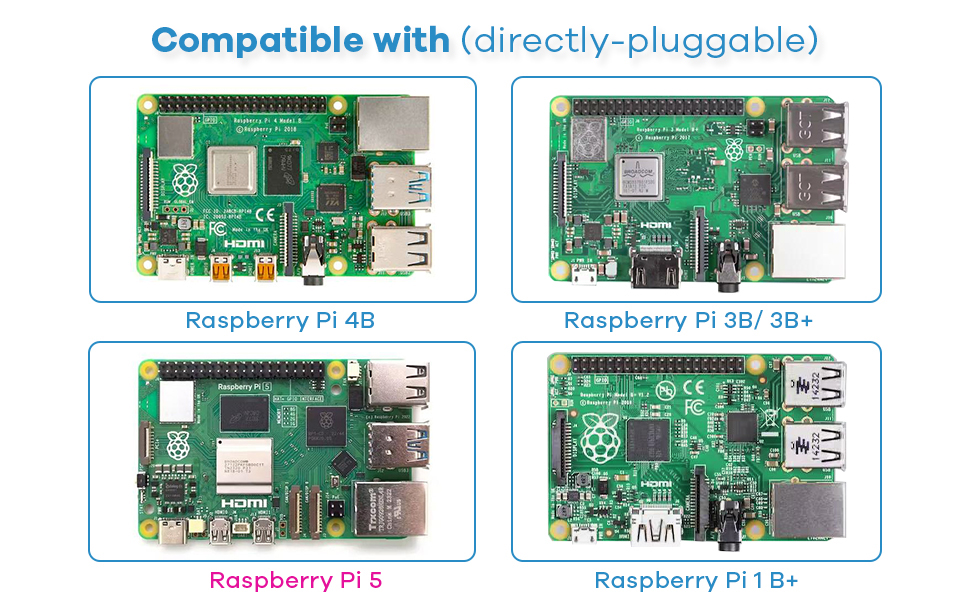
The Hosyond 3.5 Inch 480x320 Touch Screen TFT LCD SPI Display Panel is a compact, high-contrast resistive touchscreen designed specifically for Raspberry Pi models A through 5. Featuring a crisp 480x320 resolution and a 3.5-inch vibrant TFT LCD, it offers seamless plug-and-play integration via SPI interface without requiring external power. Compatible with multiple Linux systems and including a stylus and driver support, itโs the perfect upgrade for professional-grade DIY and educational Raspberry Pi projects.


| ASIN | B0BJDTL9J3 |
| Additional Features | Raspberry Pi Compatibility, SPI Interface |
| Aspect Ratio | 16:9 |
| Aspect ratio | 16:9 |
| Best Sellers Rank | #61,509 in Computers ( See Top 100 in Computers ) #873 in Single-Board Computers |
| Brand | Hosyond |
| Brightness | m2 |
| Built-In Media | 1 x 3.5" raspberry pi touchscreen, 1 x touch pen |
| Color | Default |
| Compatible Devices | Raspberry Pi A, B, A+, B+, 2B, 3B, 3B+, 4B |
| Connectivity Technology | SPI |
| Contrast Ratio | 2000:1 x |
| Customer Reviews | 3.8 out of 5 stars 316 Reviews |
| Display Resolution Maximum | 320 x 480 |
| Display Technology | LCD |
| Display Type | LCD |
| Has Color Screen | Yes |
| Image contrast ratio | 2000:1 x |
| Item Dimensions D x W x H | 34D x 34W x 117H millimeters |
| Manufacturer | Hosyond |
| Model Name | Hosyond 3.5 Inch 480x320 Touch Screen TFT LCD SPI Display Panel |
| Model Number | Hosyond-3.5-480x320 |
| Mounting Type | Panel Mount |
| Native Resolution | 320x480 |
| Number of Component Outputs | 1 |
| Picture Quality Enhancement Technology | TFT |
| Pixel Pitch | 0.00163 |
| Power Consumption | 0.65 Watts |
| Processor Count | 1 |
| Refresh Rate | 60 Hz |
| Resolution | 480 x 320 pixels |
| Response Time | 32 Milliseconds |
| Screen Finish | Glossy |
| Screen Size | 3.5 Inches |
| Screen size | 3.5 Inches |
| Screen surface description | Glossy |
| Shape | Rectangular prism |
| Specific Uses For Product | educational projects, hobbyist applications, DIY Raspberry Pi projects |
| Total Number of HDMI Ports | 1 |
| UPC | 782917535652 |
| Unit Count | 1 Count |
| Viewing Angle | 165 Degrees |
| Voltage | 5 Volts (DC) |
E**Z
Excelente producto
Excelente producto, cumple con todo lo descrito
D**N
Works with Raspberry 3
Works well but a little tricky to get working with Raspberry
C**S
Perfect, exactly as advertised!
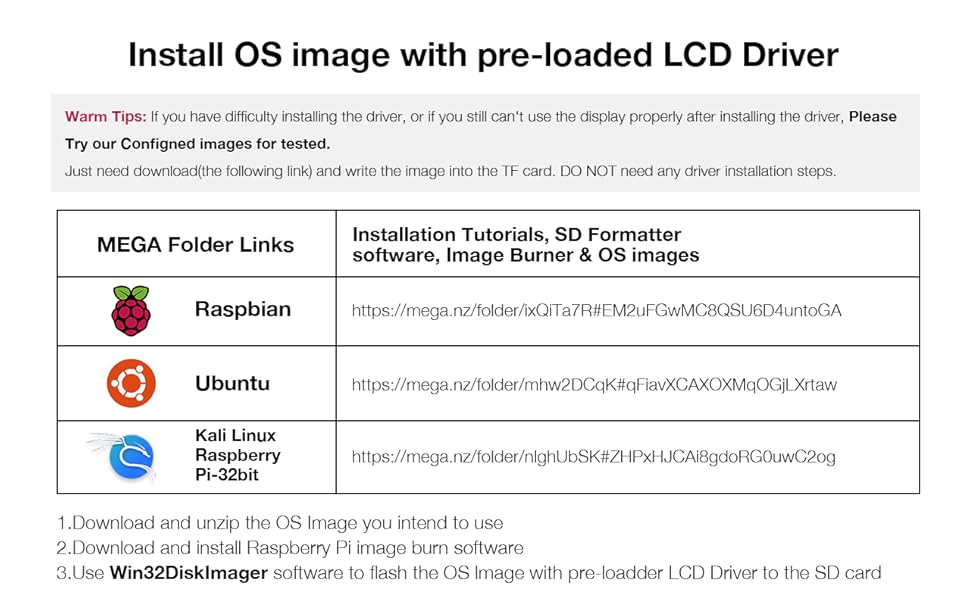
I needed a small display for my raspberry pi. It was honestly fairly easy to connect to my raspberry pi considering how much of a hassle other displays can be. This one was just a one-and-done. I was a bit concerned at first, because I didn't see raspberry pi 3A+ on the compatibility list, but it works just as good. For those who are struggling to install the drivers, find the tutorial page linked on this product page, scroll all the way to the bottom and download the raspberry pi system image that is compatible with your raspberry pi. No additional steps needed, just install that image onto your micro SD card with the raspberry pi imager. (For those complaining about user-friendliness, raspberry pis and their hardware are not meant to be user friendly. It's an experience, and you may learn a few new things)
K**S
Can't get screen to work
Been trying for 2 days now to get this screen to work. It lights up but no picture. Iv tried several different RPI images and followed the Driver instructions. The offline method doesn't seem to work like the RPI wont recognize the files. The github method seems to work but when the RPI reboots I get not picture still. I try hooking up another monitor afterwards and no picture on either screen now. I take the gpio screen off and I still have no picture and have to reinstall the OS.
A**R
Unusable drivers
As other reviews have mentioned, you need to install third party drivers for this display to work properly. However, when used on a Rasperry Pi 0, installation of the drivers causes some sort of issue where it can no longer connect to the network, and thus you can't use SSH to complete the setup. Might be fine for other devices that have inbuilt wifi, but I was not able to make it work over USB LAN, so it accurately is near impossible with a headless setup.
Trustpilot
1 month ago
3 days ago