Desertcart purchases this item on your behalf and handles shipping, customs, and support to Senegal.
🔥 PowerColor RX 7900 XTX — Unleash the beast, stay cool, and dominate every frame! ❄️
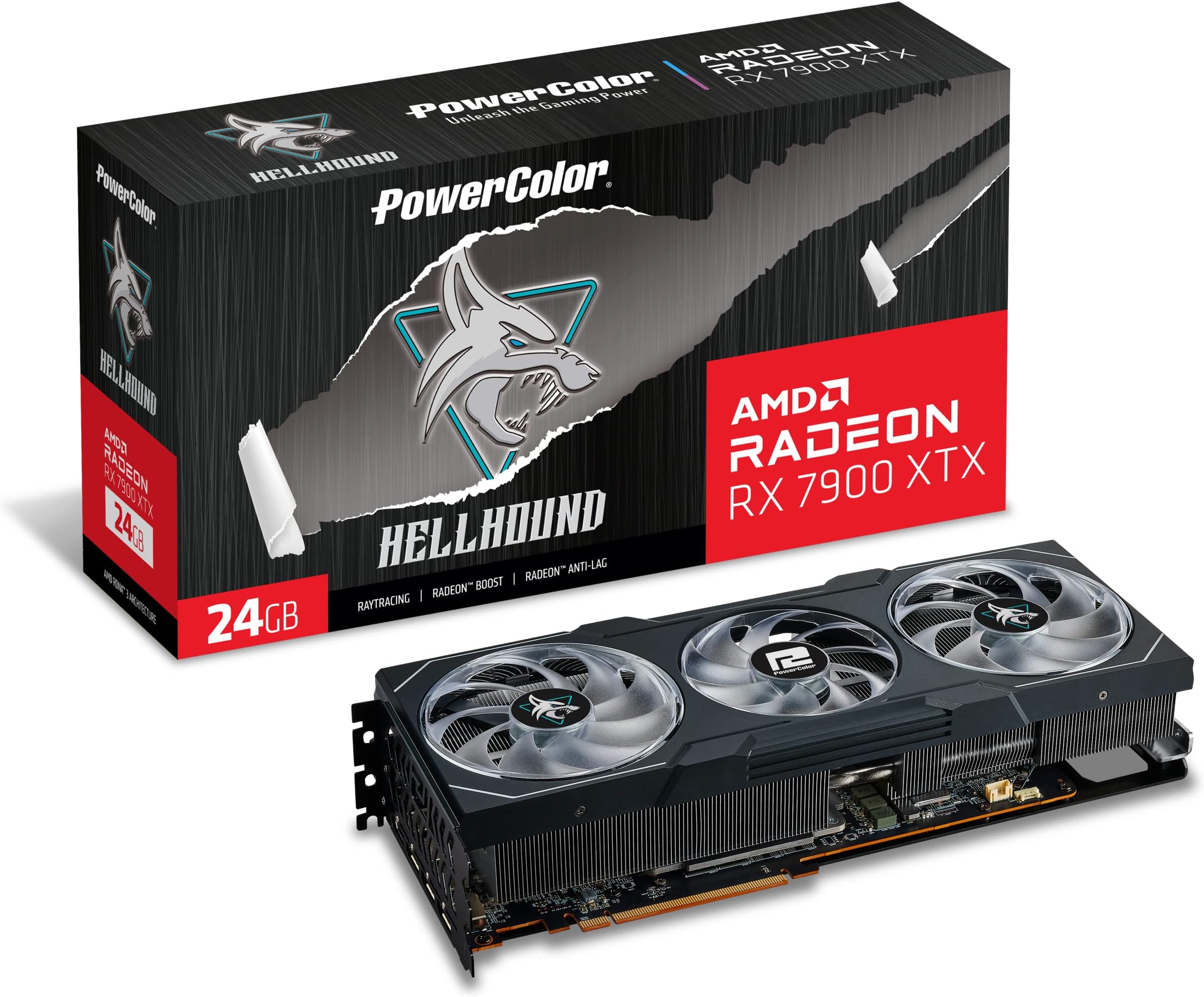
The PowerColor RX 7900 XTX 24G-L/OC is a premium AMD Radeon graphics card featuring 24GB of GDDR6 memory, a 2525 MHz boost clock, and a cutting-edge cooling system with triple fans and advanced heatpipe design. Built with a reinforced metal backplate, anti-sag bracket, and dual BIOS modes, it delivers exceptional performance and reliability for demanding gamers and professionals seeking ultra-high resolution and smooth multitasking.


| ASIN | B0BMWSRM7W |
| Antenna Location | Gaming |
| Best Sellers Rank | #52,696 in Computers ( See Top 100 in Computers ) #324 in Graphics Cards |
| Brand | PowerColor |
| Built-In Media | Graphics Card, set-up guide |
| Compatible Devices | Desktop |
| Customer Reviews | 4.0 out of 5 stars 302 Reviews |
| Display Maximum Resolution | 7680 x 4320 |
| Display Resolution Maximum | 3840x2160 |
| GPU Clock Speed | 2525 MHz |
| GPU Series | AMD Radeon RX 7000 Series |
| GPU clock speed | 2525 MHz |
| Graphics Card Interface | PCI Express |
| Graphics Card Ram | 24 GB |
| Graphics Coprocessor | AMD Radeon RX 7900 XTX |
| Graphics Description | PowerColor Hellhound AMD Radeon RX 7900 XTX with 24GB GDDR6 memory and 2525 MHz boost clock speed |
| Graphics RAM size | 24 GB |
| Graphics Ram Type | GDDR6 |
| Graphics co-processor | AMD Radeon RX 7900 XTX |
| Graphics processor manufacturer | AMD |
| Item Dimensions L x W | 33.8L x 14.7W centimeters |
| Item Weight | 1.5 Kilograms |
| Manufacturer | PowerColor |
| Memory Clock Speed | 2000 MHz |
| Mfr Part Number | RX7900XTX24G-L/OC |
| Model Name | RX7900XTX 24G-L/OC |
| Model Number | RX7900XTX24G-LOC |
| Number of Fans | 3 |
| Video Output Interface | DisplayPort, HDMI |
| Video Processor | AMD |
| Video output interface | DisplayPort , HDMI |
S**G
Temperatura influye segun el gabinete, importante 7900 xtx
ADVERTENCIA: La base que incluye para sostenerla tarjeta obstruye facilmente el movimiento de un abanico, recomiendo ampliamente ponerlo en la esquinita, por que aunque la pongas normal y a simple vista no obstruye, creeme que no permite que las aspas giren, no se arriesguen y ponganlo en la esquinita. Tenia un gabinete chiquito con poca respiracion al frente Delta Corsair RGB, no era suficiente ventilacion, la tarjeta llegaba a 99c en la parte mas caliente del gpu, al poner la mano encima del gabinete se tocaba hirviendo. Una pesadilla por que el estudio se sentia como un sauna. Luego cambie por una Lancoool 216 RGB y bajo como 15 a 10 grados dependiendo el juego, ahora lo maximo que se calienta es a 90 centigrados una parte del gpu, la otra queda en 70 o 80 grados, lo cual es una temperatura muy respetable, este gabinete le da mejor ventilacion y le puse un abanico extra que agarre aire de abajo y se lo aviente hacia arriba.Aclaro que no alguna ventilacion liquido, es solo de aire, mi cpu tiene un bequiet, los dos abanicos al frente uno abajo y otro tras. El Hellhound es mas frio que el Devil, por lo que no tendras problemas si noe s liquida tu ventilacion. El gpu hace ruido al jugar al maximo, pero no es molesto el ruido, ya que tenia un Ps4 y vaya que sonaba como avion con los ultimos juegos como god of war, ese si hace ruido en verdad. El psu que te recomiendan es de 800 watts y estuve usando uno de 750 watts, no exploto pero se sentia en ratos que jaloneaba, lei por ahi que el problema con estas nuevas tarjetas de gama alta tanto amd como nvidia, son picos de potencia espontaneos. Por lo que cambie de psu a uno de 1200 watts Thermalwake y ha trabajado de maravilla, incluso algunas temperaturas bajan mas, procesando cosas normales como youtube y trabajos de diseño la temperatura ronde de 40 a 50 grados en verano, supongo que en invierno van a ser mas bajas por vivir en el norte donde hay un caloron. Batalle en acostumbrarme al nuevo software, por ejemplo habia juegos que solo me daba 90 frames y moviendole a los settings de la tarjeta aun en ultra pudo jugar BF2042 a 160 fps todo en ultra a 1440p. He estado usando la tarjeta en undervolt, yestos son los resultados que me dan. No me interesa mucho el overclock aun por que siento que tiene que pulirlo mas el driver. Los nuevos drivers hace que consuma menos watts en idle, es decir al estar en computadora encendida sin jugar. Si tienes televisor LG o alguna otra marca con VRR, es la mejor tarjeta, nunca batallo siempre la detecta a la primera, con mi rtx 3070 anterior habia veces que tenia que desconectar una y otra vez en cada puerto hasta que la reconociera. Aqui no hay ese problema siempre la detecta sin fallo alguno. Recomendacion: Si tu gabinete cabe muy apenas la tarjeta, por milimetros, si tu psu es bajo, recomiendo actualizarlos antes de cambiar a xtx, ya que demandan mucho espacio para ventilacion y buena fuente d epoder para estabilidad, si tienes gabinete pequeño y un psu de 750 watts todo esta bien para la 7900 xt.
M**D
Parfait !
Elle tourne bien, je l'adore, mais bon faut avouer que les ventilos font un peu toc 😅 mais c'est une jolie machine de guerre 😌 pas trop longue, rentre dans un boîtier standard. Je conseille très fortement un support de carte graphique. Franchement c'est obligé si vous ne voulez pas détruire vos composants ! J'ai eu aucun problème à l'installation, tout était fluide. 👌
J**C
Best raster card still for price. Nivida is a dumpster fire
I have had several 7900 xtx cards, mostly sapphire nitro +. I needed a smaller card for a new build and they are to large. I tried the power color red devil spectral 9070xt and it is way to long. Insert the hellbound 7900xtx. It's only a 2 x8 pin power card which is surprising but can pull over 350 watts with ease. After my system not recognizing the card and some sweaty panic moments thinking I bought a dudd, I managed to delete all the amd software and start fresh. Working now 100 percent and seems to perform as good as the sapphire cards. Overall I am happy with this card for performance vs cost as a 4090 is unobtainium these days. For reference my case is a thermal take tower 500 and this card fits with around 3 mm of clearance for length. Phew!
M**.
Lightning fast GPU
These gpu's are fast, with 24Gb of memory, any game my gaming kids throw at it just produces fps so high, all I now hear is wow after wow, they are expensive but have been worth every penny, i built two gaming rigs both using these cards in an AM5 platform and can say they were very easy to install, they come with additional mounting arms to support them which was great, they are quiet and have very big heat fins on them, they come with 3 fans to help keep them cool, the build quality is very high and overall gaming performance is impressive, check you have enough room in your case as these will take up 3 slots on the rear of your case and are long. You wont be disappointed - one last thing, you will need a 900w or higher PSU, I bought the corsair RM1000X which allows these GPUs to run without issue.
J**I
100% recommended
Very good product! After 1 year it gave me 0 problems! Pros: - Ease of use or installation. - Build quality and materials.
Trustpilot
5 days ago
1 month ago