


Desertcart purchases this item on your behalf and handles shipping, customs, and support to Senegal.
๐ Power Your Productivity with the Ultimate 12-in-1 Docking Station!
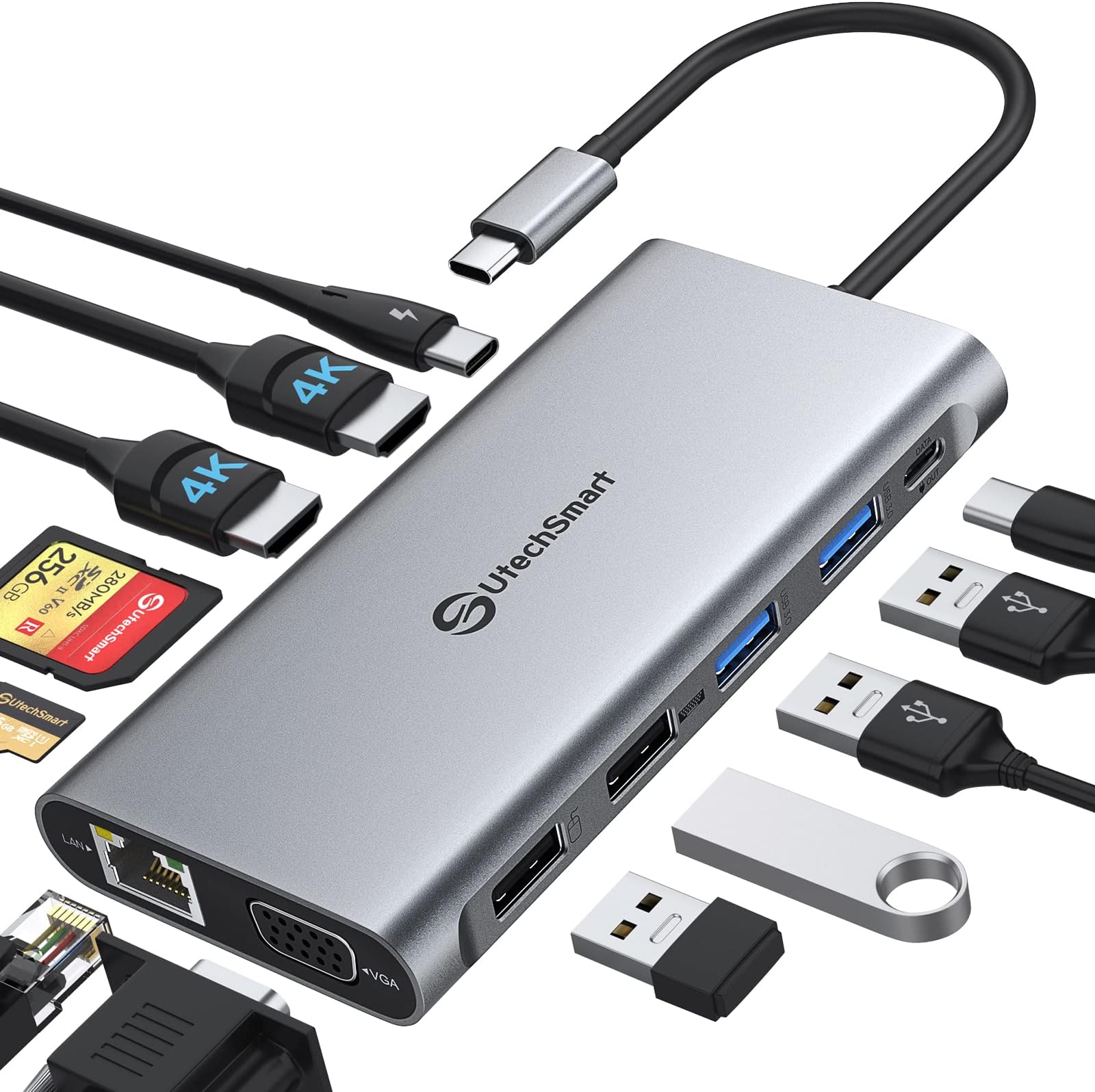
The UtechSmart USB C Docking Station is a portable 12-in-1 hub designed for professionals who demand seamless multi-device connectivity. Featuring triple monitor support with dual 4K HDMI and VGA outputs, ultra-fast 5Gbps USB 3.0 data transfer, and 100W power delivery, itโs compatible with MacOS (including M1/M2 chips), Windows, and Chrome OS. Engineered with an upgraded chipset for stable performance and heat management, this docking station transforms any workspace into a powerhouse of productivity.





| ASIN | B0BNKWPZVV |
| Additional Features | Portable |
| Best Sellers Rank | #53,730 in Computers & Accessories ( See Top 100 in Computers & Accessories ) #1,757 in Laptop Docking Stations |
| Brand | UtechSmart |
| Color | Gray |
| Compatible Devices | Dell, HP, MacBook Air, MacBook Pro, Microsoft Surface |
| Customer Reviews | 3.9 out of 5 stars 170 Reviews |
| Data Transfer Rate | 5 gigabits_per_second |
| Enclosure Material | Plastic |
| Hardware Interface | HDMI , Thunderbolt 3, USB 2.0, USB 3.0, USB Type C, VGA |
| Item Dimensions L x W x H | 1"L x 2"W x 5"H |
| Item Highlight | 12 in 1 for Thunderbolt 3/4, USB C Dock with USB 3.0 and 4K HDMI for MacBook Pro/Air/M1/M2 & Windows |
| Manufacturer | UtechSmart Technology |
| Mfr Part Number | UCN3270-2 |
| Model Number | UCN3270-2 |
| Number of Items | 1 |
| Number of Ports | 12 |
| Operating System | Chrome OS, Windows 10, Windows 7 |
| Special Feature | Portable |
| Total USB Ports | 4 |
| Total Usb Ports | 4 |
| UPC | 850045340421 |
N**N
Dual External HDMI works with my 13 inch M2 MacBook Pro!
I was starting to loose hope that I could find an affordable option to use two external monitors with my new employer issued 2022 13 inch M2 MacBook Pro. The hub also connects my Razer Blackwidow v4 Pro via USB-C. So, easily meets my needs! There are a couple of hiccups every now in then where I find one or both monitors do not wake on keyboard and I find, the monitor has powered off, likely because it has lost signal. I also notice the lights on my keyboard are off sometimes. Resolution is swift by powering back on the monitor and unplugging/replugging the keyboard. The unit does feel warmer than I would prefer. But, seems to be holding up otherwise. Will update review if anything changes.
A**F
Excellent for MacBook Pro
Excellent. Works great with MacBook Pro.
S**A
Worked great for a weekโฆ
At first this worked great. But then on the middle of my shift the internet had dropped, one of the hdmi ports stopped working. Had to run and dig up my old dock to use as a backup. I got this thinking it would be great to run two monitors along with my MacBook. Amazon is replacing this with a new one and hopefully I donโt run into the same issue. If I do, Iโm certainly going to return the new one as well.
B**9
Update...... not last.
Received a replacement no charge. Thank you! Installed and currently working fine. Purchased last year in anticipation of wife working remotely in the coming months. Finally in February connected wife's laptop to network and 2 HDMI monitors. Worked great for a while then I started losing network connection, now 1 HDMI port is dead. Wife is not happy, now nobody is happy. Wish this were a more durable product, when it worked it was great.
J**.
Versatile
Update: Seller replaced a new one for me! Now I am happy ------ I was so happy when I got it! I could finally use two external screens for M2 MacBook Air. However it stopped working properly for HDMI 1 port. I hope the seller can replace a new one for me as I really like this product.
J**N
Does not work when playing subscription type formats (netflix, prime, disney plus etc.)
The HDMI 1 out works fine when that is the only one connected. To get the HDMI 2 and VGA video outputs to work you need to download their monitor ap. This did work to enable all three outputs but will not allow video to play (only audio) with any subscription service (Netflix, Prime etc.) . Once you unplug any monitor in either of the HDMI 2 or VGA video outputs it will work. When you log onto their FAQ it details that it will not work with Mac OS. They should put this in their description. Unfortunately for me I just found this out too late to return as I was only using the HDMI 1 output. When I added the HDMI 2 I found this out too late. I can may it work, but should not have to unplug port to do so.
J**G
Three Screens for MBP!
Having failed with a prior device, I already had Display Link downloaded on my laptop when this arrived in the mail. I hooked up the monitors and Voilรก, Truly Plug and Play! I can now use my laptop monitor and two different external displays all with different screens/displays! No mirroring! I do use one VGA hook up and one HDMI, though there are two HDMI options on this device, as the VGA and HDMI were my available hardware options. It also powers the MBP (2022-M2) well and allows for other charging and connecting ports. It was nicely packaged in a box with a cloth carrying case for travel. Maybe over packaged, but a HUGE PLUS WAS THAT IT WAS A RECYCLABLE CARDBOARD BOX! Yay, no clamshell or extensive plastic.
K**R
Easy to install and works perfectly on MacBook Pro M1 16"
This little unit is perfect. The only thing you have to do is to download/install a driver for HDMI2. Takes 30 seconds and you're up and running. I have 2 Samsung 32" monitors running and there's no flicker or hesitation at all (unlike the HDMI port on the Mac). I use this setup for music production, so I have keyboards plugged into the laptop and the audio interface plugged into this unit, and still have a USBC port left over in the docking station. I have not used the USB-A ports yet. Everything works flawlessly. Incredible deal for the money!
Trustpilot
2 weeks ago
1 month ago